
ᐅ Which type of camera is suitable for the main entrance area of a house?
Created on: 21 May 2020 14:29
I
ivenh0
Hello everyone,
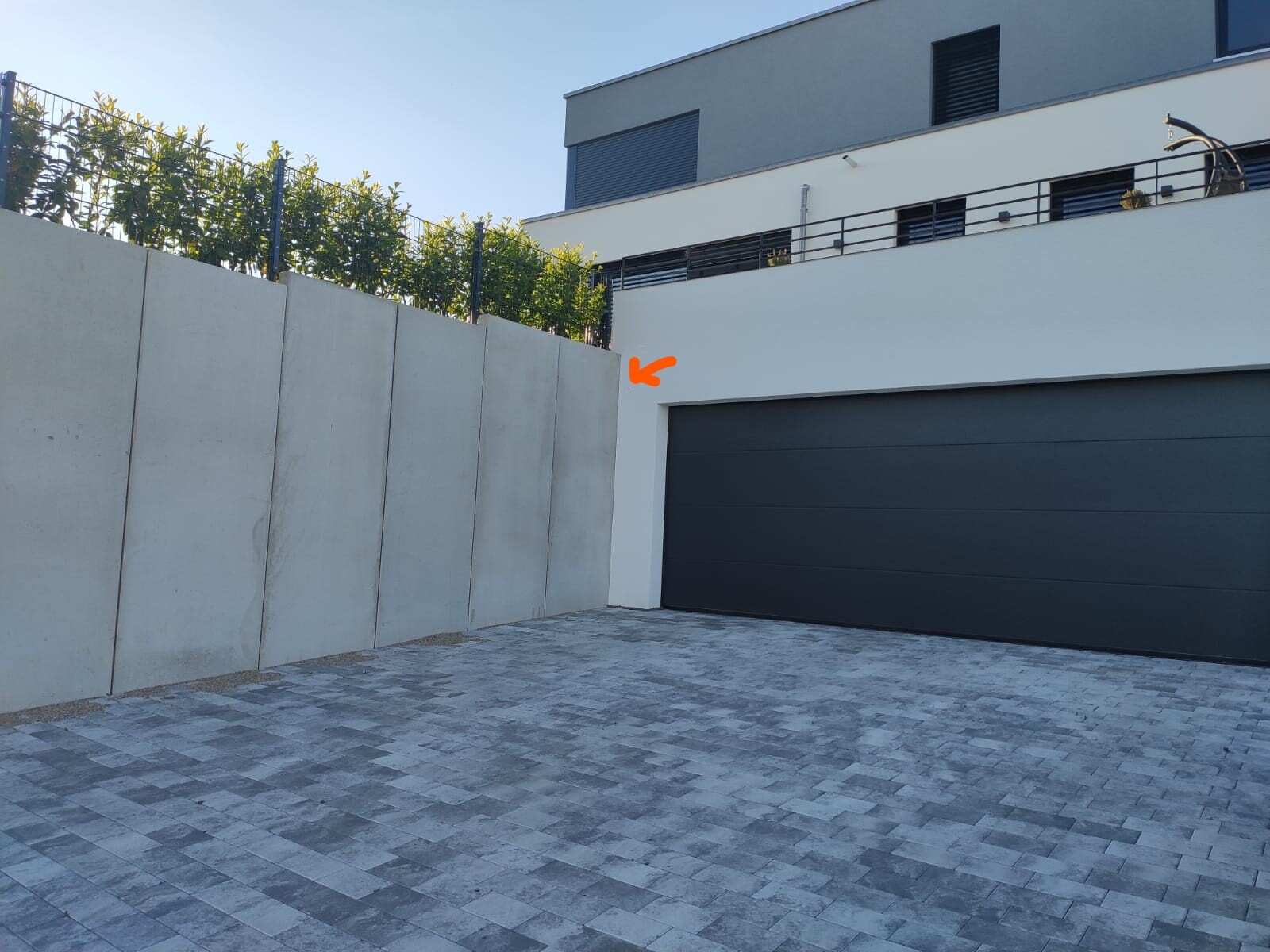
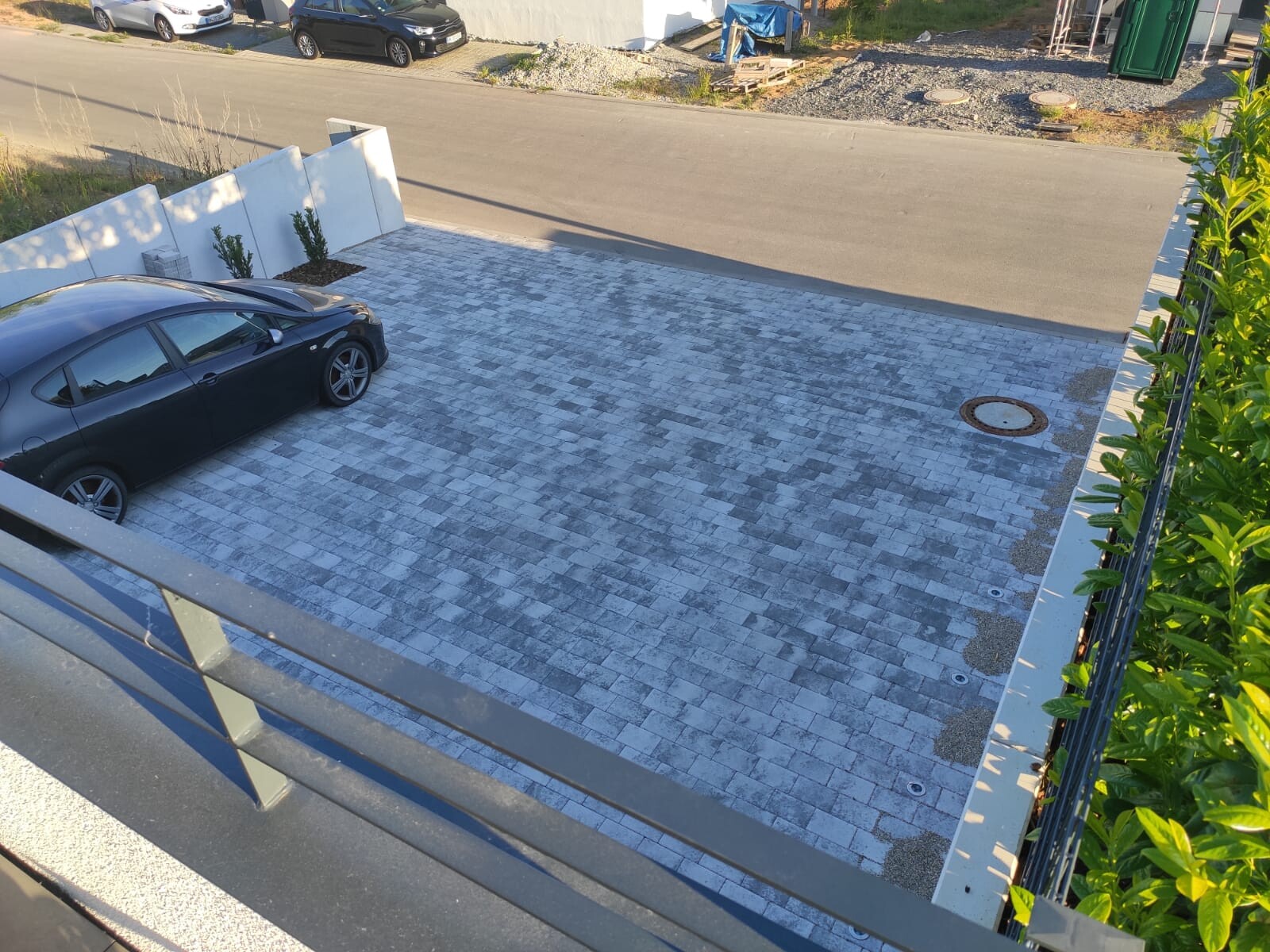
We are looking for an IP camera for our driveway and entrance area. The Dahua 5442 series sounds very promising. Therefore, I have planned an IP-B5442E-ZE for the driveway area. It will be mounted in a corner at about 2.50m (8 feet) height and should cover the driveway at a 90° angle. The range required is only 10m (33 feet). Is the bullet shape suitable for this, or would an eyeball model be better?
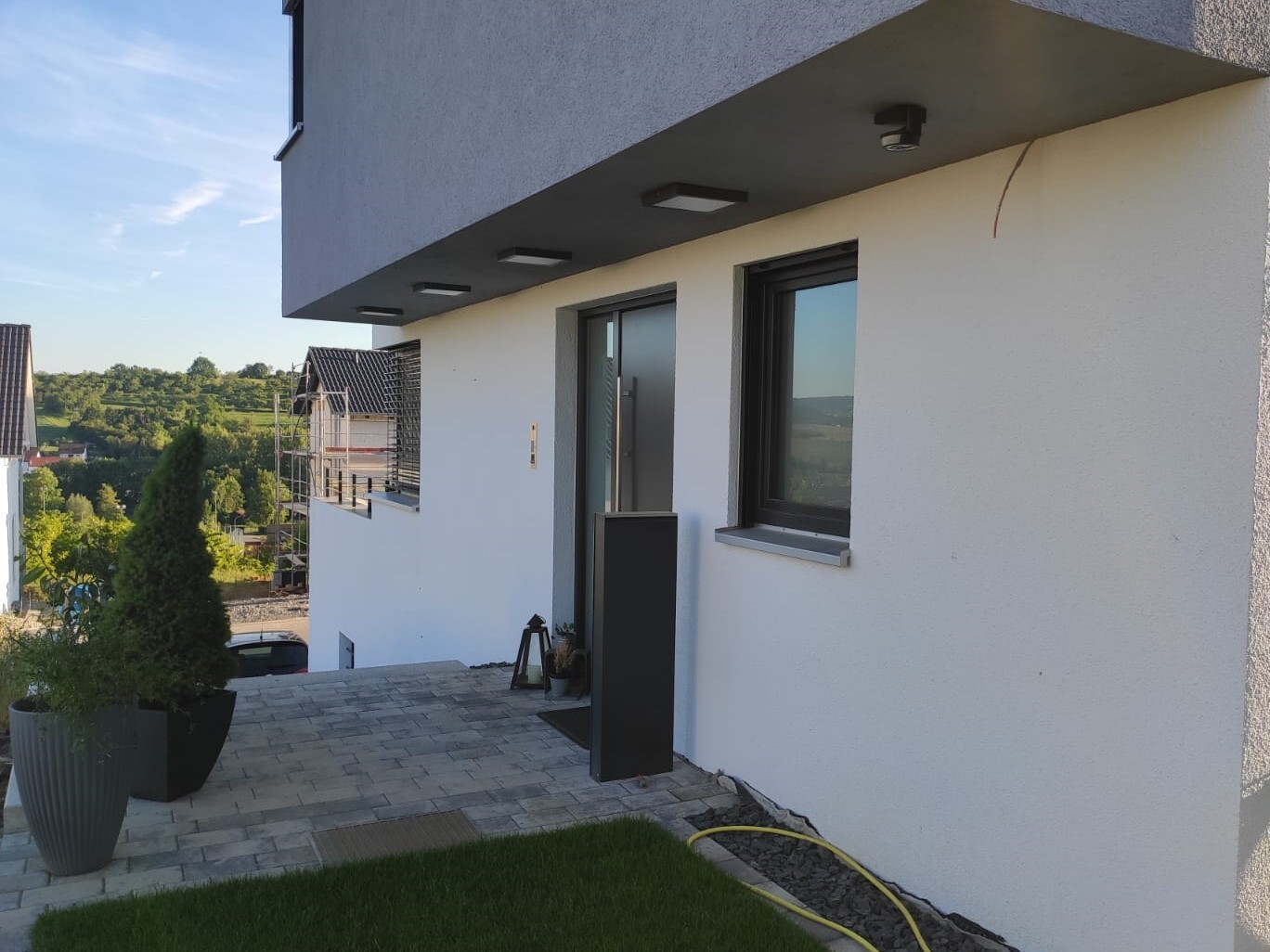
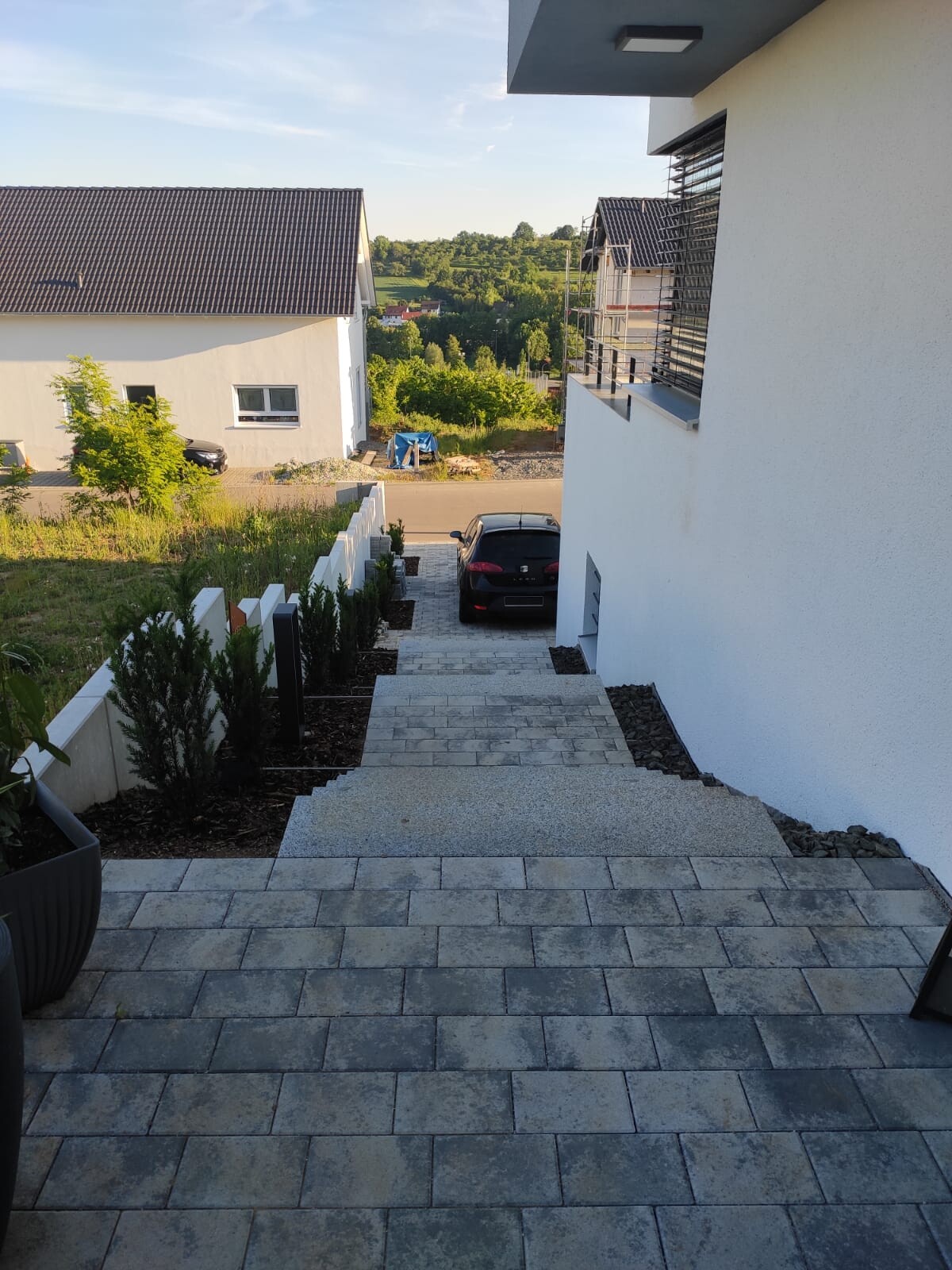
The entrance area is much more complex. Here, at least 180° need to be covered. In addition, there are several steps leading down quite a bit. The area behind the house should also be visible if possible. Is the IPC-HDPW5442G-Z suitable for this? Or how would you best cover this area? Unfortunately, I have only installed Simplex CAT cable as you can see in the photo.
We are looking for an IP camera for our driveway and entrance area. The Dahua 5442 series sounds very promising. Therefore, I have planned an IP-B5442E-ZE for the driveway area. It will be mounted in a corner at about 2.50m (8 feet) height and should cover the driveway at a 90° angle. The range required is only 10m (33 feet). Is the bullet shape suitable for this, or would an eyeball model be better?
The entrance area is much more complex. Here, at least 180° need to be covered. In addition, there are several steps leading down quite a bit. The area behind the house should also be visible if possible. Is the IPC-HDPW5442G-Z suitable for this? Or how would you best cover this area? Unfortunately, I have only installed Simplex CAT cable as you can see in the photo.

What kind of access points do you want to use? If you're already going with UniFi, I would also get the switch and USG from them. This way, you can manage everything centrally.
You should run the camera network separately. Either use a second switch with the NAS acting as a "router" on the second network port, have a completely separate network, or use virtual separation (VLAN). I would prefer the latter.
You should run the camera network separately. Either use a second switch with the NAS acting as a "router" on the second network port, have a completely separate network, or use virtual separation (VLAN). I would prefer the latter.
K
knalltüte24 May 2020 10:55@Notstrom
Perhaps you should first explain what you want to achieve with the system. Then people can give you better advice.
At the moment, it’s clear that you want:
4 cameras
-> Should they be able to see in the dark (IR)?
-> Indoor or outdoor?
-> PoE or powered by an adapter?
-> Field of view (opening angle)?
-> Zoom only or full PTZ (pan-tilt-zoom)?
Internet 500/250 Mbps
-> Which provider and which plan?
LAN cable already available in the right location.
A 24-port PoE switch will follow
-> Budget (also consider PoE power budget; but with 4 cameras this should not be a problem)
• Do you want an alarm whenever something moves in a predefined area?
• Do you want to occasionally check the cameras remotely to see what’s currently happening?
• In case of an incident, such as a break-in or car vandalism, do you want to review the recordings? (If yes, how far back? Adjust NAS storage capacity accordingly — not to be underestimated with 4x 4MP cameras.)
Your connection sounds like Deutsche Glasfaser or similar. In that case, it’s often not straightforward to just access your network remotely due to possibly being on DS-Lite / private IPv6.
This requires more technical effort to solve. I believe there was a guide in the second last issue of C’T magazine. However, don’t expect an electrician to handle this setup — it’s usually outside their scope of work.
I can recommend Dahua cameras; I have been using them myself for years without problems. They have also proven reliable for clients in harsh outdoor environments. The price/performance ratio is good. I also have Axis cameras, which have some advantages but tend to be more expensive. Suitable accessories (mounts for poles or walls) are available for both brands.
Personally, I don’t like Mobotix — very expensive, uses a different technology (single frames), and works less well with NAS systems compared to Axis or Dahua cameras. But if your electrician is experienced with Mobotix...
I would personally want the electrician to deliver a complete system, fully installed and configured according to the specifications, and only pay once everything works as intended. As I said, I have had very poor experiences with Elis and Mobotix.
Regarding NAS: I prefer QNAP for the user interface, but Synology works just as well. Additional camera licenses are similarly priced on both. I have been using both for 12/13 years (a total of 6 NAS devices with about 100TB (110 US TB) storage).
Perhaps you should first explain what you want to achieve with the system. Then people can give you better advice.
At the moment, it’s clear that you want:
4 cameras
-> Should they be able to see in the dark (IR)?
-> Indoor or outdoor?
-> PoE or powered by an adapter?
-> Field of view (opening angle)?
-> Zoom only or full PTZ (pan-tilt-zoom)?
Internet 500/250 Mbps
-> Which provider and which plan?
LAN cable already available in the right location.
A 24-port PoE switch will follow
-> Budget (also consider PoE power budget; but with 4 cameras this should not be a problem)
• Do you want an alarm whenever something moves in a predefined area?
• Do you want to occasionally check the cameras remotely to see what’s currently happening?
• In case of an incident, such as a break-in or car vandalism, do you want to review the recordings? (If yes, how far back? Adjust NAS storage capacity accordingly — not to be underestimated with 4x 4MP cameras.)
Your connection sounds like Deutsche Glasfaser or similar. In that case, it’s often not straightforward to just access your network remotely due to possibly being on DS-Lite / private IPv6.
This requires more technical effort to solve. I believe there was a guide in the second last issue of C’T magazine. However, don’t expect an electrician to handle this setup — it’s usually outside their scope of work.
I can recommend Dahua cameras; I have been using them myself for years without problems. They have also proven reliable for clients in harsh outdoor environments. The price/performance ratio is good. I also have Axis cameras, which have some advantages but tend to be more expensive. Suitable accessories (mounts for poles or walls) are available for both brands.
Personally, I don’t like Mobotix — very expensive, uses a different technology (single frames), and works less well with NAS systems compared to Axis or Dahua cameras. But if your electrician is experienced with Mobotix...
I would personally want the electrician to deliver a complete system, fully installed and configured according to the specifications, and only pay once everything works as intended. As I said, I have had very poor experiences with Elis and Mobotix.
Regarding NAS: I prefer QNAP for the user interface, but Synology works just as well. Additional camera licenses are similarly priced on both. I have been using both for 12/13 years (a total of 6 NAS devices with about 100TB (110 US TB) storage).
rick2018 schrieb:
The easiest approach is a plan showing the camera positions, the height at which they should be installed, and the area to be monitored.
Fiber optic from Telekom? The question is whether you get native Dualstack, meaning a public IPv4 address. That’s really the best option (for remote access via VPN or direct access to the NAS, cameras, PhotoStation, etc.). You can also use Synology’s (slow) relay server or set up a port mapper as a workaround. Yes, we will get fiber optic from Telekom, but I’m not familiar with Dualstack/IPv4 at this point.
Attached is the plan; areas outlined in blue are potential camera positions (230 V + LAN outlet), heights are not final yet—I still have room to decide.
rick2018 schrieb:
For example, a DS218+ or DS718+, two hard drives, a small UPS (with USB), and two additional camera licenses. Then the four cameras, and that’s it. Okay, sounds good. What is UPS? Which camera licenses (I assume that’s the software?) and camera manufacturers do you recommend? Is there something like an “all-in-one package” where I just have to click “buy”?
I’m really overwhelmed by all these abbreviations right now.
superzapp schrieb:
@Notstrom
Maybe you should explain what you want to achieve with the system. Then people can give you better advice. Well, what do I want to achieve? Surveillance of the house, possibly adding an alarm system later.
superzapp schrieb:
Right now, what’s agreed on seems to be:
4 cameras
-> Should they see in the dark (IR)?
-> Indoors or outdoors?
-> PoE or powered by separate adapter
-> Field of view
-> Fixed zoom only
-> Or even PTZ (pan-tilt-zoom) 1) Yes
2) Outdoors
3) I have planned for 230 V, but I could also imagine PoE. The problem with PoE is that the switch is in the server cabinet, so to avoid a power interruption I might have to disconnect the switch from the mains.
I’m not able to assess field of view / zoom / PTZ since I don’t know what’s needed.
superzapp schrieb:
Internet 500/250 Mbps
-> Which provider and which tariff? No tariff yet; the provider will be Telekom. It will be one of their “Magenta” tariffs.
superzapp schrieb:
• Do you want an alarm triggered when movement is detected in a predefined area?
• Do you want to check the cameras from outside only occasionally to see what’s happening?
• Do you want to be able to review recordings in case of an incident, like a break-in or vandalism? (If yes, how far back = adapt NAS storage capacity accordingly; with 4x 4MP cameras this should not be underestimated) 1) Basically, that sounds good, but isn’t there a risk of too many false alarms?
2) Yes, occasional remote viewing sounds good, yes.
3) Absolutely. There are many damages to façades, fences, and break-ins in our area (near the border), so I definitely want to secure this. How far back should recordings ideally be stored? Four weeks? I guess that’s a trade-off between storage capacity and convenience (“cleaning up”), right?
superzapp schrieb:
I don’t like Mobotix personally—very expensive, they use a different technology (single images), and integration with NAS is worse than with Axis or Dahua cameras. But if your electrician is familiar with Mobotix... The electrician is out of the picture. He told me we should implement it ourselves because just one Mobotix camera would cost around €1,000 through him. Do you think that’s unrealistic?

Notstrom schrieb:
What is UPS?Uninterruptible Power SupplyNotstrom schrieb:
Which camera licenses (I assume this means the software?) and camera manufacturers are recommended?You usually need camera licenses if you use QNAP or Synology as your storage location. If you use an NVR (Network Video Recorder) from the camera manufacturer, it can often record a certain number of channels, for example 16 cameras, and may also handle some or all of the video stream processing itself (motion detection, bitrate and frame rate control, email notifications, etc.).Notstrom schrieb:
I planned for 230 V, but POE also sounds good to me. The only issue would be that the switch is in the server cabinet, so I might need to disconnect it from the power supply to avoid a power outage.Both options are fine. For example, I only use POE for the cameras, but some additional infrared illuminators are connected to regular power outlets.Notstrom schrieb:
I can’t evaluate viewing angle / zoom / PTZ because I simply don’t know what is needed.Unfortunately, you often only know that afterwards. I have replaced cameras several times myself because something didn’t quite fit how I would have liked.It depends on exactly what you want to monitor. Mark the spots you want to cover on the plan.
If you want to monitor these positions with the widest possible view, you will need 180° cameras that also have a large vertical field of view.
High-quality models can be quite expensive...
Forget PTZ cameras. They are costly and only make sense when combined with fixed cameras or other types of alarm triggers.
Regarding detection and recording, it depends on your budget, interest level, and available time...
The most flexible solution, with additional benefits, is a NAS.
If you want to monitor these positions with the widest possible view, you will need 180° cameras that also have a large vertical field of view.
High-quality models can be quite expensive...
Forget PTZ cameras. They are costly and only make sense when combined with fixed cameras or other types of alarm triggers.
Regarding detection and recording, it depends on your budget, interest level, and available time...
The most flexible solution, with additional benefits, is a NAS.
rick2018 schrieb:
It depends on what exactly you want to monitor. Mark the spots you want to see on the plan.
If you want to cover as much as possible at these points, you need 180° cameras with a large vertical field of view.
High quality ones are quite expensive...
Forget PTZ cameras. They are costly and only make sense when used together with fixed cameras or other alarm triggers.
Regarding detection and recording, it depends on your budget, interest, and time...
The most flexible solution with added benefits is a NAS. I divided the whole area into “zones” and tried to visualize it. Of course, this is just the theory for now, based on discussions with the electrician. The camera positioning was recommended by our electrician. The zones are highlighted by color, with the X’s marking the camera positions.
As for the budget, I have to say we haven’t defined one yet because the topic of cameras only came up recently due to recent developments in the neighborhood. What is needed to establish a solid basic setup?
Similar topics