
ᐅ Which type of camera is suitable for the main entrance area of a house?
Created on: 21 May 2020 14:29
I
ivenh0
Hello everyone,
We are looking for an IP camera for our driveway and entrance area. The Dahua 5442 series sounds very promising. Therefore, I have planned an IP-B5442E-ZE for the driveway area. It will be mounted in a corner at about 2.50m (8 feet) height and should cover the driveway at a 90° angle. The range required is only 10m (33 feet). Is the bullet shape suitable for this, or would an eyeball model be better?
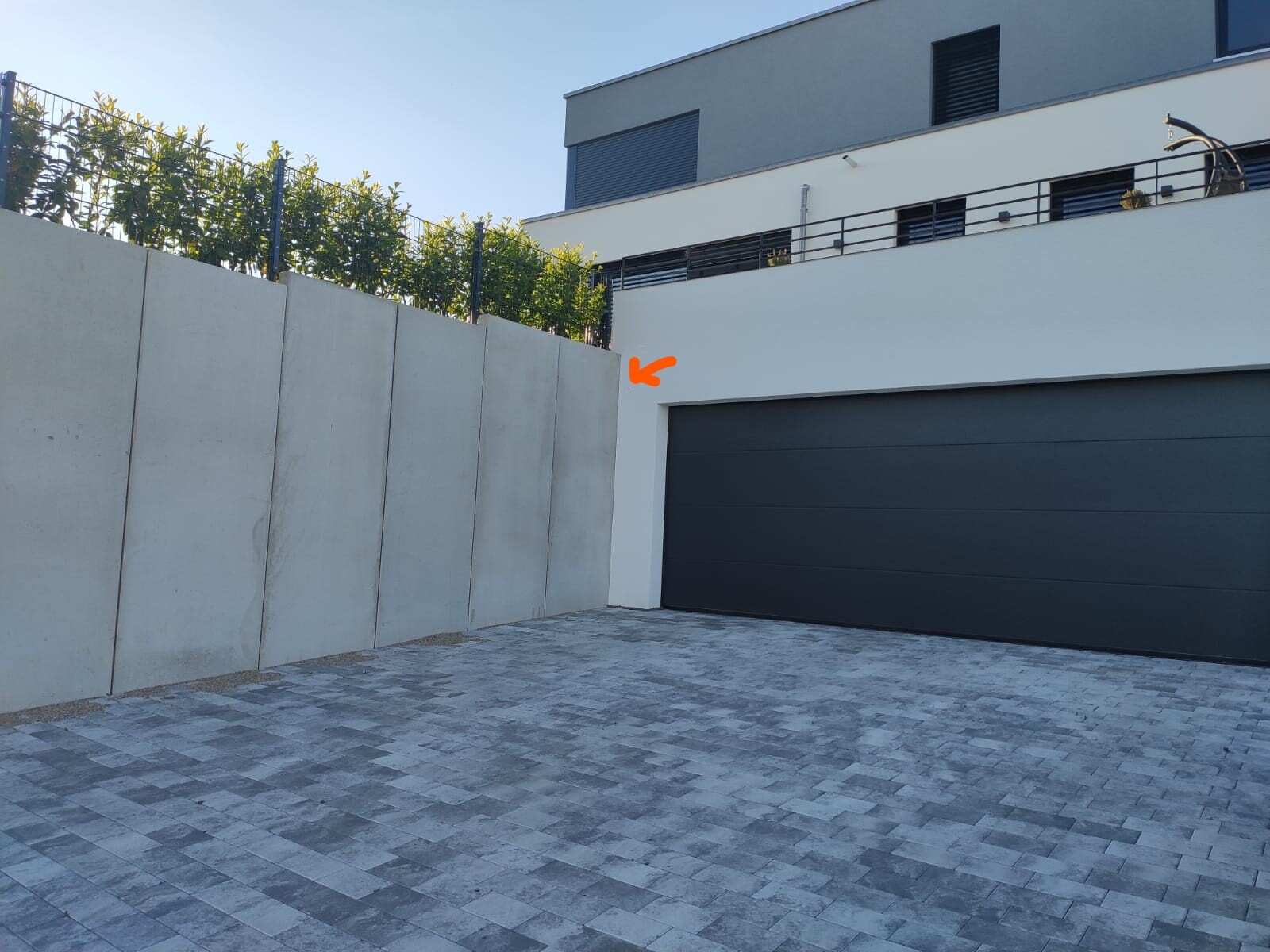
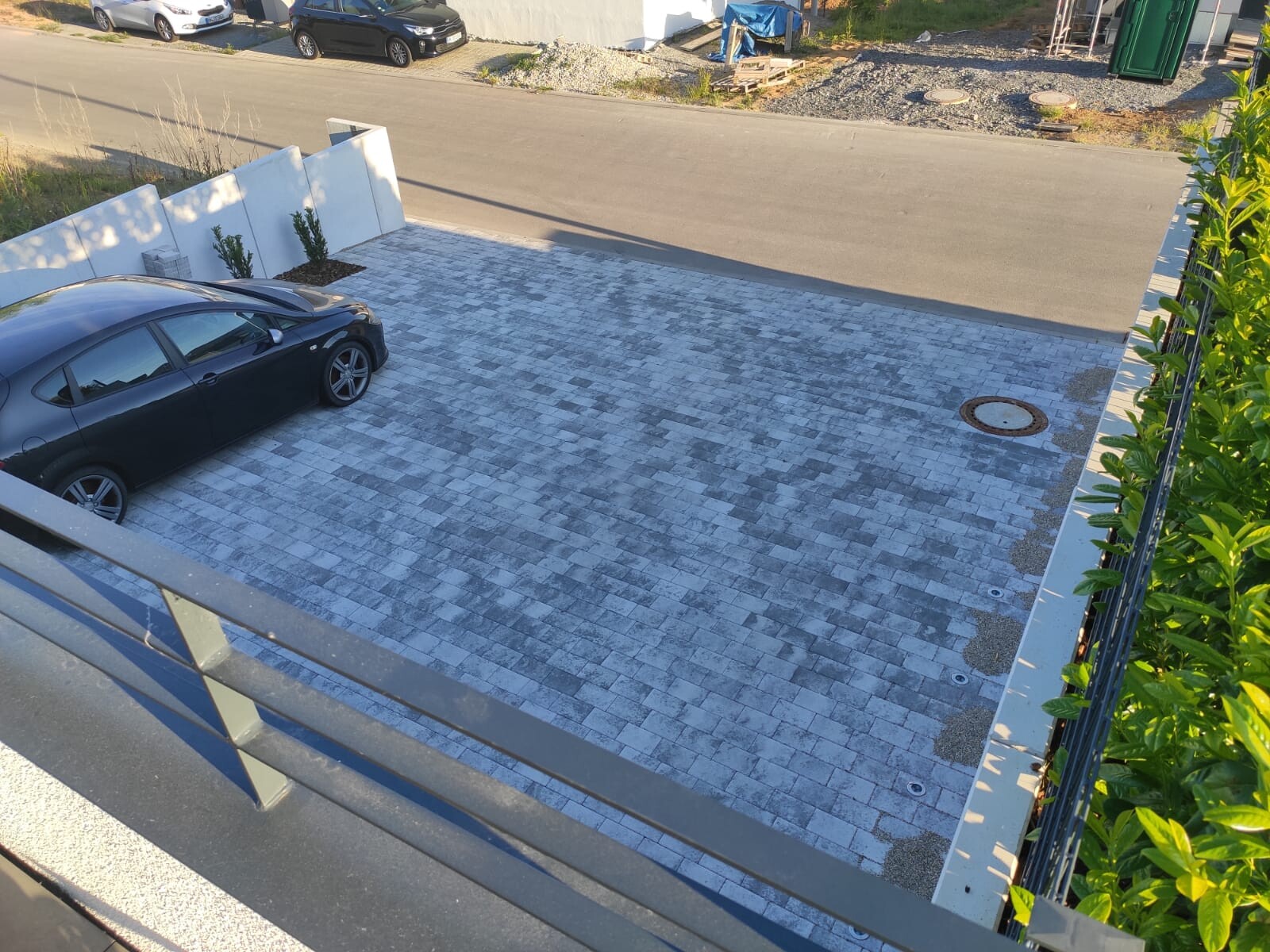
The entrance area is much more complex. Here, at least 180° need to be covered. In addition, there are several steps leading down quite a bit. The area behind the house should also be visible if possible. Is the IPC-HDPW5442G-Z suitable for this? Or how would you best cover this area? Unfortunately, I have only installed Simplex CAT cable as you can see in the photo.
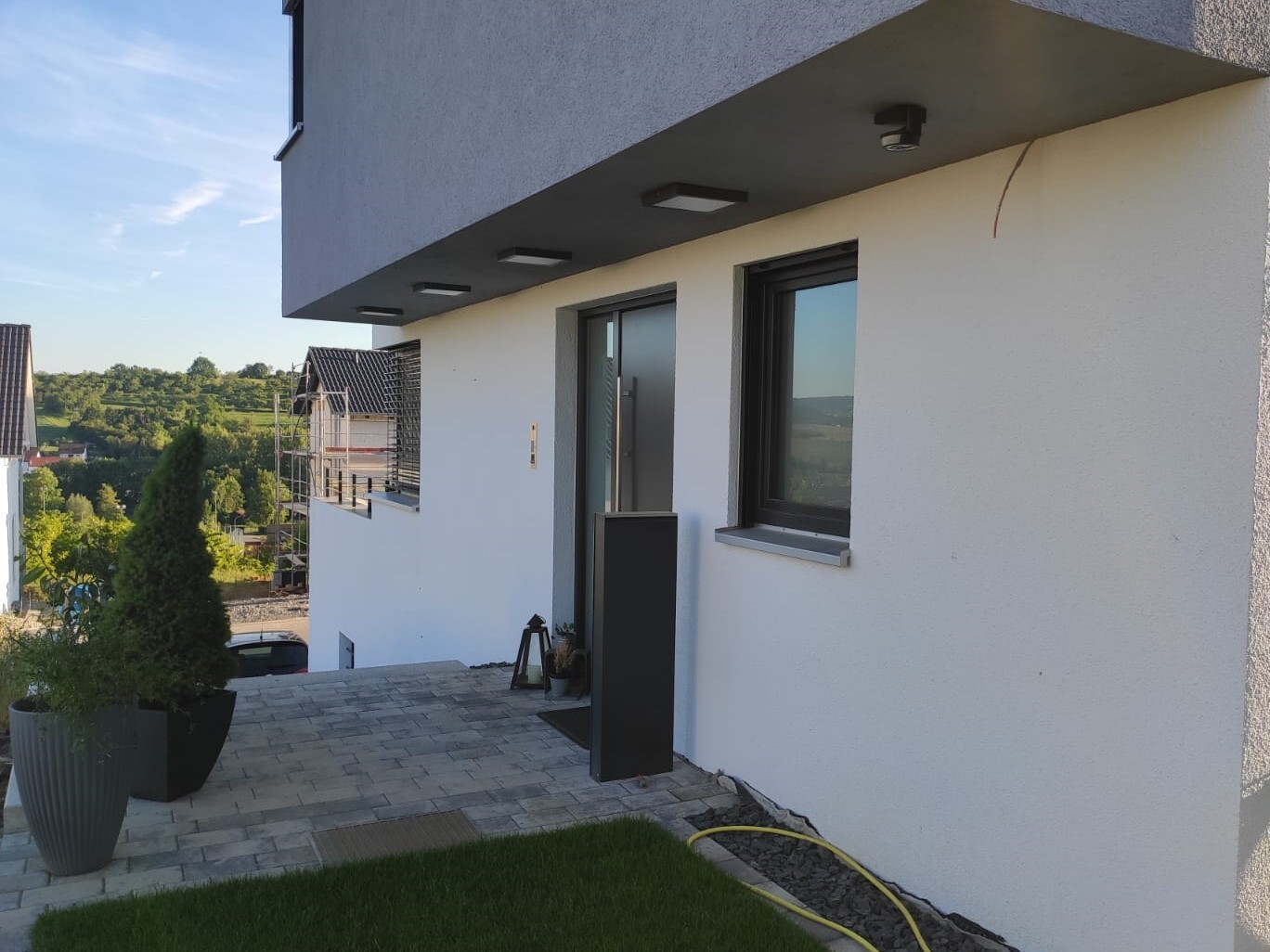
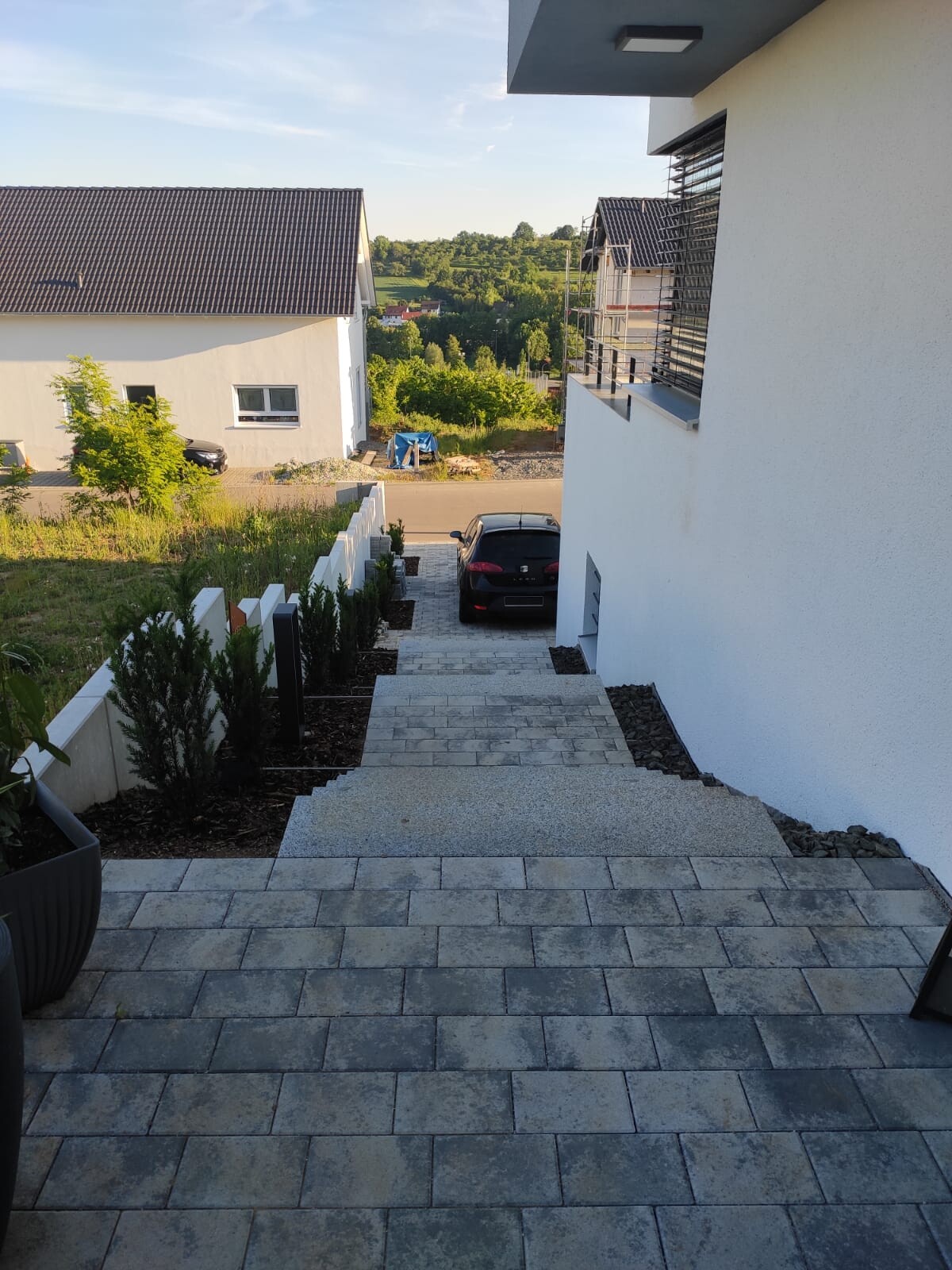
We are looking for an IP camera for our driveway and entrance area. The Dahua 5442 series sounds very promising. Therefore, I have planned an IP-B5442E-ZE for the driveway area. It will be mounted in a corner at about 2.50m (8 feet) height and should cover the driveway at a 90° angle. The range required is only 10m (33 feet). Is the bullet shape suitable for this, or would an eyeball model be better?
The entrance area is much more complex. Here, at least 180° need to be covered. In addition, there are several steps leading down quite a bit. The area behind the house should also be visible if possible. Is the IPC-HDPW5442G-Z suitable for this? Or how would you best cover this area? Unfortunately, I have only installed Simplex CAT cable as you can see in the photo.
I was hoping for other feedback.
I just removed DSM/Surveillance Station because I switched my (self-built) NAS to OMV (previously it was xpenology).
What bothered me about DSM was actually the motion detection. It wasn’t reliable. Events were missed or recording started too late (despite the corresponding pre-recording settings), and there were many false alarms, which I think were caused by loud outdoor noises. The zoning feature also never really worked properly, at least that was my impression.
I just removed DSM/Surveillance Station because I switched my (self-built) NAS to OMV (previously it was xpenology).
What bothered me about DSM was actually the motion detection. It wasn’t reliable. Events were missed or recording started too late (despite the corresponding pre-recording settings), and there were many false alarms, which I think were caused by loud outdoor noises. The zoning feature also never really worked properly, at least that was my impression.
K
knalltüte22 May 2020 12:52I use the Surveillance Station on QNAP and Synology. Both have been running continuously and without errors for years! The cameras are mixed, including AXIS and "Dahua Chinaware."
Most NAS devices from QNAP and Synology include 2 camera licenses, while the more expensive models come with 4.
I have set the motion detection quite sensitively because there is enough space on the NAS. I can review footage from more than a year ago.
To view remotely, I use DS Cam. However, I’m mainly interested in having "evidence," not as a burglary alarm system or similar.
For my purposes, I am more than satisfied. Simply practical, reliable, and efficient.
Before that, I had a dedicated NVR from QNAP. Unfortunately, it only supported 2TB HDDs (=5.5TB net with 4x2), which was too little for me, and it no longer received firmware updates. So I replaced it.
turm.tech also offers recorders that work as well. However, their long-term reliability still needs to be proven. There have already been 2 failures out of a few units delivered :-(
Most NAS devices from QNAP and Synology include 2 camera licenses, while the more expensive models come with 4.
I have set the motion detection quite sensitively because there is enough space on the NAS. I can review footage from more than a year ago.
To view remotely, I use DS Cam. However, I’m mainly interested in having "evidence," not as a burglary alarm system or similar.
For my purposes, I am more than satisfied. Simply practical, reliable, and efficient.
Before that, I had a dedicated NVR from QNAP. Unfortunately, it only supported 2TB HDDs (=5.5TB net with 4x2), which was too little for me, and it no longer received firmware updates. So I replaced it.
turm.tech also offers recorders that work as well. However, their long-term reliability still needs to be proven. There have already been 2 failures out of a few units delivered :-(
S
Stefan89022 May 2020 13:08@superzapp Since you use both brands (QNAP and Synology), which manufacturer would you recommend? I am still looking for an entry-level NAS. Use case: recording from 2-3 cameras and backing up my MacBook.
 untergasse4322 May 2020 13:11
Stefan890 schrieb:
@superzapp Since you use both brands (QNAP and Synology): Which manufacturer would you recommend? I’m still looking for an entry-level NAS. Use case: recording from 2-3 cameras and backing up my MacBook.Technically, it doesn’t make much difference. Personally, I find the software on Synology (DSM) much more user-friendly than QNAP (QTS).
Surveillance Station works better on Synology devices; overall, Synology feels more user-friendly.
For virtualization, the smaller QNAP units are more powerful than Synology’s models.
Motion detection on the NAS impacts system performance. This can be critical, especially on “smaller” systems.
With high-quality cameras, the internal camera detection is much better and does not affect NAS performance. Here, we are talking about cameras in the price range of €300 and above.
Alternatively, you could use an NVR and use the NAS only as a data storage device. Good NVRs (4K, multiple cameras, etc.) do cost money as well.
Another option is software from AXIS, for example. Recording is then done on a network drive. For HDMI output, there are gateways available. However, this only works with AXIS cameras.
Or you could let each camera record directly to the network drive. There are several apps for viewing that allow you to integrate different manufacturers and cameras.
For virtualization, the smaller QNAP units are more powerful than Synology’s models.
Motion detection on the NAS impacts system performance. This can be critical, especially on “smaller” systems.
With high-quality cameras, the internal camera detection is much better and does not affect NAS performance. Here, we are talking about cameras in the price range of €300 and above.
Alternatively, you could use an NVR and use the NAS only as a data storage device. Good NVRs (4K, multiple cameras, etc.) do cost money as well.
Another option is software from AXIS, for example. Recording is then done on a network drive. For HDMI output, there are gateways available. However, this only works with AXIS cameras.
Or you could let each camera record directly to the network drive. There are several apps for viewing that allow you to integrate different manufacturers and cameras.
Similar topics