
ᐅ LAN / Wi-Fi / Telephone – Searching for Suitable Hardware Components
Created on: 12 Apr 2017 08:37
S
sirhc
Hello everyone,
Attached is a first look at our main distribution frame (?) in the house connection room in the basement.
What we have:
- Duplex LAN in living, sleeping, and working rooms in the basement, ground floor, and upper floor
- Telecom connection with 50 Mbit/s
- TV via satellite
- No ISDN wanted
What we want:
- Additional Wi-Fi on every floor
- LAN access from all connected rooms to a NAS / network storage with photos, music, series, movies
- Wi-Fi access from all connected rooms to the NAS / network storage with photos, music, series, movies
I’m currently trying to figure out the right hardware components. About 24 LAN cables come together in the house connection room in the basement, which are connected to a patch panel and linked to a switch.
I need:
- A router
- A switch
- Two access points / (repeaters?)
- NAS
- Clients for the NAS
Router:
The telecom provider only rents routers for 5 EUR per month. However, I don’t want any of their hardware, whether rented, purchased, or provided for free. When I look for a suitable FritzBox, I find the 7430: it supports VDSL, can handle a DECT phone, media server (although I’m not yet sure if a separate component would be better here, or if a NAS already covers this functionality — I believe it does). The idea: the router connects to the switch, so all connected rooms can access the network and internet via cable. MU-MIMO seems to be a new feature for when many devices are connected via Wi-Fi. Since this will only involve two smartphones and two laptops, rarely all at the same time, I don’t think I need this feature — printers and media libraries will be wired. Therefore, I think the 7430 will be sufficient.
Switch:
I don’t need any special functions here and find plenty of options under 100 EUR. It should simply bundle my 24 cables and connect them to the router.
Though I just realized two LAN lines are for cameras and one LAN line for the doorbell — I’m not sure how yet, but these should not be connected to the internet.
Access points:
I have planned one outlet and one network connection in each hallway on the ground floor and upper floor for an access point (repeater?). The idea is to have a device that is connected via cable to the router and provides Wi-Fi on that floor.
NAS:
So far, I’m clueless. I’m thinking of around 10 TB of storage for starters, accessible via LAN / Wi-Fi. No user management needed yet, maybe in a few years. I want to be able to access our “media library” from all sleeping/living rooms, although I’m not sure yet which client will be suitable for this. Our TVs are a few years old and likely can’t do this, and the existing receivers neither.
If I roughly estimate what I need to set up our home network:
- Switch 100 EUR
- Router 100 EUR
- Access point 50 EUR
- Access point 50 EUR
- NAS ??? EUR
- NAS client ??? EUR living room
- NAS client ??? EUR bedroom
Now I have two questions for the group:
1. Are there any mistakes in my hardware setup plan?
2. Which devices do you actually use / recommend / advise against?
3. Is my assumption correct that I don’t need MU-MIMO if the “media library” is wired?
Thanks and best regards
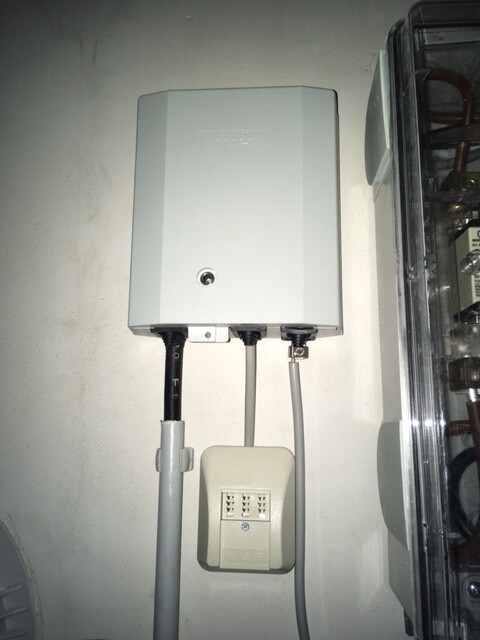
Attached is a first look at our main distribution frame (?) in the house connection room in the basement.
What we have:
- Duplex LAN in living, sleeping, and working rooms in the basement, ground floor, and upper floor
- Telecom connection with 50 Mbit/s
- TV via satellite
- No ISDN wanted
What we want:
- Additional Wi-Fi on every floor
- LAN access from all connected rooms to a NAS / network storage with photos, music, series, movies
- Wi-Fi access from all connected rooms to the NAS / network storage with photos, music, series, movies
I’m currently trying to figure out the right hardware components. About 24 LAN cables come together in the house connection room in the basement, which are connected to a patch panel and linked to a switch.
I need:
- A router
- A switch
- Two access points / (repeaters?)
- NAS
- Clients for the NAS
Router:
The telecom provider only rents routers for 5 EUR per month. However, I don’t want any of their hardware, whether rented, purchased, or provided for free. When I look for a suitable FritzBox, I find the 7430: it supports VDSL, can handle a DECT phone, media server (although I’m not yet sure if a separate component would be better here, or if a NAS already covers this functionality — I believe it does). The idea: the router connects to the switch, so all connected rooms can access the network and internet via cable. MU-MIMO seems to be a new feature for when many devices are connected via Wi-Fi. Since this will only involve two smartphones and two laptops, rarely all at the same time, I don’t think I need this feature — printers and media libraries will be wired. Therefore, I think the 7430 will be sufficient.
Switch:
I don’t need any special functions here and find plenty of options under 100 EUR. It should simply bundle my 24 cables and connect them to the router.
Though I just realized two LAN lines are for cameras and one LAN line for the doorbell — I’m not sure how yet, but these should not be connected to the internet.
Access points:
I have planned one outlet and one network connection in each hallway on the ground floor and upper floor for an access point (repeater?). The idea is to have a device that is connected via cable to the router and provides Wi-Fi on that floor.
NAS:
So far, I’m clueless. I’m thinking of around 10 TB of storage for starters, accessible via LAN / Wi-Fi. No user management needed yet, maybe in a few years. I want to be able to access our “media library” from all sleeping/living rooms, although I’m not sure yet which client will be suitable for this. Our TVs are a few years old and likely can’t do this, and the existing receivers neither.
If I roughly estimate what I need to set up our home network:
- Switch 100 EUR
- Router 100 EUR
- Access point 50 EUR
- Access point 50 EUR
- NAS ??? EUR
- NAS client ??? EUR living room
- NAS client ??? EUR bedroom
Now I have two questions for the group:
1. Are there any mistakes in my hardware setup plan?
2. Which devices do you actually use / recommend / advise against?
3. Is my assumption correct that I don’t need MU-MIMO if the “media library” is wired?
Thanks and best regards
One more thought regarding the access point:
Accordingly, the router needs 3 LAN ports—one for the switch and two more for the direct connection to the two access points. Or can this also be done through the switch? In any case, the Fritzbox 7430 with four LAN ports offers sufficient options.
Accordingly, the router needs 3 LAN ports—one for the switch and two more for the direct connection to the two access points. Or can this also be done through the switch? In any case, the Fritzbox 7430 with four LAN ports offers sufficient options.
Regarding NAS, I can recommend a DIY approach using OMV (OpenMediaVault).
There is a guide available on the Technikaffe website. I followed it myself, and the system runs perfectly.
I had a QNAP before, but with them (and also Synology), you need to spend a significant amount to get real performance. Entry-level devices may be fine for simple file management, but as soon as you want to stream (even two simultaneous streams), that’s where they fall short.
I use it, among other things, for Plex Media Center. Soon, I plan to replace the motherboard to enable a more powerful CPU, which should make transcoding (converting a stream so it can be received by a mobile device) possible.
If you have any questions, just send me a private message, as this will require links that are not allowed to be posted here.
There is a guide available on the Technikaffe website. I followed it myself, and the system runs perfectly.
I had a QNAP before, but with them (and also Synology), you need to spend a significant amount to get real performance. Entry-level devices may be fine for simple file management, but as soon as you want to stream (even two simultaneous streams), that’s where they fall short.
I use it, among other things, for Plex Media Center. Soon, I plan to replace the motherboard to enable a more powerful CPU, which should make transcoding (converting a stream so it can be received by a mobile device) possible.
If you have any questions, just send me a private message, as this will require links that are not allowed to be posted here.
B
Bieber081512 Apr 2017 10:26Switch: There are extensive German-language guides available online for setting up separate networks on Cisco "Small Enterprise" devices (this is a common topic in schools, and there are specific instructions for Cisco switches).
Router: We also have a Fritz.box, and I appreciate the easy setup of a guest Wi-Fi network, which is very convenient.
Access points: I simply bought the one from AVM (FRITZ!WLAN Repeater 1750E). It wasn't cheap, but setting it up in the network is very straightforward (and therefore quick).
There are already threads here about switches and access points (something about networks... please search for those).
NAS: I had considered building one myself back then, but size and noise were still factors. Nowadays, that would be less of an issue... So we went with a QNAP TS-435II+ (if I recall correctly). It allows us to stream at least Blu-ray quality. Music, of course, is CD quality. Again, in my opinion, the advantage is: unpack, connect, start. Hot-swapping hard drives... You’ll need to research prices yourself, as I’m no longer up to date... Hard drives are much larger now. 10 TB was extremely expensive for me at the time.
Client to NAS: Our standard Samsung TV streams without any extra effort or hardware. In the past, I had a WD TV Live in between (when we still used CRT TVs). For music, we use Teufel’s Raumfeld system. But there are thousands of other options as well.
Router: We also have a Fritz.box, and I appreciate the easy setup of a guest Wi-Fi network, which is very convenient.
Access points: I simply bought the one from AVM (FRITZ!WLAN Repeater 1750E). It wasn't cheap, but setting it up in the network is very straightforward (and therefore quick).
There are already threads here about switches and access points (something about networks... please search for those).
NAS: I had considered building one myself back then, but size and noise were still factors. Nowadays, that would be less of an issue... So we went with a QNAP TS-435II+ (if I recall correctly). It allows us to stream at least Blu-ray quality. Music, of course, is CD quality. Again, in my opinion, the advantage is: unpack, connect, start. Hot-swapping hard drives... You’ll need to research prices yourself, as I’m no longer up to date... Hard drives are much larger now. 10 TB was extremely expensive for me at the time.
Client to NAS: Our standard Samsung TV streams without any extra effort or hardware. In the past, I had a WD TV Live in between (when we still used CRT TVs). For music, we use Teufel’s Raumfeld system. But there are thousands of other options as well.
Switch: Basically, any manufacturer is possible. Wi-Fi functionality should be included. Depending on your expertise, switch/router/Wi-Fi management could be handled by a single device (e.g., Mikrotik). Given the number of ports on your full patch panel, I would recommend choosing more than 24 ports. Depending on your setup, either a 48-port model (with fan) or two 24-port models (fanless) could work. If your cameras are powered via PoE, make sure to consider that here as well. Otherwise, plan for sufficient power outlets near the switch.
Router: Either an all-in-one device (see above) or the one provided by your internet provider. A Fritzbox would be a good choice if possible (we use Telekom hybrid, so Fritzbox is not an option). Alternatively, check out the routers from Ubiquiti. They provide a solid foundation for Wi-Fi as well.
Wi-Fi: I can only recommend Ubiquiti access points here (I have 2x UAP-AC-Lite). Super simple, very stable, and fast.
Server/NAS: If you have the knowledge: do it yourself. A good hardware base for this would be the HP MicroServer Gen8. Quiet, energy efficient, and easy to manage.
Media Clients: Either a Raspberry Pi (Kodi/Plex client) or a small Intel NUC.
Good luck
Router: Either an all-in-one device (see above) or the one provided by your internet provider. A Fritzbox would be a good choice if possible (we use Telekom hybrid, so Fritzbox is not an option). Alternatively, check out the routers from Ubiquiti. They provide a solid foundation for Wi-Fi as well.
Wi-Fi: I can only recommend Ubiquiti access points here (I have 2x UAP-AC-Lite). Super simple, very stable, and fast.
Server/NAS: If you have the knowledge: do it yourself. A good hardware base for this would be the HP MicroServer Gen8. Quiet, energy efficient, and easy to manage.
Media Clients: Either a Raspberry Pi (Kodi/Plex client) or a small Intel NUC.
Good luck
B
Bieber081512 Apr 2017 12:43ntsa86 schrieb:
Media clients: either Raspberry Pi (Kodi/Plex client) or small Intel NUC. We are talking about devices that play media (video, photo, audio), right? Even a Raspberry Pi or Intel NUC still require monitors or speakers (and digital-to-analog converters) to actually display or play something. Who would want that kind of setup in a living room?
Similar topics