
ᐅ LAN / Wi-Fi / Telephone – Searching for Suitable Hardware Components
Created on: 12 Apr 2017 08:37
S
sirhc
Hello everyone,
Attached is a first look at our main distribution frame (?) in the house connection room in the basement.
What we have:
- Duplex LAN in living, sleeping, and working rooms in the basement, ground floor, and upper floor
- Telecom connection with 50 Mbit/s
- TV via satellite
- No ISDN wanted
What we want:
- Additional Wi-Fi on every floor
- LAN access from all connected rooms to a NAS / network storage with photos, music, series, movies
- Wi-Fi access from all connected rooms to the NAS / network storage with photos, music, series, movies
I’m currently trying to figure out the right hardware components. About 24 LAN cables come together in the house connection room in the basement, which are connected to a patch panel and linked to a switch.
I need:
- A router
- A switch
- Two access points / (repeaters?)
- NAS
- Clients for the NAS
Router:
The telecom provider only rents routers for 5 EUR per month. However, I don’t want any of their hardware, whether rented, purchased, or provided for free. When I look for a suitable FritzBox, I find the 7430: it supports VDSL, can handle a DECT phone, media server (although I’m not yet sure if a separate component would be better here, or if a NAS already covers this functionality — I believe it does). The idea: the router connects to the switch, so all connected rooms can access the network and internet via cable. MU-MIMO seems to be a new feature for when many devices are connected via Wi-Fi. Since this will only involve two smartphones and two laptops, rarely all at the same time, I don’t think I need this feature — printers and media libraries will be wired. Therefore, I think the 7430 will be sufficient.
Switch:
I don’t need any special functions here and find plenty of options under 100 EUR. It should simply bundle my 24 cables and connect them to the router.
Though I just realized two LAN lines are for cameras and one LAN line for the doorbell — I’m not sure how yet, but these should not be connected to the internet.
Access points:
I have planned one outlet and one network connection in each hallway on the ground floor and upper floor for an access point (repeater?). The idea is to have a device that is connected via cable to the router and provides Wi-Fi on that floor.
NAS:
So far, I’m clueless. I’m thinking of around 10 TB of storage for starters, accessible via LAN / Wi-Fi. No user management needed yet, maybe in a few years. I want to be able to access our “media library” from all sleeping/living rooms, although I’m not sure yet which client will be suitable for this. Our TVs are a few years old and likely can’t do this, and the existing receivers neither.
If I roughly estimate what I need to set up our home network:
- Switch 100 EUR
- Router 100 EUR
- Access point 50 EUR
- Access point 50 EUR
- NAS ??? EUR
- NAS client ??? EUR living room
- NAS client ??? EUR bedroom
Now I have two questions for the group:
1. Are there any mistakes in my hardware setup plan?
2. Which devices do you actually use / recommend / advise against?
3. Is my assumption correct that I don’t need MU-MIMO if the “media library” is wired?
Thanks and best regards
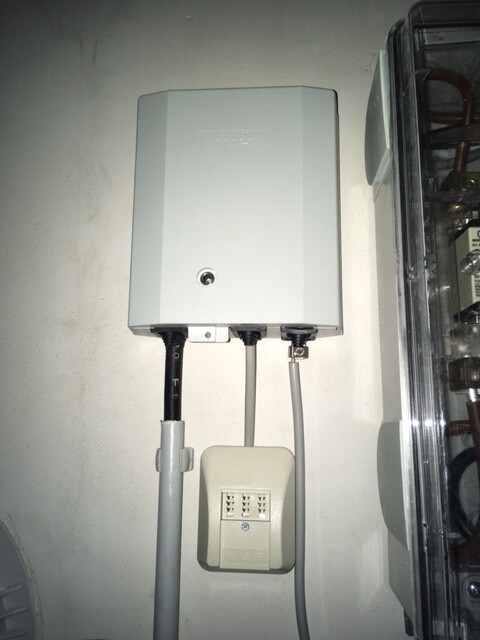
Attached is a first look at our main distribution frame (?) in the house connection room in the basement.
What we have:
- Duplex LAN in living, sleeping, and working rooms in the basement, ground floor, and upper floor
- Telecom connection with 50 Mbit/s
- TV via satellite
- No ISDN wanted
What we want:
- Additional Wi-Fi on every floor
- LAN access from all connected rooms to a NAS / network storage with photos, music, series, movies
- Wi-Fi access from all connected rooms to the NAS / network storage with photos, music, series, movies
I’m currently trying to figure out the right hardware components. About 24 LAN cables come together in the house connection room in the basement, which are connected to a patch panel and linked to a switch.
I need:
- A router
- A switch
- Two access points / (repeaters?)
- NAS
- Clients for the NAS
Router:
The telecom provider only rents routers for 5 EUR per month. However, I don’t want any of their hardware, whether rented, purchased, or provided for free. When I look for a suitable FritzBox, I find the 7430: it supports VDSL, can handle a DECT phone, media server (although I’m not yet sure if a separate component would be better here, or if a NAS already covers this functionality — I believe it does). The idea: the router connects to the switch, so all connected rooms can access the network and internet via cable. MU-MIMO seems to be a new feature for when many devices are connected via Wi-Fi. Since this will only involve two smartphones and two laptops, rarely all at the same time, I don’t think I need this feature — printers and media libraries will be wired. Therefore, I think the 7430 will be sufficient.
Switch:
I don’t need any special functions here and find plenty of options under 100 EUR. It should simply bundle my 24 cables and connect them to the router.
Though I just realized two LAN lines are for cameras and one LAN line for the doorbell — I’m not sure how yet, but these should not be connected to the internet.
Access points:
I have planned one outlet and one network connection in each hallway on the ground floor and upper floor for an access point (repeater?). The idea is to have a device that is connected via cable to the router and provides Wi-Fi on that floor.
NAS:
So far, I’m clueless. I’m thinking of around 10 TB of storage for starters, accessible via LAN / Wi-Fi. No user management needed yet, maybe in a few years. I want to be able to access our “media library” from all sleeping/living rooms, although I’m not sure yet which client will be suitable for this. Our TVs are a few years old and likely can’t do this, and the existing receivers neither.
If I roughly estimate what I need to set up our home network:
- Switch 100 EUR
- Router 100 EUR
- Access point 50 EUR
- Access point 50 EUR
- NAS ??? EUR
- NAS client ??? EUR living room
- NAS client ??? EUR bedroom
Now I have two questions for the group:
1. Are there any mistakes in my hardware setup plan?
2. Which devices do you actually use / recommend / advise against?
3. Is my assumption correct that I don’t need MU-MIMO if the “media library” is wired?
Thanks and best regards
D
Deliverer2 May 2017 09:15The small picture is correct.
A somewhat more "modern" approach would be to use IP phones. These connect to a regular LAN port (orange in the picture) or even via Wi-Fi. It doesn’t really matter if they connect through the switch or directly to the router. Strictly speaking, you can plug them into a port anywhere in the world...
The advantage is greater flexibility. I can relocate my DECT base stations (if I notice there is no reception in the garden, I just move closer to it), I can move my office to the former children’s room, I can make calls via my smartphone app, assign multiple numbers from virtual providers to the phones, and potentially avoid extra adapters (and the purple part in the picture).
The only challenge can sometimes be obtaining the access data (so-called SIP credentials) from your provider. This can take a while, so it’s best to clarify this in advance.
Oh – and of course, it requires IP-capable phones/base stations. The old base stations need to be replaced. The old handsets usually still work (for DECT).
A somewhat more "modern" approach would be to use IP phones. These connect to a regular LAN port (orange in the picture) or even via Wi-Fi. It doesn’t really matter if they connect through the switch or directly to the router. Strictly speaking, you can plug them into a port anywhere in the world...
The advantage is greater flexibility. I can relocate my DECT base stations (if I notice there is no reception in the garden, I just move closer to it), I can move my office to the former children’s room, I can make calls via my smartphone app, assign multiple numbers from virtual providers to the phones, and potentially avoid extra adapters (and the purple part in the picture).
The only challenge can sometimes be obtaining the access data (so-called SIP credentials) from your provider. This can take a while, so it’s best to clarify this in advance.
Oh – and of course, it requires IP-capable phones/base stations. The old base stations need to be replaced. The old handsets usually still work (for DECT).

Mycraft schrieb:
Yes, it’s still not 100% exact, but it’s very close to what you ultimately want.And what is still inaccurate?Okay, there are no such things as WLAN switches; what you’re actually referring to are WLAN access points, which basically perform the same function as a switch but without cables and, as is common nowadays, can also bridge between LAN and WLAN.
If you have multiple WLAN access points in the house, they should be from the same manufacturer and operated in an Extended Service Set mode, so that a single large WLAN network is created throughout the house.
Deliverer schrieb:
A somewhat "more modern" option would be to use IP phones. They connect to a regular LAN port (shown in orange in the picture) or even via Wi-Fi. Whether connected to the switch or directly to the router does not really matter. Strictly speaking, you can plug them into any connection worldwide... Do I not need to consider anything regarding the service plan with the provider? So traditional DSL + landline works with this? Does that mean I only need to get the special digital access credentials from the provider?
Or can I then save on the "landline" part (but I still need a phone number, right)?
D
Deliverer2 May 2017 10:39Kaspatoo schrieb:
Do I need to consider tariffs with the provider? In other words, does standard DSL + landline work with this? So I just need to get the specific digital login details from the provider? Or can I save on the “+ landline” option (though I still need a phone number, right)?The answer is both yes and no.
Traditional landlines are becoming rare. New contracts are generally only offered to business customers, and existing contracts are gradually being converted. That means everything is already VoIP (Voice over IP, internet telephony). When that’s the case, the login details are provided. Since last year, providers are also required to hand over these details. Some include them directly in the contract; others only after repeated requests…
Exceptions are some cable contracts, which sometimes use a different telephony system than VoIP. In those cases, you may need to purchase additional phone services to get VoIP.
Regarding the “+ landline”: some online providers offer (partially) free phone numbers. Only the number is free, not the telephony service itself. So you might be able to skip phone service with your internet provider if they offer this. You can then use these numbers with any IP phone and plug it into any LAN outlet worldwide (as long as it has internet), keeping your “landline” with you wherever you go. Alternatively, as mentioned, your mobile phone can use Wi-Fi with an app that handles landline calls. That’s also a very convenient option.

Kaspatoo schrieb:
And what else is inaccurate?This is the correct image:
Kaspatoo schrieb:
Ok, Wi-Fi switches don’t exist, they are actually called Wi-Fi Access Points and basically perform the same function as a switch but without cables, and, as commonly used nowadays, can also bridge between LAN and Wi-Fi.Exactly, Wi-Fi switches don’t exist... they are called Wireless Access Points, and that’s how we want to refer to them, since anything else just confuses people...
A hub and a switch basically do the same thing, but there is still a difference...

You understood it. The functions will not be affected by your occasional incorrect use of certain technical terms from a specialist’s perspective.
So from now on, I will only respond to your questions out of politeness, since the goal of clarification—“understanding”—has basically already been achieved.
First TAE.
The first TAE in the signal path is where responsibility shifts from the service provider to the person who then runs the cables inside the house. It is also called the monopoly TAE.
Router.
This is an IT device, a kind of control center for data signals. Inside the enclosure of a "Fritzbox / Homebox / Easybox / Digitization box" you will find such a device. The fact that this same device also has sockets for telephones does not mean that the telephone signals belong to the router’s function. These hybrids of router and small telephone system handle phone signals separately in another “chamber.”
Plugging in ports.
At the patch panel, you only need to connect the ports of your router that you actually want to use. The patch panel is basically just an “extension cable” running in the direction of all the outlets. Ports on the router intended for analog telephones often use RJ11 sockets. Yes, you then have to adapt these to the wider Western cousins, since patch panels everywhere use RJ45.
LAN.
The patch panel connects the plugged-in ports passively, without any intelligence, directly 1:1. The neighboring ports do not “see” each other; all connections are separate and exclusively “tunneled” through their cables. They simply lie on the same “board.” The LAN (in the IT network sense) can share this cabling network. This makes the cabling network / what you call LAN not identical to what IT people call LAN. The LAN you describe (with analog telephones) and the LAN (for IT) exist separately and peacefully side by side.
Each branch cable to an outlet can switch its “function” at any time—simply by connecting an IT port instead of a telephone connection there. This way, all outlets in such a “structured cabling” system have all possible uses—simply by the straightforward trick of connecting all conductors of a cable at the outlet. In this “sum” of wires, there are both those required for telephone and all those required for IT. That is the whole trick. The patch panel itself is passive; it “routes” only via cable connections.
Note well: Your understanding is not disturbed by the confusing terminology. Only readers following along may find it confusing.
SIP accounts are needed when using Voice over IP on the public network (i.e., on the line between the provider and the external side of the “I-don’t-know-what” router), which is common nowadays as ISDN lines are being phased out. Even before the transition (or independently of it), you can connect IP phones to your “I-don’t-know-what” router. This “internal” connection of these devices does not require access data. In this respect, moving a phone from the guest room to the living room is not dependent on knowing the “valid registration data.”
https://www.instagram.com/11antgmxde/
https://www.linkedin.com/company/bauen-jetzt/
So from now on, I will only respond to your questions out of politeness, since the goal of clarification—“understanding”—has basically already been achieved.
First TAE.
The first TAE in the signal path is where responsibility shifts from the service provider to the person who then runs the cables inside the house. It is also called the monopoly TAE.
Router.
This is an IT device, a kind of control center for data signals. Inside the enclosure of a "Fritzbox / Homebox / Easybox / Digitization box" you will find such a device. The fact that this same device also has sockets for telephones does not mean that the telephone signals belong to the router’s function. These hybrids of router and small telephone system handle phone signals separately in another “chamber.”
Plugging in ports.
At the patch panel, you only need to connect the ports of your router that you actually want to use. The patch panel is basically just an “extension cable” running in the direction of all the outlets. Ports on the router intended for analog telephones often use RJ11 sockets. Yes, you then have to adapt these to the wider Western cousins, since patch panels everywhere use RJ45.
LAN.
The patch panel connects the plugged-in ports passively, without any intelligence, directly 1:1. The neighboring ports do not “see” each other; all connections are separate and exclusively “tunneled” through their cables. They simply lie on the same “board.” The LAN (in the IT network sense) can share this cabling network. This makes the cabling network / what you call LAN not identical to what IT people call LAN. The LAN you describe (with analog telephones) and the LAN (for IT) exist separately and peacefully side by side.
Each branch cable to an outlet can switch its “function” at any time—simply by connecting an IT port instead of a telephone connection there. This way, all outlets in such a “structured cabling” system have all possible uses—simply by the straightforward trick of connecting all conductors of a cable at the outlet. In this “sum” of wires, there are both those required for telephone and all those required for IT. That is the whole trick. The patch panel itself is passive; it “routes” only via cable connections.
Note well: Your understanding is not disturbed by the confusing terminology. Only readers following along may find it confusing.
Deliverer schrieb:
The only challenge can sometimes be to obtain the access data (so-called SIP credentials) from your provider.
SIP accounts are needed when using Voice over IP on the public network (i.e., on the line between the provider and the external side of the “I-don’t-know-what” router), which is common nowadays as ISDN lines are being phased out. Even before the transition (or independently of it), you can connect IP phones to your “I-don’t-know-what” router. This “internal” connection of these devices does not require access data. In this respect, moving a phone from the guest room to the living room is not dependent on knowing the “valid registration data.”
https://www.instagram.com/11antgmxde/
https://www.linkedin.com/company/bauen-jetzt/
Similar topics