
ᐅ LAN / Wi-Fi / Telephone – Searching for Suitable Hardware Components
Created on: 12 Apr 2017 08:37
S
sirhc
Hello everyone,
Attached is a first look at our main distribution frame (?) in the house connection room in the basement.
What we have:
- Duplex LAN in living, sleeping, and working rooms in the basement, ground floor, and upper floor
- Telecom connection with 50 Mbit/s
- TV via satellite
- No ISDN wanted
What we want:
- Additional Wi-Fi on every floor
- LAN access from all connected rooms to a NAS / network storage with photos, music, series, movies
- Wi-Fi access from all connected rooms to the NAS / network storage with photos, music, series, movies
I’m currently trying to figure out the right hardware components. About 24 LAN cables come together in the house connection room in the basement, which are connected to a patch panel and linked to a switch.
I need:
- A router
- A switch
- Two access points / (repeaters?)
- NAS
- Clients for the NAS
Router:
The telecom provider only rents routers for 5 EUR per month. However, I don’t want any of their hardware, whether rented, purchased, or provided for free. When I look for a suitable FritzBox, I find the 7430: it supports VDSL, can handle a DECT phone, media server (although I’m not yet sure if a separate component would be better here, or if a NAS already covers this functionality — I believe it does). The idea: the router connects to the switch, so all connected rooms can access the network and internet via cable. MU-MIMO seems to be a new feature for when many devices are connected via Wi-Fi. Since this will only involve two smartphones and two laptops, rarely all at the same time, I don’t think I need this feature — printers and media libraries will be wired. Therefore, I think the 7430 will be sufficient.
Switch:
I don’t need any special functions here and find plenty of options under 100 EUR. It should simply bundle my 24 cables and connect them to the router.
Though I just realized two LAN lines are for cameras and one LAN line for the doorbell — I’m not sure how yet, but these should not be connected to the internet.
Access points:
I have planned one outlet and one network connection in each hallway on the ground floor and upper floor for an access point (repeater?). The idea is to have a device that is connected via cable to the router and provides Wi-Fi on that floor.
NAS:
So far, I’m clueless. I’m thinking of around 10 TB of storage for starters, accessible via LAN / Wi-Fi. No user management needed yet, maybe in a few years. I want to be able to access our “media library” from all sleeping/living rooms, although I’m not sure yet which client will be suitable for this. Our TVs are a few years old and likely can’t do this, and the existing receivers neither.
If I roughly estimate what I need to set up our home network:
- Switch 100 EUR
- Router 100 EUR
- Access point 50 EUR
- Access point 50 EUR
- NAS ??? EUR
- NAS client ??? EUR living room
- NAS client ??? EUR bedroom
Now I have two questions for the group:
1. Are there any mistakes in my hardware setup plan?
2. Which devices do you actually use / recommend / advise against?
3. Is my assumption correct that I don’t need MU-MIMO if the “media library” is wired?
Thanks and best regards
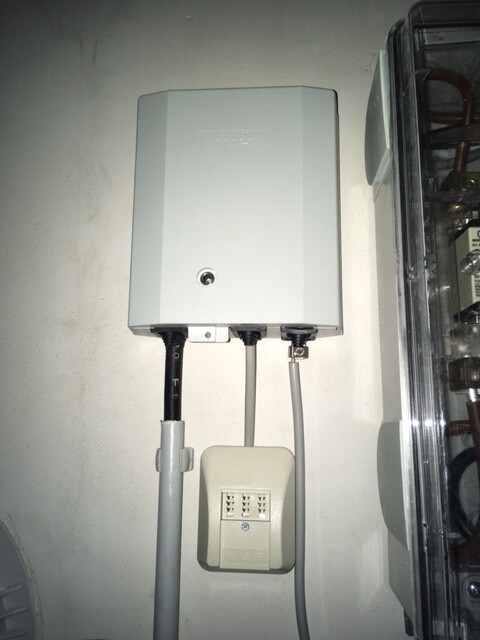
Attached is a first look at our main distribution frame (?) in the house connection room in the basement.
What we have:
- Duplex LAN in living, sleeping, and working rooms in the basement, ground floor, and upper floor
- Telecom connection with 50 Mbit/s
- TV via satellite
- No ISDN wanted
What we want:
- Additional Wi-Fi on every floor
- LAN access from all connected rooms to a NAS / network storage with photos, music, series, movies
- Wi-Fi access from all connected rooms to the NAS / network storage with photos, music, series, movies
I’m currently trying to figure out the right hardware components. About 24 LAN cables come together in the house connection room in the basement, which are connected to a patch panel and linked to a switch.
I need:
- A router
- A switch
- Two access points / (repeaters?)
- NAS
- Clients for the NAS
Router:
The telecom provider only rents routers for 5 EUR per month. However, I don’t want any of their hardware, whether rented, purchased, or provided for free. When I look for a suitable FritzBox, I find the 7430: it supports VDSL, can handle a DECT phone, media server (although I’m not yet sure if a separate component would be better here, or if a NAS already covers this functionality — I believe it does). The idea: the router connects to the switch, so all connected rooms can access the network and internet via cable. MU-MIMO seems to be a new feature for when many devices are connected via Wi-Fi. Since this will only involve two smartphones and two laptops, rarely all at the same time, I don’t think I need this feature — printers and media libraries will be wired. Therefore, I think the 7430 will be sufficient.
Switch:
I don’t need any special functions here and find plenty of options under 100 EUR. It should simply bundle my 24 cables and connect them to the router.
Though I just realized two LAN lines are for cameras and one LAN line for the doorbell — I’m not sure how yet, but these should not be connected to the internet.
Access points:
I have planned one outlet and one network connection in each hallway on the ground floor and upper floor for an access point (repeater?). The idea is to have a device that is connected via cable to the router and provides Wi-Fi on that floor.
NAS:
So far, I’m clueless. I’m thinking of around 10 TB of storage for starters, accessible via LAN / Wi-Fi. No user management needed yet, maybe in a few years. I want to be able to access our “media library” from all sleeping/living rooms, although I’m not sure yet which client will be suitable for this. Our TVs are a few years old and likely can’t do this, and the existing receivers neither.
If I roughly estimate what I need to set up our home network:
- Switch 100 EUR
- Router 100 EUR
- Access point 50 EUR
- Access point 50 EUR
- NAS ??? EUR
- NAS client ??? EUR living room
- NAS client ??? EUR bedroom
Now I have two questions for the group:
1. Are there any mistakes in my hardware setup plan?
2. Which devices do you actually use / recommend / advise against?
3. Is my assumption correct that I don’t need MU-MIMO if the “media library” is wired?
Thanks and best regards

The main TV is a 5-6 year old Philips from the 6000 series. It has network and internet capabilities, but they don’t work properly. Maybe there is a firmware update available. There are no plans to replace the TV in the next few years as long as it continues to function.
What I would find convenient is a passively cooled mini-computer combined with a keyboard, allowing me to browse my media library. I believe this would probably be something like a Raspberry Pi, if I understand correctly.
What I would find convenient is a passively cooled mini-computer combined with a keyboard, allowing me to browse my media library. I believe this would probably be something like a Raspberry Pi, if I understand correctly.
It's similar for me. I have an older Samsung TV that doesn't really support those kinds of connections.
For example, I use an Intel i7 NUC. It's basically like the old "media PC." I connected it to both the TV and a PC monitor via an HDMI switch, so I can use it both as a regular PC and as a media playback device. With a USB switch and a Bluetooth keyboard, you basically have a full-fledged PC in the living room. You can even play slower PC games on the TV :P
For example, I use an Intel i7 NUC. It's basically like the old "media PC." I connected it to both the TV and a PC monitor via an HDMI switch, so I can use it both as a regular PC and as a media playback device. With a USB switch and a Bluetooth keyboard, you basically have a full-fledged PC in the living room. You can even play slower PC games on the TV :P


We have a similar situation with our house.
The utility connections are in the basement. Placing a router there wouldn’t reach the bedrooms in the attic.
Repeaters are more of a workaround since they only amplify the (possibly poor) signal they receive and present it as “very good.”
However, I don’t really want to have a Wi-Fi access point on every floor.
We are installing LAN cabling to all rooms (with a patch panel).
Right now, I’m considering placing the Wi-Fi router in the utility room and adding a second Wi-Fi access point in the attic.
The ground floor would then receive its signal from one of the other two, which ideally would be “good.”
Alternatively, a Wi-Fi access point in the kitchen might be an option since it’s a fairly central point for all 720° around (360° per floor x 2 floors).
I’m just not sure if that would be enough for the floors above and below or if we’d end up unhappy.
I hope there are sufficiently powerful Wi-Fi access points on the market that can work through reinforced concrete.
If not, I could add additional access points later if needed.
I just hope I don’t block a good option later by poor planning now.
If the LAN cabling to all necessary rooms is structurally completed, I would simply try out different setups during operation by trial and error and gradually move toward any more expensive solutions if needed.
What is your view on the structural requirements for this?
The utility connections are in the basement. Placing a router there wouldn’t reach the bedrooms in the attic.
Repeaters are more of a workaround since they only amplify the (possibly poor) signal they receive and present it as “very good.”
However, I don’t really want to have a Wi-Fi access point on every floor.
We are installing LAN cabling to all rooms (with a patch panel).
Right now, I’m considering placing the Wi-Fi router in the utility room and adding a second Wi-Fi access point in the attic.
The ground floor would then receive its signal from one of the other two, which ideally would be “good.”
Alternatively, a Wi-Fi access point in the kitchen might be an option since it’s a fairly central point for all 720° around (360° per floor x 2 floors).
I’m just not sure if that would be enough for the floors above and below or if we’d end up unhappy.
I hope there are sufficiently powerful Wi-Fi access points on the market that can work through reinforced concrete.
If not, I could add additional access points later if needed.
I just hope I don’t block a good option later by poor planning now.
If the LAN cabling to all necessary rooms is structurally completed, I would simply try out different setups during operation by trial and error and gradually move toward any more expensive solutions if needed.
What is your view on the structural requirements for this?

Similar topics