
Hello everyone,
In about three weeks, we are supposed to finalize our electrical planning on site. Unfortunately, our electrician is somewhat old-fashioned, which makes it difficult for me to collaboratively plan a future-proof electrical setup with him. Therefore, I am currently educating myself to ensure that the networking in our single-family home is fundamentally future-proof.
Basically, it’s about the LAN network... LAN wall outlets are relatively expensive, so proper planning is even more important.
About us:
- Mid to late 20s – couple without children. Planning for 2 children in the near future.
- Single-family house with a usable basement, 2 full floors, and fully equipped with concrete ceilings
- Utility room in the basement with air-to-water heat pump, ventilation system, photovoltaic system
- The router is planned to be located in the office on the ground floor
- The upper floor includes bathroom / bedroom / 2 children’s rooms
- No satellite dish or cable TV — we will use Internet TV exclusively!
Now, I am struggling to network our single-family home sensibly but as cost-effectively as possible.
I have the following questions:
1. Slightly off-topic: In the living room, I would like to have an in-wall conduit installed on the TV wall (the TV will be wall-mounted) so that no cables are visible. Is this sensible and affordable? I will get exact prices from my electrician if this makes sense at all. Would it also make sense to install power outlets at TV height? How do you plan the connections on your media wall reasonably? What should be considered?
Since we plan to use a Magenta TV box and thus IP-TV, a total of four LAN ports in the living room area would presumably be useful, right?
2. How many LAN outlets and especially where should LAN outlets be installed? Mainly: which cable? Is CAT6 sufficient?
→ Such a double LAN outlet certainly costs close to €200, so planning must be really sensible.
Is it really necessary to install 2 double LAN outlets in each children’s room? I always wonder: what is actually going to be plugged in there?
One port for the TV and one port for a multimedia device should be enough, right? So four connections would probably be overkill, correct?
The fact is: It will certainly take years or decades before our children actually use these outlets... Who knows what changes might happen by then? Therefore, could we not cost-effectively use empty conduits (empty pipes) instead?
Is it also possible to “branch off” from an existing double outlet afterward to add more ports for the room? What should be considered here? Or should we consider having an empty conduit prepared in another spot in the room so that a socket can be installed later?
3. How do you solve the “router problem”? Should the one router be placed in the office (ground floor) with LAN outlets in the existing bedrooms upstairs to ensure a stable LAN connection? Or is a router upstairs absolutely necessary?
4. How important are LAN outlets in the utility room? Should the router possibly even be located in the utility room? Because of the concrete ceiling between basement and ground floor, a second router would almost certainly be needed. How should this situation be handled with a basement?
5. What do you think about installing empty conduits for CAT cables in the kitchen / hallway etc. to enable later retrofitting? Is this relatively affordable in new builds?
I would appreciate any feedback so we can make the best possible plans 🙂
In about three weeks, we are supposed to finalize our electrical planning on site. Unfortunately, our electrician is somewhat old-fashioned, which makes it difficult for me to collaboratively plan a future-proof electrical setup with him. Therefore, I am currently educating myself to ensure that the networking in our single-family home is fundamentally future-proof.
Basically, it’s about the LAN network... LAN wall outlets are relatively expensive, so proper planning is even more important.
About us:
- Mid to late 20s – couple without children. Planning for 2 children in the near future.
- Single-family house with a usable basement, 2 full floors, and fully equipped with concrete ceilings
- Utility room in the basement with air-to-water heat pump, ventilation system, photovoltaic system
- The router is planned to be located in the office on the ground floor
- The upper floor includes bathroom / bedroom / 2 children’s rooms
- No satellite dish or cable TV — we will use Internet TV exclusively!
Now, I am struggling to network our single-family home sensibly but as cost-effectively as possible.
I have the following questions:
1. Slightly off-topic: In the living room, I would like to have an in-wall conduit installed on the TV wall (the TV will be wall-mounted) so that no cables are visible. Is this sensible and affordable? I will get exact prices from my electrician if this makes sense at all. Would it also make sense to install power outlets at TV height? How do you plan the connections on your media wall reasonably? What should be considered?
Since we plan to use a Magenta TV box and thus IP-TV, a total of four LAN ports in the living room area would presumably be useful, right?
2. How many LAN outlets and especially where should LAN outlets be installed? Mainly: which cable? Is CAT6 sufficient?
→ Such a double LAN outlet certainly costs close to €200, so planning must be really sensible.
Is it really necessary to install 2 double LAN outlets in each children’s room? I always wonder: what is actually going to be plugged in there?
One port for the TV and one port for a multimedia device should be enough, right? So four connections would probably be overkill, correct?
The fact is: It will certainly take years or decades before our children actually use these outlets... Who knows what changes might happen by then? Therefore, could we not cost-effectively use empty conduits (empty pipes) instead?
Is it also possible to “branch off” from an existing double outlet afterward to add more ports for the room? What should be considered here? Or should we consider having an empty conduit prepared in another spot in the room so that a socket can be installed later?
3. How do you solve the “router problem”? Should the one router be placed in the office (ground floor) with LAN outlets in the existing bedrooms upstairs to ensure a stable LAN connection? Or is a router upstairs absolutely necessary?
4. How important are LAN outlets in the utility room? Should the router possibly even be located in the utility room? Because of the concrete ceiling between basement and ground floor, a second router would almost certainly be needed. How should this situation be handled with a basement?
5. What do you think about installing empty conduits for CAT cables in the kitchen / hallway etc. to enable later retrofitting? Is this relatively affordable in new builds?
I would appreciate any feedback so we can make the best possible plans 🙂
F
fromthisplace19 Feb 2023 20:03Currently, the Zyxel GS1915-24EP or the Netgear GS324TP are my favorites.
How well can the U6 Pro be connected and managed here?
Is it smarter to choose access points from Zyxel or Netgear?
What are the advantages of each?
How well can the U6 Pro be connected and managed here?
Is it smarter to choose access points from Zyxel or Netgear?
What are the advantages of each?

For the Unify APs, you need to use the software or a Unify Cloud Key.
This works, but you have an additional tool.
Other manufacturers offer web access. Fritz APs can be managed centrally through the Fritzbox.
You need to configure the switch separately if it is manageable.
This works, but you have an additional tool.
Other manufacturers offer web access. Fritz APs can be managed centrally through the Fritzbox.
You need to configure the switch separately if it is manageable.
The question you need to ask yourself might also be what exactly you want to cover? Many devices operate in the 2.4 GHz range (sockets, lamps, etc.) or the 5 GHz range (phones, etc.).
For example, if the TVs and computers are connected via LAN, you might not need a large 5 GHz network, just basic coverage.
Why actually Ubiquiti access points? I mean, they’re great, no question, but I don’t think they are inexpensive either.
For example, if the TVs and computers are connected via LAN, you might not need a large 5 GHz network, just basic coverage.
Why actually Ubiquiti access points? I mean, they’re great, no question, but I don’t think they are inexpensive either.

fromthisplace schrieb:
How well can the U6 Pro be connected and managed here? The connection fits because it’s standard. Management is only possible via additional software from Ubiquiti. At that point, we are just talking about setup and basic use! Everything else that the Unifi system could do remains hidden from you because you have to stay within the Unifi ecosystem. This is the case with any manufacturer of such systems. You can use everything together, but the really interesting features are only available if you stay within the specific ecosystem. But frankly, you don’t seem like you need all that. For you, a simple wired Fritzbox mesh system would probably be sufficient.
Reggert schrieb:
Why Ubiquiti access points anyway? I mean, they’re great, no question, but I don’t think they’re cheap. About 150 euros per unit is reasonable in my opinion. The reason becomes clear once you see what the Unifi system can do. But even without the ecosystem, as simple access points, they run very reliably. The "management" then works via software on a PC or Mac and after setup is stored safely somewhere as a backup. I have been running such systems with “standalone” Unifi access points stress-free and continuously since 2017.
F
fromthisplace19 Feb 2023 21:31Araknis schrieb:
Management is only possible through additional software from Ubiquiti. But then we’re really just talking about setup and use! Everything else that the UniFi system could do remains hidden because you have to stay within the UniFi environment. You can use everything together, but the really interesting features are only available if you stay within each respective ecosystem. With all due respect, you don’t seem to need all of that here.That impression is accurate. 🙂 I just want everything to run stable and fast. No other requirements.
I think I’m clear:
- Zyxel GS1915-24EP
- Ubiquiti U6 Pro
For the network cabinet, I want to follow the great setup from @MBPassion. That looks like 19", 12U, and 40cm (16 inches) depth, right?
MBPassion schrieb:
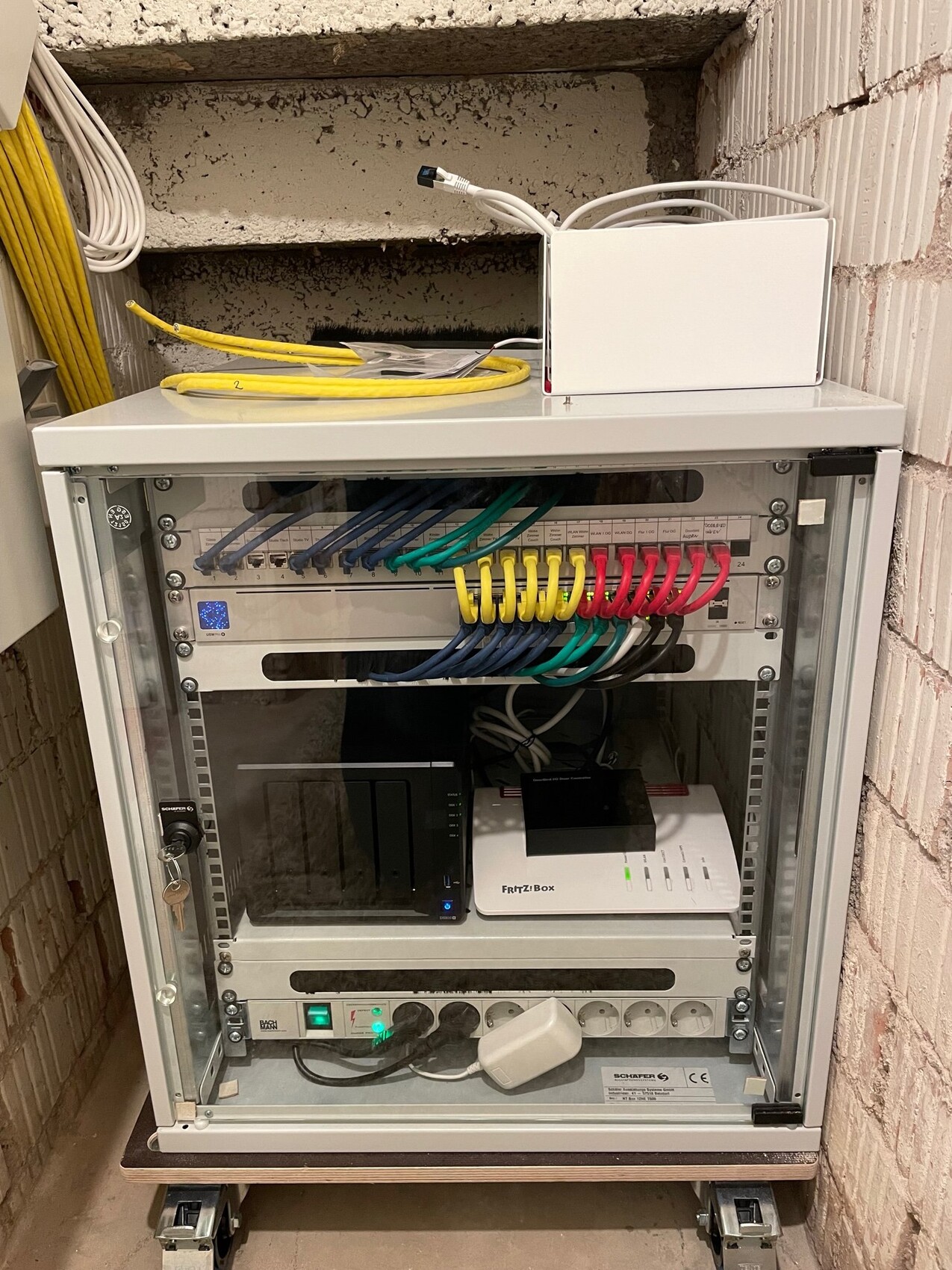
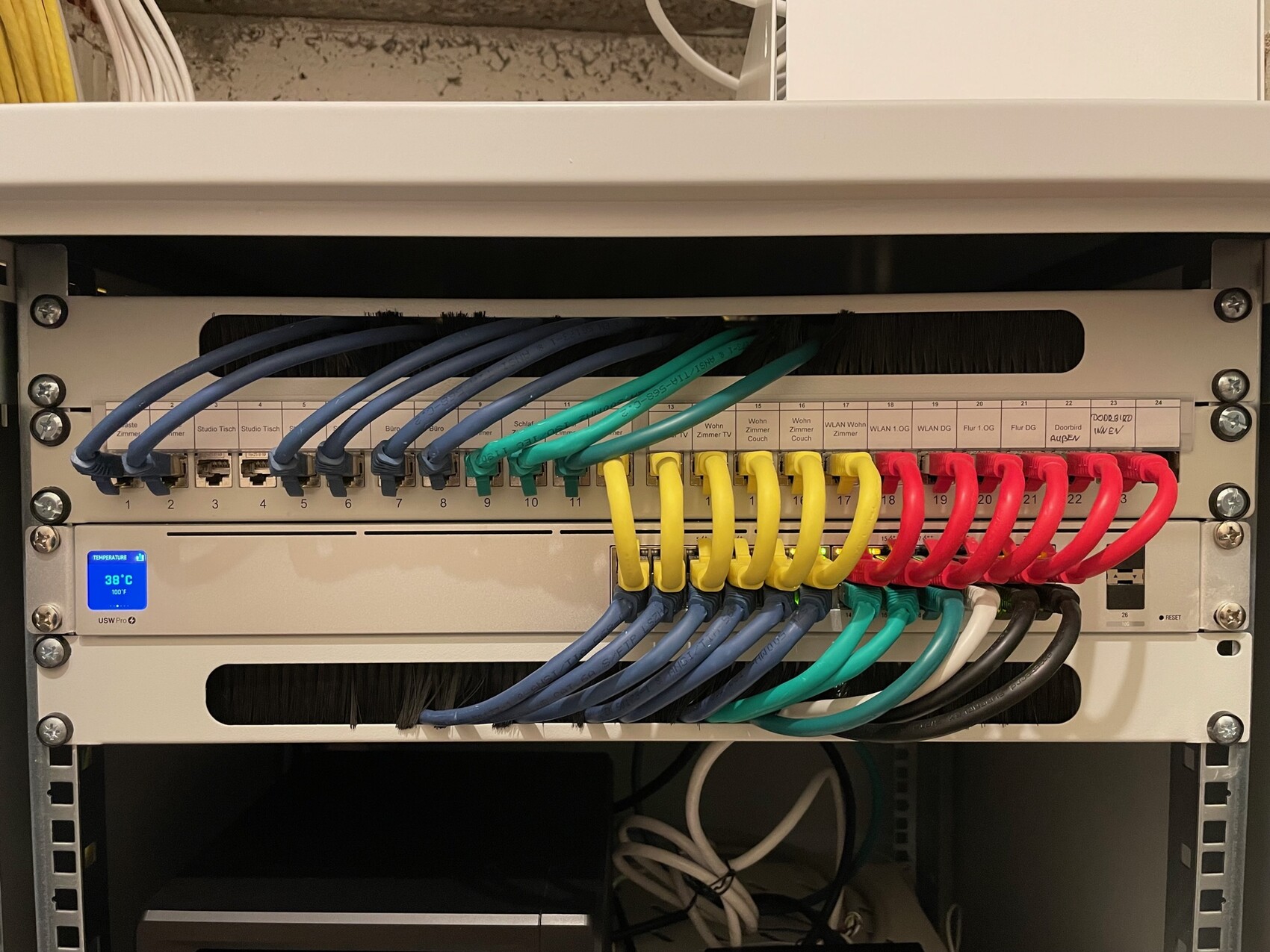
F
fromthisplace22 Feb 2023 22:31rick2018 schrieb:
I would stick entirely with UniFi. Alternatively, mix brands but then only use one UniFi AP. By now, I’m leaning in that direction as well.
The UniFi 24 PoE has 16 PoE ports with 95W. That’s enough for 4 U6 Pro APs and a door camera.
I would then stay within the same system and have only one app/interface.
Are those advantages worth the 100 euro extra cost? Do you see any other benefits compared to a switch from another manufacturer?
Similar topics