
ᐅ Electrical specification review with developer preparation
Created on: 2 Jul 2021 13:15
V
vorkalmatador
Hello dear forum members,
to keep it brief: Next Monday we have the electrical planning meeting for the shell of our upcoming semi-detached house.
We have already considered the basics (location of light fixtures, switches, motors, power outlets, network sockets), but I would like to clarify a few points before I have to deal with the probably rather unmotivated electrician from the builder on Monday 🙂
Well, it turned out a bit longer than expected, sorry.
I hope you can still help me a bit so I can tell the electrician exactly what I want and not be brushed off with comments like “no, that’s not how it’s done.”
Best regards
to keep it brief: Next Monday we have the electrical planning meeting for the shell of our upcoming semi-detached house.
We have already considered the basics (location of light fixtures, switches, motors, power outlets, network sockets), but I would like to clarify a few points before I have to deal with the probably rather unmotivated electrician from the builder on Monday 🙂
- Preparation for Wallbox: We would like to have the necessary connections (11 kW, 3-phase) prepared so we can connect a wallbox charger in the future. The plan is to install the wallbox on the outer wall of the house (36cm (14 inches) aerated concrete). Will the raw cables just stick out of a hole, or how is this typically done? In case I later decide not to mount the wallbox directly on the wall but further back in the garden, could the wiring be “extended”?
- Network Access Point: Network sockets are planned in several rooms, partly single, partly double (please don’t criticize me for not having all double, I can still add more later. The number of sockets was negotiated in the contract). Some are in aerated concrete, some in drywall. In both the ground floor corridor and the upper floor corridor, I have planned network sockets to install Ubiquiti PoE access points. Since I won’t be able to embed the device in the concrete ceiling anymore, the plan is at least on the ground floor to mount it relatively high on the wall. Is there anything special to consider here, or will the connection be prepared like a “normal” network socket, and then the flat access point is just plugged in? Between the upper floor and the attic is a wooden ceiling (not built yet). Could I plan to mount it there on the ceiling, or will the electrician laugh at me and say that’s not possible?
- Network Wiring: If I understand correctly, the electrician will run the in-wall cabling inside to the sockets. These cables end somewhere, hopefully in the utility room, where they must be connected to a patch panel. Do I have to do this myself, or is this included when the builder contract states “installation of 10 network sockets”? Then from the patch panel, a patch cable goes per run into the switch, which is connected via patch cable to LAN1 of the router.
- "Smart" Roller Shutter Motors: All our roller shutters will be motorized; unfortunately, the contract does not specify which motor. We would like to control the shutters via app so we can close or open everything while sitting on the couch downstairs. What makes the most sense here? Upgrading to a “smart” motor for probably quite some extra cost? Or just smartifying the switches? I’ve also read you can simply ask the electrician to make the wall box recess a bit deeper to install a 2.5 or similar Shelly smart relay between the switch and motor if needed. Do electricians usually agree to this, or are there warranty issues? Any other suggestions?
- Power Supply for the Garden: We would like to have electricity in the garden area, for example where the shed or carport will be later. We are not 100% certain yet where exactly the shed and carport will be, so we cannot give the electrician precise information. How can this be prepared? Conduits are not flexible either.
- Intercom System: Our semi-detached house is on a great lot, about 55m (180 feet) from the street. Since the house next door is currently for sale and we don’t know what the buyers will do, there is currently no gate at the front. Surely one will be installed later; should we already have a conduit installed there? A modern video intercom at the gate probably won’t work as there will be no internet connection. Or could I have a network cable run in a conduit to the front and then connect a camera with Power over Ethernet there?
Well, it turned out a bit longer than expected, sorry.
I hope you can still help me a bit so I can tell the electrician exactly what I want and not be brushed off with comments like “no, that’s not how it’s done.”
Best regards
V
vorkalmatador14 Jul 2021 08:49untergasse43 schrieb:
Almost. You haven’t actually seen a keystone jack or a patch panel like this in use, have you?
This is what keystone jacks look like on installed cables:

This is what a keystone patch panel with inserted keystones looks like:
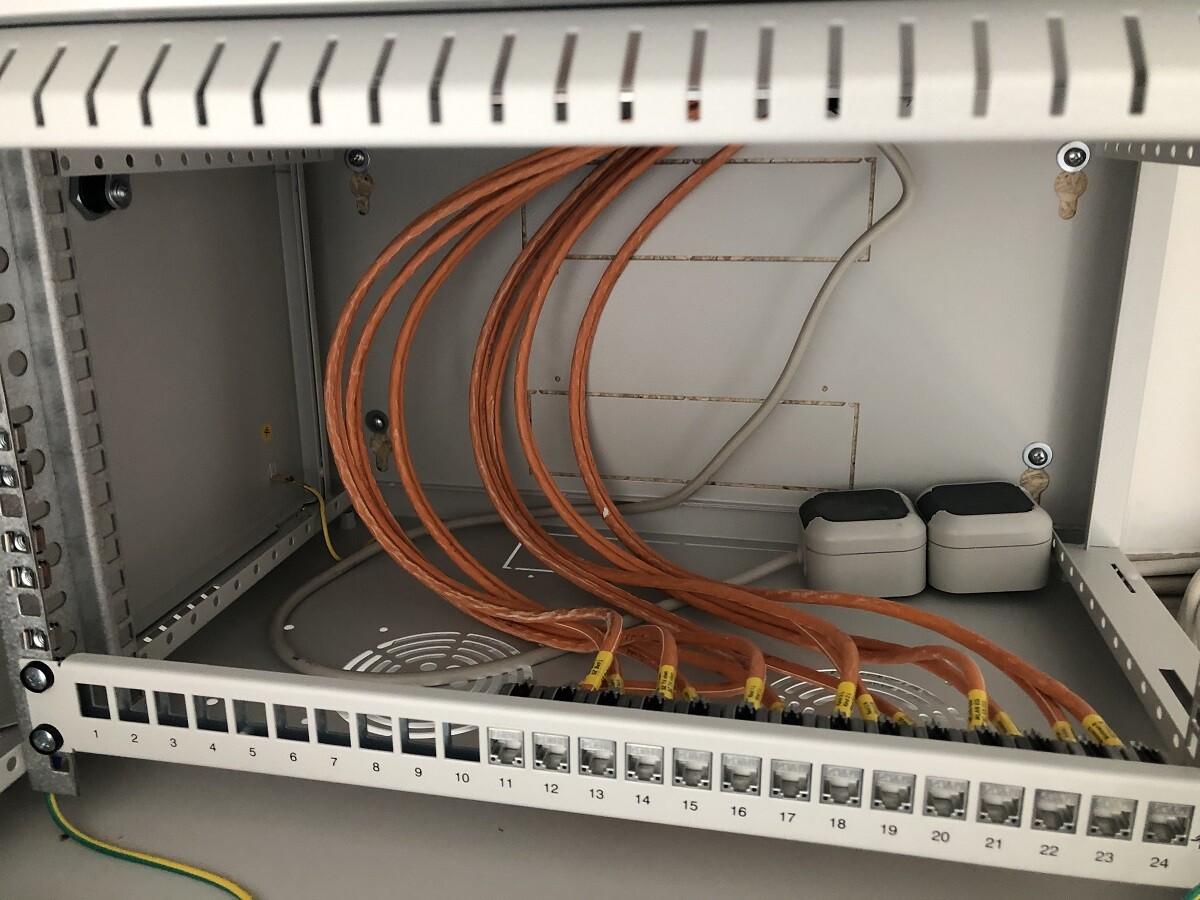
From there, you use a short patch cable to connect to the switch. The advantage of keystones is that you can easily change the order of connections on the patch panel.
For example, if you need Power over Ethernet (PoE) for access points but only have a switch with PoE on certain ports, you can organize it neatly like this without messy tangles (PoE port usually on the far left, connection to the access point on the far right, etc.). Or if you prefer a specific sequence on the patch panel and thus on the switch, or for other reasons. It’s simply cleaner and you don’t have that metal part with a bulky cable bundle in the rack that’s difficult to arrange properly. Of course, you don’t have to do this, but it just works better and looks more professional. Also, keystones are much easier to handle and terminate compared to a punch-down block (LSA field), especially if space is limited. It has only advantages and no disadvantages.
This would be an example of a reasonably clean setup. With a 24-port switch that has ports arranged in a single row, it would look even better:
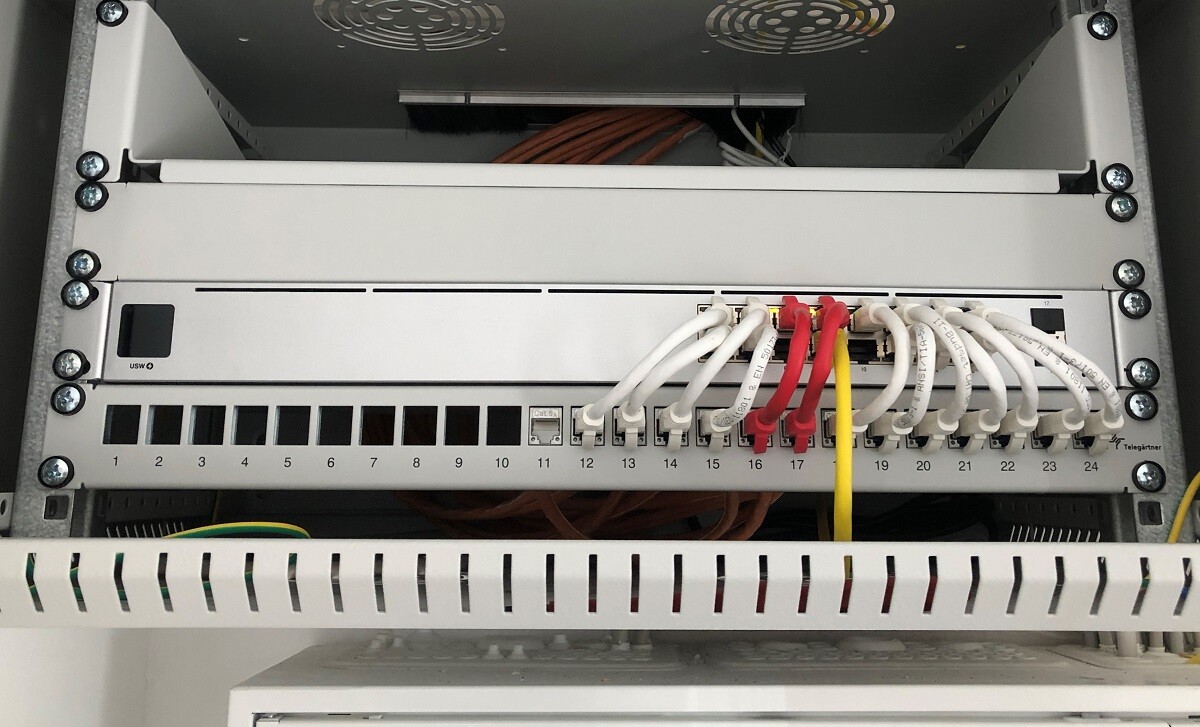
Ah great, I get it now.
The installation cables are simply organized into the keystone patch panel without any additional wiring. So it’s just for neatness and organization.
Then from the patch panel, you use short patch cables to connect to the switch, which makes sense.
Your pictures really helped me, thanks.
Actually, only the two PoE-capable switch ports for the Unifi access points need to be PoE-enabled, right? The “regular” duplex outlets, where the patch cable then goes to the TV/PC/console, don’t need PoE, correct?
 untergasse4314 Jul 2021 09:08
You really only need PoE where you want to power a device with it. Even though injectors exist, I would recommend using a PoE switch for the sake of tidiness, as it saves you a 230V outlet and various cables in the rack. The one in the picture is the smallest 19" switch from Ubiquiti with PoE (16 ports, 8 of which are PoE). Experience has shown that sometimes you end up needing more ports than initially planned, for example, in a home office as children grow older or in the living room. In those cases, you can simply add a small PoE-powered switch there (Netgear offers a lot of good options) and be glad you bought a main switch with PoE from the start, saving you an additional power adapter and outlet in those rooms. This way, you can rely on wired LAN and avoid overloading the Wi-Fi network. And since you have keystone jacks, you can easily place the relevant ports near the PoE ports on the switch. As mentioned before, keystone jacks only have advantages 🙂

untergasse43 schrieb:
This is roughly how it would look clean. With a 24-port switch, which also has its ports in a single row, it would look even better:
After all the great pictures of network setups, I’m just going to join in here, as I’m a bit annoyed with myself for having neglected this topic somewhat.
I originally wanted to get a nice 19-inch (rack) wall cabinet and do a neat wiring job. In practice, it will probably have to be different, since, for example, I hadn’t thought about the water line at all, and the pipe won’t be as flexible as my network.
This is how it looks in my basement.
I had planned to have the electrician install keystone jacks as well, but before I thought to mention it, things had already been done and cables shortened. So the patch panel will stay like this for now.
The idea is still to buy the network cabinet for the router and PoE switch (Ubiquiti?), mounting it below the orange cover and then running longer network cables from the patch panel over there. I first considered simply hanging the switch on the wall with brackets. But I’ve basically ruled that out because we will also have the washing machine and dryer in that room, and I don’t want the network equipment exposed, especially with the fans on the switch.
The fiber optical Network Termination Unit (ONT) still needs a place, and a double power outlet needs to be added as well. I would try to run everything through the cable duct above.
Would this setup be at least somewhat acceptable to you organization aficionados, or are there better ideas? If so, I’d start placing orders soon.

Question: I’m not entirely sure where the panel is located. And what kind of panel are we talking about? 8, 16, ...?
Regardless, a switch just needs to meet your requirements.
Do you know what those are?
PS: I looked again and found the panel. It’s up there, under the ceiling, right?
16 ports is quite manageable. I would consider a 19-inch rack to be overkill.
But it depends on what is connected to the panel.
NVR?
How much PoE?
Etc.
Also keep in mind that a 16-port switch can’t fully support a 16-port panel. You still need access to the WAN.
Regardless, a switch just needs to meet your requirements.
Do you know what those are?
PS: I looked again and found the panel. It’s up there, under the ceiling, right?
16 ports is quite manageable. I would consider a 19-inch rack to be overkill.
But it depends on what is connected to the panel.
NVR?
How much PoE?
Etc.
Also keep in mind that a 16-port switch can’t fully support a 16-port panel. You still need access to the WAN.
Yes, exactly. The small white box at the top is a 12-port patch panel. If I remember correctly, 14 cables would need to be terminated there. There must be some stray CAT cables somewhere. Then I have the inverter and WAN. That would fill all 16 ports. I have planned for 3 of them to be PoE. At the time, I definitely wanted a NAS, but now I’m not so sure if I still need one.
A 16-port setup might already be too small, now that I think about it.
A 16-port setup might already be too small, now that I think about it.
Similar topics