
ᐅ Planning the Network for a 1,500 sq ft Single-Family Home
Created on: 1 Oct 2015 03:12
B
blackdog110B
blackdog1101 Oct 2015 03:12I am currently in the planning phase for the electrical installation. I have already read through some topics here and picked up quite a bit of information.
I am planning a two-story single-family house (floor plans will follow shortly).
Lower level
Living room: 4 LAN outlets (for Linux satellite receiver / Hi-Fi receiver / TV), all require internet access.
The kitchen should also have a network outlet for future IPTV reception and possibly for a Wi-Fi access point, but I will come back to that question.
Upper level
One outlet per child's bedroom (or should I go for double outlets right away?)
One outlet in the master bedroom.
Hallway for a Wi-Fi access point.
I planned a small patch panel with 16 or 24 ports (24 would provide additional capacity in case IP cameras for outside or phones need to be connected via this wiring later on).
Should I invest more in the patch panel and use E-DAT modules instead of a simple LSA patch panel? I heard it should make wiring much easier.
Are E-DAT and Keystone modules essentially the same?
I would use Cat 7 cable rated for 1200 MHz.
Which types of outlets would you recommend for the wiring? E-DAT or LSA? My neighbor has the LSA tool, so that would be possible.
I would also get a 24-port switch.
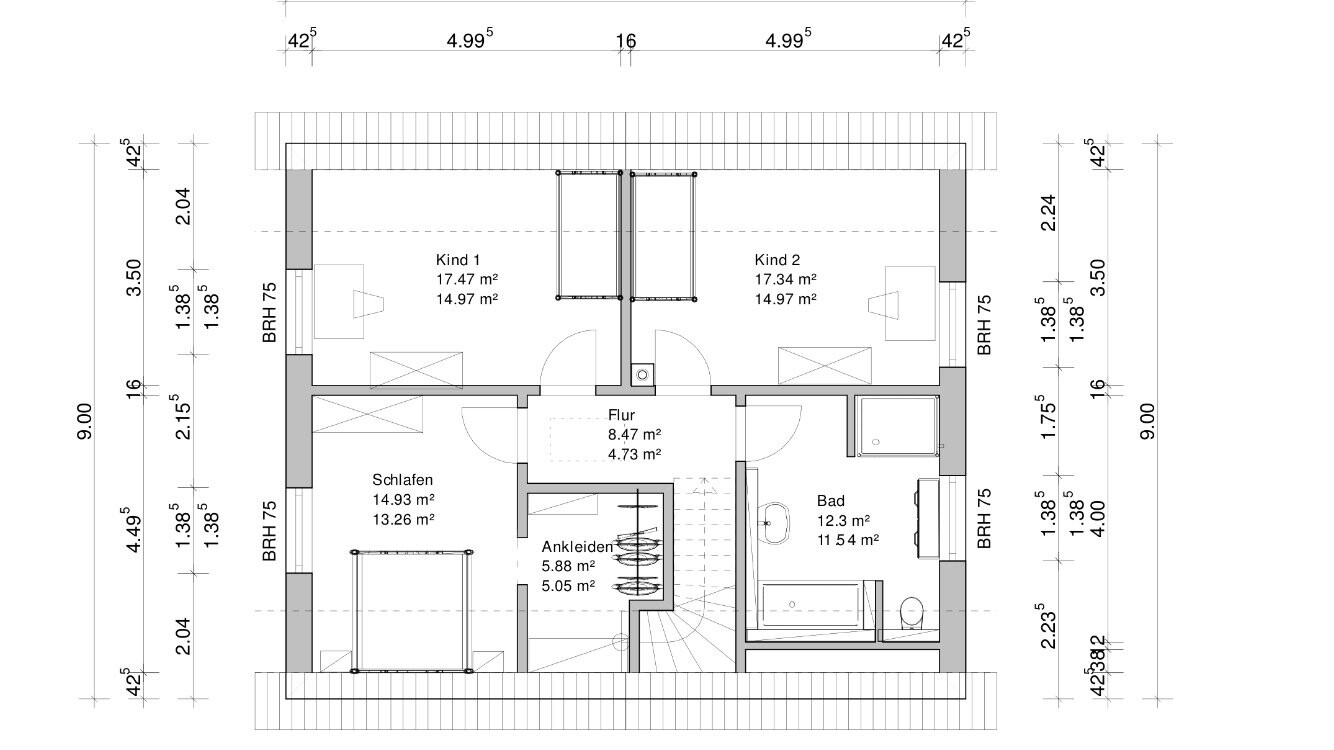
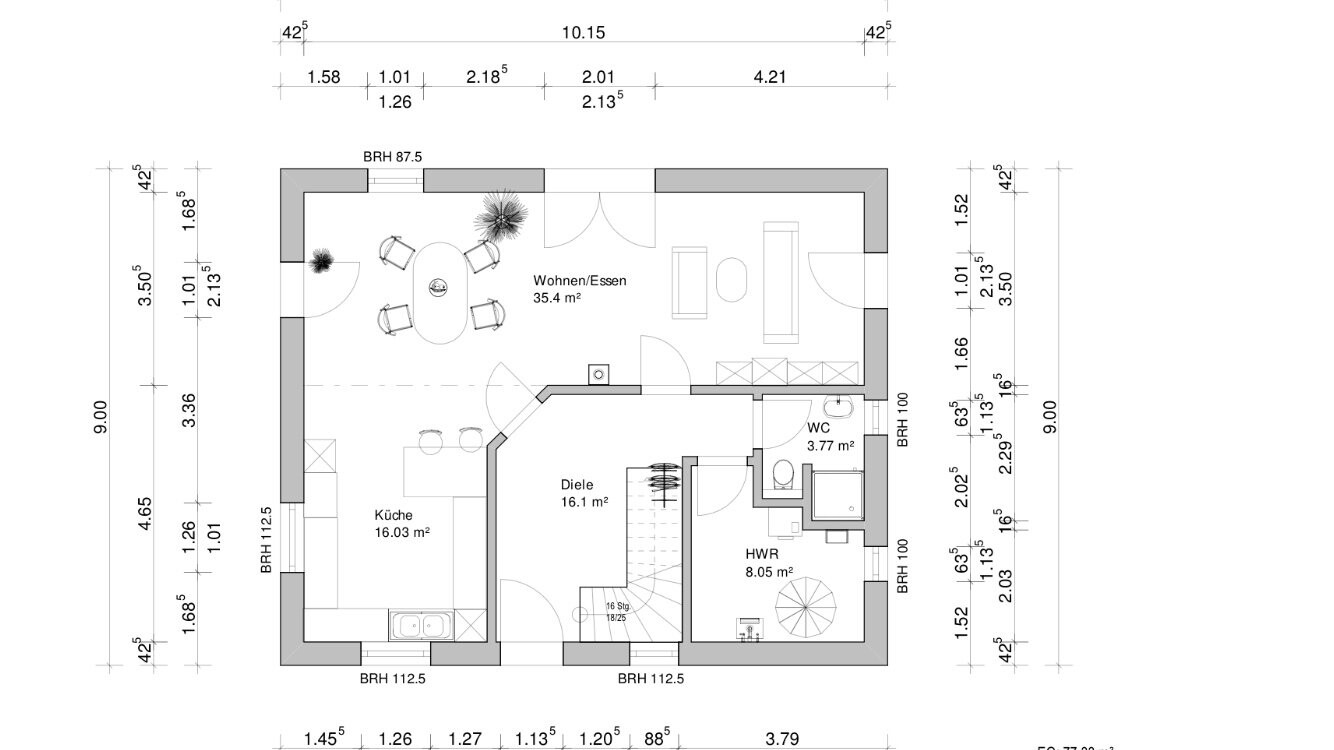
Now comes the question of all questions...
I was planning to get a FritzBox and either place it in the utility room to distribute everything in a star topology from there, or install it in the living room to make better use of the Wi-Fi range.
Or would it be more sensible to keep the FritzBox in the utility room and instead put an additional access point in the hallway downstairs or in the kitchen?
I am planning a two-story single-family house (floor plans will follow shortly).
Lower level
Living room: 4 LAN outlets (for Linux satellite receiver / Hi-Fi receiver / TV), all require internet access.
The kitchen should also have a network outlet for future IPTV reception and possibly for a Wi-Fi access point, but I will come back to that question.
Upper level
One outlet per child's bedroom (or should I go for double outlets right away?)
One outlet in the master bedroom.
Hallway for a Wi-Fi access point.
I planned a small patch panel with 16 or 24 ports (24 would provide additional capacity in case IP cameras for outside or phones need to be connected via this wiring later on).
Should I invest more in the patch panel and use E-DAT modules instead of a simple LSA patch panel? I heard it should make wiring much easier.
Are E-DAT and Keystone modules essentially the same?
I would use Cat 7 cable rated for 1200 MHz.
Which types of outlets would you recommend for the wiring? E-DAT or LSA? My neighbor has the LSA tool, so that would be possible.
I would also get a 24-port switch.
Now comes the question of all questions...
I was planning to get a FritzBox and either place it in the utility room to distribute everything in a star topology from there, or install it in the living room to make better use of the Wi-Fi range.
Or would it be more sensible to keep the FritzBox in the utility room and instead put an additional access point in the hallway downstairs or in the kitchen?
Hello,
where do you want to place the switch? It won’t be exactly small given your number of network outlets. I would put everything in the distribution box, so both the router and the switch. They will be connected anyway. The router should still have enough Wi-Fi coverage for the entire ground floor, or are you building something like a reinforced concrete WW2 bunker?
where do you want to place the switch? It won’t be exactly small given your number of network outlets. I would put everything in the distribution box, so both the router and the switch. They will be connected anyway. The router should still have enough Wi-Fi coverage for the entire ground floor, or are you building something like a reinforced concrete WW2 bunker?
N
nordanney1 Oct 2015 08:25Correct, switch + patch panel + router in the utility room.
Always use double outlets - it doesn’t cost more.
As for the technology: choose what fits your budget. You’ll manage with any option. Are you familiar with the wiring and connections? In our case, the electrician terminated and tested the 20 LAN cables on the patch panel for a very small fee.
Always use double outlets - it doesn’t cost more.
As for the technology: choose what fits your budget. You’ll manage with any option. Are you familiar with the wiring and connections? In our case, the electrician terminated and tested the 20 LAN cables on the patch panel for a very small fee.

I installed a double socket with CAT cables in every room, literally every room including the bathroom and so on.
In the living room, there are two double sockets behind the TV and a single socket in each corner.
In the bedroom, there is also one double socket behind the TV and one double socket near the bed.
Additionally, CAT7 cables are laid on the terrace, at the doorbell, on the exterior wall near the entrance, and in the attic.
The cable is relatively inexpensive, so I would always recommend running cables wherever you can imagine using a network connection.
A 24-port patch panel, switch, and router are mounted on the wall in the utility room on the ground floor. No further access points are necessary, and I get good Wi-Fi coverage even at the neighbors’ houses. The house is made of sand-lime brick.
In the living room, there are two double sockets behind the TV and a single socket in each corner.
In the bedroom, there is also one double socket behind the TV and one double socket near the bed.
Additionally, CAT7 cables are laid on the terrace, at the doorbell, on the exterior wall near the entrance, and in the attic.
The cable is relatively inexpensive, so I would always recommend running cables wherever you can imagine using a network connection.
A 24-port patch panel, switch, and router are mounted on the wall in the utility room on the ground floor. No further access points are necessary, and I get good Wi-Fi coverage even at the neighbors’ houses. The house is made of sand-lime brick.

Hi,
You can never have too many network connections, but whether they make sense in the bathroom, garage, attic, or terrace is something everyone has to decide for themselves – ultimately it’s also a question of cost. Definitely use at least CAT7 cables, and always install double outlets. In the living room, two TV connections might make sense (for recording one channel while watching another, depending on your reception system). Some even install six network connections in the living room, but here I would recommend using an additional switch instead. Don’t forget to plan a power outlet near the access point as well. Otherwise, have fun spending your money ;->
You can never have too many network connections, but whether they make sense in the bathroom, garage, attic, or terrace is something everyone has to decide for themselves – ultimately it’s also a question of cost. Definitely use at least CAT7 cables, and always install double outlets. In the living room, two TV connections might make sense (for recording one channel while watching another, depending on your reception system). Some even install six network connections in the living room, but here I would recommend using an additional switch instead. Don’t forget to plan a power outlet near the access point as well. Otherwise, have fun spending your money ;->
S
Sebastian791 Oct 2015 12:18For example, I only have one LAN cable for access points and cameras – I simply don’t need two cables and save myself the cost of a double socket – even if that saves me around 50 euros in total.
You don’t necessarily need a power outlet at the access points – you can use a power injector.
You don’t necessarily need a power outlet at the access points – you can use a power injector.
Similar topics