
ᐅ Implementing LAN and Satellite Systems in a Single-Family Home with a Centralized Server Cabinet
Created on: 26 Feb 2019 13:16
E
enoausa
Hello everyone!
I have already looked around the forum a bit to find answers to my (partly more specific) questions about LAN/SAT wiring in a single-family house. However, overall, I didn’t really get the information I needed. Therefore, I would like to explain my situation here in detail, hoping to get some answers to my questions.
Key points:
I am currently planning the LAN/SAT cabling for our single-family house. The rest of the electrical work will be carried out by a professional. To save some money, I want to install the LAN and SAT myself.
Our single-family house has a ground floor (GF), an upper floor (UF), a garage with a workshop, and a small attic. We do not have a basement.
The LAN and SAT outlets should be generously distributed throughout the house and converge in the technical room on the ground floor.
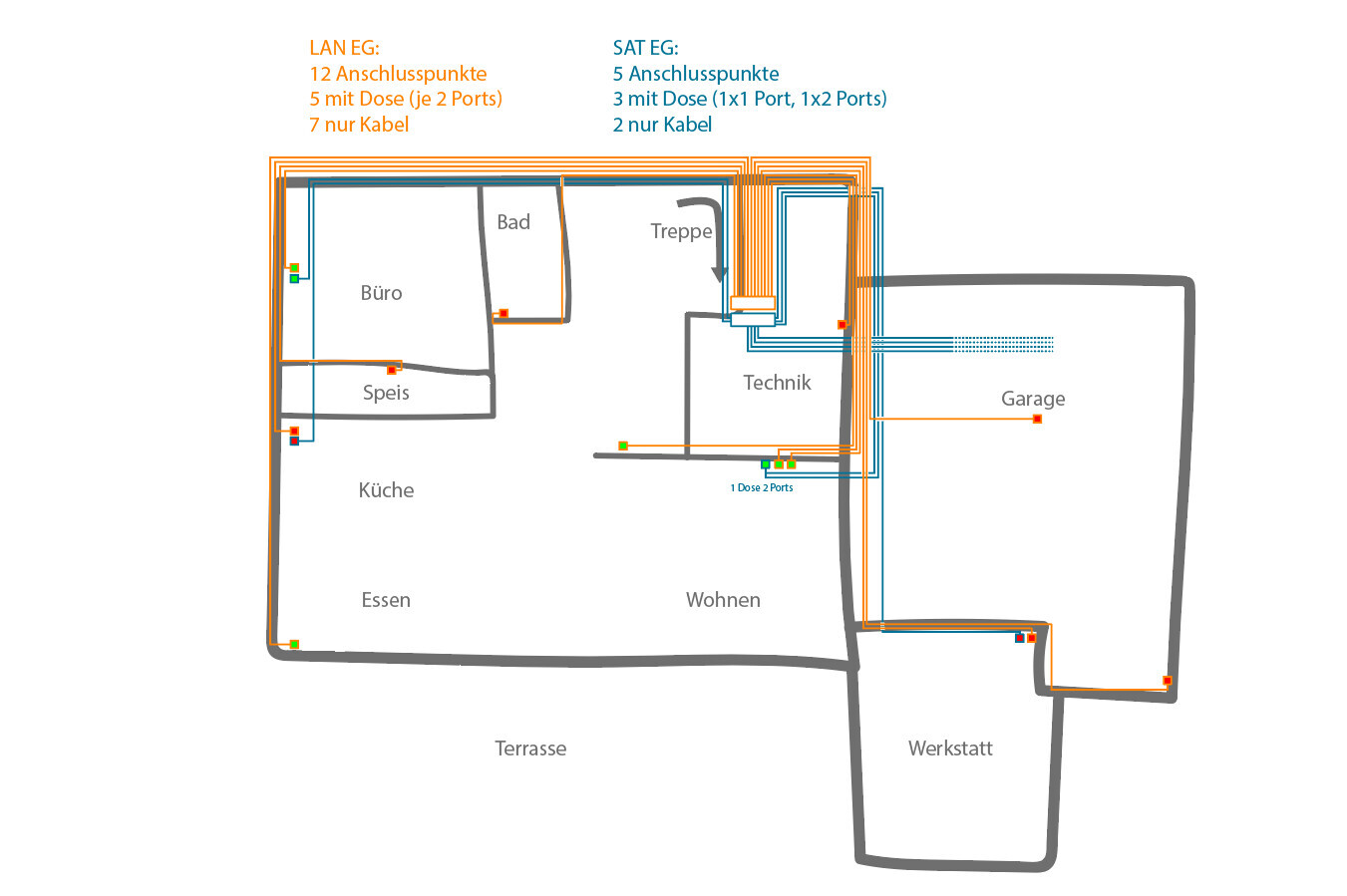
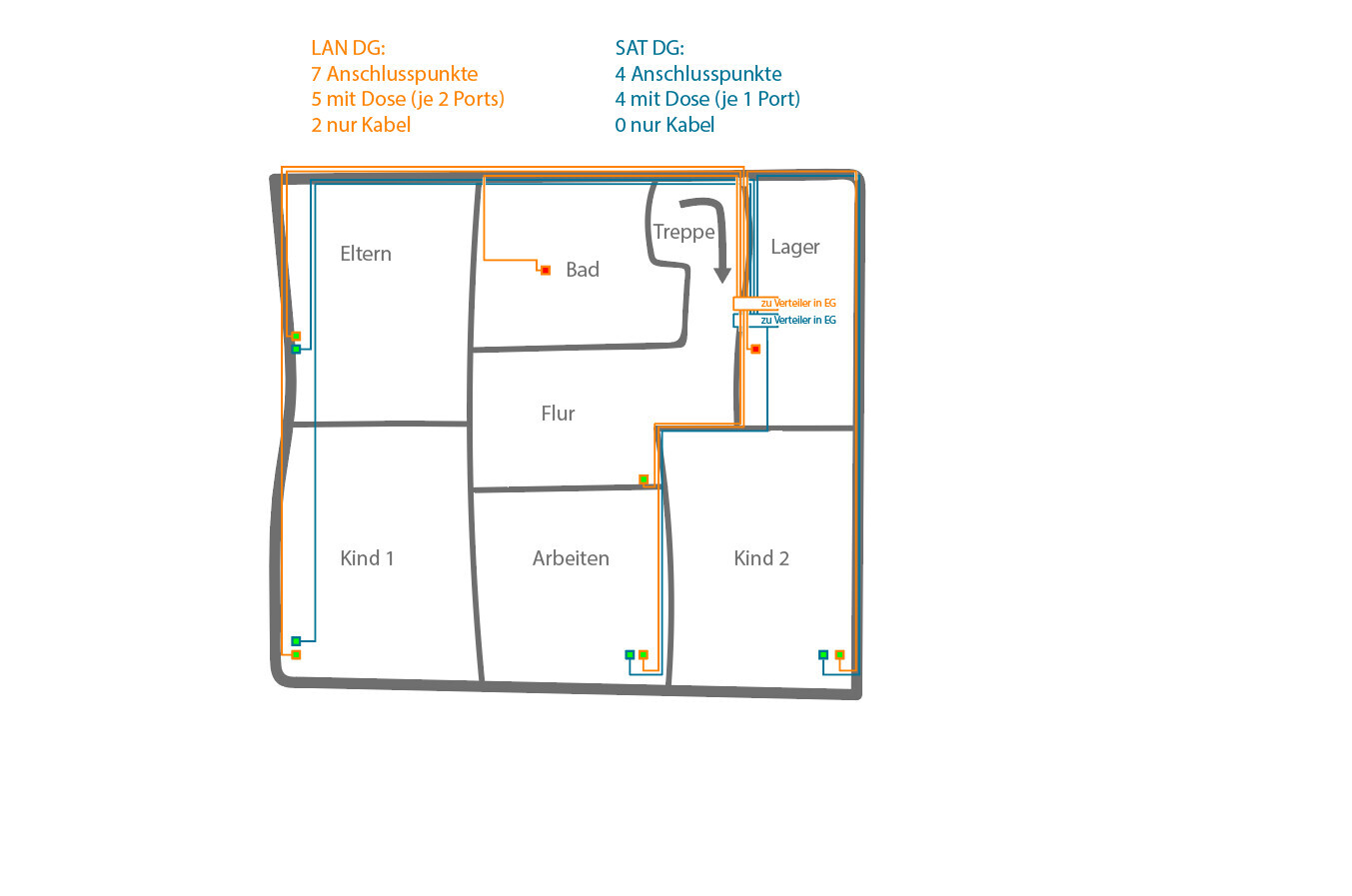
The basic layout should look like in the two attached images.
At the green connection points, one outlet each will be installed (LAN with 2 ports, SAT 1 or 2 ports). The red connection points currently only have cables without outlets and are intended for optional future connections:
In total, the following number of connection points are planned throughout the house:
LAN – GF: 12 connection points (5 with outlets (each with 2 ports), 7 cables only)
LAN – UF: 7 connection points (5 with outlets (each with 2 ports), 2 cables only)
LAN – Total: 19 connection points (10 with outlets (2 ports each), 9 cables only)
SAT – GF: 5 connection points (3 with outlets (one 1port and one 2port), 2 cables only)
SAT – UF: 4 connection points (4 with outlets with 1 port each)
SAT – Total: 9 connection points (7 with outlets (five 1 port, one 2 port), 2 cables only)
All cabling should converge in the technical room and be installed in a server cabinet (19-inch, 12 rack units – RU). This cabinet should ideally be recessed into the wall (then it would be on the other side underneath the stairs).
For LAN, I plan to use duplex CAT7 installation cable, Gigabit 10 Gbit network cable, 1000 MHz shielded twisted pair (S/FTP).
For SAT, I plan to use 135 dB coaxial SAT cable, antenna cable, 4-fold shielded coaxial cable suitable for DVB-S/S2, DVB-C, and DVB-T BK.
All cables (19 duplex LAN = 38 connection points, including those currently only running inside the wall on the opposite side) will then be connected via two 24-port patch panels and a 24-port switch to the Fritzbox (Internet).
From the satellite dish, I want to connect to a multiswitch (inside the server cabinet) and from there to the SAT outlets in the house.
Questions:
I have already looked around the forum a bit to find answers to my (partly more specific) questions about LAN/SAT wiring in a single-family house. However, overall, I didn’t really get the information I needed. Therefore, I would like to explain my situation here in detail, hoping to get some answers to my questions.
Key points:
I am currently planning the LAN/SAT cabling for our single-family house. The rest of the electrical work will be carried out by a professional. To save some money, I want to install the LAN and SAT myself.
Our single-family house has a ground floor (GF), an upper floor (UF), a garage with a workshop, and a small attic. We do not have a basement.
The LAN and SAT outlets should be generously distributed throughout the house and converge in the technical room on the ground floor.
The basic layout should look like in the two attached images.
At the green connection points, one outlet each will be installed (LAN with 2 ports, SAT 1 or 2 ports). The red connection points currently only have cables without outlets and are intended for optional future connections:
In total, the following number of connection points are planned throughout the house:
LAN – GF: 12 connection points (5 with outlets (each with 2 ports), 7 cables only)
LAN – UF: 7 connection points (5 with outlets (each with 2 ports), 2 cables only)
LAN – Total: 19 connection points (10 with outlets (2 ports each), 9 cables only)
SAT – GF: 5 connection points (3 with outlets (one 1port and one 2port), 2 cables only)
SAT – UF: 4 connection points (4 with outlets with 1 port each)
SAT – Total: 9 connection points (7 with outlets (five 1 port, one 2 port), 2 cables only)
All cabling should converge in the technical room and be installed in a server cabinet (19-inch, 12 rack units – RU). This cabinet should ideally be recessed into the wall (then it would be on the other side underneath the stairs).
For LAN, I plan to use duplex CAT7 installation cable, Gigabit 10 Gbit network cable, 1000 MHz shielded twisted pair (S/FTP).
For SAT, I plan to use 135 dB coaxial SAT cable, antenna cable, 4-fold shielded coaxial cable suitable for DVB-S/S2, DVB-C, and DVB-T BK.
All cables (19 duplex LAN = 38 connection points, including those currently only running inside the wall on the opposite side) will then be connected via two 24-port patch panels and a 24-port switch to the Fritzbox (Internet).
From the satellite dish, I want to connect to a multiswitch (inside the server cabinet) and from there to the SAT outlets in the house.
Questions:
- Is it reasonable that everything (2x 24-port patch panels (2 RU), switch (1 RU), telephone system, SAT multiswitch + possibly a second switch + possibly NAS) fits comfortably into a 19-inch server cabinet with 12 RU (it shouldn’t be unnecessarily cramped)? Or would 9 RU even suffice?
- Is it easy to feed the currently 47 cables (19x LAN duplex + 9 coax) into the server cabinet?
- Is there a mounting frame for the SAT distribution equipment designed for installation inside a server cabinet?
- Do I need to worry about overheating? The technical room also contains the main service connection, a washing machine, and a (condensation) dryer.
- Can a 19-inch server cabinet with 12 RU, which is actually intended for wall mounting, be recessed into a wall? I was thinking of simply creating an appropriately sized hole so the server cabinet passes through the wall and protrudes out the other side (this would be no problem since it is under the stairs).
- What is the best way to ground the entire system?
- Is it really necessary to run the cables inside conduits (empty ducts)? Does this method truly allow the cables to be replaced later, or is it usually too difficult in practice to be a viable option? (We are building with a timber frame structure, if that is relevant.)
- Would you recommend installing Wi-Fi access points? If yes, where? I often read "in the ceiling," but I would actually prefer not to do that.
- Would you recommend installing more outlets? Overall, I would still have 10 free ports on the patch panels.


Proper planning is important. Otherwise, you end up frustrated and can only improve it with significant effort and/or aesthetic compromise.
I assume your comment refers to my setup. It is certainly not the standard for a single-family home.
I definitely have different requirements here and am indulging a bit in my technical hobby.
However, there were some very useful suggestions. No one said that everyone needs a 10GB router and network.
I assume your comment refers to my setup. It is certainly not the standard for a single-family home.
I definitely have different requirements here and am indulging a bit in my technical hobby.
However, there were some very useful suggestions. No one said that everyone needs a 10GB router and network.

I would like to revise my network planning.
I have a question regarding this:
Is there a suitable tool that can, for example, directly tell me how many meters (yards) of installation cable I need, how wide the cable entry in the server cabinet must be for all the cables, and create a proper plan for me?
I have a question regarding this:
Is there a suitable tool that can, for example, directly tell me how many meters (yards) of installation cable I need, how wide the cable entry in the server cabinet must be for all the cables, and create a proper plan for me?
B
Bau_Bambi1 Mar 2019 11:45Since we’re already discussing pros and cons...
I briefly considered installing fiber optic cables inside the house during planning, in preparation for gigabit internet from the provider. However, network cards for PCs are quite expensive, as are the necessary adapters for consoles, TVs, etc. Not to mention the additional cost for the cables and related equipment. So I’m leaning back toward CAT7 to keep costs manageable.
Has anyone else thought about this, or is it completely impractical?
@rick2018 It’s certainly not a benchmark, but as soon as you add a NAS or even a home server, the FritzBox quickly reaches its limit when dealing with multiple parallel data streams. It’s better to use a switch so internal traffic runs through it, and only internet traffic goes through the router. Just for that reason, I would at least get a small switch.
I briefly considered installing fiber optic cables inside the house during planning, in preparation for gigabit internet from the provider. However, network cards for PCs are quite expensive, as are the necessary adapters for consoles, TVs, etc. Not to mention the additional cost for the cables and related equipment. So I’m leaning back toward CAT7 to keep costs manageable.
Has anyone else thought about this, or is it completely impractical?
@rick2018 It’s certainly not a benchmark, but as soon as you add a NAS or even a home server, the FritzBox quickly reaches its limit when dealing with multiple parallel data streams. It’s better to use a switch so internal traffic runs through it, and only internet traffic goes through the router. Just for that reason, I would at least get a small switch.
So... I have been thinking about this further.
All the ideas suggested so far seem very interesting to me.
However, at the moment, I am not ready to invest too much money and especially planning time to fully design the entire network.
I would rather set a solid foundation and prepare the system in a way that allows me to expand it later as needed.
For now, my focus is on the basic network infrastructure that I need to plan and implement during the shell construction phase.
Therefore, I would like to proceed as follows:
1. Plan the cabling, designed for a total of 24 connection points.
2. Connect each connection point with duplex cable.
3. Attach a double network outlet to the connection points that will be used from the start.
4. Position a network cabinet.
5. Terminate the cabling in the network cabinet on 2x24 port patch panels.
6. Patch the occupied ports of the patch panels to the switch.
7. Plug the main router (Fritzbox) into any port on the switch.
At this point, a basic network should already be set up, right?
This can then be expanded at any time with access points, new (larger or better) switches, etc. If I need a connection at one of the prepared outlets later, I just open the socket and attach a double network outlet to the corresponding duplex cable.
My questions before I dive into hardware details:
All the ideas suggested so far seem very interesting to me.
However, at the moment, I am not ready to invest too much money and especially planning time to fully design the entire network.
I would rather set a solid foundation and prepare the system in a way that allows me to expand it later as needed.
For now, my focus is on the basic network infrastructure that I need to plan and implement during the shell construction phase.
Therefore, I would like to proceed as follows:
1. Plan the cabling, designed for a total of 24 connection points.
2. Connect each connection point with duplex cable.
3. Attach a double network outlet to the connection points that will be used from the start.
4. Position a network cabinet.
5. Terminate the cabling in the network cabinet on 2x24 port patch panels.
6. Patch the occupied ports of the patch panels to the switch.
7. Plug the main router (Fritzbox) into any port on the switch.
At this point, a basic network should already be set up, right?
This can then be expanded at any time with access points, new (larger or better) switches, etc. If I need a connection at one of the prepared outlets later, I just open the socket and attach a double network outlet to the corresponding duplex cable.
My questions before I dive into hardware details:
- Have I understood the situation correctly?
- Is it okay to leave network cables within the wall socket box unconnected on one end, while the other end is already terminated at the patch panel, or is this not recommended?
- Based on our floor plan (two stories, no basement), how and where should I plan the placement of access points to ensure full coverage?
Similar topics