
ᐅ Poor Wi-Fi in a Newly Built Home Despite Fiber Optic Connection
Created on: 20 Nov 2020 22:31
T
Tx-25
Hello. Today, after 6 months, we finally got internet in our new build. I set up the fiber optic connection on the FritzBox 7590 router. For that, I reset the router to factory settings and configured it according to the fiber installation guide. Then I updated it to the latest version. Somehow, the Wi-Fi isn’t as fast as expected. What could be the reason? The router is located in the utility room (ground floor corner) on a cabinet. Our living room is in the opposite corner on the ground floor. There, we have 3 out of 4 bars, sometimes even less. The speed is not particularly good either.
In the upstairs bathroom (directly above the utility room), the connection is practically non-existent. If I go to the upstairs hallway, I get 3 bars. Shouldn’t the signal actually be stronger throughout, even without a repeater?
The fiber modem and the FritzBox are connected by an Ethernet cable I already had. Should this cable be upgraded? Are there any other tips?
The switch for the LAN outlets isn’t connected yet. I still need to order it and install the wiring.
In the upstairs bathroom (directly above the utility room), the connection is practically non-existent. If I go to the upstairs hallway, I get 3 bars. Shouldn’t the signal actually be stronger throughout, even without a repeater?
The fiber modem and the FritzBox are connected by an Ethernet cable I already had. Should this cable be upgraded? Are there any other tips?
The switch for the LAN outlets isn’t connected yet. I still need to order it and install the wiring.
H
hampshire22 Nov 2020 01:59Tx-25 schrieb:
As a layperson, I assumed that fiber optic and a good router could provide coverage for our single-family house. VDSL is not fiber optic – by definition. You either have a fiber optic connection OR VDSL. With Magenta M and 50 Mbps, I don’t believe it’s a fiber optic connection.
Tx-25 schrieb:
I thought you would still have at least 3 bars consistently in the living room. Bars don’t directly relate to bandwidth but to signal strength.
Tx-25 schrieb:
Am I correct in thinking that I could also connect the router to a landline socket in the living room? Yes, that should improve Wi-Fi in the living room. The fewer walls and especially ceilings between the Wi-Fi transmitter and receiver, the better the signal. Placing the transmitter inside a metal shelf is also not helpful. I have seen that many times.
T
T_im_Norden22 Nov 2020 07:07The screenshot shows that the FRITZ!Box is connected in WAN mode and no DSL signal is present, so fiber optic is already suitable.
Telekom also offers a 50 Mbps plan with 10 Mbps upload and 50 Mbps download.
Telekom also offers a 50 Mbps plan with 10 Mbps upload and 50 Mbps download.
Good morning. We definitely have fiber optic installed. The speedpipes for it are in place, and we also have the modem for it. Fiber optic was also connected.
Below is a picture showing what arrives at the OFA. The utility room door and living room door were open.
@11ant: Regarding your post. The router and modem are connected by cable. Yesterday, I also connected my laptop by cable and wanted to run a test. There should have been a LAN connection available, right?
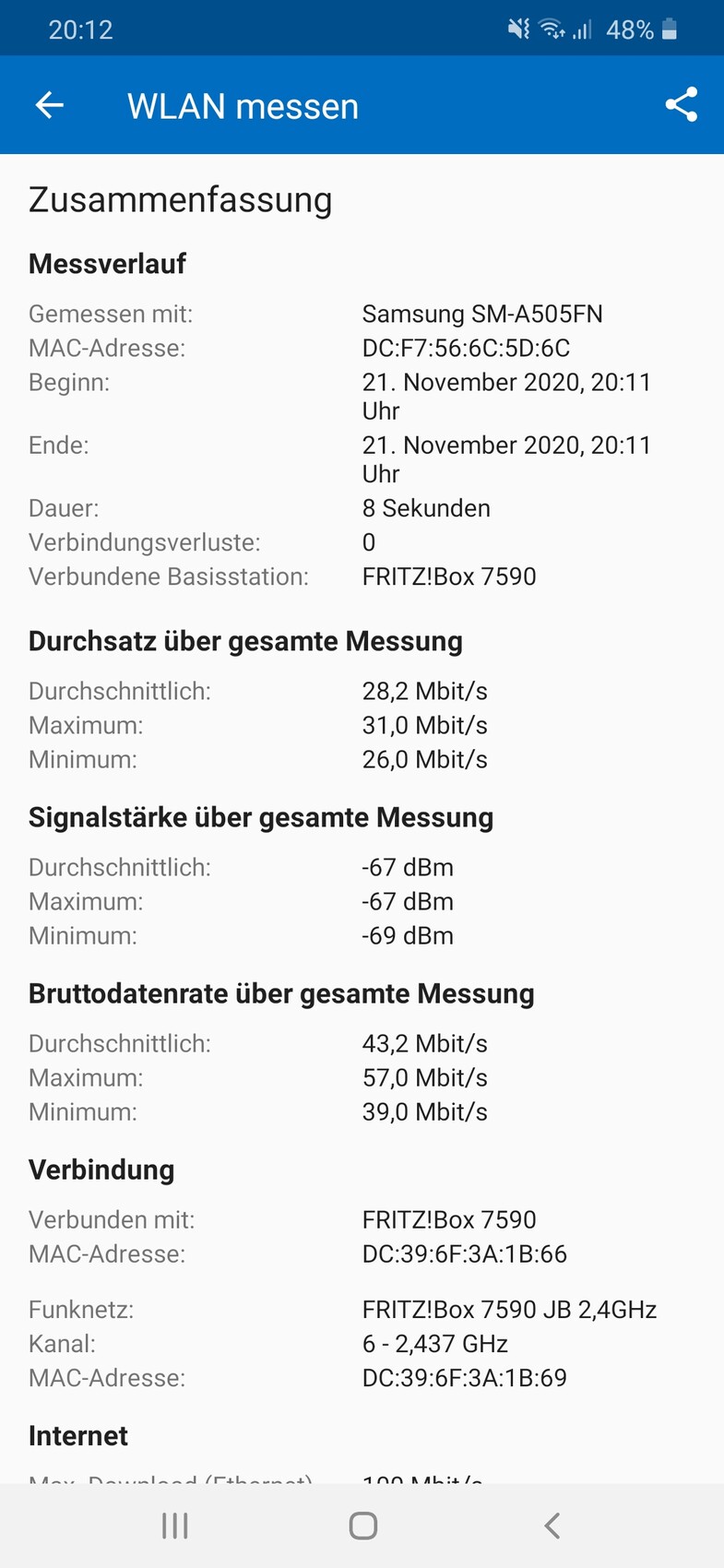
@T_im_Norden: I measured with the FritzBox app.
Unfortunately, the double wall outlets are not connected with two cables.
Below is a picture showing what arrives at the OFA. The utility room door and living room door were open.
@11ant: Regarding your post. The router and modem are connected by cable. Yesterday, I also connected my laptop by cable and wanted to run a test. There should have been a LAN connection available, right?
@T_im_Norden: I measured with the FritzBox app.
Unfortunately, the double wall outlets are not connected with two cables.
T
T_im_Norden22 Nov 2020 09:38Please post a photo of the installation.
Which port did you connect the fiber optic modem to?
Which port did you connect the fiber optic modem to?

We have the same FritzBox and also use fiber optic with a 300 connection, but we are equally dissatisfied with the Wi-Fi.
The connection itself works perfectly; most of our LAN outlets are wired, and they deliver a solid 300.
Wi-Fi near the FritzBox is also fast, but as soon as you go down the hallway to the living room, the connection frequently drops. Mobile devices constantly show the "No Internet!" warning on the signal icon. We initially used the PS4 over Wi-Fi. When it connected, it worked reasonably well, but sometimes it couldn't get any Wi-Fi signal at all or could only download data very slowly. The FritzBox is basically 4 meters (13 feet) away from the PS4 in a straight line. Unfortunately, there is a thick wall in between, and possibly the heat pump—located right in between—causes interference, or maybe the underfloor heating. God knows what else. We never had these problems in the old house, where a single FritzBox provided Wi-Fi coverage almost throughout the entire house.
We have now connected the PS4 by LAN cable, and it runs extremely fast. Upstairs, we have a Unify access point connected via LAN outlet. It works fairly well, but even there I often lose the connection in the bathroom, which is only about 3 meters (10 feet) away in a straight line.
Either my phone is faulty (I think my husband doesn’t have as many issues), or it’s the house. My husband occasionally experiences some Wi-Fi problems, but not as often as I do. In the basement, I suspect the FritzBox simply isn’t very advanced when it comes to Wi-Fi. We will probably buy a second Unify access point soon and just turn off the FritzBox’s Wi-Fi. It can’t be my phone because, for example, the printer also runs on the Wi-Fi, and we had huge problems initially connecting it due to the weak signal.
The connection itself works perfectly; most of our LAN outlets are wired, and they deliver a solid 300.
Wi-Fi near the FritzBox is also fast, but as soon as you go down the hallway to the living room, the connection frequently drops. Mobile devices constantly show the "No Internet!" warning on the signal icon. We initially used the PS4 over Wi-Fi. When it connected, it worked reasonably well, but sometimes it couldn't get any Wi-Fi signal at all or could only download data very slowly. The FritzBox is basically 4 meters (13 feet) away from the PS4 in a straight line. Unfortunately, there is a thick wall in between, and possibly the heat pump—located right in between—causes interference, or maybe the underfloor heating. God knows what else. We never had these problems in the old house, where a single FritzBox provided Wi-Fi coverage almost throughout the entire house.
We have now connected the PS4 by LAN cable, and it runs extremely fast. Upstairs, we have a Unify access point connected via LAN outlet. It works fairly well, but even there I often lose the connection in the bathroom, which is only about 3 meters (10 feet) away in a straight line.
Either my phone is faulty (I think my husband doesn’t have as many issues), or it’s the house. My husband occasionally experiences some Wi-Fi problems, but not as often as I do. In the basement, I suspect the FritzBox simply isn’t very advanced when it comes to Wi-Fi. We will probably buy a second Unify access point soon and just turn off the FritzBox’s Wi-Fi. It can’t be my phone because, for example, the printer also runs on the Wi-Fi, and we had huge problems initially connecting it due to the weak signal.
Tx-25 schrieb:
Below is a photo showing what is received at the OFA. The utility room door and the living room door were open.
Your issue is probably more related to the signal strength at 67 dBm. It seems you only have a 50 Mbps connection going outside, so it doesn't matter whether it’s fiber optic or VDSL. The fluctuations in the values during your short measurement also indicate problems with the WLAN signal strength. The only solution is to use repeaters...
Similar topics