
ᐅ Are Ethernet ports still relevant today? Wi-Fi and wireless connections are the future!
Created on: 29 Jan 2020 21:06
B
Bauherr am L
Hello fellow cable enthusiasts and Wi-Fi addicts,
I already confessed in the SAT discussion that I consider coax outlets and satellite dishes completely outdated since entertainment is streamed nowadays, and I’m not planning to include them in our new build (more on that in the SAT discussion). But that’s not what this is about.
Right now, I’m trying to smartly distribute LAN duplex Cat 6a and Cat7 cable outlets throughout the rooms (1st floor: 2 kids’ rooms, kids’ bathroom, master bedroom, dressing room, master bathroom, hallway; 2nd floor: open living/dining/kitchen area, hallway, entrance area, guest restroom).
On one hand, I feel like none of the rooms really fit the outlets perfectly, like: “the desk could go here…” But what if the TV ends up in that corner instead?
On the other hand, I’m looking at our current devices and very few still have LAN ports: MacBooks, iPhones, tablets, or devices that have LAN options but mostly connect via Wi-Fi anyway, like Sonos, printers, TVs.
So the question arises whether LAN ports in rooms are still that important today. I’m not talking about the Wi-Fi access points, which of course should be connected via LAN in a convenient location, or special cases like PoE cameras and door intercoms. I’m mainly referring to the LAN outlets in individual rooms. Most end devices are mobile anyway, and the outlets will be in the wrong place 99% of the time.
I read (yes, I spent some time researching this) that the cost of LAN outlets is negligible. Well, if I install duplex outlets in all those questionable locations, the cost for switches and everything else adds up to a nice chunk.
I would be interested in your opinion on this. Since I am straightforwardly skipping any traditional TV (in our case only satellite would be possible) and the corresponding connections, wouldn’t it be consistent to also counteract the outlet overload regarding LAN?
Looking forward to your comments, thanks!
I already confessed in the SAT discussion that I consider coax outlets and satellite dishes completely outdated since entertainment is streamed nowadays, and I’m not planning to include them in our new build (more on that in the SAT discussion). But that’s not what this is about.
Right now, I’m trying to smartly distribute LAN duplex Cat 6a and Cat7 cable outlets throughout the rooms (1st floor: 2 kids’ rooms, kids’ bathroom, master bedroom, dressing room, master bathroom, hallway; 2nd floor: open living/dining/kitchen area, hallway, entrance area, guest restroom).
On one hand, I feel like none of the rooms really fit the outlets perfectly, like: “the desk could go here…” But what if the TV ends up in that corner instead?
On the other hand, I’m looking at our current devices and very few still have LAN ports: MacBooks, iPhones, tablets, or devices that have LAN options but mostly connect via Wi-Fi anyway, like Sonos, printers, TVs.
So the question arises whether LAN ports in rooms are still that important today. I’m not talking about the Wi-Fi access points, which of course should be connected via LAN in a convenient location, or special cases like PoE cameras and door intercoms. I’m mainly referring to the LAN outlets in individual rooms. Most end devices are mobile anyway, and the outlets will be in the wrong place 99% of the time.
I read (yes, I spent some time researching this) that the cost of LAN outlets is negligible. Well, if I install duplex outlets in all those questionable locations, the cost for switches and everything else adds up to a nice chunk.
I would be interested in your opinion on this. Since I am straightforwardly skipping any traditional TV (in our case only satellite would be possible) and the corresponding connections, wouldn’t it be consistent to also counteract the outlet overload regarding LAN?
Looking forward to your comments, thanks!
G
Grobmutant4 Nov 2020 07:58For aesthetic reasons, I’m still wondering whether I really want to mount the access point on the ceiling. I would prefer it to be a bit more hidden, but I’m unsure how much range or transmission speed I would lose by doing so.
Does anyone have experience with the Unifi Flex HD or Unifi In-Wall? Do they provide similar performance compared to ceiling mounting? These two could potentially be placed more discreetly inside the house.
Does anyone have experience with the Unifi Flex HD or Unifi In-Wall? Do they provide similar performance compared to ceiling mounting? These two could potentially be placed more discreetly inside the house.
G
Grobmutant4 Nov 2020 08:17Addendum:
Could one install 1-2 UniFi in-wall units per floor instead of a traditional network outlet? The in-wall unit would replace the network socket, as it provides 4 additional LAN ports. This way, I can avoid installing a network outlet and the access point would be less conspicuous.
To compensate for potentially reduced range, it might be necessary to install an additional access point compared to ceiling mounting.
What do you think?
Could one install 1-2 UniFi in-wall units per floor instead of a traditional network outlet? The in-wall unit would replace the network socket, as it provides 4 additional LAN ports. This way, I can avoid installing a network outlet and the access point would be less conspicuous.
To compensate for potentially reduced range, it might be necessary to install an additional access point compared to ceiling mounting.
What do you think?
G
goalkeeper4 Nov 2020 09:02So, in my terraced house, I installed the Ubiquiti In-Wall units just below the ceiling in every hallway, and it works absolutely perfectly. The range is excellent and entirely sufficient everywhere.
We had the general contractor install network outlets because the In-Wall units can be easily screwed onto the frames. Just crimp the network plugs on, and that was it.
I also find them much nicer on the wall since there are already lamps, outlets for the mechanical ventilation system, and smoke detectors on the ceiling.
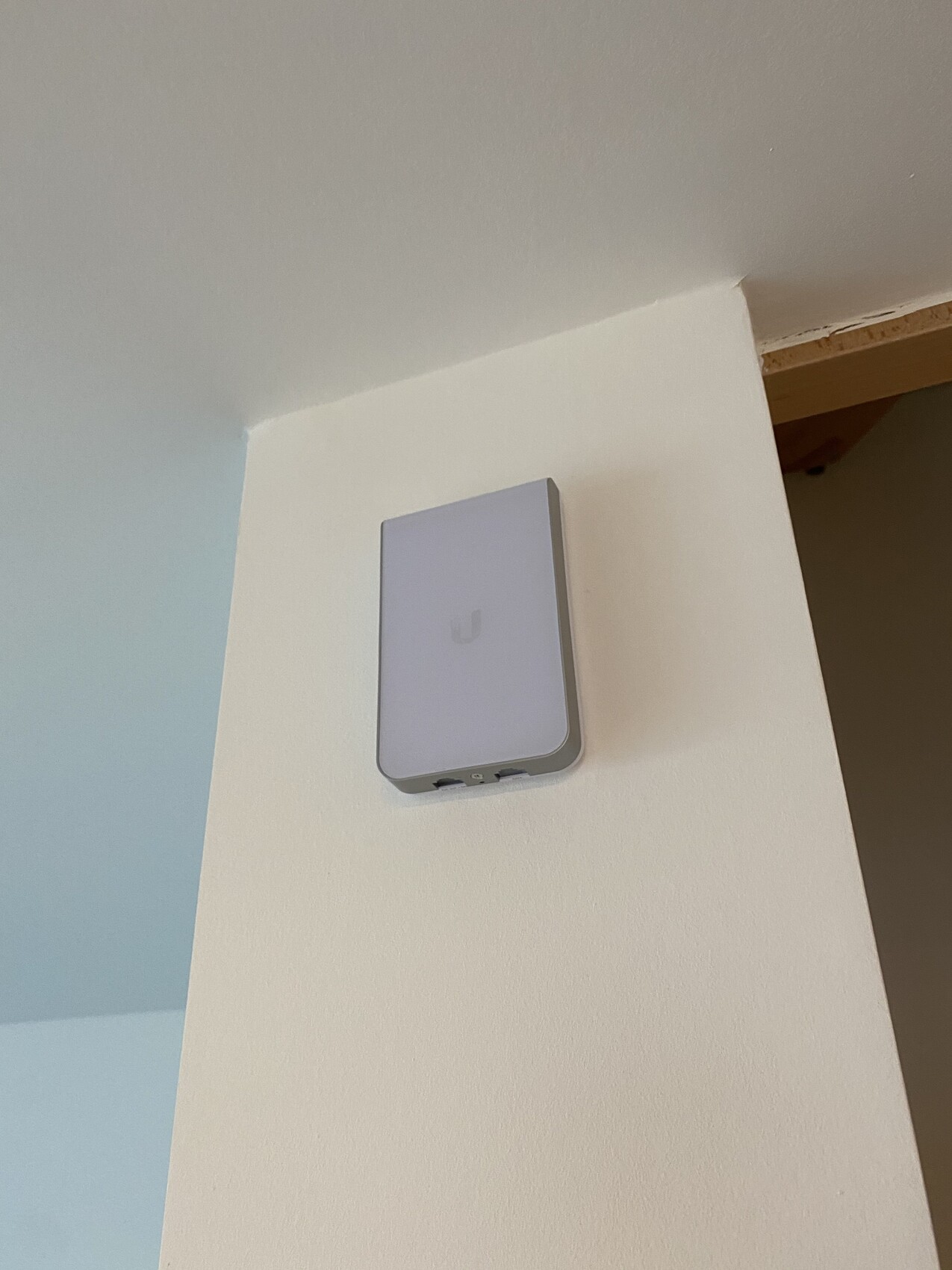
We had the general contractor install network outlets because the In-Wall units can be easily screwed onto the frames. Just crimp the network plugs on, and that was it.
I also find them much nicer on the wall since there are already lamps, outlets for the mechanical ventilation system, and smoke detectors on the ceiling.
G
Grobmutant4 Nov 2020 09:05So, you have one access point (in-wall) per floor?
Edit:
From your picture, it looks like the access point has only 2 Ethernet ports. Is that the in-wall AC model?
Edit:
From your picture, it looks like the access point has only 2 Ethernet ports. Is that the in-wall AC model?
G
goalkeeper4 Nov 2020 09:06Grobmutant schrieb:
So you have one access point (in-wall) per floor?Exactly.
The quantity depends on the floor plan, but also on the installation height and your specific requirements.
With Goalkeeper, the units are installed just below the ceiling. If you want to use the LAN ports, the units need to be installed closer to floor level. However, in that case, the Wi-Fi signal may compete with furniture and other obstacles. So, from my perspective, it’s not that easy to compare.
With Goalkeeper, the units are installed just below the ceiling. If you want to use the LAN ports, the units need to be installed closer to floor level. However, in that case, the Wi-Fi signal may compete with furniture and other obstacles. So, from my perspective, it’s not that easy to compare.
Similar topics