
Hello everyone,
We moved into our new house three weeks ago. In previous apartments, we always used just one router, which is about the limit of my networking knowledge.
To improve the network in the house, and partly inspired by posts in this forum, I decided to set up a Unifi network. My setup looks like this:
- Draytek 165 as modem
- TP-Link TL-SG1016PE 16-Port Gigabit Desktop PoE Smart Switch
- Unifi Security Gateway
- Unifi Cloud Key
- 2 Access Point AC-Lite units
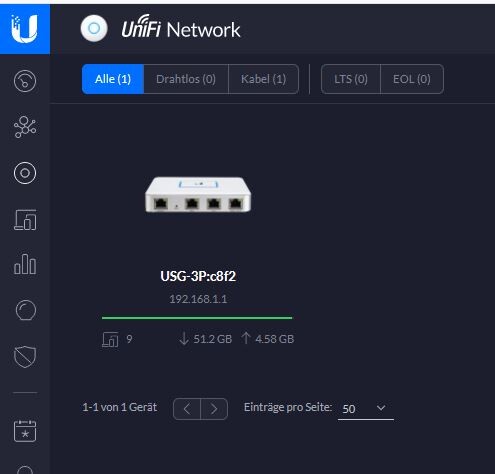
After some trial and error, the internet is now working and both access points are functioning. However, the two access points do not appear in the Unifi network. Under "Devices," only the USG is shown:

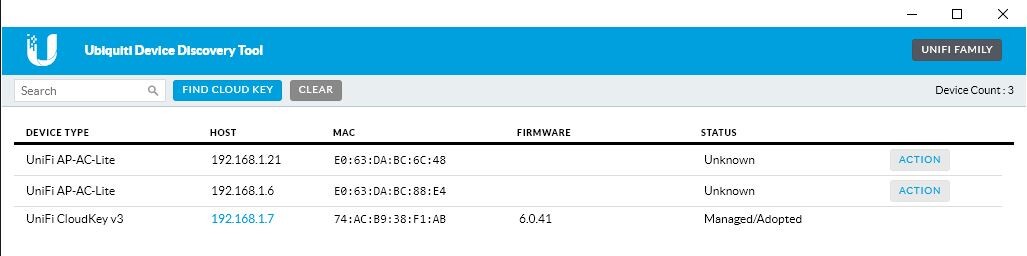
Both access points are visible in the Discovery Tool:
What do I need to do to have the two access points adopted into the network?
Thanks in advance for all the answers 🙂
Good luck
Crossy
We moved into our new house three weeks ago. In previous apartments, we always used just one router, which is about the limit of my networking knowledge.
To improve the network in the house, and partly inspired by posts in this forum, I decided to set up a Unifi network. My setup looks like this:
- Draytek 165 as modem
- TP-Link TL-SG1016PE 16-Port Gigabit Desktop PoE Smart Switch
- Unifi Security Gateway
- Unifi Cloud Key
- 2 Access Point AC-Lite units
After some trial and error, the internet is now working and both access points are functioning. However, the two access points do not appear in the Unifi network. Under "Devices," only the USG is shown:
Both access points are visible in the Discovery Tool:
What do I need to do to have the two access points adopted into the network?
Thanks in advance for all the answers 🙂
Good luck
Crossy

Unfortunately, you probably didn’t look into this thoroughly. The Lite model is quite slow.
Now they are here. You can still replace them later.
You need to go to action and then adopt in the Discovery Tool. This should also work in the controller.
Did you set up the APs as standalone? Otherwise, they shouldn’t be broadcasting any SSID.
In the worst case, reset them and adopt them in the controller. Set up user group(s), network(s), Wi-Fi(s) ....
Now they are here. You can still replace them later.
You need to go to action and then adopt in the Discovery Tool. This should also work in the controller.
Did you set up the APs as standalone? Otherwise, they shouldn’t be broadcasting any SSID.
In the worst case, reset them and adopt them in the controller. Set up user group(s), network(s), Wi-Fi(s) ....
I chose the Lite model because it is smaller and, as far as I can tell, its performance should be sufficient for us. But as you said, it can always be replaced later.
I probably set it up as a standalone device. When I click on action in the Discovery Tool, I can select "Set Inform," "Locate," "Reboot," "Restore to Factory Default," and "Upgrade"; there is no option for adopt.
Does that mean only a reset is possible?
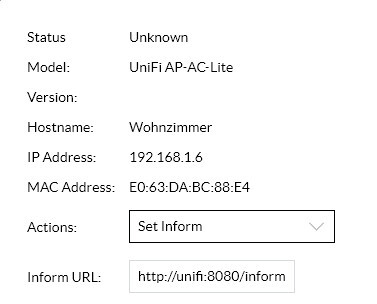
I probably set it up as a standalone device. When I click on action in the Discovery Tool, I can select "Set Inform," "Locate," "Reboot," "Restore to Factory Default," and "Upgrade"; there is no option for adopt.
Does that mean only a reset is possible?
Similar topics