
ᐅ How do I set up a network starting from the telephone connection?
Created on: 2 Jan 2013 00:02
P
Pitco112Hello everyone,
I have already searched the web as well as this forum, but apart from some initial ideas, I haven’t found much.
I bought a house from 1960 and I am currently renovating. It’s a single-family home, 130 sqm (1400 sq ft), with a basement, ground floor, and second floor.
Now the question is, how do I properly set up a network and the telephone system?
My telephone connection is outside the house, see the picture. However, I plan to move it to the basement.

Here is my plan, which I would appreciate you adding to.
Internet/network access in the following rooms:
Conservatory: 1 connection
Living room: 1 for TV, 1 for music system
2 children’s rooms: 1 PC each, (should I provide 1 connection for TV or music too?)
1 office: 1 PC
Hallway downstairs: cordless phone
Hallway upstairs: cordless phone
I would like to set it up so that all PCs (wired) and laptops (wired and Wi-Fi) can access a common hard drive/server to share music, movies, and videos.
Now comes the big question
1. What exactly do I need and which types of cables should be run from where to where?
I see a lot of discussion about Cat5, Cat5e, Cat6, Cat7, etc., but what makes sense at which point?
2. Also, I need to arrange a telephone service/provider soon.
Would it make sense to get a home server/router from 1&x? Or do I need other hardware anyway and could save that money?
3. It would be great if you could explain everything quite simply, starting with the telephone connection.
From the telephone connection with an xx cable to yy, then with yy cable to...
Thanks in advance!
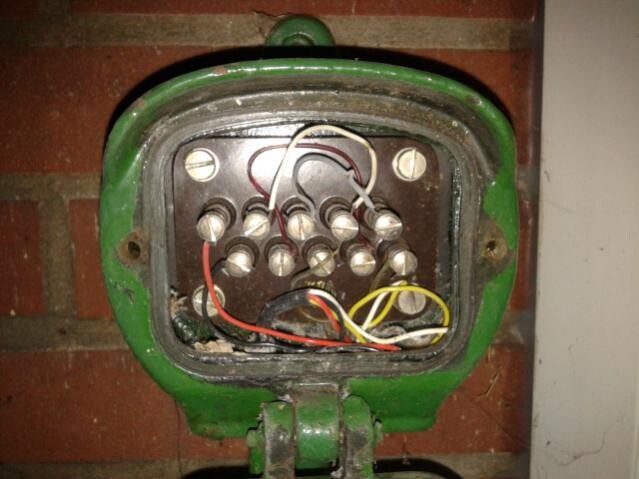
I have already searched the web as well as this forum, but apart from some initial ideas, I haven’t found much.
I bought a house from 1960 and I am currently renovating. It’s a single-family home, 130 sqm (1400 sq ft), with a basement, ground floor, and second floor.
Now the question is, how do I properly set up a network and the telephone system?
My telephone connection is outside the house, see the picture. However, I plan to move it to the basement.
Here is my plan, which I would appreciate you adding to.
Internet/network access in the following rooms:
Conservatory: 1 connection
Living room: 1 for TV, 1 for music system
2 children’s rooms: 1 PC each, (should I provide 1 connection for TV or music too?)
1 office: 1 PC
Hallway downstairs: cordless phone
Hallway upstairs: cordless phone
I would like to set it up so that all PCs (wired) and laptops (wired and Wi-Fi) can access a common hard drive/server to share music, movies, and videos.
Now comes the big question
1. What exactly do I need and which types of cables should be run from where to where?
I see a lot of discussion about Cat5, Cat5e, Cat6, Cat7, etc., but what makes sense at which point?
2. Also, I need to arrange a telephone service/provider soon.
Would it make sense to get a home server/router from 1&x? Or do I need other hardware anyway and could save that money?
3. It would be great if you could explain everything quite simply, starting with the telephone connection.
From the telephone connection with an xx cable to yy, then with yy cable to...
Thanks in advance!

Let me try to shed some light on your situation:
I assume you have a Telekom TAE socket in the house (the classic phone jack).
If that’s the case, you don’t need to change anything at the telephone connection.
You should then consider whether the network sockets are sufficient for you. I would recommend installing double network outlets. If you are already running cables, you might as well install two instead of one. A double outlet takes up the same space as a single socket. Behind the TV, I would even install two double outlets (for Smart TV, online radio on the hi-fi system, gaming console...).
You shouldn’t change anything on the cables of your traditional connection. That might be taken care of by the Telekom technician or the provider’s technician.
Once the infrastructure is in place, and you have run all the cables, connected them to the sockets in the rooms, and fitted the ends with connectors, you can start connecting everything into a network. IMPORTANT: Label the cables at both ends so you know later which cable comes out where in the house.
What do you need in terms of materials?
Cat7 cable (future-proof, can also be used as Cat6e)
Cat6e double outlets
Cat6e connectors
Probably a 16-port network switch
A 16-port patch panel
16 patch cables
A FritzBox router that also supports DECT phones (I have the 7270, but its successors are good too; it’s available from 1&2 for €99 for connection)
2 DECT phones
Special tools for cable termination
A lot of time
You terminate the cables with Cat6e connectors using special tools and then test them with a network cable tester (possibly rent one, they’re expensive). All cables end in the "server room." There you either mount the patch panel and switch in a 19-inch rack with 2–3 rack units, or, like me, simply fix them directly to the wall.
Advantages of this solution: The installer takes care of your internet connection, so you don’t have to worry about that. With the DECT phones, you can connect phones anywhere in the house where there is a power outlet. You don’t need those annoying phone cables anymore, everything runs through the FritzBox. You can even assign different numbers to special phones if available, and possibly bill children separately.
The newest FritzBox models have a USB port where you can connect a hard drive for the network, but I find this solution not ideal—better to integrate a small name server or a NAS into the network. Therefore, make sure your switch still has free ports after connecting all the sockets. There are also hard drives with network ports; then you can do without a home server.
I hope I was reasonably clear. It’s a lot of work and not exactly fun, but I also have to terminate and connect 20 cables on Saturday...
I assume you have a Telekom TAE socket in the house (the classic phone jack).
If that’s the case, you don’t need to change anything at the telephone connection.
You should then consider whether the network sockets are sufficient for you. I would recommend installing double network outlets. If you are already running cables, you might as well install two instead of one. A double outlet takes up the same space as a single socket. Behind the TV, I would even install two double outlets (for Smart TV, online radio on the hi-fi system, gaming console...).
You shouldn’t change anything on the cables of your traditional connection. That might be taken care of by the Telekom technician or the provider’s technician.
Once the infrastructure is in place, and you have run all the cables, connected them to the sockets in the rooms, and fitted the ends with connectors, you can start connecting everything into a network. IMPORTANT: Label the cables at both ends so you know later which cable comes out where in the house.
What do you need in terms of materials?
Cat7 cable (future-proof, can also be used as Cat6e)
Cat6e double outlets
Cat6e connectors
Probably a 16-port network switch
A 16-port patch panel
16 patch cables
A FritzBox router that also supports DECT phones (I have the 7270, but its successors are good too; it’s available from 1&2 for €99 for connection)
2 DECT phones
Special tools for cable termination
A lot of time
You terminate the cables with Cat6e connectors using special tools and then test them with a network cable tester (possibly rent one, they’re expensive). All cables end in the "server room." There you either mount the patch panel and switch in a 19-inch rack with 2–3 rack units, or, like me, simply fix them directly to the wall.
Advantages of this solution: The installer takes care of your internet connection, so you don’t have to worry about that. With the DECT phones, you can connect phones anywhere in the house where there is a power outlet. You don’t need those annoying phone cables anymore, everything runs through the FritzBox. You can even assign different numbers to special phones if available, and possibly bill children separately.
The newest FritzBox models have a USB port where you can connect a hard drive for the network, but I find this solution not ideal—better to integrate a small name server or a NAS into the network. Therefore, make sure your switch still has free ports after connecting all the sockets. There are also hard drives with network ports; then you can do without a home server.
I hope I was reasonably clear. It’s a lot of work and not exactly fun, but I also have to terminate and connect 20 cables on Saturday...

Musketier has already explained that really well.
Maybe just a few additional remarks:
Even if you have a PC in your office, I would connect the printer to the network rather than directly to the PC. That way, you can print from a laptop or tablet as well. So, make sure to have enough network outlets at the printer’s location.
Regarding the switch, there are 100 Mbit and 1 Gbit switches. Especially when streaming videos from a home server, it makes sense to design the network generously. If you are buying everything new anyway, I would make sure both the switch and the home server support Gigabit speeds. When multiple clients access the server, that is usually the bottleneck.
Depending on your usage habits with laptops, smartphones, or tablets, you should also ensure that Wi-Fi is available if needed. My priority would be the living room and terrace. If the signal from the router in the basement/utility room is not sufficient, it is better to install an additional network outlet and distribute the signal from there. This can also be turned off with a switchable power outlet when it’s not needed.
Looking ahead, many more devices will likely be networked than we can imagine today. I have already seen washing machines and refrigerators with network connections. Do you want music or TV in the kitchen or bathtub? Whether this makes sense is up to everyone to decide. But it’s better to install one more cable or at least an empty conduit than one too few.
Even though it is not exactly cheap, it is also worth considering surge-protected power outlets when setting up such a network.
Maybe just a few additional remarks:
Even if you have a PC in your office, I would connect the printer to the network rather than directly to the PC. That way, you can print from a laptop or tablet as well. So, make sure to have enough network outlets at the printer’s location.
Regarding the switch, there are 100 Mbit and 1 Gbit switches. Especially when streaming videos from a home server, it makes sense to design the network generously. If you are buying everything new anyway, I would make sure both the switch and the home server support Gigabit speeds. When multiple clients access the server, that is usually the bottleneck.
Depending on your usage habits with laptops, smartphones, or tablets, you should also ensure that Wi-Fi is available if needed. My priority would be the living room and terrace. If the signal from the router in the basement/utility room is not sufficient, it is better to install an additional network outlet and distribute the signal from there. This can also be turned off with a switchable power outlet when it’s not needed.
Looking ahead, many more devices will likely be networked than we can imagine today. I have already seen washing machines and refrigerators with network connections. Do you want music or TV in the kitchen or bathtub? Whether this makes sense is up to everyone to decide. But it’s better to install one more cable or at least an empty conduit than one too few.
Even though it is not exactly cheap, it is also worth considering surge-protected power outlets when setting up such a network.
K
K.Brodbeck4 Jan 2013 07:09Hello everyone,
I think all the answers are good, but I would recommend avoiding non-switchable continuous transmitters (as has mostly been suggested here). I would have concerns about the mentioned Fritzbox, as it will probably transmit whether or not you have a DECT phone!
Best regards
K.Brodbeck
I think all the answers are good, but I would recommend avoiding non-switchable continuous transmitters (as has mostly been suggested here). I would have concerns about the mentioned Fritzbox, as it will probably transmit whether or not you have a DECT phone!
Best regards
K.Brodbeck
Give up on always-on devices? I don’t understand that. Especially since you can set a good device to be online only at certain times. Wi-Fi can also be turned on and off. And the person asking the question mentioned cordless phones, so DECT is probably not relevant here.
But who the heck still switches off their internet connection nowadays—apart from maybe parental controls?
But who the heck still switches off their internet connection nowadays—apart from maybe parental controls?
K
K.Brodbeck4 Jan 2013 12:35Hello Der Da,
You didn’t quite understand.
By continuous transmitters, I mean all devices that constantly send signals, such as cordless phones, Wi-Fi, etc. Some people are sensitive to this kind of exposure, others may become sensitive over time, and some never will. I don’t mind either way. I’m just suggesting that it’s a good idea to keep the devices you use under control.
And whether you turn off your internet connection at night or not is your choice, but why should the Wi-Fi be transmitting all the time if it’s not needed? Why should the DECT phone be transmitting constantly when the handset is in its cradle?
Best regards
K.Brodbeck
You didn’t quite understand.
By continuous transmitters, I mean all devices that constantly send signals, such as cordless phones, Wi-Fi, etc. Some people are sensitive to this kind of exposure, others may become sensitive over time, and some never will. I don’t mind either way. I’m just suggesting that it’s a good idea to keep the devices you use under control.
And whether you turn off your internet connection at night or not is your choice, but why should the Wi-Fi be transmitting all the time if it’s not needed? Why should the DECT phone be transmitting constantly when the handset is in its cradle?
Best regards
K.Brodbeck
Similar topics