
ᐅ How do I set up a network starting from the telephone connection?
Created on: 2 Jan 2013 00:02
P
Pitco112
Hello everyone,
I have already searched the web as well as this forum, but apart from some initial ideas, I haven’t found much.
I bought a house from 1960 and I am currently renovating. It’s a single-family home, 130 sqm (1400 sq ft), with a basement, ground floor, and second floor.
Now the question is, how do I properly set up a network and the telephone system?
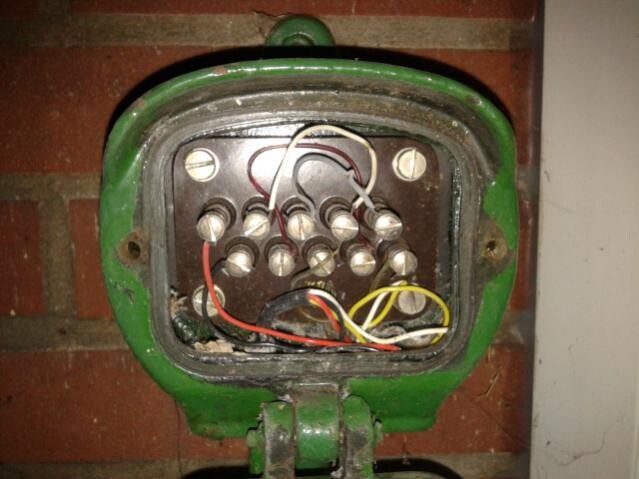
My telephone connection is outside the house, see the picture. However, I plan to move it to the basement.

Here is my plan, which I would appreciate you adding to.
Internet/network access in the following rooms:
Conservatory: 1 connection
Living room: 1 for TV, 1 for music system
2 children’s rooms: 1 PC each, (should I provide 1 connection for TV or music too?)
1 office: 1 PC
Hallway downstairs: cordless phone
Hallway upstairs: cordless phone
I would like to set it up so that all PCs (wired) and laptops (wired and Wi-Fi) can access a common hard drive/server to share music, movies, and videos.
Now comes the big question
1. What exactly do I need and which types of cables should be run from where to where?
I see a lot of discussion about Cat5, Cat5e, Cat6, Cat7, etc., but what makes sense at which point?
2. Also, I need to arrange a telephone service/provider soon.
Would it make sense to get a home server/router from 1&x? Or do I need other hardware anyway and could save that money?
3. It would be great if you could explain everything quite simply, starting with the telephone connection.
From the telephone connection with an xx cable to yy, then with yy cable to...
Thanks in advance!
I have already searched the web as well as this forum, but apart from some initial ideas, I haven’t found much.
I bought a house from 1960 and I am currently renovating. It’s a single-family home, 130 sqm (1400 sq ft), with a basement, ground floor, and second floor.
Now the question is, how do I properly set up a network and the telephone system?
My telephone connection is outside the house, see the picture. However, I plan to move it to the basement.
Here is my plan, which I would appreciate you adding to.
Internet/network access in the following rooms:
Conservatory: 1 connection
Living room: 1 for TV, 1 for music system
2 children’s rooms: 1 PC each, (should I provide 1 connection for TV or music too?)
1 office: 1 PC
Hallway downstairs: cordless phone
Hallway upstairs: cordless phone
I would like to set it up so that all PCs (wired) and laptops (wired and Wi-Fi) can access a common hard drive/server to share music, movies, and videos.
Now comes the big question
1. What exactly do I need and which types of cables should be run from where to where?
I see a lot of discussion about Cat5, Cat5e, Cat6, Cat7, etc., but what makes sense at which point?
2. Also, I need to arrange a telephone service/provider soon.
Would it make sense to get a home server/router from 1&x? Or do I need other hardware anyway and could save that money?
3. It would be great if you could explain everything quite simply, starting with the telephone connection.
From the telephone connection with an xx cable to yy, then with yy cable to...
Thanks in advance!
To each their own, I’d say, because if you can detect DECT base stations, you might consider installing a metal mesh around your house to prevent signals from mobile phone masts, amateur radio operators, and so on from entering your home.
Jokes aside, since it hasn’t been mentioned yet, make sure your patch panel supports CAT6e.
When wiring with CAT6a, it’s also important that the individual pair shielding for each pair is carried through to the termination. If everything is CAT6a or higher and the termination is done correctly, later on—once prices become reasonable—you can simply replace the 1GB switch with a 10GB switch and run the entire network at 10GB.
Regarding DECT phones, they might need to stay on so you can remain reachable. At least that’s why mine are always on.
Of course, if someone decides from 10 p.m. to 8 a.m. that they do not want to be contacted at all and turns their phones off and otherwise isolates their bedroom during that time for beauty sleep, that is understandable. However, they should not forget to switch every phone or mobile device on and off throughout the house daily; otherwise, you might suddenly find yourself unreachable for an entire day. (Personally, I find it too much hassle to run around the basement, ground floor, and upper floor every evening and morning for that.)
Jokes aside, since it hasn’t been mentioned yet, make sure your patch panel supports CAT6e.
When wiring with CAT6a, it’s also important that the individual pair shielding for each pair is carried through to the termination. If everything is CAT6a or higher and the termination is done correctly, later on—once prices become reasonable—you can simply replace the 1GB switch with a 10GB switch and run the entire network at 10GB.
Regarding DECT phones, they might need to stay on so you can remain reachable. At least that’s why mine are always on.
Of course, if someone decides from 10 p.m. to 8 a.m. that they do not want to be contacted at all and turns their phones off and otherwise isolates their bedroom during that time for beauty sleep, that is understandable. However, they should not forget to switch every phone or mobile device on and off throughout the house daily; otherwise, you might suddenly find yourself unreachable for an entire day. (Personally, I find it too much hassle to run around the basement, ground floor, and upper floor every evening and morning for that.)
Hello,
I work in IT consulting myself and would recommend the following additional points to most non-experts:
- When installing cables, always try to use the highest possible category with the best shielding (the price difference is not significant, but it allows for future speed upgrades) – this means installing Category 7 cables; price for 100 meters of Cat 7 versus Cat 5e is about 60€ to 25€.
- Plan a Cat 6 patch panel for all cables in the house or network with switches (8-port switches from brands like Netgear cost about 35€), for example: one switch for the upper floor, one for the lower floor, and one separately for the office/technical room (this setup allows you to prioritize or throttle certain lines later if needed). Depending on where the telephone connection is located, the setup may vary accordingly.
- Use a FritzBox + Fritz repeater for extending Wi-Fi coverage; the FritzBox (model 7390) can be configured to turn Wi-Fi on and off at specific times, with the option to set a detailed weekly schedule (the same applies to DECT phones or regular telephony).
- The FritzBox has USB ports for printers and USB drives that all network participants can access; its media center can even stream music and movies from the drive.
- Additional network storage can be provided by a NAS, but please note that a NAS does not replace backups (in case of doubt, buy two and store them in different locations).
For more advanced users with time and interest, I would recommend:
- Cat 7 cables throughout the entire house, depending on what the electrician would suggest (cable prices are very cheap; installation is expensive).
- If budget allows, run a cable from every room where it might be necessary all the way to the technical room; Don’t forget that the refrigerator, TV, and even smart toilet paper holders want to connect to the Internet (realistic: any spot where someone might want to work with a laptop). Potentially reduce the number of cables to be installed by using switches.
- Why cables and not Wi-Fi: I work in IT security and would only use Wi-Fi if absolutely necessary, and only for non-critical devices (this might be considered somewhat paranoid, but I’m hoping you don’t live near me then).
- Build Wi-Fi repeaters, if necessary, using old routers with DD-WRT firmware; suitable routers can be bought used for 10–20€, compared to Fritz repeaters costing about 70€ new and being 100 times more expensive.
- Build your own server for NAS and (smart) home media services: this makes everything much cheaper but requires expert knowledge.
Best regards
I work in IT consulting myself and would recommend the following additional points to most non-experts:
- When installing cables, always try to use the highest possible category with the best shielding (the price difference is not significant, but it allows for future speed upgrades) – this means installing Category 7 cables; price for 100 meters of Cat 7 versus Cat 5e is about 60€ to 25€.
- Plan a Cat 6 patch panel for all cables in the house or network with switches (8-port switches from brands like Netgear cost about 35€), for example: one switch for the upper floor, one for the lower floor, and one separately for the office/technical room (this setup allows you to prioritize or throttle certain lines later if needed). Depending on where the telephone connection is located, the setup may vary accordingly.
- Use a FritzBox + Fritz repeater for extending Wi-Fi coverage; the FritzBox (model 7390) can be configured to turn Wi-Fi on and off at specific times, with the option to set a detailed weekly schedule (the same applies to DECT phones or regular telephony).
- The FritzBox has USB ports for printers and USB drives that all network participants can access; its media center can even stream music and movies from the drive.
- Additional network storage can be provided by a NAS, but please note that a NAS does not replace backups (in case of doubt, buy two and store them in different locations).
For more advanced users with time and interest, I would recommend:
- Cat 7 cables throughout the entire house, depending on what the electrician would suggest (cable prices are very cheap; installation is expensive).
- If budget allows, run a cable from every room where it might be necessary all the way to the technical room; Don’t forget that the refrigerator, TV, and even smart toilet paper holders want to connect to the Internet (realistic: any spot where someone might want to work with a laptop). Potentially reduce the number of cables to be installed by using switches.
- Why cables and not Wi-Fi: I work in IT security and would only use Wi-Fi if absolutely necessary, and only for non-critical devices (this might be considered somewhat paranoid, but I’m hoping you don’t live near me then).
- Build Wi-Fi repeaters, if necessary, using old routers with DD-WRT firmware; suitable routers can be bought used for 10–20€, compared to Fritz repeaters costing about 70€ new and being 100 times more expensive.
- Build your own server for NAS and (smart) home media services: this makes everything much cheaper but requires expert knowledge.
Best regards
Similar topics