
ᐅ How to Position a Ubiquiti Access Point (nanoHD or Other) in a New Build
Created on: 5 Jan 2020 12:38
S
Schimi1983
Hi,
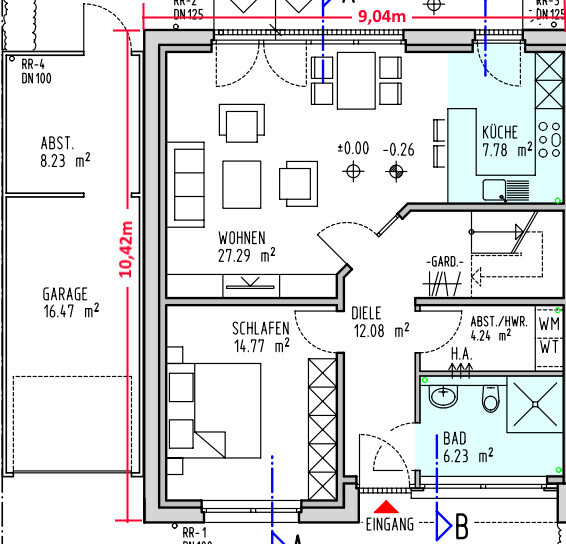
attached are two floor plans.....
For the new build, we are considering mounting the access points (APs) on the ceiling (for example, with AVM you would use a power outlet and LAN connection in the wall) and using Power over Ethernet (PoE).
But where (and how many APs) should I install?
My idea is to place them centrally on each floor. For example, on the ground floor, roughly "above the slanted door" in the hallway, and similarly above it on the upper floor.
Is that sufficient? All other rooms will have at least one LAN double socket each..... the Wi-Fi is mainly for smartphones, laptops, tablets, Alexa devices, etc.
Ground floor:
Upper floor:
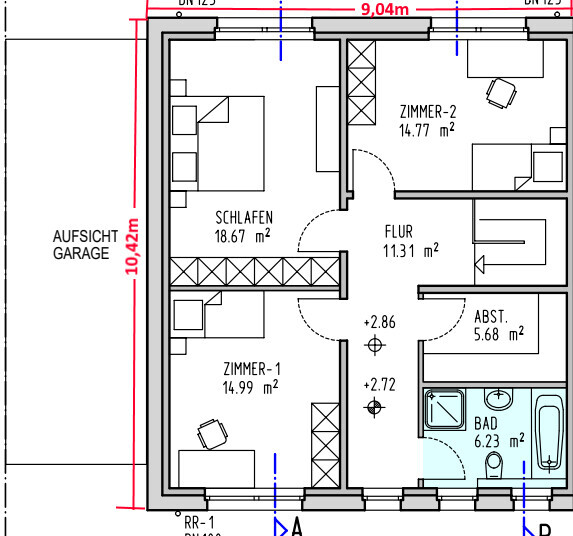
attached are two floor plans.....
For the new build, we are considering mounting the access points (APs) on the ceiling (for example, with AVM you would use a power outlet and LAN connection in the wall) and using Power over Ethernet (PoE).
But where (and how many APs) should I install?
My idea is to place them centrally on each floor. For example, on the ground floor, roughly "above the slanted door" in the hallway, and similarly above it on the upper floor.
Is that sufficient? All other rooms will have at least one LAN double socket each..... the Wi-Fi is mainly for smartphones, laptops, tablets, Alexa devices, etc.
Ground floor:
Upper floor:
If you only run devices with low data demands on the Wi-Fi, then two access points should be enough. Everything that needs to work fast and reliably should be connected via Ethernet. I would also position one in the living area and one in the upstairs hallway.
Basically, I would recommend having a dual Ethernet outlet per room. For the TV area, I would install two dual outlets, as you often have more than two devices connected via Ethernet. Somewhere near the kitchen-dining area and the garage, I would also add a dual outlet. If there is a hobby room or the attic is potentially convertible, don’t forget to include those as well.
By the way, where is the network cabinet supposed to go? I can’t find any room allocated for the building services in the entire plan.
@blackm88: To make the Unifi access points work, you don’t necessarily need the Cloud Key. It’s enough to have the software installed on a PC, set everything up once, and then push the settings to the access points. The PC doesn’t have to run all the time, but it has to be the same device each time. You can’t just switch devices. Of course, having a 24/7 device is ideal. I’m going to install the software on my Pi-hole Raspberry Pi anyway, as it is always running.
Basically, I would recommend having a dual Ethernet outlet per room. For the TV area, I would install two dual outlets, as you often have more than two devices connected via Ethernet. Somewhere near the kitchen-dining area and the garage, I would also add a dual outlet. If there is a hobby room or the attic is potentially convertible, don’t forget to include those as well.
By the way, where is the network cabinet supposed to go? I can’t find any room allocated for the building services in the entire plan.
@blackm88: To make the Unifi access points work, you don’t necessarily need the Cloud Key. It’s enough to have the software installed on a PC, set everything up once, and then push the settings to the access points. The PC doesn’t have to run all the time, but it has to be the same device each time. You can’t just switch devices. Of course, having a 24/7 device is ideal. I’m going to install the software on my Pi-hole Raspberry Pi anyway, as it is always running.
S
Schimi19835 Jan 2020 17:01An outdoor access point will also be planned. Both utility rooms (one will be for technical equipment) will have LAN connections, as will the garage and the garden shed (not visible).
This part is "relatively simple." When it comes to access points, I really have no idea. Currently, we use AVM devices in the apartment, and they work without any problems. However, if installing new ones, I would prefer something more aesthetically pleasing and discreet than the AVM repeaters. The network should be sufficient and well arranged to avoid any frustration later on.
*Edit*
I just noticed that the Ubiquiti Controller has a simulation mode... I’ll see what results it produces.
This part is "relatively simple." When it comes to access points, I really have no idea. Currently, we use AVM devices in the apartment, and they work without any problems. However, if installing new ones, I would prefer something more aesthetically pleasing and discreet than the AVM repeaters. The network should be sufficient and well arranged to avoid any frustration later on.
*Edit*
I just noticed that the Ubiquiti Controller has a simulation mode... I’ll see what results it produces.
I would definitely put it in the garden. But if you have one in the living room, you’ll be surprised how far the signal reaches.
However, I don’t know how large your garden is or if you need Wi-Fi coverage all the way to the farthest corner.
Here in the new development area, the plots aren’t that big, and the "pollution" from Wi-Fi signals is already quite significant. Nowadays, every simple inverter, water softener, and so on wants to set up its own Wi-Fi network...
However, I don’t know how large your garden is or if you need Wi-Fi coverage all the way to the farthest corner.
Here in the new development area, the plots aren’t that big, and the "pollution" from Wi-Fi signals is already quite significant. Nowadays, every simple inverter, water softener, and so on wants to set up its own Wi-Fi network...
Similar topics