
Hello everyone,
I think my question might be a bit silly, but I haven’t found an answer yet, and I might be searching in the wrong way, so I wanted to explain my situation.
In our house, we have installed Cat 7 cables on 4 floors with the corresponding network outlets (RJ45). All these Cat 7 cables lead to the connection room in the basement, where the main telecom connection will also be located.
Now, the internet/telephone/TV service from the telecom provider enters the connection room.
Here is my actual question: I assume the Cat 7 cables will be connected to the "internet" in the connection room. However, we want to place our Wi-Fi router on the ground floor, so NOT in the connection room. Is this even possible?
On the ground floor, where we want to place the Wi-Fi router, the following connections are available:
1 x network outlet (Cat 7)
1 x telephone
Sorry if this is probably the most basic question ever, but I really don’t have enough knowledge about this.
Thank you very much.
Best regards,
benkler1401
I think my question might be a bit silly, but I haven’t found an answer yet, and I might be searching in the wrong way, so I wanted to explain my situation.
In our house, we have installed Cat 7 cables on 4 floors with the corresponding network outlets (RJ45). All these Cat 7 cables lead to the connection room in the basement, where the main telecom connection will also be located.
Now, the internet/telephone/TV service from the telecom provider enters the connection room.
Here is my actual question: I assume the Cat 7 cables will be connected to the "internet" in the connection room. However, we want to place our Wi-Fi router on the ground floor, so NOT in the connection room. Is this even possible?
On the ground floor, where we want to place the Wi-Fi router, the following connections are available:
1 x network outlet (Cat 7)
1 x telephone
Sorry if this is probably the most basic question ever, but I really don’t have enough knowledge about this.
Thank you very much.
Best regards,
benkler1401

Sorry, this is not nonsense...
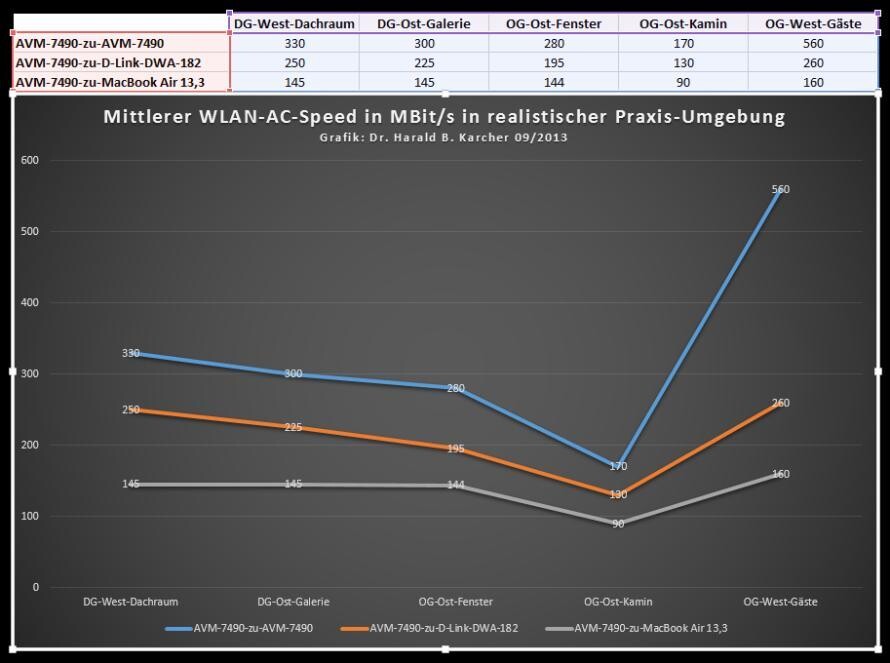
WLAN AC real-world test: On the far right, you can see the average sustained WLAN AC throughput when two AC devices had to penetrate a reinforced concrete ceiling. Top, blue: Two 3x3 MIMO Fritzbox AVM 7490 units achieved 560 Mbit/s net. Center, ocher: One AVM 7490 and one AC USB adapter D-Link DWA-182 achieved 260 Mbit/s net. Bottom, gray: One AVM 7490 and an AC laptop MacBook Air 13.3” achieved 160 Mbit/s net average sustained throughput. (mb)
WLAN AC real-world test: On the far right, you can see the average sustained WLAN AC throughput when two AC devices had to penetrate a reinforced concrete ceiling. Top, blue: Two 3x3 MIMO Fritzbox AVM 7490 units achieved 560 Mbit/s net. Center, ocher: One AVM 7490 and one AC USB adapter D-Link DWA-182 achieved 260 Mbit/s net. Bottom, gray: One AVM 7490 and an AC laptop MacBook Air 13.3” achieved 160 Mbit/s net average sustained throughput. (mb)
77.willo schrieb:
Sorry, that’s nonsense. High-frequency signals are attenuated by almost anything in their path, and nothing passes through a reinforced concrete ceiling. Maybe a weak signal comes through reflections via the stairwell, but it cannot be used with a decent data rate.No, it’s not nonsense! A good access point (e.g., Unify) covers my entire house (235 m² (2,530 sq ft), 2 floors, reinforced concrete ceiling). I turned off the Wi-Fi on my FritzBox and now use only the Unify access point.
Similar topics