
ᐅ How to Position a Ubiquiti Access Point (nanoHD or Other) in a New Build
Created on: 5 Jan 2020 12:38
S
Schimi1983S
Schimi19835 Jan 2020 12:38Hi,
attached are two floor plans.....
For the new build, we are considering mounting the access points (APs) on the ceiling (for example, with AVM you would use a power outlet and LAN connection in the wall) and using Power over Ethernet (PoE).
But where (and how many APs) should I install?
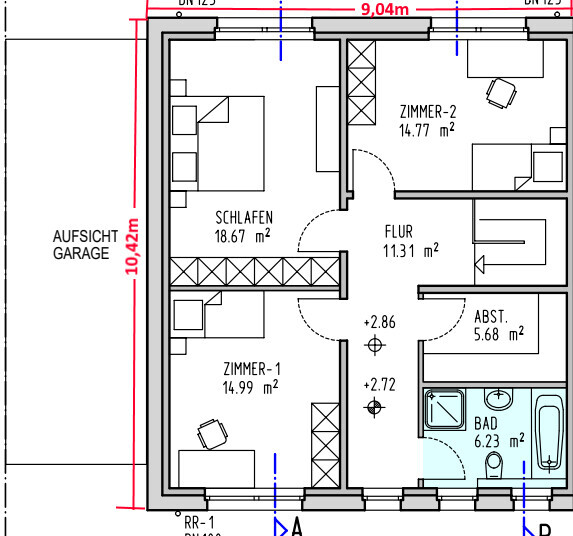
My idea is to place them centrally on each floor. For example, on the ground floor, roughly "above the slanted door" in the hallway, and similarly above it on the upper floor.
Is that sufficient? All other rooms will have at least one LAN double socket each..... the Wi-Fi is mainly for smartphones, laptops, tablets, Alexa devices, etc.
Ground floor:
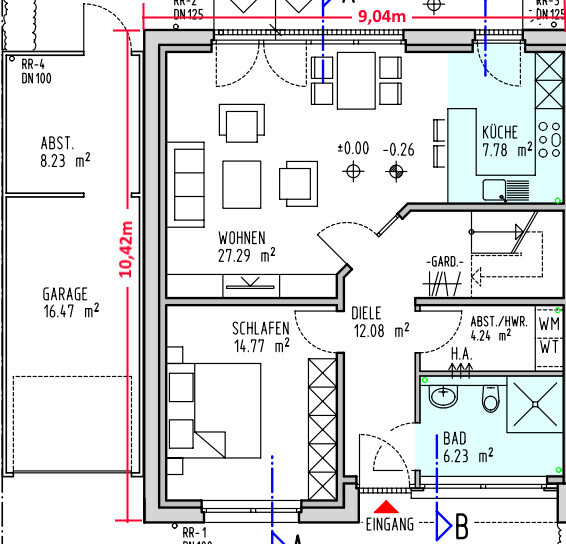
Upper floor:
attached are two floor plans.....
For the new build, we are considering mounting the access points (APs) on the ceiling (for example, with AVM you would use a power outlet and LAN connection in the wall) and using Power over Ethernet (PoE).
But where (and how many APs) should I install?
My idea is to place them centrally on each floor. For example, on the ground floor, roughly "above the slanted door" in the hallway, and similarly above it on the upper floor.
Is that sufficient? All other rooms will have at least one LAN double socket each..... the Wi-Fi is mainly for smartphones, laptops, tablets, Alexa devices, etc.
Ground floor:
Upper floor:
The access point from Ubiquiti you mentioned is very good; we have also installed APs from the same brand.
If you only want two APs, I would suggest mounting one on the living room ceiling and the second on the hallway ceiling on the upper floor.
If a few more are possible, then place one in every living area (ground floor: living room, bedroom; upper floor: bedroom, child 1, child 2).
Also consider an access point for outdoor use.
If you only want two APs, I would suggest mounting one on the living room ceiling and the second on the hallway ceiling on the upper floor.
If a few more are possible, then place one in every living area (ground floor: living room, bedroom; upper floor: bedroom, child 1, child 2).
Also consider an access point for outdoor use.
S
Schimi19835 Jan 2020 14:30The outdoor area is at the back of my mind....
The problem is more inside the house.
I wanted to avoid installing one in every single room if "it works well enough as is".... but of course, it can be more than just the two....
... beforehand, it’s more of an estimate... and afterwards, it would be too late (once you already live inside) :
The problem is more inside the house.
I wanted to avoid installing one in every single room if "it works well enough as is".... but of course, it can be more than just the two....
... beforehand, it’s more of an estimate... and afterwards, it would be too late (once you already live inside) :

Please use a Ubiquiti key or a similar device. I know many people who don't know how to configure the access points properly and end up with useless access points mounted on the ceiling.
I showed a neighbor that all devices always communicate with just one access point; they never connected to the others. But he was only impressed by how great they are when using a single one...
I showed a neighbor that all devices always communicate with just one access point; they never connected to the others. But he was only impressed by how great they are when using a single one...
S
Schimi19835 Jan 2020 14:56The controller software would be installed on an existing server that runs 24/7.
Similar topics