
Hello everyone,
I am currently considering how to set up the network in our house.
In this context, I thought it would be great if some of you could share how you have implemented a high-end network on an individual basis.
I am an IT professional myself, but my focus lies elsewhere. Nevertheless, feel free to get technical—I assume I will understand you.
I am interested in:
- How have you segmented your networks?
- What devices do you use (manufacturer-independent)?
- Which devices (manufacturer-independent) do you group together in which network, and why?
- Which networks do you allow to communicate with each other?
- How have you implemented external access, if desired?
- Do you perhaps have a DMZ?
- In your opinion, what is a “must-have” and what is a “nice-to-have”?
I am currently considering how to set up the network in our house.
In this context, I thought it would be great if some of you could share how you have implemented a high-end network on an individual basis.
I am an IT professional myself, but my focus lies elsewhere. Nevertheless, feel free to get technical—I assume I will understand you.
I am interested in:
- How have you segmented your networks?
- What devices do you use (manufacturer-independent)?
- Which devices (manufacturer-independent) do you group together in which network, and why?
- Which networks do you allow to communicate with each other?
- How have you implemented external access, if desired?
- Do you perhaps have a DMZ?
- In your opinion, what is a “must-have” and what is a “nice-to-have”?

Araknis schrieb:
You need something to run the RADIUS server on. For example, I use a pfSense. Then the authorized device must, of course, support 802.1x and know the RADIUS credentials. These devices have a menu option somewhere where you can activate this and enter the login details.
You can’t just plug in any device – or rather, what is the practical goal here? At some point, you must register the allowed device with the system, either through simple MAC filtering or via RADIUS credentials. How do you come to mention a TV now? I thought you wanted to secure outdoor ports? You rarely connect a TV or PC to the RJ45 socket on an outdoor access point under a terrace overhang. In a house (and I assume you mean a private house), you typically don’t have suspicious guests tampering with the LAN. “Vulnerable” ports in a guest room could also be placed in a separate VLAN that is highly restricted.
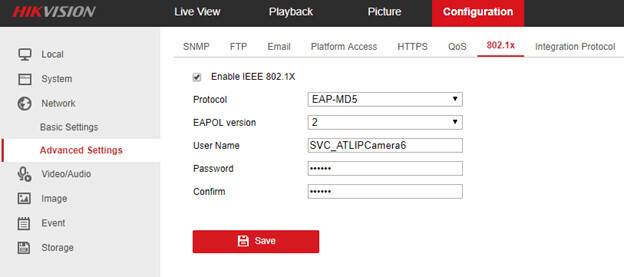
With Hikvision cameras, it looks like this, for example:
The practical goal is that the three ports (one above the terrace and two in the garage) cannot be used by any device not authorized by me, but the ports should still be usable by any device I want. In the garage, there is a Gardena Gateway and an access point; above the terrace, there is also an access point. I want to prevent anyone from plugging in any device there and gaining access to my network, while still allowing my devices (no matter which) to connect.
Without researching, I can't imagine that cheap Chinese devices offer the same range as something like a Gardena gateway. If you really want to be able to connect every device, using MAC filtering might be the only option. However, that’s not very secure, since a MAC address can be fairly easily read from the old device and then spoofed. Something always has to give—usability, device selection, or security.
However, “just plug and play” doesn’t work with MAC filtering either, because you always need to register the MAC address at the authorization point first. On the plus side, any device with a MAC address should be usable this way.
However, “just plug and play” doesn’t work with MAC filtering either, because you always need to register the MAC address at the authorization point first. On the plus side, any device with a MAC address should be usable this way.
That was exactly my question.
MAC filtering doesn’t help at all.
If the answer to my question is “not possible,” then I’m already a step further.
Specifically, I wanted to know if it’s possible to control which device gets an address via DHCP and which does not. If that’s not possible, okay. Then I know that my assumption was wrong and I’m not interested in that.
MAC filtering doesn’t help at all.
If the answer to my question is “not possible,” then I’m already a step further.
Specifically, I wanted to know if it’s possible to control which device gets an address via DHCP and which does not. If that’s not possible, okay. Then I know that my assumption was wrong and I’m not interested in that.
Okay, briefly:
Yes, you can.
It usually is possible. It works best if your device supports 802.1x. It’s less reliable if you only have the MAC address.
In general, I would suggest realistically considering such attack scenarios. Using VLANs, you can isolate the outdoor ports from the rest of the network. Then there are only certain routes left, for example to the internet. And then? Your visitor can browse online. But is it worth all that effort, when every second Wi-Fi network in the neighborhood is poorly secured? I would actually worry more about someone taking the access point or the Gardena gateway during that opportunity.
Tarnari schrieb:
Specifically, I wanted to know if I can control which device receives an IP address via DHCP and which does not.
Yes, you can.
Tarnari schrieb:
If that’s not possible, okay. Then I know my suspicion was wrong and I’m not interested in it.
It usually is possible. It works best if your device supports 802.1x. It’s less reliable if you only have the MAC address.
In general, I would suggest realistically considering such attack scenarios. Using VLANs, you can isolate the outdoor ports from the rest of the network. Then there are only certain routes left, for example to the internet. And then? Your visitor can browse online. But is it worth all that effort, when every second Wi-Fi network in the neighborhood is poorly secured? I would actually worry more about someone taking the access point or the Gardena gateway during that opportunity.
Araknis schrieb:
In general, I would suggest thinking realistically about such attack scenarios. Using VLANs, you can already separate the outdoor ports from the rest of the network. Then there are still certain routes, for example to the internet.I agree. VLANs are exactly designed for that purpose. If you then restrict the traffic by firewall to only the addresses that Gardena and similar devices need, no one can cause any trouble. (Or throttle the data rate to modem speed 😀)
Similar topics