
Hello everyone,
Slowly but surely, we are getting closer to moving in.
In about 4-6 weeks, we will most likely move into our new build.
For this reason, I am gradually starting to think about the technology in my house so that I have all the necessary information in time and everything works properly.
We built with a basement — so the utility room is located in the basement.
--> Fiber optic connection from the telecom provider – 100 Mbps with Magenta Smart TV (we only watch Internet TV – no satellite connection).
--> 7 double LAN outlets installed throughout the house (1x bedroom, 2x kids’ rooms, 1x living area, 1x office, 2x access points) – so 14 individual cables.
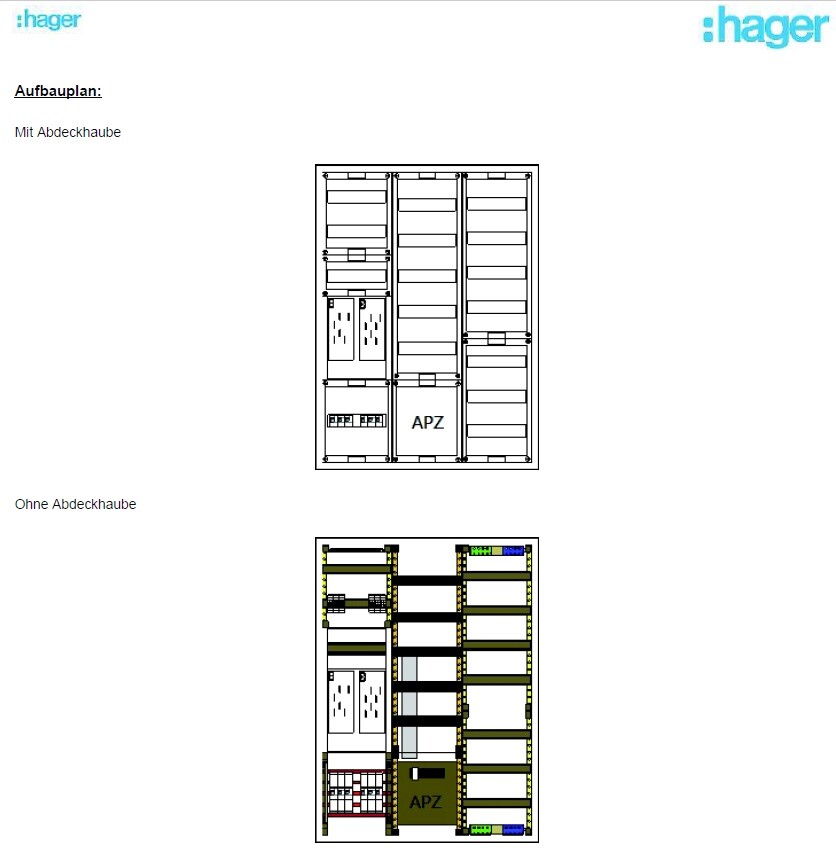
--> The distribution panel on the wall is attached (in case this is important).
Now to my questions:
1. I’m considering buying the FritzBox 7590 router because it seems to be one of the leading models on the market right now and has received very good reviews. I haven’t had good experiences with Speedports in the past, but the FritzBox has always left a positive impression.
– Does this make sense?
2. Is a router alone enough for this setup? It seems to me that there are too few ports on the router, so I definitely need a switch, correct?
I only know switches from LAN parties years ago and don’t have much experience with them. When connecting router <--> switch, do I lose any speed?
– If a switch is needed, what should I pay attention to when buying one? Are there any models you have had good experiences with?
3. Access points – how does this work? I am currently a bit unsure because I only had LAN cables pre-installed in the walls in the ground floor and attic hallway areas for the access points. Is that sufficient? How is the access point powered? Is it enough to simply plug this cable into the switch or the router? Is that even possible?
So: which cables should connect to the router, and which should go to a switch?
I would appreciate a simple explanation! I don’t need a high-end solution… There are currently and will be just two of us living in a very large house, no kids into gaming or anything like that… I just want reliable Wi-Fi throughout the house (since we have concrete ceilings) and good streaming of my Internet TV.
Additionally:
Are there any mounting options for switches or routers? At the moment, I don’t see any space for them in my distribution panel 😀
Slowly but surely, we are getting closer to moving in.
In about 4-6 weeks, we will most likely move into our new build.
For this reason, I am gradually starting to think about the technology in my house so that I have all the necessary information in time and everything works properly.
We built with a basement — so the utility room is located in the basement.
--> Fiber optic connection from the telecom provider – 100 Mbps with Magenta Smart TV (we only watch Internet TV – no satellite connection).
--> 7 double LAN outlets installed throughout the house (1x bedroom, 2x kids’ rooms, 1x living area, 1x office, 2x access points) – so 14 individual cables.
--> The distribution panel on the wall is attached (in case this is important).
Now to my questions:
1. I’m considering buying the FritzBox 7590 router because it seems to be one of the leading models on the market right now and has received very good reviews. I haven’t had good experiences with Speedports in the past, but the FritzBox has always left a positive impression.
– Does this make sense?
2. Is a router alone enough for this setup? It seems to me that there are too few ports on the router, so I definitely need a switch, correct?
I only know switches from LAN parties years ago and don’t have much experience with them. When connecting router <--> switch, do I lose any speed?
– If a switch is needed, what should I pay attention to when buying one? Are there any models you have had good experiences with?
3. Access points – how does this work? I am currently a bit unsure because I only had LAN cables pre-installed in the walls in the ground floor and attic hallway areas for the access points. Is that sufficient? How is the access point powered? Is it enough to simply plug this cable into the switch or the router? Is that even possible?
So: which cables should connect to the router, and which should go to a switch?
I would appreciate a simple explanation! I don’t need a high-end solution… There are currently and will be just two of us living in a very large house, no kids into gaming or anything like that… I just want reliable Wi-Fi throughout the house (since we have concrete ceilings) and good streaming of my Internet TV.
Additionally:
Are there any mounting options for switches or routers? At the moment, I don’t see any space for them in my distribution panel 😀

hanse987 schrieb:
Why not just get a 24-port switch right away? You’re already using all 15 ports you have now, and it’s wise to have some extra capacity for the future. Absolutely correct. People often forget to account for the port needed for the router and other devices commonly found in the technical room: heat pumps, ventilation systems, photovoltaic inverters, and so on.
hanse987 schrieb:
Why don’t you just get a 24-port switch? You’ve already got 15 ports in use, and it’s good to have some spare capacity for the future.
Does your chosen switch support IGMPv3? If not, MagentaTV won’t work.I’m more concerned that the switch might not last longer than 5 years, or am I mistaken?
I was thinking that over the next few years, I’m pretty sure no more ports will be needed—at most maybe 3 additional ones.
Uhm, regarding IGMPv3, no? What is that? I’m not familiar with it at all!
I use the Magenta app to watch TV—not the Magenta box. Does that make a difference?
Prager91 schrieb:
I’m more concerned that the switch won’t last longer than 5 years, or am I mistaken? And is the concern now that the smaller switch won’t be that expensive? If you simply choose a switch from an established manufacturer instead of one of those cheap Chinese models, the risk would be minimized that way.
Prager91 schrieb:
I use the Magenta app to watch TV — so no Magenta Box. Does that make a difference? Then IGMP is not an issue.
Araknis schrieb:
And now the concern is that the smaller switch might not be that expensive? If you simply choose a switch from a reputable manufacturer instead of a cheap one from China, the risk would be minimized that way.
Then IGMP is not an issue. That’s why I asked again about a suitable model/manufacturer… But yuanley hasn’t been spoken badly about here – quite the opposite.
The 24-port switch from them is only available with 100 Mbps instead of 1000 Mbps. Of course... I also don’t want to spend 300€ – that’s why I’m asking what suitable options there might be.
Great, then I don’t have to deal with the IGMP issue 🙂
face26 schrieb:
I’m just having trouble with the hardware setup. Is the original poster getting a fiber optic connection from Telekom?
When I built my house, I called Telekom’s customer service for builders. They were really helpful for a layperson like me. I now have exactly the FritzBox 7590 in the basement. No separate modem needed.
From what I understand, Telekom includes a modem in the flat-rate connection fee. At least, two boxes with magenta-colored Telekom stickers are mounted on the wall there. I plugged my FritzBox into that according to Telekom’s instructions, and it works fine. That’s how it is with us too (EON Highspeed). They provided a media converter (fiber optic to copper), and then you can use basically any hardware. Best to call customer service for builders like @face26 suggests and ask directly.
face26 schrieb:
Sorry for jumping in here again. I haven’t read every post in this thread.
I have to say right away that I’m not a network expert and only handle rather simple tasks as a user.
I’m just a bit confused about the hardware setup. The original poster is getting a fiber optic connection from Telekom, right?
I actually called Telekom’s builders’ service back then. They were really helpful for me as a layperson. And I currently have exactly the Fritzbox 7590 in the basement. No additional separate modem. Yes, SORRY on my part, and thanks for the reminder and correction.
I mixed things up! 🙁
That was exactly the difference between the "speedport smart 4" and the "smart 4 PLUS." The latter is the one with the fiber optic connection.
If you take the regular version without Plus, Telekom’s own modem is connected in between, just like with the Fritzbox.
The only downside might be that the Fritzbox still needs to be configured (login credentials, etc.), while the Speedports work directly on the connection without any extra setup.
Sorry again for the confusion 🙁 ... I better go get another coffee 😉
Similar topics