
Hello everyone,
Slowly but surely, we are getting closer to moving in.
In about 4-6 weeks, we will most likely move into our new build.
For this reason, I am gradually starting to think about the technology in my house so that I have all the necessary information in time and everything works properly.
We built with a basement — so the utility room is located in the basement.
--> Fiber optic connection from the telecom provider – 100 Mbps with Magenta Smart TV (we only watch Internet TV – no satellite connection).
--> 7 double LAN outlets installed throughout the house (1x bedroom, 2x kids’ rooms, 1x living area, 1x office, 2x access points) – so 14 individual cables.
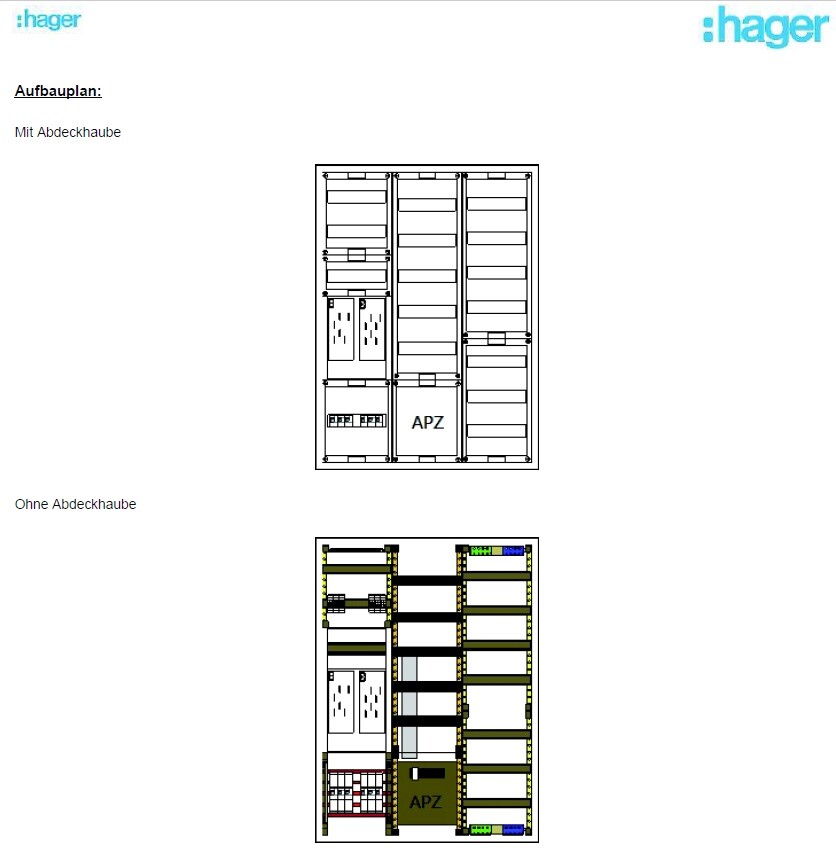
--> The distribution panel on the wall is attached (in case this is important).
Now to my questions:
1. I’m considering buying the FritzBox 7590 router because it seems to be one of the leading models on the market right now and has received very good reviews. I haven’t had good experiences with Speedports in the past, but the FritzBox has always left a positive impression.
– Does this make sense?
2. Is a router alone enough for this setup? It seems to me that there are too few ports on the router, so I definitely need a switch, correct?
I only know switches from LAN parties years ago and don’t have much experience with them. When connecting router <--> switch, do I lose any speed?
– If a switch is needed, what should I pay attention to when buying one? Are there any models you have had good experiences with?
3. Access points – how does this work? I am currently a bit unsure because I only had LAN cables pre-installed in the walls in the ground floor and attic hallway areas for the access points. Is that sufficient? How is the access point powered? Is it enough to simply plug this cable into the switch or the router? Is that even possible?
So: which cables should connect to the router, and which should go to a switch?
I would appreciate a simple explanation! I don’t need a high-end solution… There are currently and will be just two of us living in a very large house, no kids into gaming or anything like that… I just want reliable Wi-Fi throughout the house (since we have concrete ceilings) and good streaming of my Internet TV.
Additionally:
Are there any mounting options for switches or routers? At the moment, I don’t see any space for them in my distribution panel 😀
Slowly but surely, we are getting closer to moving in.
In about 4-6 weeks, we will most likely move into our new build.
For this reason, I am gradually starting to think about the technology in my house so that I have all the necessary information in time and everything works properly.
We built with a basement — so the utility room is located in the basement.
--> Fiber optic connection from the telecom provider – 100 Mbps with Magenta Smart TV (we only watch Internet TV – no satellite connection).
--> 7 double LAN outlets installed throughout the house (1x bedroom, 2x kids’ rooms, 1x living area, 1x office, 2x access points) – so 14 individual cables.
--> The distribution panel on the wall is attached (in case this is important).
Now to my questions:
1. I’m considering buying the FritzBox 7590 router because it seems to be one of the leading models on the market right now and has received very good reviews. I haven’t had good experiences with Speedports in the past, but the FritzBox has always left a positive impression.
– Does this make sense?
2. Is a router alone enough for this setup? It seems to me that there are too few ports on the router, so I definitely need a switch, correct?
I only know switches from LAN parties years ago and don’t have much experience with them. When connecting router <--> switch, do I lose any speed?
– If a switch is needed, what should I pay attention to when buying one? Are there any models you have had good experiences with?
3. Access points – how does this work? I am currently a bit unsure because I only had LAN cables pre-installed in the walls in the ground floor and attic hallway areas for the access points. Is that sufficient? How is the access point powered? Is it enough to simply plug this cable into the switch or the router? Is that even possible?
So: which cables should connect to the router, and which should go to a switch?
I would appreciate a simple explanation! I don’t need a high-end solution… There are currently and will be just two of us living in a very large house, no kids into gaming or anything like that… I just want reliable Wi-Fi throughout the house (since we have concrete ceilings) and good streaming of my Internet TV.
Additionally:
Are there any mounting options for switches or routers? At the moment, I don’t see any space for them in my distribution panel 😀

netuser schrieb:
Do you mean 10" cabinets or the content for them?
Well, of course you have to consider it, but sometimes less is more. And with the "minimalist" requirements of the OP, there’s no need to overdo it. If you don’t have serious space constraints, it’s mostly nonsense. Compared to 19", less only means lower costs for the content (10" patch panels usually have fewer than 12 ports), but more effort when selecting hardware (10" patch panels with more than 12 ports are rarer and more expensive; 10" switches with PoE are also less common), generally higher electrician costs (10" is not a standard size electricians are used to), and more hassle because the racks are just very small—especially if you install them yourself. If you hire the installation, it ends up costing more again because it’s non-standard.
Even with minimalist requirements (which aren’t really that minimalist here), 19" is the better choice simply because the range of available equipment is much larger.
Prager91 schrieb:
Here is a picture from a few weeks ago – this is how it looked 2-3 weeks ago.Are the LAN cables still that long? You should urgently discuss this with your electrician. You don't want him to suddenly shorten the cables and nail them to a patch panel inside the Hager cabinet. That would cause you real problems!
I would have the power strip connected directly. That way, you avoid the issue of someone unplugging it because they might need to use the vacuum cleaner.
Unfortunately, if you don’t agree on details, you end up with something you didn’t want.
hanse987 schrieb:
Are the LAN cables still that long? You should urgently clarify this with your electrician. You don’t want them to suddenly cut the cables and just nail them to a patch panel inside the Hager cabinet. That would cause real trouble!
I would have the power strip connected directly. That way, there’s no risk of someone unplugging it when, for example, the vacuum cleaner is needed.
Unfortunately, if you don’t specify anything, you usually get whatever.
Okay, I probably do have a problem... I even believe everything inside the Hager cabinet is already finished.
What options do I have now? The electrician won’t be back until Friday – so I can’t speak with him before then.
Can it be extended? Would the Hager cabinet possibly be sufficient and have enough space for a router and switch?
You can find the drawing of my Hager cabinet in my original post.
... Unfortunately, my electrician is not really known for the most modern technology or wiring in the house. I think the planning was quite minimal on his part...
But it’s my own fault for not following up early enough… That’s how it goes during construction – at certain stages you focus on other things.
Maybe it can still be “saved” relatively easily?
Prager91 schrieb:
What options do I have now?First, post a photo of the inside of the cabinet. If there is a patch panel, you can simply connect sufficiently long patch cables there and lead them out of the cabinet into an adjacent rack, where they can go directly to the switch through a brush strip or a similar solution.Araknis schrieb:
First, post a photo of the inside of the cabinet. If there is a patch panel, you can simply connect sufficiently long patch cables there and route them out of the cabinet to an adjacent rack, where they can go directly to the switch via a brush strip or similar. The electrician has now responded:
"In this case, it would make more sense to skip our patch panel and terminate the network cables in your patch cabinet directly onto a 19” panel you provide.
You can go ahead and install the cabinet already."
So, I wouldn’t have a patch panel at all then? I’m starting to get confused... 😀
In theory, I should buy a 19" patch panel to install in my Digitus cabinet, right? Then he can just plug into that—am I understanding this correctly?

Similar topics