
Of course, years ago we didn’t think about it or didn’t consider it important to be able to open our front door electronically.
By now, our daughter is 6 years old and will start school this year. She also often plays outside with her friends. We want to give her a key, but we have to expect that she might lose it 😉
However, ideally I would like to upgrade to a fingerprint or keypad lock.
There are cables only at the doorbell, and I would like to avoid running new wiring; this probably isn’t possible with a wooden door anyway.
During my search, I found the Burg Wächter Secure Entry.
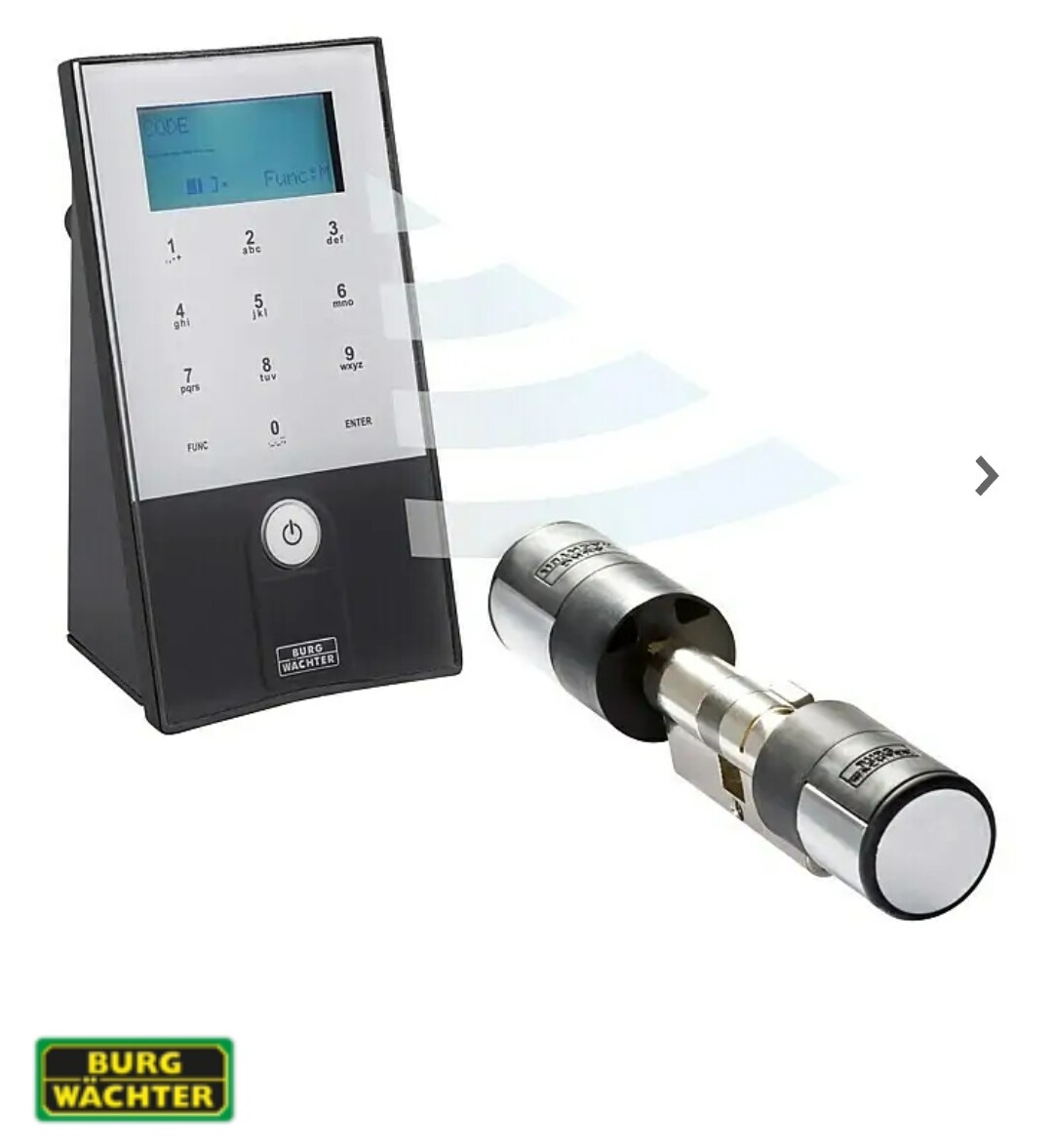
It has pretty much everything we need, but before spending 300–400€ I’d rather ask if anyone has alternatives, experiences with it, or recommendations.
Thanks
By now, our daughter is 6 years old and will start school this year. She also often plays outside with her friends. We want to give her a key, but we have to expect that she might lose it 😉
However, ideally I would like to upgrade to a fingerprint or keypad lock.
There are cables only at the doorbell, and I would like to avoid running new wiring; this probably isn’t possible with a wooden door anyway.
During my search, I found the Burg Wächter Secure Entry.
It has pretty much everything we need, but before spending 300–400€ I’d rather ask if anyone has alternatives, experiences with it, or recommendations.
Thanks

Hello, with Dahua or most similar systems, unfortunately, the indoor station usually has to be purchased as well for the setup. This might be different with Goliath, as these come pre-configured. Of course, smartphones, phablets, and tablets with Android, iOS, or Windows can then be used as additional stations for audio and video transmission as well as door release.

I ordered a used POE-capable tablet from Allnet on eBay for testing. Unlike with a standard tablet and the app, I couldn’t get the ringing function to work on it, so I returned it. Video and audio worked fine, but no ringing.
With the regular tablet, I set up the app. Video, audio, and ringing work (although sometimes the ringing is delayed). However, with the usual lock screen and all the clicks required in the app, I find it completely impractical for everyday use. It might work if the app is always in the foreground and the tablet stays unlocked. I haven’t looked into Tasker or similar tools yet.
For my upstairs office, I recently bought a used second indoor station from Dahua. Its handling is a whole different level compared to the app and has also been accepted by my wife. Of course, it’s not as universally applicable as a tablet.
With the regular tablet, I set up the app. Video, audio, and ringing work (although sometimes the ringing is delayed). However, with the usual lock screen and all the clicks required in the app, I find it completely impractical for everyday use. It might work if the app is always in the foreground and the tablet stays unlocked. I haven’t looked into Tasker or similar tools yet.
For my upstairs office, I recently bought a used second indoor station from Dahua. Its handling is a whole different level compared to the app and has also been accepted by my wife. Of course, it’s not as universally applicable as a tablet.
B
blinkybob6 Jun 2022 10:10Okay, thanks for the information. Of course, acceptance at home has to be right 🙂
If I get the chance in the near future, I’ll have to order a test installation and set it up...
If I get the chance in the near future, I’ll have to order a test installation and set it up...
Now that the project is complete, here is a brief update:
On Monday, the security technician came to carry out the door modification.
Beforehand, I had already run the cable from the electrical distribution panel to the door frame.
The craftsman then installed a new multipoint locking system with an automatic lock and a door opener (A-opener). A cable transition was made from the door frame to the door within the door reveal, allowing the cable to be routed to the door opener. The power supply from the Goliath system could be reused. The existing locking cylinder was also reinstalled as a backup solution.
Connecting to the security module of the Goliath intercom system worked without any problems.
Retrofit costs were approximately €1,500.
All in all, I ended up just under €3,000 for the complete upgrade. This includes:
- Goliath intercom system with fingerprint module, RFID module, and 10-inch (10in) indoor monitor
- POE switch
- Power supply
- Security module
- Multipoint locking system with automatic lock and door opener
- Cables, cable ducts, etc.
The second indoor station (7-inch (7in)) was used and not strictly necessary, so I’ll leave that out.
Both my child and wife are very happy so far. Overall, it was worth it.
On Monday, the security technician came to carry out the door modification.
Beforehand, I had already run the cable from the electrical distribution panel to the door frame.
The craftsman then installed a new multipoint locking system with an automatic lock and a door opener (A-opener). A cable transition was made from the door frame to the door within the door reveal, allowing the cable to be routed to the door opener. The power supply from the Goliath system could be reused. The existing locking cylinder was also reinstalled as a backup solution.
Connecting to the security module of the Goliath intercom system worked without any problems.
Retrofit costs were approximately €1,500.
All in all, I ended up just under €3,000 for the complete upgrade. This includes:
- Goliath intercom system with fingerprint module, RFID module, and 10-inch (10in) indoor monitor
- POE switch
- Power supply
- Security module
- Multipoint locking system with automatic lock and door opener
- Cables, cable ducts, etc.
The second indoor station (7-inch (7in)) was used and not strictly necessary, so I’ll leave that out.
Both my child and wife are very happy so far. Overall, it was worth it.
B
blinkybob8 Sep 2022 15:28@Musketier Thanks for sharing your impressions! Our Inotherm front door with the integrated fingerprint scanner will be installed soon. Unfortunately, I haven’t made progress with the video intercom system yet… but we’ll see. How do you find the Goliath in terms of feel and usability? Thanks!
Let's put it this way – it’s a fun little gadget. 😎
For me, the deciding factors were fingerprint and RFID. If you don’t want to mix and match products, that really limits your options, and you end up with something noticeable next to the front door, whether it’s a Goliath, a Doorbird, 2N, or similar. At that point, it no longer looks like just a cheap, standard camera.
The Goliath already feels very high-quality straight out of the box. Whether the material will still look this good after a few years remains to be seen. The initial impression is definitely positive, even though it’s still plastic.
I find the indoor monitor really attractive (based on pictures, clearly nicer than the Doorbird’s).
In Goliath’s own lineup, the 10-inch screen is easier to handle than the 7-inch. As an extension unit, the 7-inch monitor is enough for us. For the hallway, I’m glad I chose the 10-inch display.
In terms of everyday use, the system on the display is relatively easy to operate. Of course, the range of functions is quite limited.
When it comes to configuration via the web interface, I can imagine some users might struggle. The system is designed to work in hotels and offices as well. That can be confusing because you only use a fraction of the features in a single-family home.
When buying from Goliath, everything comes preconfigured, so you mainly have to assemble the hardware but don’t need to do much setup yourself.
There are also good videos available to help configure the remaining features like RFID and fingerprint without any issues.
There are several apps. I set them up on a tablet just for fun. They worked reasonably well, but I wasn’t really impressed. On vacation, though, you could at least check what the weather was like back home. 🙂
Goliath (or rather Dahua) seems to lean towards a closed system. Doorbird, from what I’ve read, appears to be somewhat more open at first glance.
If you want to integrate the Goliath system into your smart home somehow, you should really know what you’re doing. Since Goliath only distributes the product here in Germany, you tend to end up dealing with Dahua in China for support questions (at least that’s what I read in a forum that focuses specifically on IP phones). I managed to get the video stream via browser on the PC, but beyond that, I’m out of my depth. i_b_n_a_n is probably better informed on this.
If the topic of door openers and internet connectivity feels too risky, you can run the system entirely closed by operating the PoE switch separately from the rest of your network. Of course, app use won’t be possible then.
For me, the deciding factors were fingerprint and RFID. If you don’t want to mix and match products, that really limits your options, and you end up with something noticeable next to the front door, whether it’s a Goliath, a Doorbird, 2N, or similar. At that point, it no longer looks like just a cheap, standard camera.
The Goliath already feels very high-quality straight out of the box. Whether the material will still look this good after a few years remains to be seen. The initial impression is definitely positive, even though it’s still plastic.
I find the indoor monitor really attractive (based on pictures, clearly nicer than the Doorbird’s).
In Goliath’s own lineup, the 10-inch screen is easier to handle than the 7-inch. As an extension unit, the 7-inch monitor is enough for us. For the hallway, I’m glad I chose the 10-inch display.
In terms of everyday use, the system on the display is relatively easy to operate. Of course, the range of functions is quite limited.
When it comes to configuration via the web interface, I can imagine some users might struggle. The system is designed to work in hotels and offices as well. That can be confusing because you only use a fraction of the features in a single-family home.
When buying from Goliath, everything comes preconfigured, so you mainly have to assemble the hardware but don’t need to do much setup yourself.
There are also good videos available to help configure the remaining features like RFID and fingerprint without any issues.
There are several apps. I set them up on a tablet just for fun. They worked reasonably well, but I wasn’t really impressed. On vacation, though, you could at least check what the weather was like back home. 🙂
Goliath (or rather Dahua) seems to lean towards a closed system. Doorbird, from what I’ve read, appears to be somewhat more open at first glance.
If you want to integrate the Goliath system into your smart home somehow, you should really know what you’re doing. Since Goliath only distributes the product here in Germany, you tend to end up dealing with Dahua in China for support questions (at least that’s what I read in a forum that focuses specifically on IP phones). I managed to get the video stream via browser on the PC, but beyond that, I’m out of my depth. i_b_n_a_n is probably better informed on this.
If the topic of door openers and internet connectivity feels too risky, you can run the system entirely closed by operating the PoE switch separately from the rest of your network. Of course, app use won’t be possible then.
Similar topics