
Hello everyone,
In about three weeks, we are supposed to finalize our electrical planning on site. Unfortunately, our electrician is somewhat old-fashioned, which makes it difficult for me to collaboratively plan a future-proof electrical setup with him. Therefore, I am currently educating myself to ensure that the networking in our single-family home is fundamentally future-proof.
Basically, it’s about the LAN network... LAN wall outlets are relatively expensive, so proper planning is even more important.
About us:
- Mid to late 20s – couple without children. Planning for 2 children in the near future.
- Single-family house with a usable basement, 2 full floors, and fully equipped with concrete ceilings
- Utility room in the basement with air-to-water heat pump, ventilation system, photovoltaic system
- The router is planned to be located in the office on the ground floor
- The upper floor includes bathroom / bedroom / 2 children’s rooms
- No satellite dish or cable TV — we will use Internet TV exclusively!
Now, I am struggling to network our single-family home sensibly but as cost-effectively as possible.
I have the following questions:
1. Slightly off-topic: In the living room, I would like to have an in-wall conduit installed on the TV wall (the TV will be wall-mounted) so that no cables are visible. Is this sensible and affordable? I will get exact prices from my electrician if this makes sense at all. Would it also make sense to install power outlets at TV height? How do you plan the connections on your media wall reasonably? What should be considered?
Since we plan to use a Magenta TV box and thus IP-TV, a total of four LAN ports in the living room area would presumably be useful, right?
2. How many LAN outlets and especially where should LAN outlets be installed? Mainly: which cable? Is CAT6 sufficient?
→ Such a double LAN outlet certainly costs close to €200, so planning must be really sensible.
Is it really necessary to install 2 double LAN outlets in each children’s room? I always wonder: what is actually going to be plugged in there?
One port for the TV and one port for a multimedia device should be enough, right? So four connections would probably be overkill, correct?
The fact is: It will certainly take years or decades before our children actually use these outlets... Who knows what changes might happen by then? Therefore, could we not cost-effectively use empty conduits (empty pipes) instead?
Is it also possible to “branch off” from an existing double outlet afterward to add more ports for the room? What should be considered here? Or should we consider having an empty conduit prepared in another spot in the room so that a socket can be installed later?
3. How do you solve the “router problem”? Should the one router be placed in the office (ground floor) with LAN outlets in the existing bedrooms upstairs to ensure a stable LAN connection? Or is a router upstairs absolutely necessary?
4. How important are LAN outlets in the utility room? Should the router possibly even be located in the utility room? Because of the concrete ceiling between basement and ground floor, a second router would almost certainly be needed. How should this situation be handled with a basement?
5. What do you think about installing empty conduits for CAT cables in the kitchen / hallway etc. to enable later retrofitting? Is this relatively affordable in new builds?
I would appreciate any feedback so we can make the best possible plans 🙂
In about three weeks, we are supposed to finalize our electrical planning on site. Unfortunately, our electrician is somewhat old-fashioned, which makes it difficult for me to collaboratively plan a future-proof electrical setup with him. Therefore, I am currently educating myself to ensure that the networking in our single-family home is fundamentally future-proof.
Basically, it’s about the LAN network... LAN wall outlets are relatively expensive, so proper planning is even more important.
About us:
- Mid to late 20s – couple without children. Planning for 2 children in the near future.
- Single-family house with a usable basement, 2 full floors, and fully equipped with concrete ceilings
- Utility room in the basement with air-to-water heat pump, ventilation system, photovoltaic system
- The router is planned to be located in the office on the ground floor
- The upper floor includes bathroom / bedroom / 2 children’s rooms
- No satellite dish or cable TV — we will use Internet TV exclusively!
Now, I am struggling to network our single-family home sensibly but as cost-effectively as possible.
I have the following questions:
1. Slightly off-topic: In the living room, I would like to have an in-wall conduit installed on the TV wall (the TV will be wall-mounted) so that no cables are visible. Is this sensible and affordable? I will get exact prices from my electrician if this makes sense at all. Would it also make sense to install power outlets at TV height? How do you plan the connections on your media wall reasonably? What should be considered?
Since we plan to use a Magenta TV box and thus IP-TV, a total of four LAN ports in the living room area would presumably be useful, right?
2. How many LAN outlets and especially where should LAN outlets be installed? Mainly: which cable? Is CAT6 sufficient?
→ Such a double LAN outlet certainly costs close to €200, so planning must be really sensible.
Is it really necessary to install 2 double LAN outlets in each children’s room? I always wonder: what is actually going to be plugged in there?
One port for the TV and one port for a multimedia device should be enough, right? So four connections would probably be overkill, correct?
The fact is: It will certainly take years or decades before our children actually use these outlets... Who knows what changes might happen by then? Therefore, could we not cost-effectively use empty conduits (empty pipes) instead?
Is it also possible to “branch off” from an existing double outlet afterward to add more ports for the room? What should be considered here? Or should we consider having an empty conduit prepared in another spot in the room so that a socket can be installed later?
3. How do you solve the “router problem”? Should the one router be placed in the office (ground floor) with LAN outlets in the existing bedrooms upstairs to ensure a stable LAN connection? Or is a router upstairs absolutely necessary?
4. How important are LAN outlets in the utility room? Should the router possibly even be located in the utility room? Because of the concrete ceiling between basement and ground floor, a second router would almost certainly be needed. How should this situation be handled with a basement?
5. What do you think about installing empty conduits for CAT cables in the kitchen / hallway etc. to enable later retrofitting? Is this relatively affordable in new builds?
I would appreciate any feedback so we can make the best possible plans 🙂

This no longer has anything to do with electrical planning, but rather wanders into consumption optimization, right? 😀
I already fell into Tim Cook’s trap and therefore ordered the Telekom Apple TV with the Magenta plan. I am very satisfied with it. Since Toshiba once disabled all smart TV functions for me, I now rely exclusively on Apple TV or Fire TV.
I already fell into Tim Cook’s trap and therefore ordered the Telekom Apple TV with the Magenta plan. I am very satisfied with it. Since Toshiba once disabled all smart TV functions for me, I now rely exclusively on Apple TV or Fire TV.

exto1791 schrieb:
Hello everyone,
In about three weeks, we should finalize our electrical planning on site. Unfortunately, our electrician is somewhat "old-fashioned," which makes it difficult for me to collaboratively create a well-founded electrical plan for the future with him – so I am currently learning about this myself to ensure that the networking in our single-family house is basically future-proof.
Basically, it’s about the LAN networking... LAN wall outlets are fairly expensive, so thorough planning is definitely even more important.
About us:
- Mid to late 20s – couple without children. Planned: 2 children in the near future.
- Single-family house with a usable basement, 2 full floors, and completely equipped with concrete ceilings
- Technical room in the basement with air-water heat pump, ventilation system, photovoltaic system
- The router is planned to be located in the home office on the ground floor
- Upstairs are the bathroom, bedroom, and 2 children’s rooms
- No satellite dish or cable TV – we will exclusively use internet TV!
I’m having a hard time figuring out how to network our single-family home sensibly but also as cost-effectively as possible.
Here are my questions:
1. Slightly off-topic: In the living room, I would like to have an in-wall conduit installed on the TV wall (the TV will be wall-mounted) so that no cables are visible. Is this sensible and affordable? I will get exact prices from my electrician if it even makes sense. Would it also make sense to install power outlets at the height of the TV? How do you plan the connections on your media walls in a sensible way? What should be taken into account?
Since we plan to use a Magenta TV box and thus IPTV, four LAN ports in the living room area are probably sensible overall, right?
2. How many LAN outlets and, especially, where should LAN outlets be installed? Most importantly: which cable? Is CAT6 sufficient?
→ A double LAN outlet usually costs around €200, so it really needs to be planned carefully.
Is it really necessary to install two double LAN outlets directly in the children’s rooms? I keep asking myself: What should actually be plugged in there?
One outlet for the TV and one outlet for a multimedia device should be enough, right? So four ports are probably oversized, correct?
Fact is: It will take years or decades before our children will use these outlets. Who knows what will change by then? Therefore, would it be more cost-effective to use empty conduits for now?
Is there possibly a way to branch off from an existing double outlet later to add more connections to the room? What should be considered here? Or should you consider having empty conduit installed in another part of the room so that another outlet can be installed later?
3. How do you solve the “problem” with the router? Place one router in the office (ground floor), install LAN outlets in the existing bedrooms upstairs to ensure a stable LAN connection? Or is it absolutely necessary to have a router upstairs as well?
4. How important are LAN connections in the technical room? Should the router possibly be placed there as a must? Due to the concrete ceiling separating the basement from the ground floor, wouldn’t you definitely need another router? How should this situation in a basement be handled?
5. What do you think about installing empty conduits for CAT cables in the kitchen, hallway, etc., to allow retrofitting later? Is this relatively cost-effective in new construction?
I would appreciate any feedback so we can make the best possible plan 🙂1. I would have the TV power supply installed flush in the wall, which is reasonable in terms of cost. That means: LAN outlet, power outlet, antenna socket. Possibly add an empty conduit for an HDMI cable as well. 2. Basically, at least one LAN outlet in every room for a computer (plus possibly one for the TV, see 1.). Double LAN outlets are, in my opinion, unnecessary. If the room will also be used as an office, I would have LAN outlets installed in two different locations.
3. I would recommend the router in the technical room, with LAN cables run radially to each room. You don’t have to patch all the outlets, just the ones you actually need. Otherwise, you would need a huge patch panel. In reality, you’ll never use some outlets – you learn that over time.
4. The router doesn’t have to be in the technical room, but it usually makes sense. It is placed directly in the distribution cabinet, which is well suited for it. The cabinet should be sized accordingly.
5. It never hurts. It’s always good to be able to connect an access point somewhere.
MBPassion schrieb:
I can share our experience from a major renovation and offer some recommendations. We had two Ethernet cables installed in every room (each ending in a double outlet; I would say that in most cases a single outlet is enough nowadays, as more and more devices are connected via Wi-Fi). You should have a good idea of where desks and devices will be located. Additionally, we had individual cables installed in the following locations:
- Next to the front door for the Doorbird outdoor station
- On the ground floor by the staircase for the Doorbird indoor station
- In the hallway on the first floor
- In the hallway in the attic
- 3 cables to the ceilings on ground floor/first floor/attic for three access points
Altogether, 23 Ethernet cables run to a patch panel inside a small storage room in the basement. There is also a 19-inch network rack where I consolidate the rest of the infrastructure:
- 24-port PoE switch (Unifi USW-Pro-24-POE)
- A FritzBox router (Wi-Fi disabled)
- A NAS
- A Doorbird I/O controller
- (Sometimes a Raspberry Pi or Jetson Nano) 🙂
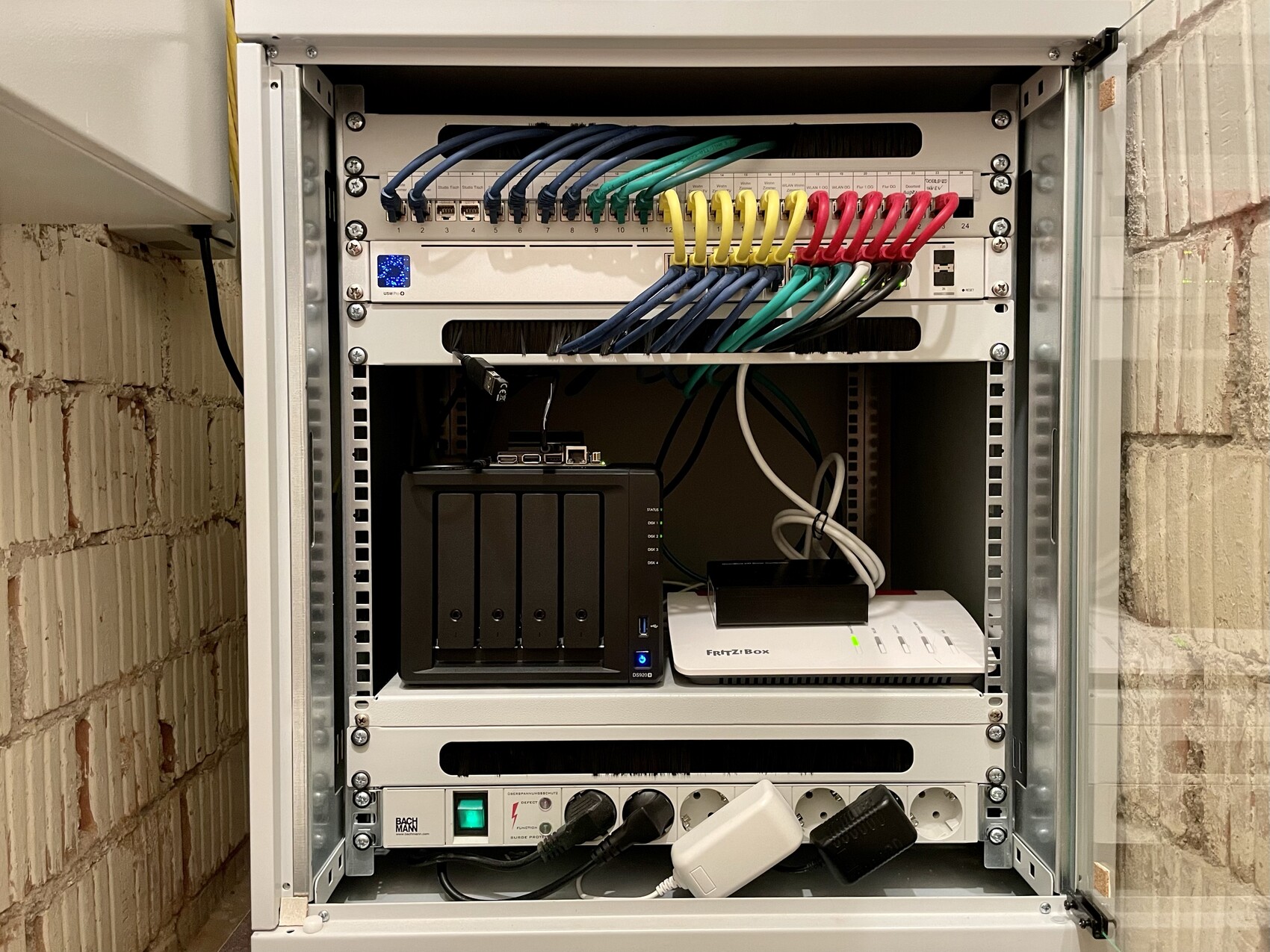
From my perspective, it is very important to have the access points well distributed, as Wi-Fi is becoming increasingly important. We have one Unifi nanoHD access point installed on each floor and are very satisfied with them. We no longer use the FritzBox’s Wi-Fi and have it disabled.
The DECT signal for the phone actually reaches from the FritzBox in the basement (inside the server rack) all the way up to the attic. Of course, you can also use a DECT base station placed centrally, like the Gigaset Pro N670 IP DECT for about 100 euros. (Other alternatives would have been to extend the DSL signal via an Ethernet cable and then connect it back into the network via a second cable; have the DSL socket installed directly on the ground floor by the electrician; use a DECT repeater; or set up a second FritzBox.)
Regarding access points, I definitely recommend having Ethernet cables installed directly into the ceiling for them. This looks neat (or inconspicuous) and provides good coverage. You should tell the electrician to use a deep back box for this, as the terminated Ethernet cable then needs to be connected to the access point using a short patch cable.
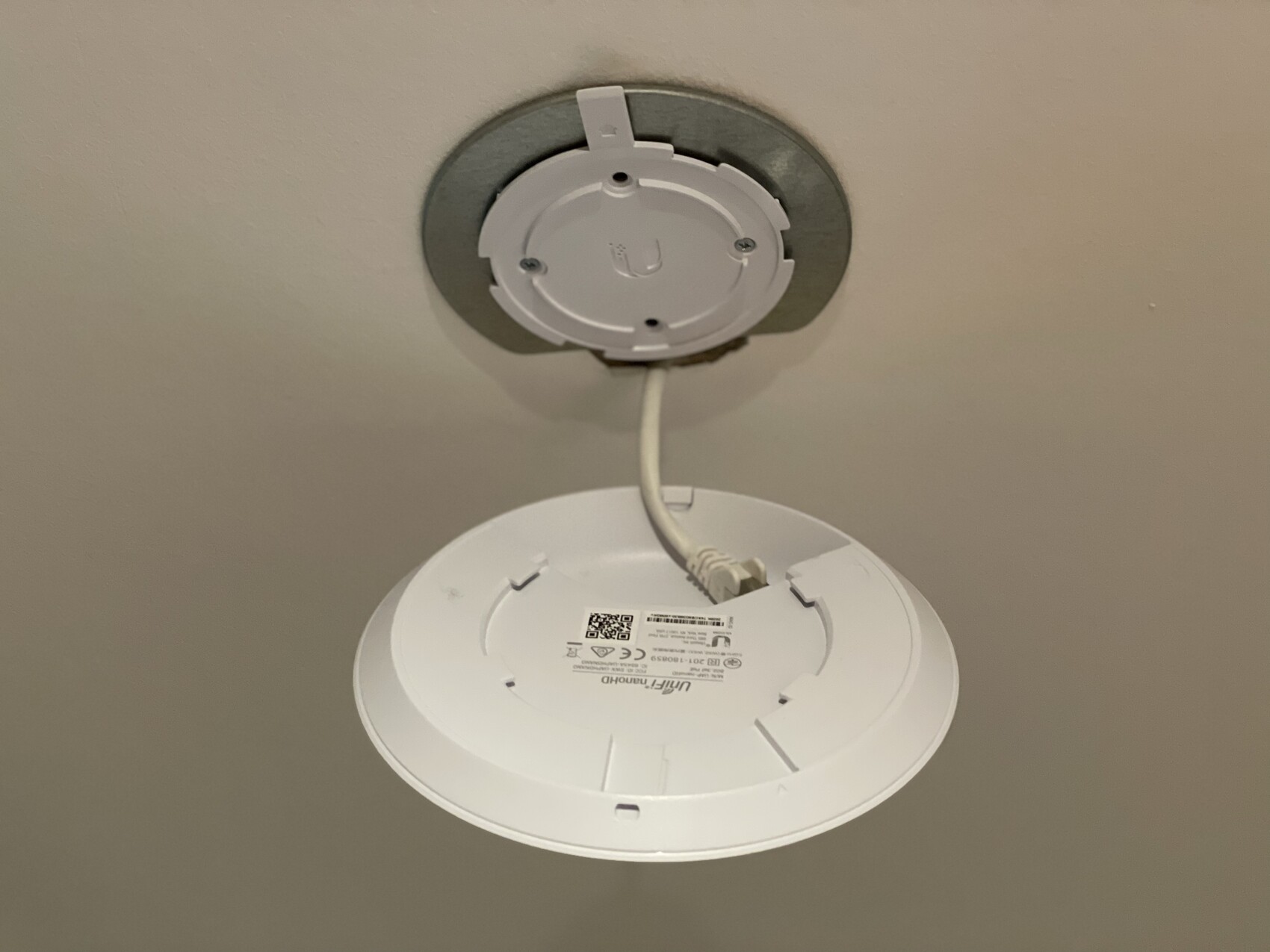
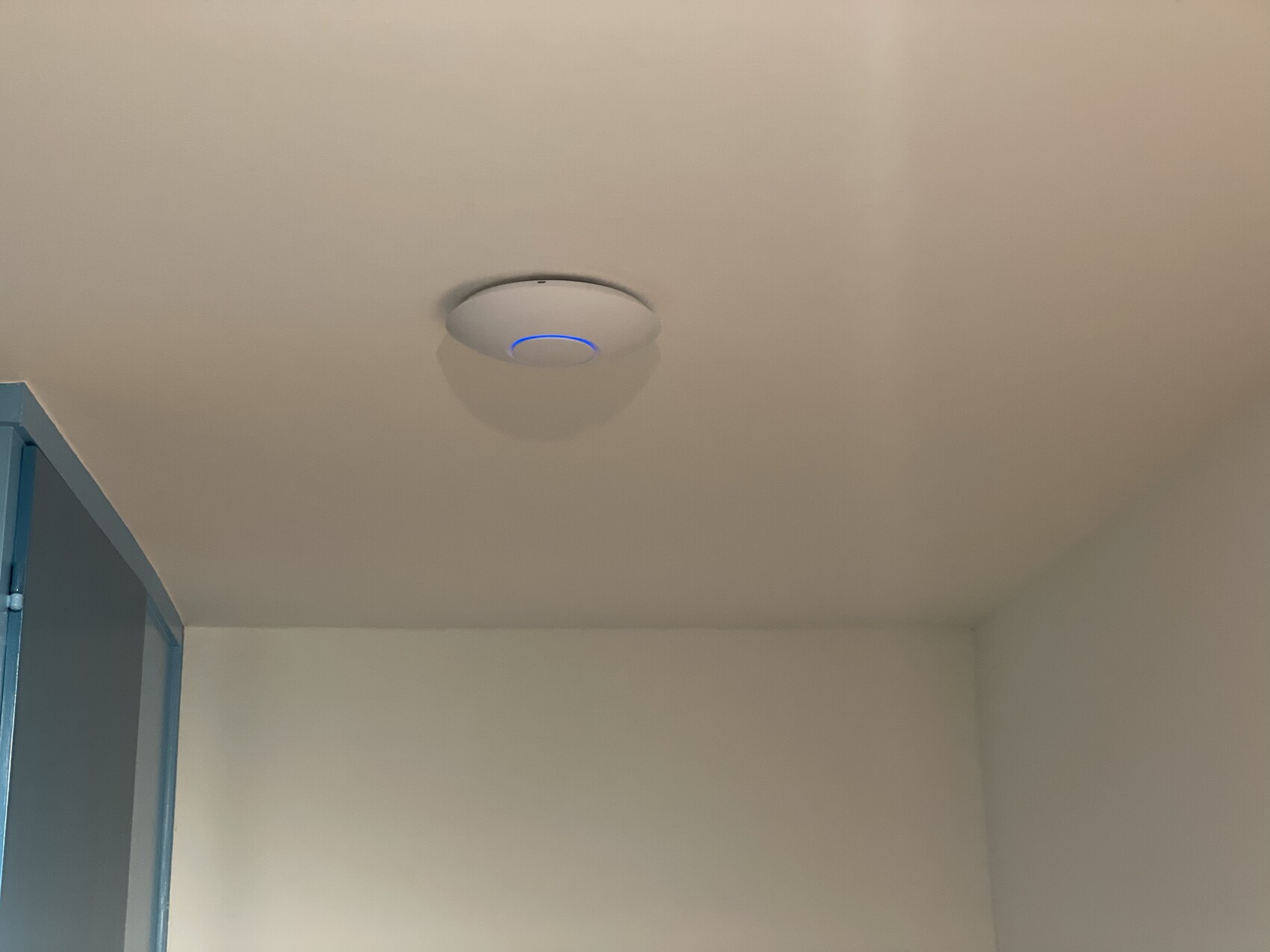
The great thing is that the access points get their power via PoE directly from my switch, so a single Ethernet cable is enough. Besides Unifi, there are also good solutions from other manufacturers.
In Germany, Cat7 is commonly used for cabling nowadays, which is future-proof. I wouldn’t go any lower than that for Ethernet cabling, as Cat7 is better shielded than Cat6. Once installed, these cables generally aren’t replaced unless you have empty conduits or you plan to avoid replacing them later. I even decided on Cat8 cables — but that’s too expensive for most. From the wall outlets to devices, short Cat6 patch cables are fine — they are more flexible anyway.
What to consider with this setup:
A large switch obviously consumes more power than a smaller one. If you know that 90% of your LAN ports won’t be used, it may be more cost-effective to use a smaller switch. (I just wanted to have this kind of setup.)
Each access point draws about 5W and unfortunately cannot be easily switched off at night, which bothers me because it wastes power.
Unifi operates its devices using a software-defined network, meaning the devices themselves don’t have a controller or admin interface but are managed by a central controller. This controller is needed for initial setup but doesn’t have to run all the time. I currently run it on my NAS inside a Docker container.
My setup is definitely at the upper end for a private user. Everything could be scaled down easily without problems. The important thing is to be clear about what will be hard to change in the future — and then install a very reliable and sustainable solution there. Switches and routers like FritzBox can always be replaced. Good cabling might not be replaceable at all.Very good setup. What price range are we talking about here? How many meters of Cat8 do you have installed?M
MBPassion18 Dec 2021 15:40I can gladly share the cost breakdown here. However, please note upfront that I deliberately chose expensive but high-quality components because this is important to me and also a passion of mine. You can get it done cheaper. The prices below are rounded.
Here is the list:
In total, this should be around €2630 (approx. $2855) according to the above breakdown. Additional patch cables were also purchased (either for unsuitable lengths or for our end devices).
Perhaps another point to keep in mind with this setup is the power consumption caused by the switch, NAS, Fritzbox, the three access points (via PoE), and my Doorbird components (via PoE), which is not insignificant. When all components are on, they require about 75W. I do turn off the NAS and the three access points (each 15W) for seven hours overnight. This results in about 8Wh overnight and about 18.5Wh during the day, totaling roughly 1.6kWh per day.
Here is the list:
- 2 x 250m Cat.8.2 installation cable --> €720 (approx. $780)
- I had to order a second set at short notice, and there were still a few meters left over
- Rough estimate (server cabinet in the basement, 7 connections on the ground floor, 8 on the first floor, 8 in the attic) means the cables were on average about 20 meters (65 feet) long
- 46 x Cat.8.1 Keystone modules --> €395 (approx. $430)
- 8 x flush-mounted box frame set, 2-port, pure white, for RJ45 Keystone modules --> €23 (approx. $25)
- Two frames are still missing from the electrician
- 3 x angled Cat.6A Keystone for access points --> €21 (approx. $23)
- 12 x patch cables 0.15m (6 inches) --> €34 (approx. $37)
- 6 x patch cables 1m (3.3 feet) --> €11 (approx. $12)
- 2 x patch cables 1.5m (5 feet) --> €4 (approx. $4)
- 3 x patch cables 0.25m (10 inches) for access points --> €7 (approx. $8)
- 19" wall or floor-standing network cabinet NT-BOX by SCHÄFER - 12U - 600 mm (24 inches) depth --> €280 (approx. $300)
- 3 x 19" cable entry panels with brushes - 1U --> €30 (approx. $33)
- Two would have been sufficient for me here
- 19" shelf - only 0.5U high - 450 mm (18 inches) deep --> €20 (approx. $22)
- It probably does not need to be that deep
- 1 x 19" mounting rails for NT-BOX by SCHÄFER IT-Systems - 12U --> €21 (approx. $23)
- 4 sets super-easy mounting hardware - M5 cage nuts, M5 screws, washers - 12 pieces --> €4 (approx. $4)
- 19" power strip with surge protection and switch --> €60 (approx. $65)
- 1 x Ubiquiti UniFi Switch Pro 24 Gen2 - USW-Pro-24-POE --> €562 (approx. $610)
- 3 x Ubiquiti UniFi AC Nanohd Access Points --> €438 (approx. $475)
In total, this should be around €2630 (approx. $2855) according to the above breakdown. Additional patch cables were also purchased (either for unsuitable lengths or for our end devices).
Perhaps another point to keep in mind with this setup is the power consumption caused by the switch, NAS, Fritzbox, the three access points (via PoE), and my Doorbird components (via PoE), which is not insignificant. When all components are on, they require about 75W. I do turn off the NAS and the three access points (each 15W) for seven hours overnight. This results in about 8Wh overnight and about 18.5Wh during the day, totaling roughly 1.6kWh per day.
MBPassion schrieb:
I’m happy to share the cost breakdown here. However, I want to point out upfront that I deliberately chose expensive but high-quality components, because this is important to me and also a passion of mine. It’s definitely possible to get cheaper alternatives. The prices below are rounded.
Here is the list:
- 2 x 250m (820 feet) Cat 8.2 installation cables --> €720
- I had to reorder a second set at short notice, so there were some meters left over
- Roughly estimated (server cabinet in the basement, 7 connections on the ground floor, 8 on the first floor, 8 on the attic floor) the cables were on average about 20 meters (65 feet) long
- 46 x Cat 8.1 keystone jacks --> €395
- 8 x double gang flush wall box frame set in pure white for RJ45 keystone jacks --> €23
- 2 frames from the electrician are still missing here
- 3 x angled Cat 6A keystone jacks for access points --> €21
- 12 x patch cables 0.15m (6 inches) --> €34
- 6 x patch cables 1m (3 feet) --> €11
- 2 x patch cables 1.5m (5 feet) --> €4
- 3 x patch cables 0.25m (10 inches) for access points --> €7
- 19" wall-mounted / freestanding network cabinet NT-BOX by SCHÄFER - 12U - 600mm (24 inches) depth --> €280
- 3 x 19" cable entry panels with brush - 1U --> €30
- Two would have been enough for me here
- 19" shelf - only 0.5U height - 450mm (18 inches) deep --> €20
- It doesn’t actually need to be that deep
- 1 x 19" mounting rails for NT-Box by SCHÄFER IT-Systems - 12U --> €21
- 4 sets of super-easy mounting hardware - M5 special cage nuts, M5 screws, washers - 12 pieces --> €4
- 19" power strip with surge protection and switch --> €60
- 1 x Ubiquiti UniFi Switch Pro 24 Gen2 - USW-Pro-24-POE --> €562
- 3 x Ubiquiti UniFi Access Point AC NanoHD --> €438
The total according to the above list should be €2630. A few additional patch cables were purchased as well (either lengths that didn’t fit or for our end devices).
One more point to consider with this setup is the power consumption caused by the switch, NAS, Fritz!Box, the three access points (powered over Ethernet), and my Doorbird components (also powered over Ethernet). It’s not insignificant. When all components are running, they require about 75W. I switch off the NAS and the three access points (each 15W) for seven hours at night. This means night-time consumption is about 8Wh and daytime about 18.5Wh, totaling roughly 1.6kWh per day. Thanks.
The price seems completely reasonable to me, and I’d expect “expensive” to mean something different.
Exactly what devices are connected to this setup?
Similar topics