
Hello everyone,
In about three weeks, we are supposed to finalize our electrical planning on site. Unfortunately, our electrician is somewhat old-fashioned, which makes it difficult for me to collaboratively plan a future-proof electrical setup with him. Therefore, I am currently educating myself to ensure that the networking in our single-family home is fundamentally future-proof.
Basically, it’s about the LAN network... LAN wall outlets are relatively expensive, so proper planning is even more important.
About us:
- Mid to late 20s – couple without children. Planning for 2 children in the near future.
- Single-family house with a usable basement, 2 full floors, and fully equipped with concrete ceilings
- Utility room in the basement with air-to-water heat pump, ventilation system, photovoltaic system
- The router is planned to be located in the office on the ground floor
- The upper floor includes bathroom / bedroom / 2 children’s rooms
- No satellite dish or cable TV — we will use Internet TV exclusively!
Now, I am struggling to network our single-family home sensibly but as cost-effectively as possible.
I have the following questions:
1. Slightly off-topic: In the living room, I would like to have an in-wall conduit installed on the TV wall (the TV will be wall-mounted) so that no cables are visible. Is this sensible and affordable? I will get exact prices from my electrician if this makes sense at all. Would it also make sense to install power outlets at TV height? How do you plan the connections on your media wall reasonably? What should be considered?
Since we plan to use a Magenta TV box and thus IP-TV, a total of four LAN ports in the living room area would presumably be useful, right?
2. How many LAN outlets and especially where should LAN outlets be installed? Mainly: which cable? Is CAT6 sufficient?
→ Such a double LAN outlet certainly costs close to €200, so planning must be really sensible.
Is it really necessary to install 2 double LAN outlets in each children’s room? I always wonder: what is actually going to be plugged in there?
One port for the TV and one port for a multimedia device should be enough, right? So four connections would probably be overkill, correct?
The fact is: It will certainly take years or decades before our children actually use these outlets... Who knows what changes might happen by then? Therefore, could we not cost-effectively use empty conduits (empty pipes) instead?
Is it also possible to “branch off” from an existing double outlet afterward to add more ports for the room? What should be considered here? Or should we consider having an empty conduit prepared in another spot in the room so that a socket can be installed later?
3. How do you solve the “router problem”? Should the one router be placed in the office (ground floor) with LAN outlets in the existing bedrooms upstairs to ensure a stable LAN connection? Or is a router upstairs absolutely necessary?
4. How important are LAN outlets in the utility room? Should the router possibly even be located in the utility room? Because of the concrete ceiling between basement and ground floor, a second router would almost certainly be needed. How should this situation be handled with a basement?
5. What do you think about installing empty conduits for CAT cables in the kitchen / hallway etc. to enable later retrofitting? Is this relatively affordable in new builds?
I would appreciate any feedback so we can make the best possible plans 🙂
In about three weeks, we are supposed to finalize our electrical planning on site. Unfortunately, our electrician is somewhat old-fashioned, which makes it difficult for me to collaboratively plan a future-proof electrical setup with him. Therefore, I am currently educating myself to ensure that the networking in our single-family home is fundamentally future-proof.
Basically, it’s about the LAN network... LAN wall outlets are relatively expensive, so proper planning is even more important.
About us:
- Mid to late 20s – couple without children. Planning for 2 children in the near future.
- Single-family house with a usable basement, 2 full floors, and fully equipped with concrete ceilings
- Utility room in the basement with air-to-water heat pump, ventilation system, photovoltaic system
- The router is planned to be located in the office on the ground floor
- The upper floor includes bathroom / bedroom / 2 children’s rooms
- No satellite dish or cable TV — we will use Internet TV exclusively!
Now, I am struggling to network our single-family home sensibly but as cost-effectively as possible.
I have the following questions:
1. Slightly off-topic: In the living room, I would like to have an in-wall conduit installed on the TV wall (the TV will be wall-mounted) so that no cables are visible. Is this sensible and affordable? I will get exact prices from my electrician if this makes sense at all. Would it also make sense to install power outlets at TV height? How do you plan the connections on your media wall reasonably? What should be considered?
Since we plan to use a Magenta TV box and thus IP-TV, a total of four LAN ports in the living room area would presumably be useful, right?
2. How many LAN outlets and especially where should LAN outlets be installed? Mainly: which cable? Is CAT6 sufficient?
→ Such a double LAN outlet certainly costs close to €200, so planning must be really sensible.
Is it really necessary to install 2 double LAN outlets in each children’s room? I always wonder: what is actually going to be plugged in there?
One port for the TV and one port for a multimedia device should be enough, right? So four connections would probably be overkill, correct?
The fact is: It will certainly take years or decades before our children actually use these outlets... Who knows what changes might happen by then? Therefore, could we not cost-effectively use empty conduits (empty pipes) instead?
Is it also possible to “branch off” from an existing double outlet afterward to add more ports for the room? What should be considered here? Or should we consider having an empty conduit prepared in another spot in the room so that a socket can be installed later?
3. How do you solve the “router problem”? Should the one router be placed in the office (ground floor) with LAN outlets in the existing bedrooms upstairs to ensure a stable LAN connection? Or is a router upstairs absolutely necessary?
4. How important are LAN outlets in the utility room? Should the router possibly even be located in the utility room? Because of the concrete ceiling between basement and ground floor, a second router would almost certainly be needed. How should this situation be handled with a basement?
5. What do you think about installing empty conduits for CAT cables in the kitchen / hallway etc. to enable later retrofitting? Is this relatively affordable in new builds?
I would appreciate any feedback so we can make the best possible plans 🙂
A
Axolotl20226 Jul 2022 15:21hanse987 schrieb:
I can gladly send you my Unifi access point. There’s no room for installation cables or field-attachable connectors. Yes, there are Unifi access points with slightly more space, but the space isn’t really generous, especially considering the very stiff installation cable.It works perfectly fine with the Nano HD. My electrician didn’t even think about installing a keystone module first. That definitely wouldn’t work.Apart from that, there are also more flexible installation cables that are as soft as rubber. There are plenty of patch cables that are less flexible.

Axolotl2022 schrieb:
It works flawlessly with the Nano HD. My electrician didn’t even consider installing a keystone module first. That would have made it even less functional.
Besides that, there are also more flexible installation cables that are as soft as rubber. There are plenty of patch cables that are less flexible than those. I wouldn’t have thought of using something exotic like flexible installation cable 😉 .
In my opinion, they’re just as bad as installed patch cables. But surely, others have different views.
Anyway, only with flexible installation cables can you mount the aforementioned RJ45 connectors somewhat reliably.
Throwing some buzzwords into the mix: KIS, ITIL
That’s why this will never be my preferred method.
F
fromthisplace6 Jul 2022 19:20Bauenaberwie schrieb:
Next week, the ceiling will be installed and then poured. We want to lay the cables for lighting and the access point now. Is it enough to have a network cable sticking out for the access point, or would it be better to use a recessed mounting box? Basically, I could just drill the access point directly into the ceiling, or is there any reason not to? You’re still early enough in the process to have a flush-mounted box installed without much effort. You should do that. So, another vote for:
Run the cable ending in an empty box, then connect the access point neatly with a patch cable above it.
A few weeks ago, I hadn’t considered this, and now I’m glad that installing the flush-mounted boxes was still possible.
F
FrankChief14 Jul 2022 08:28Hello,
we have reached the electrical planning stage for our new build and want to prepare it as thoroughly as possible in advance.
I am attaching a photo of the floor plans.
We are building with a developer, using solid masonry with lime sandstone blocks.
Here is a brief explanation of the rooms:
Basement: self-explanatory
Ground floor: self-explanatory
1st floor: Room 2: master bedroom / Room 3: walk-in closet / Room 1: future child’s bedroom
Attic/Studio: gaming corner and office/desk with laptop / cabinets for files and such
The following points have already been considered:
Satellite TV: A satellite dish with a Quattro LNB will be installed on the roof and distributed to all rooms via a multiswitch.
1x = 1 double wall outlet with 2 connectors
Satellite outlets: living room = 1x behind the TV / Room 1 = 1x / Studio = 2x (one in the upper right corner and one in the lower left) (the gaming corner with console will be in the upper right and the office/desk with laptop in the lower left of the studio)
Yes, we want to continue using satellite TV for things like live sports.
LAN: all cabling will be CAT7 duplex.
1x = 1 double wall outlet with 2 connectors
LAN outlets: living room = 1x behind the TV / Room 1 = 1x / Studio = 2x
Where satellite outlets are installed, a matching double LAN outlet will also be installed.
Garage = 1x
Wi-Fi: We want good Wi-Fi coverage with access points, prepared with flush-mounted boxes with keystone modules, powered by PoE.
The access points will be located as follows; ceiling-mounted APs are planned:
Ground floor = near the dining table, centrally located in the open living/dining area / 1st floor = centrally in the hallway / Studio = uncertain due to many sloping ceilings; possibly a wall-mounted AP in the studio and one mounted on the wall by the stairs? (please advise regarding the studio)
Garden = should we add 1 access point for the terrace?
One access point per floor should be sufficient for us.
Lighting: difficult to explain / each room will have one centrally positioned ceiling light (the standard setup) and we plan to supplement with floor lamps / possibly LED light strips behind furniture.
Garage: 1 red socket 16/32A for a mobile wallbox
1 conduit 25mm (1 inch) for future garden upgrades (power cables can be routed through the garage wall into the garden and distributed from there).
Photovoltaic preparation: 2 conduits, each 32mm (1.25 inches) diameter (according to a solar company, this is sufficient);
Unfortunately, we can only install the photovoltaic system after handover, as it is prohibited by the developer beforehand.
The conduits will, of course, be routed through the roof sealing.
Power outlets: hard to summarize, there are quite a few.
For each LAN double outlet, there is a double power outlet (behind the TV, a power strip can be added if needed), plus others distributed around the rooms depending on need.
For example, fewer in the walk-in closet.
In total: 18 single power outlets and 11 double power outlets (all included in the standard installation).
Roller shutters: all roller shutters are motorized and operated with a toggle switch next to the window.
Smart home: Unfortunately, we have to omit a KNX smart home system for now due to budget constraints.
We will likely skip a full smart home for the time being and may add some wireless components later (possibly the new Matter wireless standard once it’s available), for example for the roller shutters.
It would be enough for us to control some devices with Alexa or a smartphone and set up a few if-then rules.
(I know this isn’t a full smart home, but that would be sufficient for us.)
How can we best prepare for this at low cost? Installing deep flush-mounted boxes for wireless actuators everywhere and using only 5-core cables?
Video doorbell: We might want to add a video doorbell later on (only if needed). We will install a Cat cable from the standard doorbell and chime to allow a future PoE video doorbell installation.
Our budget is around 5000€ (approximately), possibly a bit more for special requests.
What have we forgotten or what can we still improve?
I look forward to your advice and suggestions for improvements.
Thank you very much.
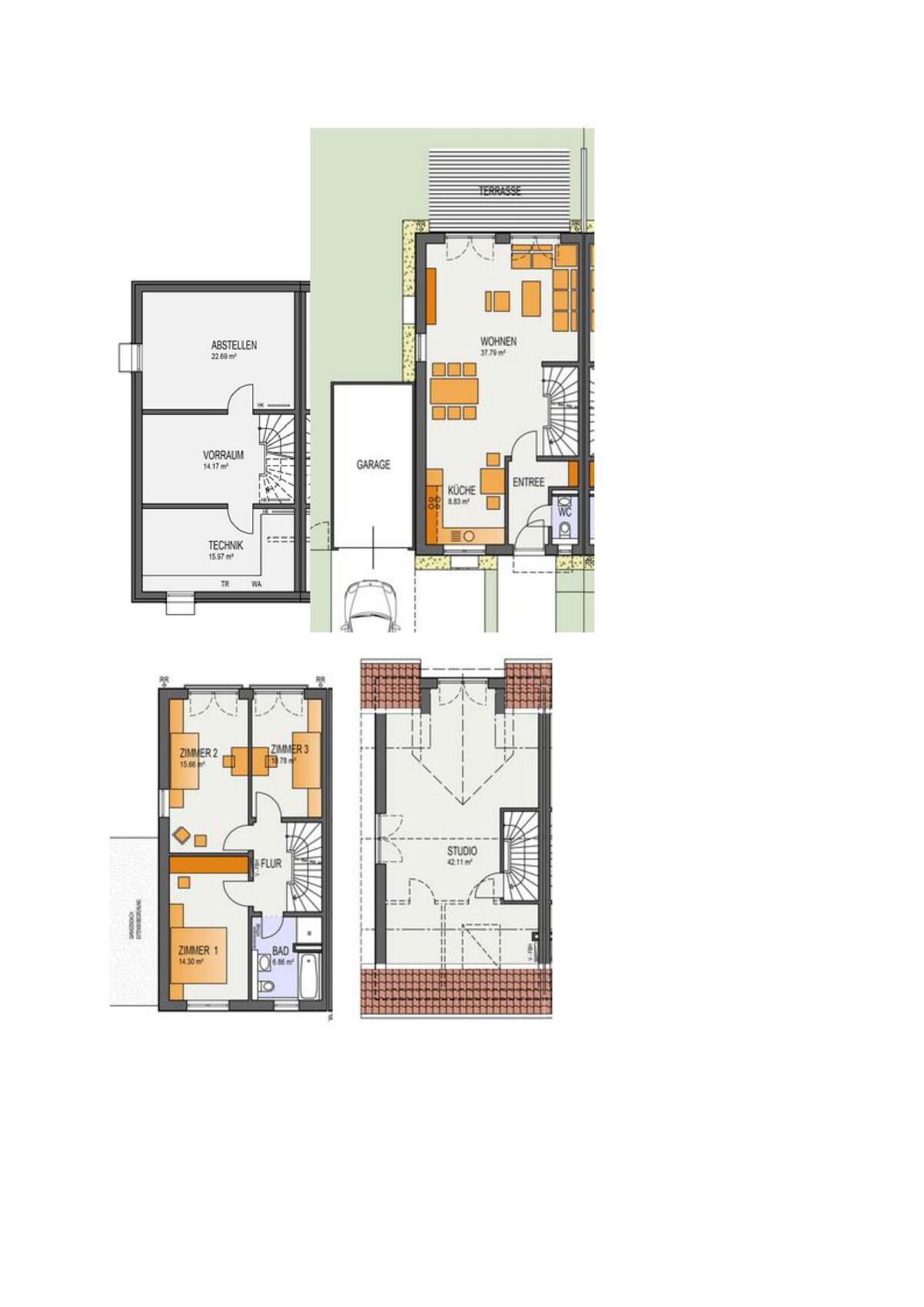
we have reached the electrical planning stage for our new build and want to prepare it as thoroughly as possible in advance.
I am attaching a photo of the floor plans.
We are building with a developer, using solid masonry with lime sandstone blocks.
Here is a brief explanation of the rooms:
Basement: self-explanatory
Ground floor: self-explanatory
1st floor: Room 2: master bedroom / Room 3: walk-in closet / Room 1: future child’s bedroom
Attic/Studio: gaming corner and office/desk with laptop / cabinets for files and such
The following points have already been considered:
Satellite TV: A satellite dish with a Quattro LNB will be installed on the roof and distributed to all rooms via a multiswitch.
1x = 1 double wall outlet with 2 connectors
Satellite outlets: living room = 1x behind the TV / Room 1 = 1x / Studio = 2x (one in the upper right corner and one in the lower left) (the gaming corner with console will be in the upper right and the office/desk with laptop in the lower left of the studio)
Yes, we want to continue using satellite TV for things like live sports.
LAN: all cabling will be CAT7 duplex.
1x = 1 double wall outlet with 2 connectors
LAN outlets: living room = 1x behind the TV / Room 1 = 1x / Studio = 2x
Where satellite outlets are installed, a matching double LAN outlet will also be installed.
Garage = 1x
Wi-Fi: We want good Wi-Fi coverage with access points, prepared with flush-mounted boxes with keystone modules, powered by PoE.
The access points will be located as follows; ceiling-mounted APs are planned:
Ground floor = near the dining table, centrally located in the open living/dining area / 1st floor = centrally in the hallway / Studio = uncertain due to many sloping ceilings; possibly a wall-mounted AP in the studio and one mounted on the wall by the stairs? (please advise regarding the studio)
Garden = should we add 1 access point for the terrace?
One access point per floor should be sufficient for us.
Lighting: difficult to explain / each room will have one centrally positioned ceiling light (the standard setup) and we plan to supplement with floor lamps / possibly LED light strips behind furniture.
Garage: 1 red socket 16/32A for a mobile wallbox
1 conduit 25mm (1 inch) for future garden upgrades (power cables can be routed through the garage wall into the garden and distributed from there).
Photovoltaic preparation: 2 conduits, each 32mm (1.25 inches) diameter (according to a solar company, this is sufficient);
Unfortunately, we can only install the photovoltaic system after handover, as it is prohibited by the developer beforehand.
The conduits will, of course, be routed through the roof sealing.
Power outlets: hard to summarize, there are quite a few.
For each LAN double outlet, there is a double power outlet (behind the TV, a power strip can be added if needed), plus others distributed around the rooms depending on need.
For example, fewer in the walk-in closet.
In total: 18 single power outlets and 11 double power outlets (all included in the standard installation).
Roller shutters: all roller shutters are motorized and operated with a toggle switch next to the window.
Smart home: Unfortunately, we have to omit a KNX smart home system for now due to budget constraints.
We will likely skip a full smart home for the time being and may add some wireless components later (possibly the new Matter wireless standard once it’s available), for example for the roller shutters.
It would be enough for us to control some devices with Alexa or a smartphone and set up a few if-then rules.
(I know this isn’t a full smart home, but that would be sufficient for us.)
How can we best prepare for this at low cost? Installing deep flush-mounted boxes for wireless actuators everywhere and using only 5-core cables?
Video doorbell: We might want to add a video doorbell later on (only if needed). We will install a Cat cable from the standard doorbell and chime to allow a future PoE video doorbell installation.
Our budget is around 5000€ (approximately), possibly a bit more for special requests.
What have we forgotten or what can we still improve?
I look forward to your advice and suggestions for improvements.
Thank you very much.

By the way, due to insufficient research beforehand, I had LAN outlets installed on the wall just below the ceiling. However, you can’t easily mount the Unifi in-wall access points there because they basically require an electrical back box. Their mounting box even has a protrusion where the patch cable is supposed to go through. I then got a kind of mounting box from a major retailer. Now the whole setup sticks out by another 4cm (1.6 inches), but there’s enough space inside...
F
fromthisplace27 Jul 2022 17:42How essential do you consider surge protection for a power strip?
An online retailer offers a 9-outlet Brennestuhl Aluminum-Line 19" strip for 16 euros, but it does not include surge protection.
An online retailer offers a 9-outlet Brennestuhl Aluminum-Line 19" strip for 16 euros, but it does not include surge protection.
Similar topics