
Hello everyone,
In about three weeks, we are supposed to finalize our electrical planning on site. Unfortunately, our electrician is somewhat old-fashioned, which makes it difficult for me to collaboratively plan a future-proof electrical setup with him. Therefore, I am currently educating myself to ensure that the networking in our single-family home is fundamentally future-proof.
Basically, it’s about the LAN network... LAN wall outlets are relatively expensive, so proper planning is even more important.
About us:
- Mid to late 20s – couple without children. Planning for 2 children in the near future.
- Single-family house with a usable basement, 2 full floors, and fully equipped with concrete ceilings
- Utility room in the basement with air-to-water heat pump, ventilation system, photovoltaic system
- The router is planned to be located in the office on the ground floor
- The upper floor includes bathroom / bedroom / 2 children’s rooms
- No satellite dish or cable TV — we will use Internet TV exclusively!
Now, I am struggling to network our single-family home sensibly but as cost-effectively as possible.
I have the following questions:
1. Slightly off-topic: In the living room, I would like to have an in-wall conduit installed on the TV wall (the TV will be wall-mounted) so that no cables are visible. Is this sensible and affordable? I will get exact prices from my electrician if this makes sense at all. Would it also make sense to install power outlets at TV height? How do you plan the connections on your media wall reasonably? What should be considered?
Since we plan to use a Magenta TV box and thus IP-TV, a total of four LAN ports in the living room area would presumably be useful, right?
2. How many LAN outlets and especially where should LAN outlets be installed? Mainly: which cable? Is CAT6 sufficient?
→ Such a double LAN outlet certainly costs close to €200, so planning must be really sensible.
Is it really necessary to install 2 double LAN outlets in each children’s room? I always wonder: what is actually going to be plugged in there?
One port for the TV and one port for a multimedia device should be enough, right? So four connections would probably be overkill, correct?
The fact is: It will certainly take years or decades before our children actually use these outlets... Who knows what changes might happen by then? Therefore, could we not cost-effectively use empty conduits (empty pipes) instead?
Is it also possible to “branch off” from an existing double outlet afterward to add more ports for the room? What should be considered here? Or should we consider having an empty conduit prepared in another spot in the room so that a socket can be installed later?
3. How do you solve the “router problem”? Should the one router be placed in the office (ground floor) with LAN outlets in the existing bedrooms upstairs to ensure a stable LAN connection? Or is a router upstairs absolutely necessary?
4. How important are LAN outlets in the utility room? Should the router possibly even be located in the utility room? Because of the concrete ceiling between basement and ground floor, a second router would almost certainly be needed. How should this situation be handled with a basement?
5. What do you think about installing empty conduits for CAT cables in the kitchen / hallway etc. to enable later retrofitting? Is this relatively affordable in new builds?
I would appreciate any feedback so we can make the best possible plans 🙂
In about three weeks, we are supposed to finalize our electrical planning on site. Unfortunately, our electrician is somewhat old-fashioned, which makes it difficult for me to collaboratively plan a future-proof electrical setup with him. Therefore, I am currently educating myself to ensure that the networking in our single-family home is fundamentally future-proof.
Basically, it’s about the LAN network... LAN wall outlets are relatively expensive, so proper planning is even more important.
About us:
- Mid to late 20s – couple without children. Planning for 2 children in the near future.
- Single-family house with a usable basement, 2 full floors, and fully equipped with concrete ceilings
- Utility room in the basement with air-to-water heat pump, ventilation system, photovoltaic system
- The router is planned to be located in the office on the ground floor
- The upper floor includes bathroom / bedroom / 2 children’s rooms
- No satellite dish or cable TV — we will use Internet TV exclusively!
Now, I am struggling to network our single-family home sensibly but as cost-effectively as possible.
I have the following questions:
1. Slightly off-topic: In the living room, I would like to have an in-wall conduit installed on the TV wall (the TV will be wall-mounted) so that no cables are visible. Is this sensible and affordable? I will get exact prices from my electrician if this makes sense at all. Would it also make sense to install power outlets at TV height? How do you plan the connections on your media wall reasonably? What should be considered?
Since we plan to use a Magenta TV box and thus IP-TV, a total of four LAN ports in the living room area would presumably be useful, right?
2. How many LAN outlets and especially where should LAN outlets be installed? Mainly: which cable? Is CAT6 sufficient?
→ Such a double LAN outlet certainly costs close to €200, so planning must be really sensible.
Is it really necessary to install 2 double LAN outlets in each children’s room? I always wonder: what is actually going to be plugged in there?
One port for the TV and one port for a multimedia device should be enough, right? So four connections would probably be overkill, correct?
The fact is: It will certainly take years or decades before our children actually use these outlets... Who knows what changes might happen by then? Therefore, could we not cost-effectively use empty conduits (empty pipes) instead?
Is it also possible to “branch off” from an existing double outlet afterward to add more ports for the room? What should be considered here? Or should we consider having an empty conduit prepared in another spot in the room so that a socket can be installed later?
3. How do you solve the “router problem”? Should the one router be placed in the office (ground floor) with LAN outlets in the existing bedrooms upstairs to ensure a stable LAN connection? Or is a router upstairs absolutely necessary?
4. How important are LAN outlets in the utility room? Should the router possibly even be located in the utility room? Because of the concrete ceiling between basement and ground floor, a second router would almost certainly be needed. How should this situation be handled with a basement?
5. What do you think about installing empty conduits for CAT cables in the kitchen / hallway etc. to enable later retrofitting? Is this relatively affordable in new builds?
I would appreciate any feedback so we can make the best possible plans 🙂
B
Benutzer20016 May 2022 14:27i_b_n_a_n schrieb:
And you wouldn’t really want to use standard RJ45 connectors, especially when dealing with POE, right?Why not? What do you mean by "non-standard" connectors?With a reasonably flexible cable, there is plenty of space on the back of the Nano.
A
AllThumbs16 May 2022 15:22As long as the shell construction is still in place, I would try to have a conduit installed using core drilling. The installation cables are quite rigid and would need to be cut very short before mounting the keystone connector. Even then, it will still be tricky to fit everything into the gap near the Nano.
It will also become problematic if the access point needs to be replaced in 5-10 years. Who can guarantee that the same recess will be available again?
It will also become problematic if the access point needs to be replaced in 5-10 years. Who can guarantee that the same recess will be available again?

Benutzer200 schrieb:
Why not? What do you mean by "unusual" connectors?
With a reasonably flexible cable, there is plenty of space on the back of the Nano.
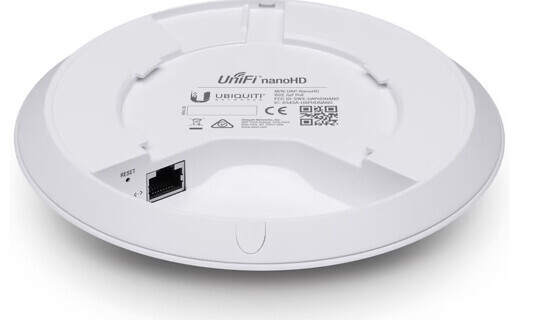
I wasn’t entirely clear. By "standard RJ45 connectors" I didn’t mean those already attached to patch cables (with molded strain relief), but rather the "cheap RJ45 crimp connectors," which I consider unacceptable. Besides that, as I already mentioned, all in-field connectors for installation cables are too large and rigid to fit into the Unify access points. I have the HD Flex, Pro, UAP-AC-M-Pro, etc. here at home. They simply don’t fit.F
fromthisplace16 May 2022 19:05Thank you all. When I asked whether we could still specify flush-mount boxes for the upcoming precast concrete ceilings, our site manager replied: "The ceilings have already been ordered, but there is a solution for everything." 🙂
i_b_n_a_n schrieb:
And you wouldn’t really want to use standard RJ45 connectors, especially when working with PoE, right?i_b_n_a_n schrieb:
I wasn’t very precise. By "standard RJ45 connectors" I didn’t mean the ones already attached to patch cables (with molded strain relief), but the cheap RJ45 crimp connectors (which I consider unacceptable).What exactly is the issue with cheap RJ45 crimp connectors? I’ve used them successfully with PoE.F
fromthisplace11 Jun 2022 17:36Things are getting more concrete for us. Earlier this week, we had a shell construction walkthrough with our electrician. I’m happy to share feedback on how a layperson collaborates with the general contractor’s electrician.
As a first step, I’ve selected the following components (based on tips from threads, YouTube, or shops) and asked the electrician to install them as preparation for my further work:
1. Network cabinet:
Either the HMF 65709 (unassembled) measuring 51 x 40 x 45 cm (20 x 16 x 18 inches) with 9U for 70 euros, or the Digitus network cabinet "Dynamic Basic" measuring 45 x 60 x 50.5 cm (18 x 24 x 20 inches) with 9U for 100 euros.
2. Patch panel for keystone modules:
HB-Digital 24-port shielded patch panel for 24 euros.
3. Power strip:
Brennenstuhl 8-outlet power strip with surge protection for 32 euros.
I’ve asked the electrician to use Cat 7 cable or, alternatively, to source it himself (which he probably won’t want to do). Then, he should install the cabinet in the technical room near the telecom entry point, connect the keystone modules to the patch panel, and make a list indicating which cable number corresponds to which installation cable.
What do you think about these components? Are they generally okay, or would you recommend swapping anything? Have I forgotten something? I plan to buy the switch and patch cables in a few months.
It will be DSL for now. Although our municipality is completing fiber rollout for every household these weeks, it will probably be too early for us. So, the DSL cable has to run from the house connection to the Fritzbox inside the network cabinet, right?
As a first step, I’ve selected the following components (based on tips from threads, YouTube, or shops) and asked the electrician to install them as preparation for my further work:
1. Network cabinet:
Either the HMF 65709 (unassembled) measuring 51 x 40 x 45 cm (20 x 16 x 18 inches) with 9U for 70 euros, or the Digitus network cabinet "Dynamic Basic" measuring 45 x 60 x 50.5 cm (18 x 24 x 20 inches) with 9U for 100 euros.
2. Patch panel for keystone modules:
HB-Digital 24-port shielded patch panel for 24 euros.
3. Power strip:
Brennenstuhl 8-outlet power strip with surge protection for 32 euros.
I’ve asked the electrician to use Cat 7 cable or, alternatively, to source it himself (which he probably won’t want to do). Then, he should install the cabinet in the technical room near the telecom entry point, connect the keystone modules to the patch panel, and make a list indicating which cable number corresponds to which installation cable.
What do you think about these components? Are they generally okay, or would you recommend swapping anything? Have I forgotten something? I plan to buy the switch and patch cables in a few months.
hanse987 schrieb:
What kind of internet connection will you have? DSL, cable, fiber? Is the connection right next to the network cabinet or somewhere else? Depending on that, you might need an extra cable there.
It will be DSL for now. Although our municipality is completing fiber rollout for every household these weeks, it will probably be too early for us. So, the DSL cable has to run from the house connection to the Fritzbox inside the network cabinet, right?
Similar topics