
Hello,
first, a brief summary of our current situation:
In our future place of residence (village), according to Telekom, only a "slow" DSL connection would be possible. Fortunately, last year Deutsche Glasfaser launched a so-called demand aggregation for the community, which was successful. Therefore, in the next few weeks/months, the village will be supplied with fiber optic cables.
I have already placed an order with Deutsche Glasfaser for our plot for internet ("DG Classic, 400Mbit/s") and TV (IPTV, which I understand means television over the internet cable) and thus save the connection fee of 750 EUR.
Now my question
first, a brief summary of our current situation:
- currently still renting
- currently a customer of Telekom (internet + phone)
- already owner of an undeveloped plot of land (not yet connected to utilities)
- construction contract signed with general contractor, planned start of construction mid-March, guaranteed construction period ~ 6 months, so move-in expected around September, more likely October
- all electrical work included in the construction contract, no owner-provided work specified
- number of sockets, network outlets, etc., according to the construction contract very few, so we will need to add quite a few
- no basement
In our future place of residence (village), according to Telekom, only a "slow" DSL connection would be possible. Fortunately, last year Deutsche Glasfaser launched a so-called demand aggregation for the community, which was successful. Therefore, in the next few weeks/months, the village will be supplied with fiber optic cables.
I have already placed an order with Deutsche Glasfaser for our plot for internet ("DG Classic, 400Mbit/s") and TV (IPTV, which I understand means television over the internet cable) and thus save the connection fee of 750 EUR.
Now my question
- Upon inquiry, Deutsche Glasfaser told me that construction work in the community is planned to start in the coming weeks but will last a few months, so our connection will probably only be activated by the end of 2019 / beginning of 2020. If they are not ready by the time our other utilities (gas, water...) are connected to the house, they advise us to pre-install an empty conduit from the property boundary to the utility room as a preparatory measure. What would be the best solution in the meantime? We will move in in September/October. Assuming DG’s construction takes longer than planned, we would be in our nice new house without TV/television/phone.
Should we first continue ordering internet/TV connections from Telekom during our construction? Our contract there is still valid anyway. Although the connection would cost about 800 EUR, I would get the later DG TV connection free of charge.
S
SenorRaul721 Feb 2019 10:56Mycraft schrieb:
Sure,
it is the simplest, fastest, most reliable, and cost-effective option. I wouldn’t hesitate.
And if SAT-IP ever becomes outdated, you can always retrofit it later.How should I best prepare for this retrofit during the house construction if I decide to go with the traditional satellite wiring for now? Should I already install a CAT7 cable from the utility room to near the satellite dish to easily replace the traditional dish later with one that has a built-in converter?
Sorry for asking so often and perhaps in a naive way, but I prefer not to rely "blindly" on the experts’ statements for such matters. I’d rather understand it at least somewhat myself to discuss it properly with the electrician.

You could run a LAN cable directly to the satellite dish.
However, I would simply run 4 coaxial cables from the satellite system to the utility room, and then distribute them from there to the rooms. This way, you are prepared for everything. You will have satellite in the utility room, LAN as well, and the cable ends from the utility room will be in the respective rooms for both satellite and LAN. This allows you to reconfigure everything anytime as you wish.
However, I would simply run 4 coaxial cables from the satellite system to the utility room, and then distribute them from there to the rooms. This way, you are prepared for everything. You will have satellite in the utility room, LAN as well, and the cable ends from the utility room will be in the respective rooms for both satellite and LAN. This allows you to reconfigure everything anytime as you wish.
S
SenorRaul722 Feb 2019 07:06All right. I will present this exactly the same way in our electrical meeting. At least then I have a rough idea of what the electrician is talking about.
Regarding the CAT cabling, I made a sketch. I hope I understood the connections between the patch panel, switch, etc., correctly?
The internet-connected devices I could imagine for each room:
Kitchen: Radio / Alexa / Sonos
Living Room: Worktop (ceiling-mounted in the center), TV, receiver, PS4, hi-fi system(?)
Guest Room: PC, printer, PS4, possibly also TV and receiver
Guest WC: Radio / Sonos
Hallway: Doorbell / video intercom system
Upper Gallery: Worktop on the ceiling
Children’s Rooms each: In the “distant” future TV, receiver, console, PC/laptop
Bedroom: TV, receiver
Bathroom: Radio / Sonos
If I understand correctly, according to my sketch I need 20 CAT7 installation cables and 10 double outlets (or do I also have to include an outlet for a worktop?).
The kitchen, bathroom, and ground-floor hallway are not yet included. There I could — as already suggested here — have just cables installed without outlets if at all.
That would bring me close to 24 cables, and a 24-port switch would then be fully used, right? There probably wouldn’t be any spare ports left for a NAS or something similar.
The costs will probably run into the several thousands.
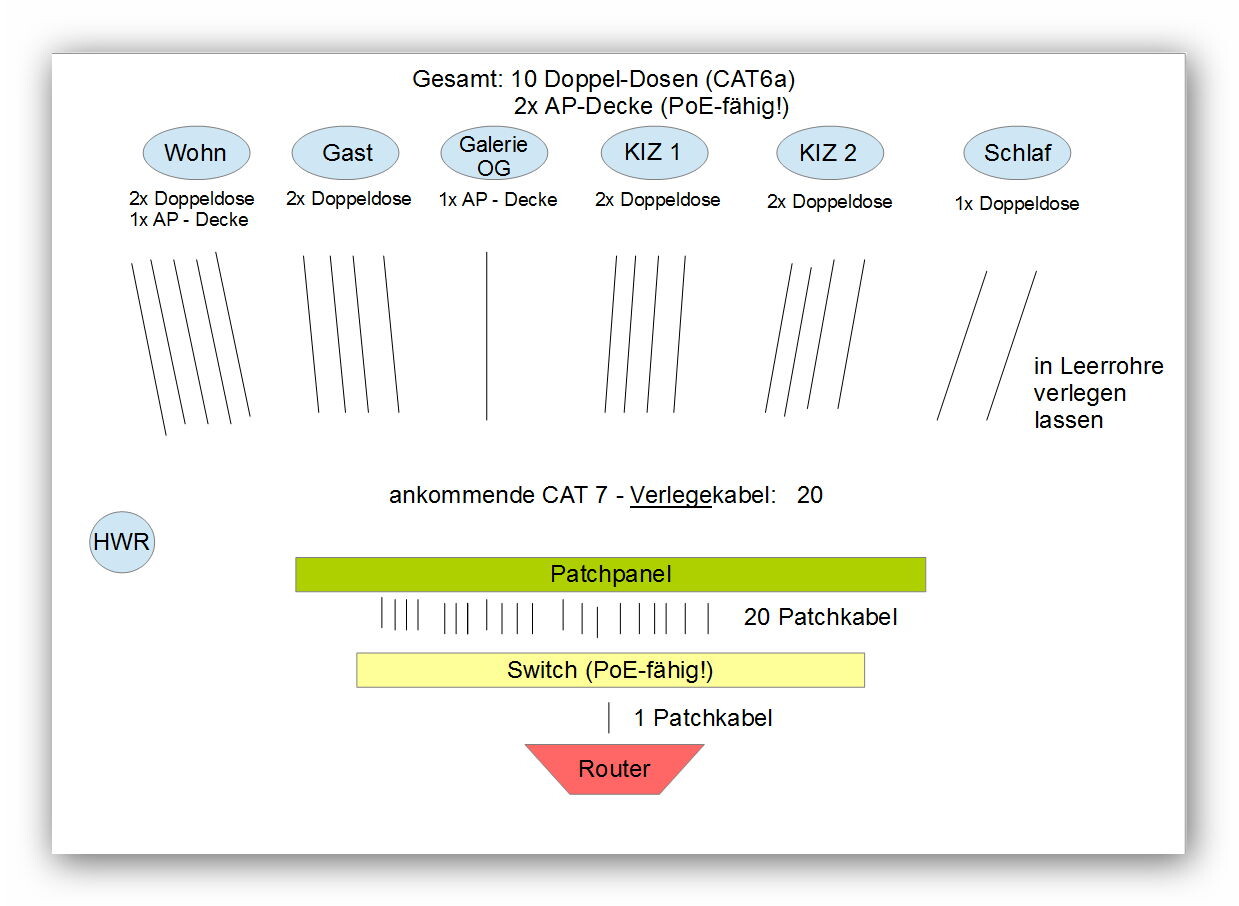
Regarding the CAT cabling, I made a sketch. I hope I understood the connections between the patch panel, switch, etc., correctly?
The internet-connected devices I could imagine for each room:
Kitchen: Radio / Alexa / Sonos
Living Room: Worktop (ceiling-mounted in the center), TV, receiver, PS4, hi-fi system(?)
Guest Room: PC, printer, PS4, possibly also TV and receiver
Guest WC: Radio / Sonos
Hallway: Doorbell / video intercom system
Upper Gallery: Worktop on the ceiling
Children’s Rooms each: In the “distant” future TV, receiver, console, PC/laptop
Bedroom: TV, receiver
Bathroom: Radio / Sonos
If I understand correctly, according to my sketch I need 20 CAT7 installation cables and 10 double outlets (or do I also have to include an outlet for a worktop?).
The kitchen, bathroom, and ground-floor hallway are not yet included. There I could — as already suggested here — have just cables installed without outlets if at all.
That would bring me close to 24 cables, and a 24-port switch would then be fully used, right? There probably wouldn’t be any spare ports left for a NAS or something similar.
The costs will probably run into the several thousands.
SenorRaul7 schrieb:
(or do I also need to plan for a wall outlet for an access point?). Yes, of course the access point also requires a wall outlet. In-wall cables are thicker than patch cables.
SenorRaul7 schrieb:
Then I would soon be at 24 cables and a 24-port switch would be completely utilized, right? There wouldn’t be any room left for a NAS or something similar. If it’s just 1 or 2 extras, the router usually has a small built-in switch.
Alternatively, you can temporarily unplug unused ports from one or another double wall outlet at the switch.
Or you can change the wiring on a double wall outlet that doesn’t require high bandwidth (then both ports of the double outlet are connected with only one cable, which still supports 100 Mbit) and free up a port on the switch again.
Or you simply buy a small, inexpensive additional switch and connect it to the existing one.

I wouldn’t install a box for the access points (APs). It always looks untidy. For suspended ceilings, just connect a keystone module to the in-wall cable and then run a short patch cable to the countertop. This way, no cables are visible.
Alternatively, you can attach a small connector to the in-wall cable. Due to the stiffness of the cable, this can sometimes be problematic depending on how the connection at the countertop is set up.
Under no circumstances should you change or split the wiring. Double sockets should have two cables or a duplex cable. Install Cat 7 or 8 cable right from the start. The cable itself is not a significant cost factor. This way, you can upgrade to 10 Gb later on.
Most 24-port or 48-port switches have additional uplink ports, so effectively you get two extra ports. But with your plan, I would go straight for a 48-port switch.
Personally, I’m a fan of Unifi.
For the countertop, consider the NanoHD (also available with skins and can be flush-mounted). Use a Unifi switch, Cloud Key, and possibly a USG. Then you have all options available.
I would install the access point on the ground floor near the kitchen/living/dining area. This way, you get 5 GHz where you spend most of your time.
Upstairs, in the rooms, you will mostly have only 2.4 GHz (depending on the wall construction).
I would rather install one or two more APs or at least plan for the connections. Personally, I’m a fan of overkill.
Alternatively, you can attach a small connector to the in-wall cable. Due to the stiffness of the cable, this can sometimes be problematic depending on how the connection at the countertop is set up.
Under no circumstances should you change or split the wiring. Double sockets should have two cables or a duplex cable. Install Cat 7 or 8 cable right from the start. The cable itself is not a significant cost factor. This way, you can upgrade to 10 Gb later on.
Most 24-port or 48-port switches have additional uplink ports, so effectively you get two extra ports. But with your plan, I would go straight for a 48-port switch.
Personally, I’m a fan of Unifi.
For the countertop, consider the NanoHD (also available with skins and can be flush-mounted). Use a Unifi switch, Cloud Key, and possibly a USG. Then you have all options available.
I would install the access point on the ground floor near the kitchen/living/dining area. This way, you get 5 GHz where you spend most of your time.
Upstairs, in the rooms, you will mostly have only 2.4 GHz (depending on the wall construction).
I would rather install one or two more APs or at least plan for the connections. Personally, I’m a fan of overkill.
S
SenorRaul722 Feb 2019 08:46rick2018 schrieb:
For the access points, I wouldn’t install a wall outlet. It always looks awkward. With a suspended ceiling, just use a keystone module on the installation cable, then run a short patch cable to the access point. That way, no cables are visible. Alternatively, use a small connector on the installation cable. However, due to the stiffness of the installation cable, this can sometimes be problematic depending on the type of connector on the access point. Got it. I’ll just explain to the electrician how I want it to look. Hopefully, he’ll come up with the same ideas as you.
rick2018 schrieb:
A double socket should have two cables or a duplex cable. In that case, should I simply choose the more cost-effective option? Or are there specific advantages or disadvantages to each?
And should I insist on running the CAT cables through conduit?
rick2018 schrieb:
Cloud Key and possibly USG. Then you have all options. That’s new to me, I’ll take a look at it.
rick2018 schrieb:
I’d rather install one or two extra access points or at least provide the connections. I tend to prefer overkill. In my current plan, I have one central access point on each floor. That’s completely sufficient for me. The only devices running wireless will be things like phones, laptops, maybe speakers, etc. That should be enough.
Similar topics