
Hello,
In the secondhand house we bought, some light switches are not located where we would like them to be. Installing new junction boxes and running cables is not an option due to the effort involved. That’s why I’m looking for a wireless switch system, where a receiver relay is installed in the existing switch box and I can place a transmitter with a switch or push button at the desired new position.
There are some simple solutions available even in hardware stores, but I would prefer something Wi-Fi-based that can later be integrated into a home automation system. I want to use these switches to create a presence simulation. Is there a good overview of options somewhere, or can you recommend anything?
As a central controller, I’m considering a Raspberry Pi with appropriate software. I plan to tinker with it a bit in the future.
In the secondhand house we bought, some light switches are not located where we would like them to be. Installing new junction boxes and running cables is not an option due to the effort involved. That’s why I’m looking for a wireless switch system, where a receiver relay is installed in the existing switch box and I can place a transmitter with a switch or push button at the desired new position.
There are some simple solutions available even in hardware stores, but I would prefer something Wi-Fi-based that can later be integrated into a home automation system. I want to use these switches to create a presence simulation. Is there a good overview of options somewhere, or can you recommend anything?
As a central controller, I’m considering a Raspberry Pi with appropriate software. I plan to tinker with it a bit in the future.
 empyresystems20 Feb 2019 18:53
Apart from the materials and high-quality workmanship, the products do not differ much at first glance from, for example, Shelly. However, from a technological perspective, the wireless technology used is a proprietary development that is compatible with Wi-Fi (the wireless LAN we know). An excerpt from an official document from the manufacturer:
A brief overview of the different standards and their distinctions:
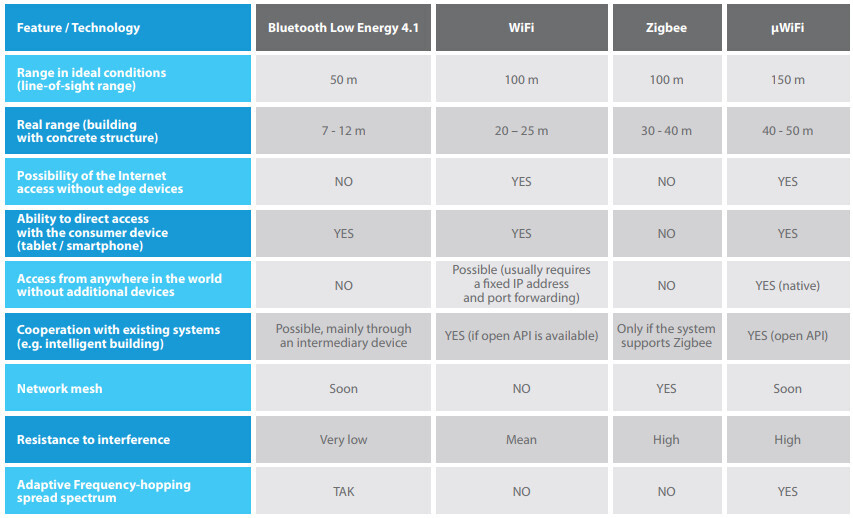
μWiFi technology is a solution dedicated to data transmission in a harsh environment developed by the BleBox R & D Team. Based on a combination of elements from three known communication standards: Bluetooth Low Energy, Wi-Fi and Zigbee. A simple-to-use technology was created, including the use of broadcasting mode and ad-hoc connections (as in Bluetooth 4.1), resistance to interference (and in the future node mesh – derivative of Zigbee), high bandwidth, and the ability to connect to existing infrastructure networks based on a standard access point Wi-Fi (compatibility with the Wi-Fi standard has been preserved). The technology was officially presented by the authors at the Chengdu International Exhibition of New Technologies and Inventions (China) in October 2015, where it was appreciated by manufacturers and the scientific community.
μWiFi technology allows both a direct connection with each device (peer-to-peer) and using the existing Wi-Fi network (e.g., home, company).
A brief overview of the different standards and their distinctions:
That looks like an interesting solution. I could start with standalone switches and receivers and then integrate them into a smart home system when the opportunity arises. I don’t want to have to deal with that right from the start. Due to family commitments, I can’t really dedicate enough time to focus on these things thoroughly. It needs to be something that can be checked off in an evening.
empyresystems21 Feb 2019 12:02How many modules of which type are needed?
empyresystems21 Feb 2019 13:35You will need 2 relays (switchBox) for the two lights. If possible, you could also use a double relay (switchBoxD) to control both lights. The double relay costs the same as a single relay, so you would save nearly €60. The two old switches then connect to the switchBox(D) as well, or you can patch that up if you only want to switch from the new location.
For the new control point, you only need one inBox. It has 4 inputs (4 buttons). Here, you could use a switch with a double rocker to control both lights.
Good luck
For the new control point, you only need one inBox. It has 4 inputs (4 buttons). Here, you could use a switch with a double rocker to control both lights.
Good luck
Similar topics