
ᐅ Implementing LAN and Satellite Systems in a Single-Family Home with a Centralized Server Cabinet
Created on: 26 Feb 2019 13:16
E
enoausa
Hello everyone!
I have already looked around the forum a bit to find answers to my (partly more specific) questions about LAN/SAT wiring in a single-family house. However, overall, I didn’t really get the information I needed. Therefore, I would like to explain my situation here in detail, hoping to get some answers to my questions.
Key points:
I am currently planning the LAN/SAT cabling for our single-family house. The rest of the electrical work will be carried out by a professional. To save some money, I want to install the LAN and SAT myself.
Our single-family house has a ground floor (GF), an upper floor (UF), a garage with a workshop, and a small attic. We do not have a basement.
The LAN and SAT outlets should be generously distributed throughout the house and converge in the technical room on the ground floor.
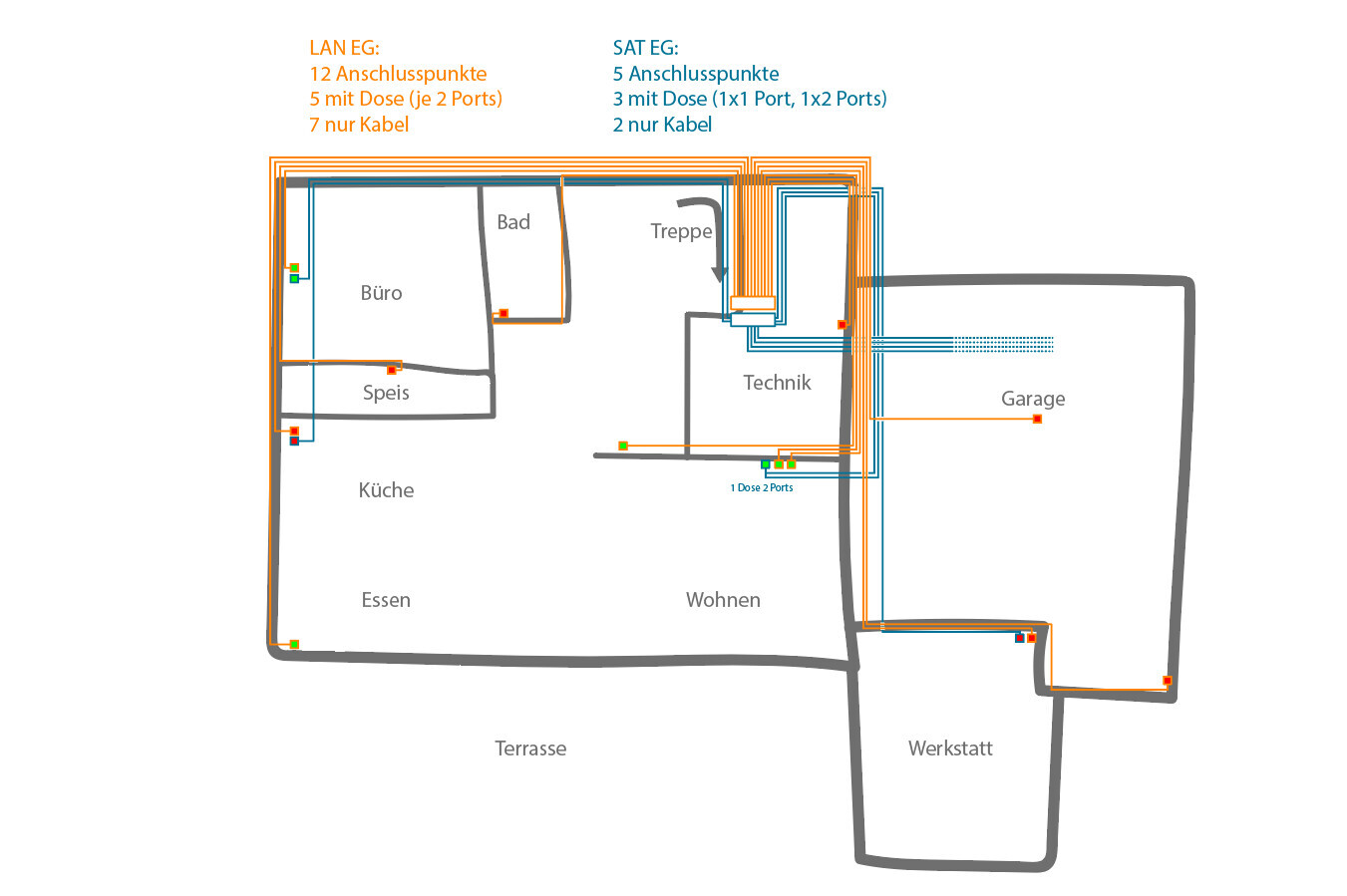
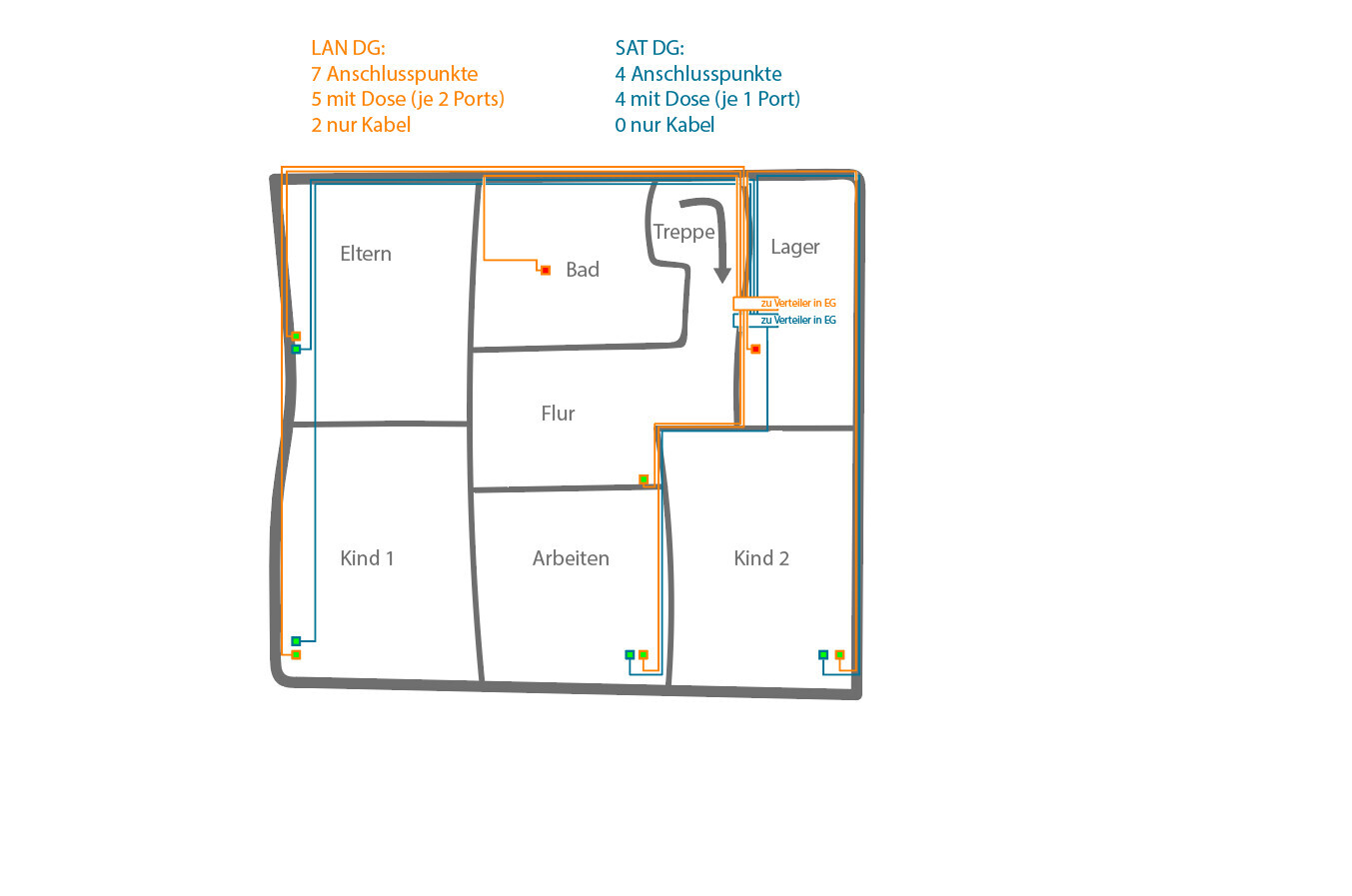
The basic layout should look like in the two attached images.
At the green connection points, one outlet each will be installed (LAN with 2 ports, SAT 1 or 2 ports). The red connection points currently only have cables without outlets and are intended for optional future connections:
In total, the following number of connection points are planned throughout the house:
LAN – GF: 12 connection points (5 with outlets (each with 2 ports), 7 cables only)
LAN – UF: 7 connection points (5 with outlets (each with 2 ports), 2 cables only)
LAN – Total: 19 connection points (10 with outlets (2 ports each), 9 cables only)
SAT – GF: 5 connection points (3 with outlets (one 1port and one 2port), 2 cables only)
SAT – UF: 4 connection points (4 with outlets with 1 port each)
SAT – Total: 9 connection points (7 with outlets (five 1 port, one 2 port), 2 cables only)
All cabling should converge in the technical room and be installed in a server cabinet (19-inch, 12 rack units – RU). This cabinet should ideally be recessed into the wall (then it would be on the other side underneath the stairs).
For LAN, I plan to use duplex CAT7 installation cable, Gigabit 10 Gbit network cable, 1000 MHz shielded twisted pair (S/FTP).
For SAT, I plan to use 135 dB coaxial SAT cable, antenna cable, 4-fold shielded coaxial cable suitable for DVB-S/S2, DVB-C, and DVB-T BK.
All cables (19 duplex LAN = 38 connection points, including those currently only running inside the wall on the opposite side) will then be connected via two 24-port patch panels and a 24-port switch to the Fritzbox (Internet).
From the satellite dish, I want to connect to a multiswitch (inside the server cabinet) and from there to the SAT outlets in the house.
Questions:
I have already looked around the forum a bit to find answers to my (partly more specific) questions about LAN/SAT wiring in a single-family house. However, overall, I didn’t really get the information I needed. Therefore, I would like to explain my situation here in detail, hoping to get some answers to my questions.
Key points:
I am currently planning the LAN/SAT cabling for our single-family house. The rest of the electrical work will be carried out by a professional. To save some money, I want to install the LAN and SAT myself.
Our single-family house has a ground floor (GF), an upper floor (UF), a garage with a workshop, and a small attic. We do not have a basement.
The LAN and SAT outlets should be generously distributed throughout the house and converge in the technical room on the ground floor.
The basic layout should look like in the two attached images.
At the green connection points, one outlet each will be installed (LAN with 2 ports, SAT 1 or 2 ports). The red connection points currently only have cables without outlets and are intended for optional future connections:
In total, the following number of connection points are planned throughout the house:
LAN – GF: 12 connection points (5 with outlets (each with 2 ports), 7 cables only)
LAN – UF: 7 connection points (5 with outlets (each with 2 ports), 2 cables only)
LAN – Total: 19 connection points (10 with outlets (2 ports each), 9 cables only)
SAT – GF: 5 connection points (3 with outlets (one 1port and one 2port), 2 cables only)
SAT – UF: 4 connection points (4 with outlets with 1 port each)
SAT – Total: 9 connection points (7 with outlets (five 1 port, one 2 port), 2 cables only)
All cabling should converge in the technical room and be installed in a server cabinet (19-inch, 12 rack units – RU). This cabinet should ideally be recessed into the wall (then it would be on the other side underneath the stairs).
For LAN, I plan to use duplex CAT7 installation cable, Gigabit 10 Gbit network cable, 1000 MHz shielded twisted pair (S/FTP).
For SAT, I plan to use 135 dB coaxial SAT cable, antenna cable, 4-fold shielded coaxial cable suitable for DVB-S/S2, DVB-C, and DVB-T BK.
All cables (19 duplex LAN = 38 connection points, including those currently only running inside the wall on the opposite side) will then be connected via two 24-port patch panels and a 24-port switch to the Fritzbox (Internet).
From the satellite dish, I want to connect to a multiswitch (inside the server cabinet) and from there to the SAT outlets in the house.
Questions:
- Is it reasonable that everything (2x 24-port patch panels (2 RU), switch (1 RU), telephone system, SAT multiswitch + possibly a second switch + possibly NAS) fits comfortably into a 19-inch server cabinet with 12 RU (it shouldn’t be unnecessarily cramped)? Or would 9 RU even suffice?
- Is it easy to feed the currently 47 cables (19x LAN duplex + 9 coax) into the server cabinet?
- Is there a mounting frame for the SAT distribution equipment designed for installation inside a server cabinet?
- Do I need to worry about overheating? The technical room also contains the main service connection, a washing machine, and a (condensation) dryer.
- Can a 19-inch server cabinet with 12 RU, which is actually intended for wall mounting, be recessed into a wall? I was thinking of simply creating an appropriately sized hole so the server cabinet passes through the wall and protrudes out the other side (this would be no problem since it is under the stairs).
- What is the best way to ground the entire system?
- Is it really necessary to run the cables inside conduits (empty ducts)? Does this method truly allow the cables to be replaced later, or is it usually too difficult in practice to be a viable option? (We are building with a timber frame structure, if that is relevant.)
- Would you recommend installing Wi-Fi access points? If yes, where? I often read "in the ceiling," but I would actually prefer not to do that.
- Would you recommend installing more outlets? Overall, I would still have 10 free ports on the patch panels.
You can place the Fritzbox behind the cupboard under the stairs; then it might be able to provide Wi-Fi for the entire house.
I would avoid using PoE injectors due to operating costs. A PoE switch is more cost-effective in terms of power consumption and maintenance over a few years.
In general, I would recommend keeping an eye on power consumption with all this tech playing around.
A question for those who already have Ethernet wiring in their homes: How many devices do you actually use in the house? Wouldn’t it be enough to just patch the 4 ports of the Fritzbox until there is an actual need?
I would avoid using PoE injectors due to operating costs. A PoE switch is more cost-effective in terms of power consumption and maintenance over a few years.
In general, I would recommend keeping an eye on power consumption with all this tech playing around.
A question for those who already have Ethernet wiring in their homes: How many devices do you actually use in the house? Wouldn’t it be enough to just patch the 4 ports of the Fritzbox until there is an actual need?

With DECT phones, the question is how good the coverage is. The Fritzbox is in a metal case. You might need repeaters. Unfortunately, I know many people who have problems with this. The Fritzbox could theoretically also be installed outside. I would need to think about that. If it would give me better DECT reception and save me an access point.
The phones connected to LAN are IP or SIP phones. Do you get the SIP data from your provider? They also need a power supply or PoE. SIP/SIP data doesn’t ring a bell right now. (I don’t know if I get this data from the provider. I will most likely start with Telekom.) I thought I’d just buy two GIGASET IP phones, plug them in, and use them easily.
What kind of door station do you want?
Some work via mobile phone. Unfortunately, mostly through the manufacturer’s cloud, which would be a no-go for me.
Alternatively, a SIP phone system. You can integrate this both with Fritzfon and with SIP phones/mobile phones. I would like a SIEDLE door station with a flush-mount mailbox, a simple doorbell, and door opener function.
I thought I would connect it to my Fritzbox and then be able to answer the doorbell from any phone.
The 4 ports aren’t enough for me. I used to have an additional 8-port switch for a long time. A new 16-port switch would have been sufficient, but the 24-port had a very attractive price.
Devices:
Network printer
NAS
CCU 2
2 x Raspberry Pi
TV
PC
Access point
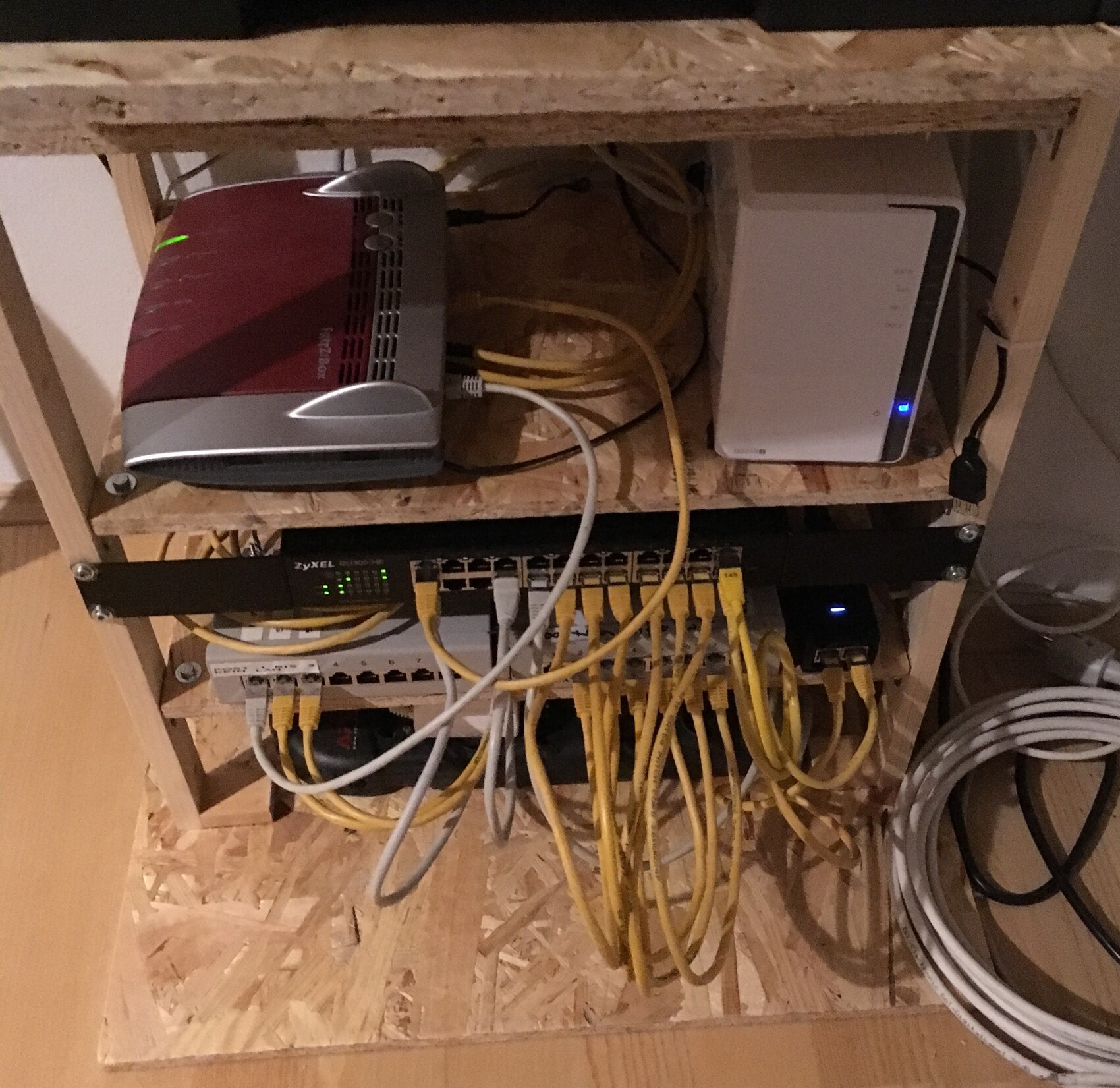
I still haven’t organized all the equipment into a network cabinet yet, but eventually I’ll get around to that too.
Devices:
Network printer
NAS
CCU 2
2 x Raspberry Pi
TV
PC
Access point
I still haven’t organized all the equipment into a network cabinet yet, but eventually I’ll get around to that too.
hanse987 schrieb:
Four ports are not enough for me. For a long time, I also had an 8-port switch. A new 16-port switch would have been sufficient, but the 24-port one was offered at a very attractive price.
Devices:
Network printer
NAS
CCU 2
2 x Raspberry Pi
TV
PC
Access point
I still haven’t installed all the equipment into a network cabinet, but someday I’ll get around to it. I think it will turn out like this for me too...
Can you share a bit about your setup?
Are the gray components two patch panels?
Is the black strip your switch?
What is the small black box on the right?
Is the white box a NAS?
Do you have a separate router or additional access points?
How is this setup in terms of noise level?
Have you integrated your door intercom system with this setup?

The gray components are patch panels. If I were you, I wouldn’t start with a 24-port panel for rack installation right away.
The small black device is a PoE injector from Unifi.
The white box is a NAS (2-bay Synology?).
From the setup, I only see a Fritzbox as the router and one access point, so just one injector.
Everything I see, except for the NAS, should be fanless. If installed inside a cabinet, it won’t be audible.
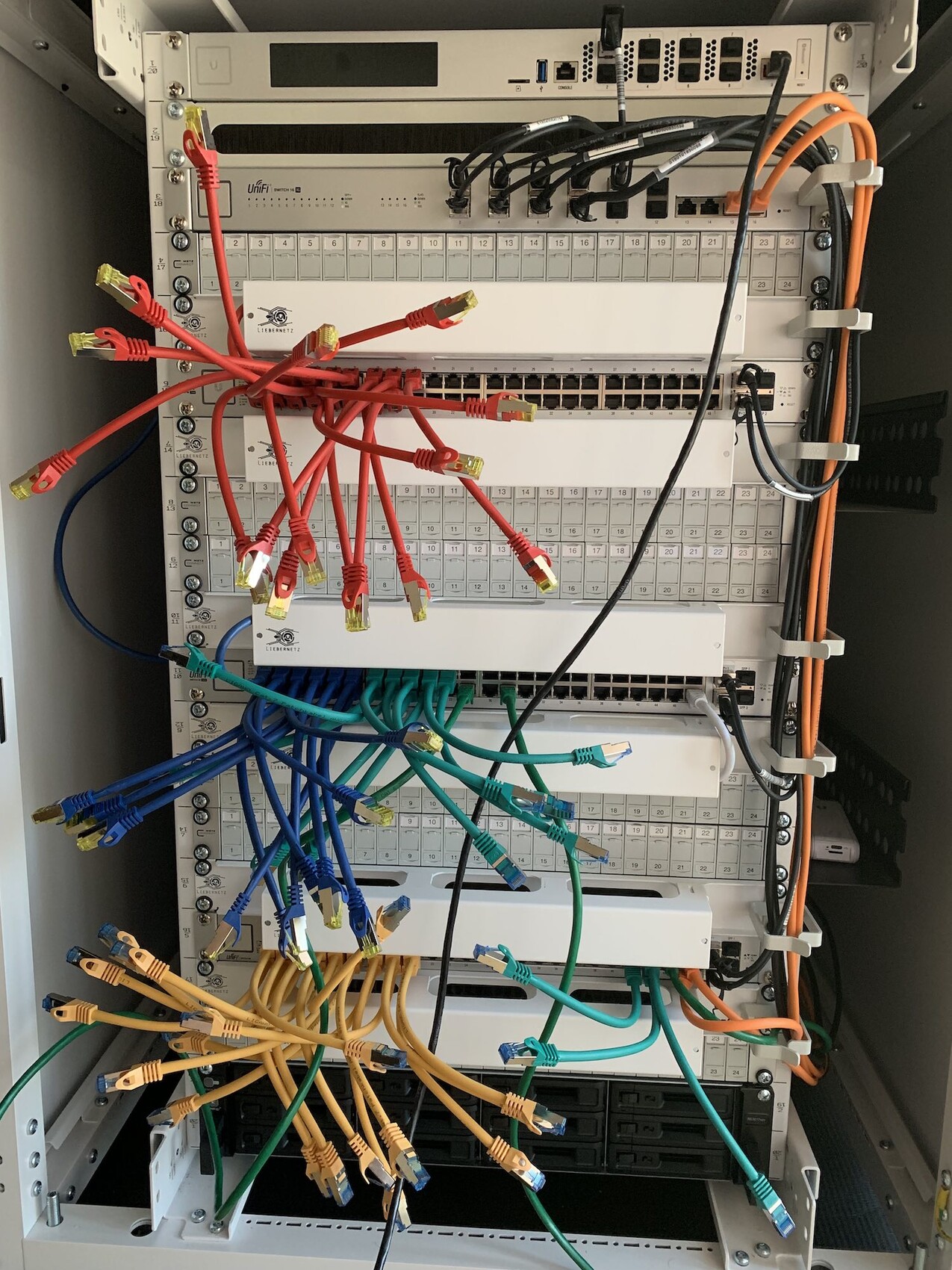
I’m currently working on our network for the new house. The setup so far looks like this:
The small black device is a PoE injector from Unifi.
The white box is a NAS (2-bay Synology?).
From the setup, I only see a Fritzbox as the router and one access point, so just one injector.
Everything I see, except for the NAS, should be fanless. If installed inside a cabinet, it won’t be audible.
I’m currently working on our network for the new house. The setup so far looks like this:
Similar topics