
ᐅ Implementing LAN and Satellite Systems in a Single-Family Home with a Centralized Server Cabinet
Created on: 26 Feb 2019 13:16
E
enoausa
Hello everyone!
I have already looked around the forum a bit to find answers to my (partly more specific) questions about LAN/SAT wiring in a single-family house. However, overall, I didn’t really get the information I needed. Therefore, I would like to explain my situation here in detail, hoping to get some answers to my questions.
Key points:
I am currently planning the LAN/SAT cabling for our single-family house. The rest of the electrical work will be carried out by a professional. To save some money, I want to install the LAN and SAT myself.
Our single-family house has a ground floor (GF), an upper floor (UF), a garage with a workshop, and a small attic. We do not have a basement.
The LAN and SAT outlets should be generously distributed throughout the house and converge in the technical room on the ground floor.
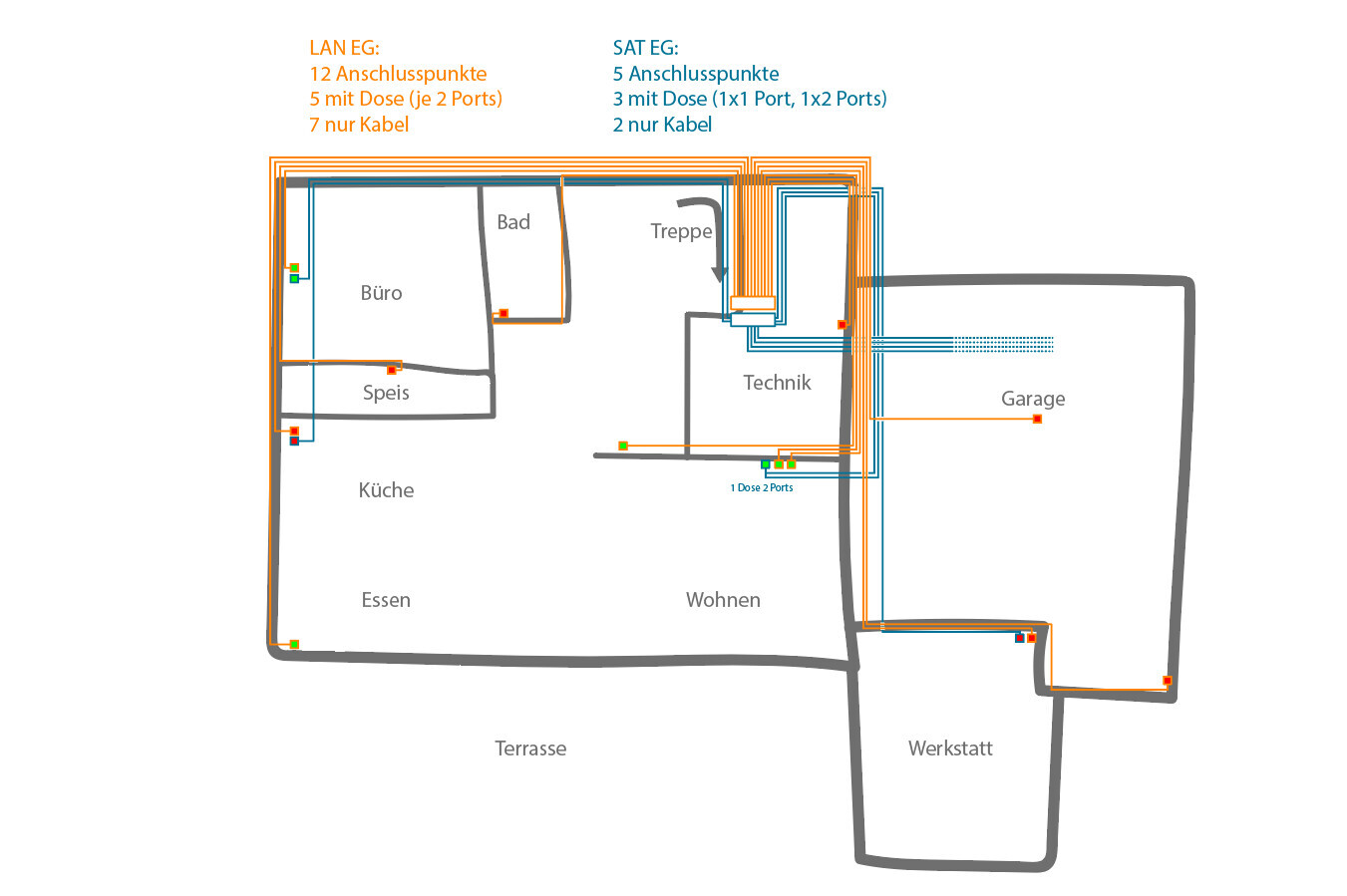
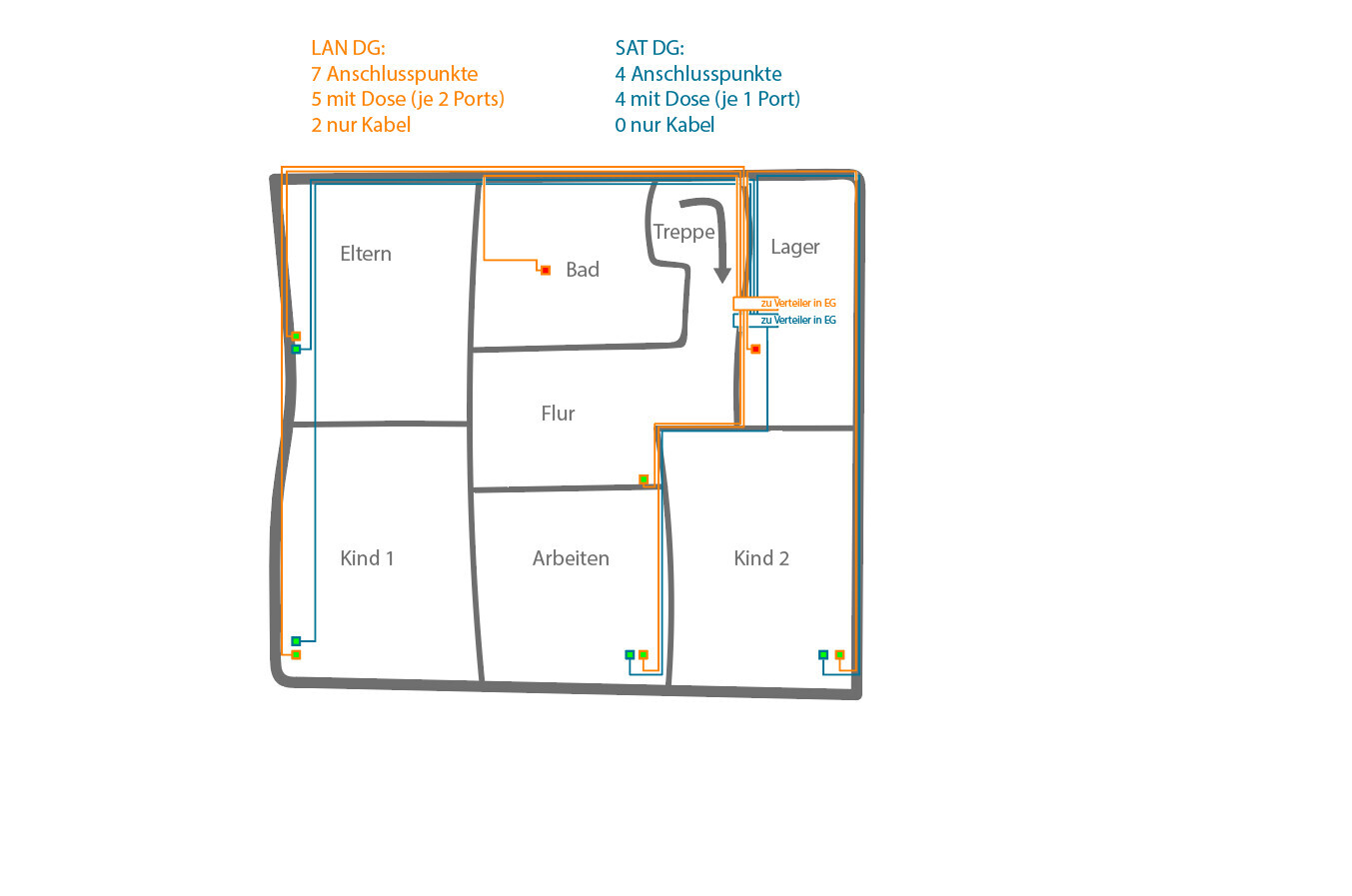
The basic layout should look like in the two attached images.
At the green connection points, one outlet each will be installed (LAN with 2 ports, SAT 1 or 2 ports). The red connection points currently only have cables without outlets and are intended for optional future connections:
In total, the following number of connection points are planned throughout the house:
LAN – GF: 12 connection points (5 with outlets (each with 2 ports), 7 cables only)
LAN – UF: 7 connection points (5 with outlets (each with 2 ports), 2 cables only)
LAN – Total: 19 connection points (10 with outlets (2 ports each), 9 cables only)
SAT – GF: 5 connection points (3 with outlets (one 1port and one 2port), 2 cables only)
SAT – UF: 4 connection points (4 with outlets with 1 port each)
SAT – Total: 9 connection points (7 with outlets (five 1 port, one 2 port), 2 cables only)
All cabling should converge in the technical room and be installed in a server cabinet (19-inch, 12 rack units – RU). This cabinet should ideally be recessed into the wall (then it would be on the other side underneath the stairs).
For LAN, I plan to use duplex CAT7 installation cable, Gigabit 10 Gbit network cable, 1000 MHz shielded twisted pair (S/FTP).
For SAT, I plan to use 135 dB coaxial SAT cable, antenna cable, 4-fold shielded coaxial cable suitable for DVB-S/S2, DVB-C, and DVB-T BK.
All cables (19 duplex LAN = 38 connection points, including those currently only running inside the wall on the opposite side) will then be connected via two 24-port patch panels and a 24-port switch to the Fritzbox (Internet).
From the satellite dish, I want to connect to a multiswitch (inside the server cabinet) and from there to the SAT outlets in the house.
Questions:
I have already looked around the forum a bit to find answers to my (partly more specific) questions about LAN/SAT wiring in a single-family house. However, overall, I didn’t really get the information I needed. Therefore, I would like to explain my situation here in detail, hoping to get some answers to my questions.
Key points:
I am currently planning the LAN/SAT cabling for our single-family house. The rest of the electrical work will be carried out by a professional. To save some money, I want to install the LAN and SAT myself.
Our single-family house has a ground floor (GF), an upper floor (UF), a garage with a workshop, and a small attic. We do not have a basement.
The LAN and SAT outlets should be generously distributed throughout the house and converge in the technical room on the ground floor.
The basic layout should look like in the two attached images.
At the green connection points, one outlet each will be installed (LAN with 2 ports, SAT 1 or 2 ports). The red connection points currently only have cables without outlets and are intended for optional future connections:
In total, the following number of connection points are planned throughout the house:
LAN – GF: 12 connection points (5 with outlets (each with 2 ports), 7 cables only)
LAN – UF: 7 connection points (5 with outlets (each with 2 ports), 2 cables only)
LAN – Total: 19 connection points (10 with outlets (2 ports each), 9 cables only)
SAT – GF: 5 connection points (3 with outlets (one 1port and one 2port), 2 cables only)
SAT – UF: 4 connection points (4 with outlets with 1 port each)
SAT – Total: 9 connection points (7 with outlets (five 1 port, one 2 port), 2 cables only)
All cabling should converge in the technical room and be installed in a server cabinet (19-inch, 12 rack units – RU). This cabinet should ideally be recessed into the wall (then it would be on the other side underneath the stairs).
For LAN, I plan to use duplex CAT7 installation cable, Gigabit 10 Gbit network cable, 1000 MHz shielded twisted pair (S/FTP).
For SAT, I plan to use 135 dB coaxial SAT cable, antenna cable, 4-fold shielded coaxial cable suitable for DVB-S/S2, DVB-C, and DVB-T BK.
All cables (19 duplex LAN = 38 connection points, including those currently only running inside the wall on the opposite side) will then be connected via two 24-port patch panels and a 24-port switch to the Fritzbox (Internet).
From the satellite dish, I want to connect to a multiswitch (inside the server cabinet) and from there to the SAT outlets in the house.
Questions:
- Is it reasonable that everything (2x 24-port patch panels (2 RU), switch (1 RU), telephone system, SAT multiswitch + possibly a second switch + possibly NAS) fits comfortably into a 19-inch server cabinet with 12 RU (it shouldn’t be unnecessarily cramped)? Or would 9 RU even suffice?
- Is it easy to feed the currently 47 cables (19x LAN duplex + 9 coax) into the server cabinet?
- Is there a mounting frame for the SAT distribution equipment designed for installation inside a server cabinet?
- Do I need to worry about overheating? The technical room also contains the main service connection, a washing machine, and a (condensation) dryer.
- Can a 19-inch server cabinet with 12 RU, which is actually intended for wall mounting, be recessed into a wall? I was thinking of simply creating an appropriately sized hole so the server cabinet passes through the wall and protrudes out the other side (this would be no problem since it is under the stairs).
- What is the best way to ground the entire system?
- Is it really necessary to run the cables inside conduits (empty ducts)? Does this method truly allow the cables to be replaced later, or is it usually too difficult in practice to be a viable option? (We are building with a timber frame structure, if that is relevant.)
- Would you recommend installing Wi-Fi access points? If yes, where? I often read "in the ceiling," but I would actually prefer not to do that.
- Would you recommend installing more outlets? Overall, I would still have 10 free ports on the patch panels.
I’ll try to answer some of the questions:
- A 9U rack might work, but it can quickly become too cramped. Maybe in the future, a server or devices without a 19-inch form factor could be added, or something else over the next 30 years. It’s better to go for a larger rack if possible.
- Those should definitely fit in the rack, but comfortably might be another matter. It also depends on the depth of the racks.
- I can’t answer the satellite-related questions, but it seems oversized to me. Even the kitchen, workshop basement, and pantry with satellite connection... is all of that really necessary?
- Regarding conduit pipes, it’s hard to say what the next 20 years will bring. I consider cable replacement very unlikely. Personally, I would install conduit pipes sparingly. As a compromise, maybe just conduit pipes up to the first floor, so in the distant future you can more easily re-route cables from room to room.
- Access points: Definitely include them, of course. One central access point might be enough, for example in your upstairs hallway. It doesn’t have to be mounted on the ceiling, it really doesn’t matter. If that’s not sufficient, then add more. You’ll notice once you’re living there. But there are enough free sockets in every room anyway.
- Other: Since you already have plenty of outlets everywhere, all that’s missing is outdoor coverage for the terrace. If I were you, I would consider downsizing to a patch panel.
Thanks for the feedback...
What about outlets for outdoor use? Are there special types? What about safety considerations here?
How about grounding and overheating concerns?
Tassimat schrieb:I already planned for a NAS, which should fit inside the rack.
- A 9U rack might work, but it gets cramped quickly. Maybe in the future a server will be added, or devices that don’t have a 19" form factor, or other equipment over the next 30 years. Better to choose the larger rack if possible.
Tassimat schrieb:Satellite is planned “only” in the kitchen. In the pantry there will only be LAN, mainly for the refrigerator from the back.
- I can’t answer questions about satellite, but it seems oversized to me. Even kitchen, workshop cellar, and pantry with satellite connection… is all that really necessary?
Tassimat schrieb:I was thinking of access points that can be installed in a wall outlet box. Not a plug-in solution where a network cable is then plugged in. Can I connect something like that directly to the in-wall wiring cable?
- Access points: Absolutely required, of course. One central unit if it’s enough, e.g. in your hallway upstairs. Doesn’t have to be ceiling-mounted, totally fine. If not enough, then add more. You’ll realize once you start living there. But there are enough free ports in every room.
Tassimat schrieb:Downsizing will be difficult. I probably won’t go below 25 ports. Apart from the space in the server rack, I don’t see any reason for it.
- Other: Since you already have plenty of outlets everywhere, only the terrace outdoors is missing. If I were you, I would rather downsize to a patch panel.
What about outlets for outdoor use? Are there special types? What about safety considerations here?
How about grounding and overheating concerns?
enoausa schrieb:
I was thinking about access points that can be installed inside an electrical box. Not a plug-in solution where a network cable is simply plugged in. Is it possible to connect something like that directly to a structured cabling cable?There are flush-mounted access points. The ones I know still protrude several millimeters (inches) from the wall and are larger than standard electrical outlets or light switches. But are they any good? They usually have only small antennas. I would really appreciate a user review here.
For outdoor boxes, just give them the same access rights as the guest Wi-Fi. Or turn them off when not in use. That’s exactly the advantage of your complex installation—you can use a nice switch with managed ports. Or unplug manually during winter.
enoausa schrieb:
I was thinking of access points that can be installed inside a wall box. Not a plug-in solution where a network cable is simply plugged in. Is it possible to connect something like that directly to an in-wall cable?By plug-in solution, do you mean plugged into a power outlet? I would only connect an access point directly to the network cable and power it via PoE (Power over Ethernet).
I don’t have any experience with built-in access points. The ones I quickly found online, I would never use. You can get great access points for similar prices. I use Unifi access points myself. They are mounted on the ceiling because ceiling installation provides the best wireless coverage. If the network cable is routed cleverly, it won’t be visible behind the access point. Power supply is done via a PoE injector, or if you have multiple PoE devices, you can use a PoE switch.

Recessing is not ideal since you only have access from the front.
You can also mount access points on the wall, but the ceiling is better.
If you really want a wall mount, take a look at the Unifi IW-HD. It combines the access point and LAN ports.
Does the technical room have an (oversized) mechanical ventilation system with supply and exhaust air?
Otherwise, I would carefully consider whether to place the equipment in a warm and humid room.
I would also think about using an appropriate router and switch to work with VLANs.
I would choose a cabinet with at least 12 height units.
It fills up quickly.
You can also mount access points on the wall, but the ceiling is better.
If you really want a wall mount, take a look at the Unifi IW-HD. It combines the access point and LAN ports.
Does the technical room have an (oversized) mechanical ventilation system with supply and exhaust air?
Otherwise, I would carefully consider whether to place the equipment in a warm and humid room.
I would also think about using an appropriate router and switch to work with VLANs.
I would choose a cabinet with at least 12 height units.
It fills up quickly.
Similar topics