
Hello everyone,
I hope the topic description fits my question. Our house is now turnkey ready. The electrician rolled up all the network cables and hung them under the circuit breaker panel in the utility room.
For cost reasons, I would like to connect the cables to the patch panel myself.
I have 6 network outlets in the house. So I need a patch panel with at least 6 ports. A network switch and a Fritz!Box are already available.
Which patch panel would you recommend?
What else do I need to connect to the patch panel?
The "small thin gray" cable is the telephone connection, right? Which connector do I need for that?
I hope you can give me a bit of guidance.
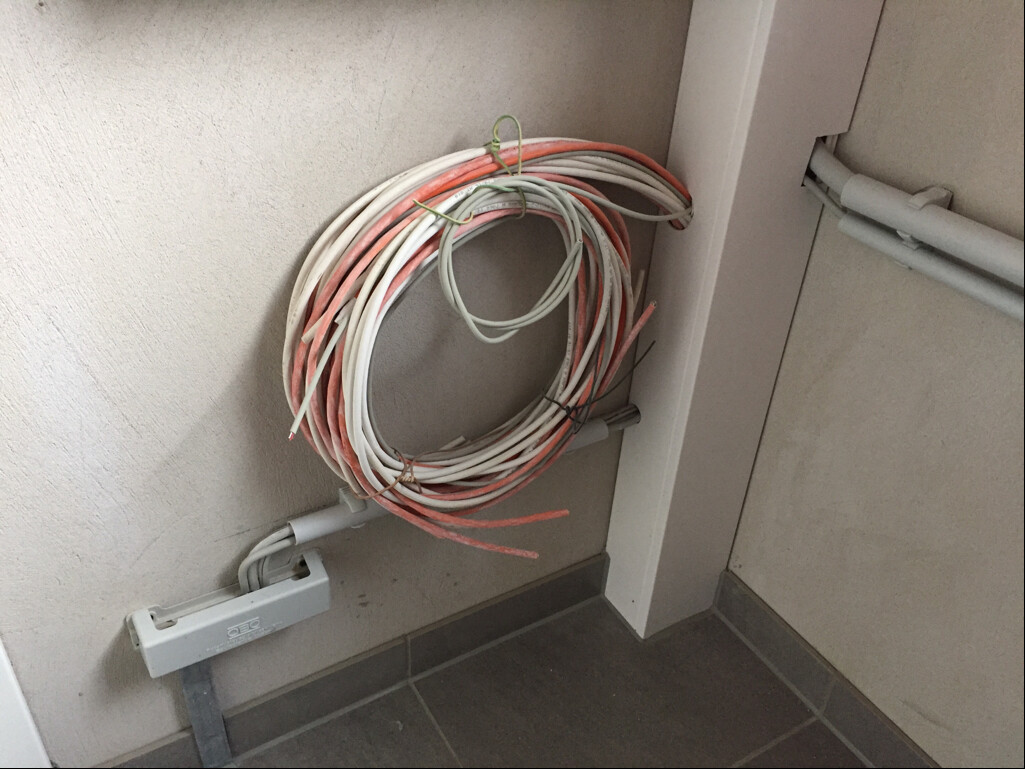
I hope the topic description fits my question. Our house is now turnkey ready. The electrician rolled up all the network cables and hung them under the circuit breaker panel in the utility room.
For cost reasons, I would like to connect the cables to the patch panel myself.
I have 6 network outlets in the house. So I need a patch panel with at least 6 ports. A network switch and a Fritz!Box are already available.
Which patch panel would you recommend?
What else do I need to connect to the patch panel?
The "small thin gray" cable is the telephone connection, right? Which connector do I need for that?
I hope you can give me a bit of guidance.
C
Caspar202028 Apr 2016 15:21Normally, the telecommunications technician connects the "first outlet" to the so-called main distribution frame (MDF). Usually, this MDF is located inside; possibly outside in your case. The splitter and network termination unit (NTU) for ISDN are then connected to this first outlet.
In any case, ask the electrician, because you should not touch the MDF unless the telecom provider has released and activated the connection.
In any case, ask the electrician, because you should not touch the MDF unless the telecom provider has released and activated the connection.
C
Caspar202028 Apr 2016 15:25If the cable actually goes to the main distribution point (MDP), you only need to get a TAE surface-mounted socket and simply screw it onto the wall. When the telecom technician arrives, they will connect the MDP to this socket, check whether ISDN/DSL or the connection to the exchange is working, and then leave. You can then connect all your equipment to this socket.
Addendum:
The TAE socket must, of course, be at least a TAE 6 F socket. It can also be a TAE 6NFN, but since ISDN/DSL equipment will be connected afterwards anyway, a 6 F socket is completely sufficient.
Addendum:
The TAE socket must, of course, be at least a TAE 6 F socket. It can also be a TAE 6NFN, but since ISDN/DSL equipment will be connected afterwards anyway, a 6 F socket is completely sufficient.
 Sascha aus H28 Apr 2016 16:35
bergi schrieb:
@Sascha: What is the advantage of being able to rearrange cables directly at the patch panel?! Ultimately, the network is controlled via the Fritz!Box anyway, right?!
Is that enough? If you only have the FritzBox and it is located next to the patch panel in the utility room, then there is no advantage.
However, if you have, for example, a NAS in your office that should not be connected to the FritzBox but instead to a computer in another room, you can "pass through" connections via the patch panel.
That is the advantage of a star topology... but as mentioned, it strongly depends on what the user plans to do.

I only did this last month at our place.
The mounting kit with tester is an absolute must for us—about 10 cables with 8 wires each and outlets.
I chose a 24-port patch panel because it was affordable.
A 24-port managed switch with 1 Gbps!
For the patch panel enclosure, I had to use an Ikea shelf for 15 euros.
I connected 8 outlets
+ NAS
+ Somfy
1x Fritzbox + O2 box. I need to retrieve the access data again because of the move, got a new password, and the annoying router lock-in.
The mounting kit with tester is an absolute must for us—about 10 cables with 8 wires each and outlets.
I chose a 24-port patch panel because it was affordable.
A 24-port managed switch with 1 Gbps!
For the patch panel enclosure, I had to use an Ikea shelf for 15 euros.
I connected 8 outlets
+ NAS
+ Somfy
1x Fritzbox + O2 box. I need to retrieve the access data again because of the move, got a new password, and the annoying router lock-in.

tomtom79 schrieb:
An IKEA shelf has to serve as the enclosure for the patch panel The LackRack?
For 100€ you can also get a small network cabinet including accessories like the patch panel, cable management, and power outlets. I find that a tidier solution than hanging or even just placing the components separately somewhere. But I have different requirements, so I mounted a 12U server rack to the wall.
Similar topics