
ᐅ Are there houses that even professional design software cannot accurately model?
Created on: 6 Apr 2018 23:36
T
Tobias ClarenT
Tobias Claren6 Apr 2018 23:36Hello.
It seems that in every house planning software, whether free like "Sweet Home 3D" or paid like "Architect 3D," you always set only one level for the ceiling and floor.
With Architect 3D, this can be seen in a video on YouTube.
Can that really be the case? Does this happen so rarely?
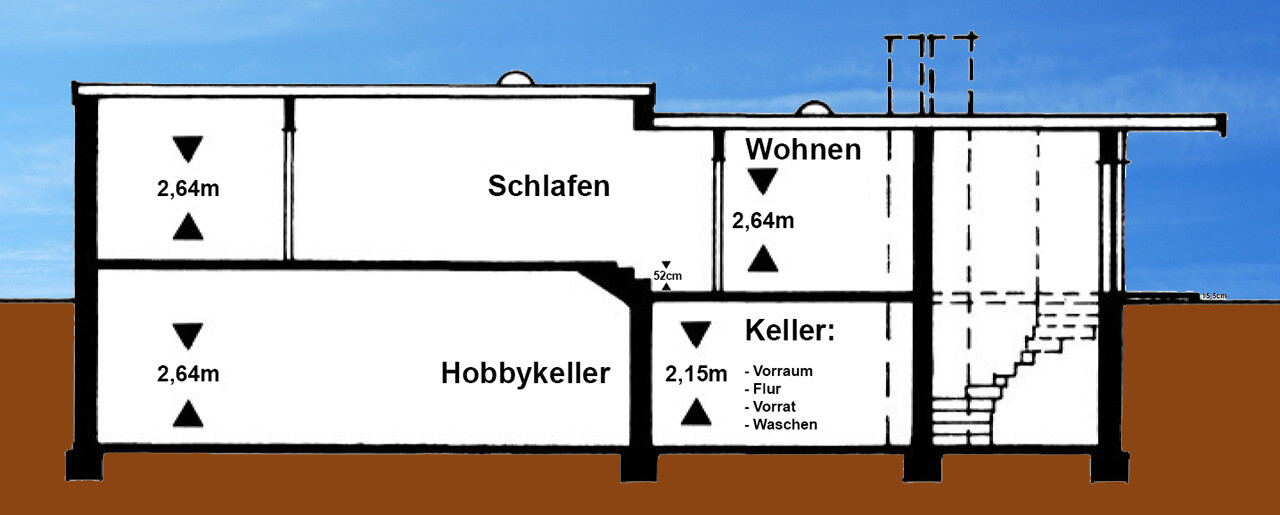
Attached is an example of how something like this might look.
Of course, a 3D program like SketchUp could somehow represent that, but it is not specialized house planning software...
It seems that in every house planning software, whether free like "Sweet Home 3D" or paid like "Architect 3D," you always set only one level for the ceiling and floor.
With Architect 3D, this can be seen in a video on YouTube.
Can that really be the case? Does this happen so rarely?
Attached is an example of how something like this might look.
Of course, a 3D program like SketchUp could somehow represent that, but it is not specialized house planning software...
With the software I use, this would be possible; I think it might also be doable with SweetHome3D, but some workarounds would be needed—modeling intermediate levels in both cases. So it should be possible, but the result wouldn’t be very neat... and I’m not completely sure about SweetHome3D either.
T
Tobias Claren7 Apr 2018 00:06Yes, I have thought about that as well, but just look at the sketch.
If I make the basement ceiling 264 cm (104 inches) high everywhere and attach a "slab" to the ceiling except in the hobby basement, there would no longer be a staircase leading up to the sleeping area. Also, you would have to go higher into the house. The house is already built, so that would no longer reflect reality.
If I then add a landing in the sleeping area so that it is raised again by a staircase, the entire area ends up being too high, for example in comparison to the terrace and the rest of the rear part.
I don’t know how to “trick” this, or if I have missed an option?
If a software cannot handle this, not even the professional ones, then that would be not only unprofessional for professional software, it should at least allow placing two houses directly wall-to-wall in one plan to “trick” this.
Then you could plan the height differences shown in the picture as two houses.
If you stand on the roof, the rear part is actually higher than the front.
With its own continuous roof shingle cladding, like a second house.
The actual neighboring house is on the same level.
If I make the basement ceiling 264 cm (104 inches) high everywhere and attach a "slab" to the ceiling except in the hobby basement, there would no longer be a staircase leading up to the sleeping area. Also, you would have to go higher into the house. The house is already built, so that would no longer reflect reality.
If I then add a landing in the sleeping area so that it is raised again by a staircase, the entire area ends up being too high, for example in comparison to the terrace and the rest of the rear part.
I don’t know how to “trick” this, or if I have missed an option?
If a software cannot handle this, not even the professional ones, then that would be not only unprofessional for professional software, it should at least allow placing two houses directly wall-to-wall in one plan to “trick” this.
Then you could plan the height differences shown in the picture as two houses.
If you stand on the roof, the rear part is actually higher than the front.
With its own continuous roof shingle cladding, like a second house.
The actual neighboring house is on the same level.
SweetHome3D is certainly not professional software. I use CADVilla, which I would categorize in the ambitious hobbyist price range (€50-250), while professionals usually pay four to five figures.
With CADVilla, even the smallest version offers this functionality. You can design multiple building sections as separate buildings and assign separate floors to each. It’s fairly straightforward, but the software has a different learning curve compared to SweetHome3D.
I modeled the entire site based on the contour lines from the land registry maps to capture the elevations of neighboring properties, the street, and so on, in order to plan the house entrance and carport area (where steps, ramps, and retaining walls against the neighbor’s property will be located).
With CADVilla, even the smallest version offers this functionality. You can design multiple building sections as separate buildings and assign separate floors to each. It’s fairly straightforward, but the software has a different learning curve compared to SweetHome3D.
I modeled the entire site based on the contour lines from the land registry maps to capture the elevations of neighboring properties, the street, and so on, in order to plan the house entrance and carport area (where steps, ramps, and retaining walls against the neighbor’s property will be located).
T
Tobias Claren7 Apr 2018 00:26Also, a comparable price to Architect 3D, which ranges from a few tens up to around 300, I believe.
As a tip: There are quite a few (many) YouTube tutorials on CADVilla that show how to model terrain, underground garage entrances, and so on. I find they give a pretty good impression of what’s possible and how to do it, without needing to buy or install anything. The narration is quite entertaining—I have no idea what the speaker was on [emoji6]
Similar topics