
Hello everyone,
Slowly but surely, we are getting closer to moving in.
In about 4-6 weeks, we will most likely move into our new build.
For this reason, I am gradually starting to think about the technology in my house so that I have all the necessary information in time and everything works properly.
We built with a basement — so the utility room is located in the basement.
--> Fiber optic connection from the telecom provider – 100 Mbps with Magenta Smart TV (we only watch Internet TV – no satellite connection).
--> 7 double LAN outlets installed throughout the house (1x bedroom, 2x kids’ rooms, 1x living area, 1x office, 2x access points) – so 14 individual cables.
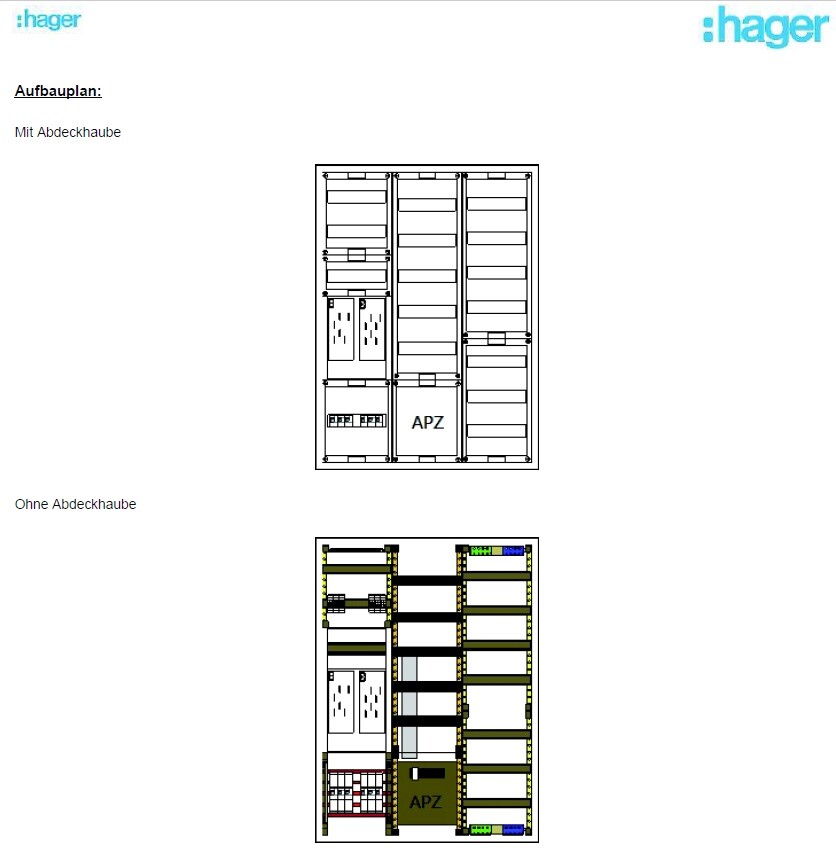
--> The distribution panel on the wall is attached (in case this is important).
Now to my questions:
1. I’m considering buying the FritzBox 7590 router because it seems to be one of the leading models on the market right now and has received very good reviews. I haven’t had good experiences with Speedports in the past, but the FritzBox has always left a positive impression.
– Does this make sense?
2. Is a router alone enough for this setup? It seems to me that there are too few ports on the router, so I definitely need a switch, correct?
I only know switches from LAN parties years ago and don’t have much experience with them. When connecting router <--> switch, do I lose any speed?
– If a switch is needed, what should I pay attention to when buying one? Are there any models you have had good experiences with?
3. Access points – how does this work? I am currently a bit unsure because I only had LAN cables pre-installed in the walls in the ground floor and attic hallway areas for the access points. Is that sufficient? How is the access point powered? Is it enough to simply plug this cable into the switch or the router? Is that even possible?
So: which cables should connect to the router, and which should go to a switch?
I would appreciate a simple explanation! I don’t need a high-end solution… There are currently and will be just two of us living in a very large house, no kids into gaming or anything like that… I just want reliable Wi-Fi throughout the house (since we have concrete ceilings) and good streaming of my Internet TV.
Additionally:
Are there any mounting options for switches or routers? At the moment, I don’t see any space for them in my distribution panel 😀
Slowly but surely, we are getting closer to moving in.
In about 4-6 weeks, we will most likely move into our new build.
For this reason, I am gradually starting to think about the technology in my house so that I have all the necessary information in time and everything works properly.
We built with a basement — so the utility room is located in the basement.
--> Fiber optic connection from the telecom provider – 100 Mbps with Magenta Smart TV (we only watch Internet TV – no satellite connection).
--> 7 double LAN outlets installed throughout the house (1x bedroom, 2x kids’ rooms, 1x living area, 1x office, 2x access points) – so 14 individual cables.
--> The distribution panel on the wall is attached (in case this is important).
Now to my questions:
1. I’m considering buying the FritzBox 7590 router because it seems to be one of the leading models on the market right now and has received very good reviews. I haven’t had good experiences with Speedports in the past, but the FritzBox has always left a positive impression.
– Does this make sense?
2. Is a router alone enough for this setup? It seems to me that there are too few ports on the router, so I definitely need a switch, correct?
I only know switches from LAN parties years ago and don’t have much experience with them. When connecting router <--> switch, do I lose any speed?
– If a switch is needed, what should I pay attention to when buying one? Are there any models you have had good experiences with?
3. Access points – how does this work? I am currently a bit unsure because I only had LAN cables pre-installed in the walls in the ground floor and attic hallway areas for the access points. Is that sufficient? How is the access point powered? Is it enough to simply plug this cable into the switch or the router? Is that even possible?
So: which cables should connect to the router, and which should go to a switch?
I would appreciate a simple explanation! I don’t need a high-end solution… There are currently and will be just two of us living in a very large house, no kids into gaming or anything like that… I just want reliable Wi-Fi throughout the house (since we have concrete ceilings) and good streaming of my Internet TV.
Additionally:
Are there any mounting options for switches or routers? At the moment, I don’t see any space for them in my distribution panel 😀
netuser schrieb:
If his offer includes a pre-configured patch panel, he would probably just nail it to the wall...
If you provide him with the cabinet and a suitable patch panel, he will likely have no problem routing the cables directly through it and connecting to it...
I would install the cabinet under your main distribution board since the cables are already hanging there. Then they can be routed through the upper part of the cabinet and installed neatly. From my point of view, a 10" cabinet should be sufficient, for example a Digitus DN-10-09U. The advantage is that it is only 30 cm (12 inches) deep, similar to the distribution board, so it won’t stick out much. At least in my case, this was important because it is directly behind the door... The 19" cabinet that @rick2018 recommended is only available in a 400 mm (16 inch) depth. The 10" cabinet is available in 300 mm (12 inch) depth, as you mentioned. If the smaller one is enough for a switch, router, patch panel, and power strip, I would also prefer the smaller network cabinet.
What do you think? Is the DN-10-09U - 10" really sufficient?
Ideally, I would like the patch panel to come from him, as long as it can definitely be connected universally here. He has probably already ordered it... I don’t want to do much remodeling, unless it’s no extra effort for him to install everything inside the network cabinet.
I would have simply given it to him and told him to mount the patch panel here.
@rick2018 – what do you mean by a power outlet inside the network cabinet? 😀 I can just plug the cable from the power strip into the electricity cabinet at the top, right? Or do you mean he needs to install an outlet behind the new network cabinet? But then a hole would have to be drilled in the cabinet, wouldn’t it? Somehow I’m a bit lost right now xD

Prager91 schrieb:
What do you think? Is DN-10-09U - 10" really sufficient?No. The selection of 10" devices is practically non-existent. Always go for 19".The electrician will likely use the cheapest patch panel possible and just terminate everything there. Trying to fit that into a rack afterwards is a real hassle. Ask him if he can terminate keystone jacks on the cables and install a keystone patch panel in the rack yourself. It’s much easier, even with a small number of connections.

@netuser
I can only find the Telekom Speedport Smart 4 everywhere – but not the "PLUS" version?
The regular Smart 4 is relatively affordable (€130) – if it’s any good and you’re satisfied with it, I would consider switching back to Speedport instead of the Fritzbox 5530 Fiber.
Do you mean that one, or is there actually a newer version available here?
I can only find the Telekom Speedport Smart 4 everywhere – but not the "PLUS" version?
The regular Smart 4 is relatively affordable (€130) – if it’s any good and you’re satisfied with it, I would consider switching back to Speedport instead of the Fritzbox 5530 Fiber.
Do you mean that one, or is there actually a newer version available here?
Araknis schrieb:
No. The selection of 10" devices is virtually nonexistent. Always go for 19". Do you mean 10" cabinets or the equipment for them?
Well, of course you have to consider that, but sometimes less is more. And with the "minimalistic" requirements of the original poster, there’s no need to overdo it.
@Prager91 Take a look at the pictures, for example of the DN-10-09U, where some show the possible installation content. In my opinion, that should be enough for you, but a larger size certainly won’t hurt. It’s just counterproductive if your goal is to install as cost-effectively and needs-based as possible.

I have the AVM FB 5530 for my fiber optic connection. However, I have to say right away that the Wi-Fi on the is not very good.
I’m only using it as the "entry box." After that, there’s a switch, and at the other end, an older 7390 is connected.
If the 7390 ever stops working, it will be replaced by a 7590 or its successor.
In its current condition, the 7390 is significantly better than the newer 5530 when it comes to Wi-Fi. This is due to the antennas built into the box.
The rest has already been accurately described to you.
I’m only using it as the "entry box." After that, there’s a switch, and at the other end, an older 7390 is connected.
If the 7390 ever stops working, it will be replaced by a 7590 or its successor.
In its current condition, the 7390 is significantly better than the newer 5530 when it comes to Wi-Fi. This is due to the antennas built into the box.
The rest has already been accurately described to you.
Similar topics