
Hello everyone,
Slowly but surely, we are getting closer to moving in.
In about 4-6 weeks, we will most likely move into our new build.
For this reason, I am gradually starting to think about the technology in my house so that I have all the necessary information in time and everything works properly.
We built with a basement — so the utility room is located in the basement.
--> Fiber optic connection from the telecom provider – 100 Mbps with Magenta Smart TV (we only watch Internet TV – no satellite connection).
--> 7 double LAN outlets installed throughout the house (1x bedroom, 2x kids’ rooms, 1x living area, 1x office, 2x access points) – so 14 individual cables.
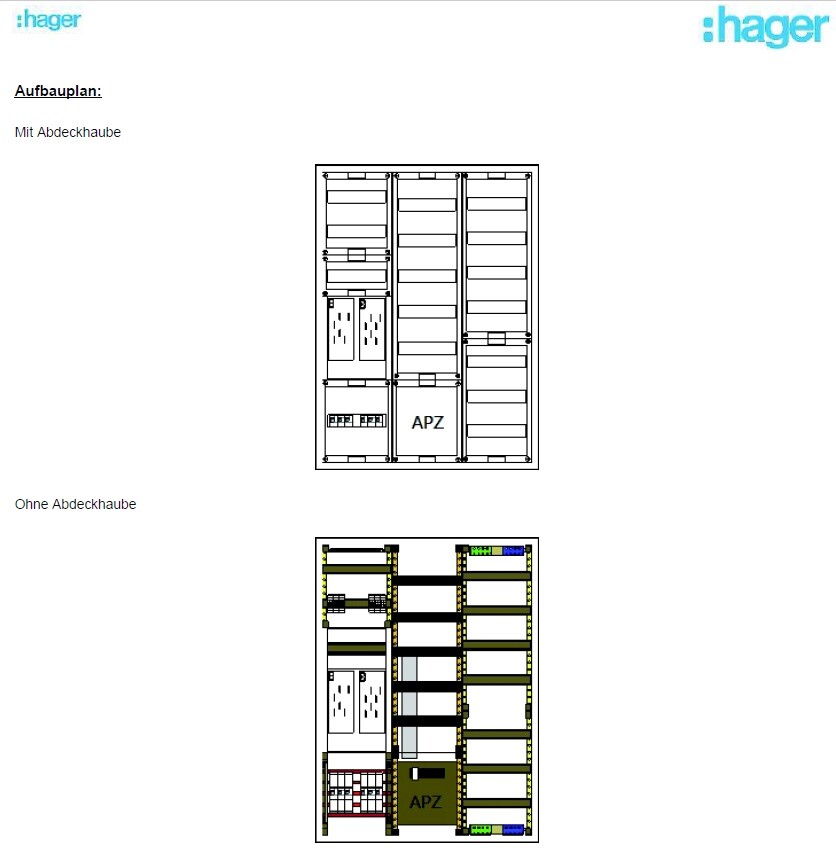
--> The distribution panel on the wall is attached (in case this is important).
Now to my questions:
1. I’m considering buying the FritzBox 7590 router because it seems to be one of the leading models on the market right now and has received very good reviews. I haven’t had good experiences with Speedports in the past, but the FritzBox has always left a positive impression.
– Does this make sense?
2. Is a router alone enough for this setup? It seems to me that there are too few ports on the router, so I definitely need a switch, correct?
I only know switches from LAN parties years ago and don’t have much experience with them. When connecting router <--> switch, do I lose any speed?
– If a switch is needed, what should I pay attention to when buying one? Are there any models you have had good experiences with?
3. Access points – how does this work? I am currently a bit unsure because I only had LAN cables pre-installed in the walls in the ground floor and attic hallway areas for the access points. Is that sufficient? How is the access point powered? Is it enough to simply plug this cable into the switch or the router? Is that even possible?
So: which cables should connect to the router, and which should go to a switch?
I would appreciate a simple explanation! I don’t need a high-end solution… There are currently and will be just two of us living in a very large house, no kids into gaming or anything like that… I just want reliable Wi-Fi throughout the house (since we have concrete ceilings) and good streaming of my Internet TV.
Additionally:
Are there any mounting options for switches or routers? At the moment, I don’t see any space for them in my distribution panel 😀
Slowly but surely, we are getting closer to moving in.
In about 4-6 weeks, we will most likely move into our new build.
For this reason, I am gradually starting to think about the technology in my house so that I have all the necessary information in time and everything works properly.
We built with a basement — so the utility room is located in the basement.
--> Fiber optic connection from the telecom provider – 100 Mbps with Magenta Smart TV (we only watch Internet TV – no satellite connection).
--> 7 double LAN outlets installed throughout the house (1x bedroom, 2x kids’ rooms, 1x living area, 1x office, 2x access points) – so 14 individual cables.
--> The distribution panel on the wall is attached (in case this is important).
Now to my questions:
1. I’m considering buying the FritzBox 7590 router because it seems to be one of the leading models on the market right now and has received very good reviews. I haven’t had good experiences with Speedports in the past, but the FritzBox has always left a positive impression.
– Does this make sense?
2. Is a router alone enough for this setup? It seems to me that there are too few ports on the router, so I definitely need a switch, correct?
I only know switches from LAN parties years ago and don’t have much experience with them. When connecting router <--> switch, do I lose any speed?
– If a switch is needed, what should I pay attention to when buying one? Are there any models you have had good experiences with?
3. Access points – how does this work? I am currently a bit unsure because I only had LAN cables pre-installed in the walls in the ground floor and attic hallway areas for the access points. Is that sufficient? How is the access point powered? Is it enough to simply plug this cable into the switch or the router? Is that even possible?
So: which cables should connect to the router, and which should go to a switch?
I would appreciate a simple explanation! I don’t need a high-end solution… There are currently and will be just two of us living in a very large house, no kids into gaming or anything like that… I just want reliable Wi-Fi throughout the house (since we have concrete ceilings) and good streaming of my Internet TV.
Additionally:
Are there any mounting options for switches or routers? At the moment, I don’t see any space for them in my distribution panel 😀

There are already some posts on this topic here.
Since you are using Magenta, there are a few things to keep in mind.
The Fritz!Box is not bad. For beginners or your intended use, it is absolutely sufficient. It can do everything, but nothing perfectly.
The number of ports a router has does not say anything about its performance. The Fritz!Box can easily handle routing your traffic.
As you correctly pointed out, you need a switch. This can only be connected to the Fritz!Box with 1 Gbit duplex. The Fritz!Box does not support bonding and also has no 10 Gbit uplink ports.
Get a 24-port switch. You already use 15 ports, so this will leave you some spare capacity in case you want to install a NAS in the basement or something similar.
All of this should go into a small network cabinet. In the cabinet, you can turn off the Wi-Fi right away...
You need to bring power, LAN cables, and internet to this cabinet. These cabinets come in 10" and 19" widths. They can be wall-mounted. For space reasons, I would go straight for a 19" cabinet.
With one access point per floor, you will probably have Wi-Fi everywhere but not everywhere at full speed. The Fritz!Box in the basement and in the house will not provide Wi-Fi coverage everywhere.
Make sure to install an additional access point in the garden or run LAN cables there. Do you have a garage? If so, please install one there as well.
Since you only have one LAN cable, you need to power the access points via PoE. That rules out Fritz AVM access points, as they require a power outlet and do not support PoE. However, there are plenty of manufacturers that offer PoE access points. This only requires a bit more configuration.
All access points should broadcast the same Wi-Fi network (same SSID and password). The client device then decides when to switch to which access point. In other words: Fritz!Box in the basement, access point on the first floor, and access point on the second floor. It is also recommended to have one in the garden and, if applicable, in the garage.
The access points should be located where the most speed and highest usage is needed (e.g., office, living room). Please do not place them in hallways.
You are currently planning for only two PoE devices. There are two ways to supply power: either with a PoE switch or with injectors that are connected between the switch and the device. Essentially, it is a power supply with a plug and two LAN ports. If you have multiple devices and limited space, it is better to get a PoE switch — which I would also recommend. I think you will end up with 3-5 access points.
A PoE switch can be found for under 200€ (Euros). A PoE access point (e.g., Zyxel WiFi 6 AX1800) costs just over 80€ and usually comes with injectors included. Please avoid the very cheapest access points, as they often use outdated wireless standards.
For outdoor use, you need an access point that is weatherproof.
Are your access point outlets located on the ceiling? Hopefully, deep wall boxes were used. You need a keystone jack for the cabling, and then a patch cable to the access point.
Since you are using Magenta, there are a few things to keep in mind.
The Fritz!Box is not bad. For beginners or your intended use, it is absolutely sufficient. It can do everything, but nothing perfectly.
The number of ports a router has does not say anything about its performance. The Fritz!Box can easily handle routing your traffic.
As you correctly pointed out, you need a switch. This can only be connected to the Fritz!Box with 1 Gbit duplex. The Fritz!Box does not support bonding and also has no 10 Gbit uplink ports.
Get a 24-port switch. You already use 15 ports, so this will leave you some spare capacity in case you want to install a NAS in the basement or something similar.
All of this should go into a small network cabinet. In the cabinet, you can turn off the Wi-Fi right away...
You need to bring power, LAN cables, and internet to this cabinet. These cabinets come in 10" and 19" widths. They can be wall-mounted. For space reasons, I would go straight for a 19" cabinet.
With one access point per floor, you will probably have Wi-Fi everywhere but not everywhere at full speed. The Fritz!Box in the basement and in the house will not provide Wi-Fi coverage everywhere.
Make sure to install an additional access point in the garden or run LAN cables there. Do you have a garage? If so, please install one there as well.
Since you only have one LAN cable, you need to power the access points via PoE. That rules out Fritz AVM access points, as they require a power outlet and do not support PoE. However, there are plenty of manufacturers that offer PoE access points. This only requires a bit more configuration.
All access points should broadcast the same Wi-Fi network (same SSID and password). The client device then decides when to switch to which access point. In other words: Fritz!Box in the basement, access point on the first floor, and access point on the second floor. It is also recommended to have one in the garden and, if applicable, in the garage.
The access points should be located where the most speed and highest usage is needed (e.g., office, living room). Please do not place them in hallways.
You are currently planning for only two PoE devices. There are two ways to supply power: either with a PoE switch or with injectors that are connected between the switch and the device. Essentially, it is a power supply with a plug and two LAN ports. If you have multiple devices and limited space, it is better to get a PoE switch — which I would also recommend. I think you will end up with 3-5 access points.
A PoE switch can be found for under 200€ (Euros). A PoE access point (e.g., Zyxel WiFi 6 AX1800) costs just over 80€ and usually comes with injectors included. Please avoid the very cheapest access points, as they often use outdated wireless standards.
For outdoor use, you need an access point that is weatherproof.
Are your access point outlets located on the ceiling? Hopefully, deep wall boxes were used. You need a keystone jack for the cabling, and then a patch cable to the access point.
Hello Prager,
last week we had a similar thread here...
https://www.hausbau-forum.de/threads/welches-internet-wlan-mesh-system.42681/
Basically, you cannot go wrong with Fritzbox.
However, keep in mind that to my knowledge the 7590 does not have an integrated fiber optic modem and you will need an additional one for that.
A Speedport (e.g., Smart 4 Plus), on the other hand, does have it and can be connected directly. I have used Fritzbox routers successfully for 20 years and tended to avoid Speedports. But currently, with the same connection, I am actually using a Speedport and I am positively surprised.
No, you do not lose speed. You should preferably look for a PoE-capable switch.
There are PoE-capable access points that can be powered directly via LAN. For other access points you will need a power supply/socket nearby.
last week we had a similar thread here...
https://www.hausbau-forum.de/threads/welches-internet-wlan-mesh-system.42681/
Prager91 schrieb:
Now to my question:
1. I am considering buying the Fritzbox 7590 router because it is currently one of the market leaders and has very good test results. Unfortunately, I have had bad experiences with Speedports in the past – but I always had a positive impression of Fritzbox.
-- Does this make sense?
Basically, you cannot go wrong with Fritzbox.
However, keep in mind that to my knowledge the 7590 does not have an integrated fiber optic modem and you will need an additional one for that.
A Speedport (e.g., Smart 4 Plus), on the other hand, does have it and can be connected directly. I have used Fritzbox routers successfully for 20 years and tended to avoid Speedports. But currently, with the same connection, I am actually using a Speedport and I am positively surprised.
Prager91 schrieb:
2. Is a router enough for this at all? I have far too few ports on the router, so I definitely need a switch, right?
I only know switches from LAN parties in the past and don’t have much experience with them. When connecting router <--> switch, do I lose any speed here?
-- If a switch is needed, what should I look for when buying one? Are there models you have had good experiences with?
No, you do not lose speed. You should preferably look for a PoE-capable switch.
Prager91 schrieb:
3. Access points – how does that work? I am currently a bit worried because for the access points I only have one LAN cable pre-installed in the ground floor wall and another in the attic floorboarding area. Is this sufficient? How is the access point powered? Is it enough to just plug this cable into the switch or router? Is that even possible?
There are PoE-capable access points that can be powered directly via LAN. For other access points you will need a power supply/socket nearby.
The suitable FritzBox for fiber optic connections would be the FritzBox 5530 Fiber.
Alternatively, a standalone modem (e.g., Vigor) combined with any router can be used. However, I do not recommend this for non-experts.
The thread mentioned above does not fully apply here. There have already been threads that explore this topic in much greater detail.
Alternatively, a standalone modem (e.g., Vigor) combined with any router can be used. However, I do not recommend this for non-experts.
The thread mentioned above does not fully apply here. There have already been threads that explore this topic in much greater detail.
Wow... thank you very much for the detailed explanation!
I think I understood most of it!
Can I basically imagine it like this:
Both the internet provider and my electrician will fully connect the internet, LAN, and power in my electrical control cabinet.
Then I have to route all 14 LAN cables, as well as the internet cable and power cable, from the control cabinet into my (hopefully future) network cabinet and plug them into the switch there (PoE switch with at least 16 ports).
So: which cable stays in the Fritzbox? Don’t I need to connect the regular internet cable from the provider into the router and then run a normal LAN cable from the router to the switch, so the switch gets the connection from the router?
At the beginning, I will probably set everything up once on a table under the control cabinet and see how it looks, and also decide where to mount the network cabinet. I will do that part myself on site – at first, that doesn’t bother me. I just want everything to work 😀
Regarding the access point:
I have a small drilled hole (box) with a LAN connection on the wall in the hall on the ground floor and also in the hall on the upper floor. I think the connection and data rate will be more than sufficient for my needs. This is "just" Wi-Fi after all. I have LAN connections in all important areas.
I did not run LAN cables in the walls of the garage or garden, so now I am a bit "too late." Whether I add those later or sometime in the future if needed probably doesn’t make much difference, right?
From what I understand, a PoE switch makes the most sense, right? So: the LAN cable goes directly from the access point down into the switch and is plugged in, correct? That’s how it gets power from the switch? So I would need access points without injectors, correct? Wouldn’t the Netgear WAX214 be a typical access point that fits here?
I will definitely work with these two access points for the next few years – no more! And yes, they are "unfortunately" in the hallway. But I can’t imagine that I don’t have Wi-Fi reception just 3 meters (about 10 feet) away in my living room, or am I wrong?
And regarding all the devices:
Access points, switches, and routers do cost quite a bit – I really want to keep that as low as possible.
Is the Fritzbox 7590 really necessary? It costs quickly around 239€. If I need a switch anyway, couldn’t I use a cheaper router that does the same job? What alternatives are there?
A 16 or 18 port switch would be enough for now, as far as I can see? I found one by YuanLey (according to reviews) that’s a decent PoE switch for 140.00€ – something like that should fit, right?
Everything should be kept as simple as possible, as I said – for “standard use” without any high-end processes.
I think I understood most of it!
Can I basically imagine it like this:
Both the internet provider and my electrician will fully connect the internet, LAN, and power in my electrical control cabinet.
Then I have to route all 14 LAN cables, as well as the internet cable and power cable, from the control cabinet into my (hopefully future) network cabinet and plug them into the switch there (PoE switch with at least 16 ports).
So: which cable stays in the Fritzbox? Don’t I need to connect the regular internet cable from the provider into the router and then run a normal LAN cable from the router to the switch, so the switch gets the connection from the router?
At the beginning, I will probably set everything up once on a table under the control cabinet and see how it looks, and also decide where to mount the network cabinet. I will do that part myself on site – at first, that doesn’t bother me. I just want everything to work 😀
Regarding the access point:
I have a small drilled hole (box) with a LAN connection on the wall in the hall on the ground floor and also in the hall on the upper floor. I think the connection and data rate will be more than sufficient for my needs. This is "just" Wi-Fi after all. I have LAN connections in all important areas.
I did not run LAN cables in the walls of the garage or garden, so now I am a bit "too late." Whether I add those later or sometime in the future if needed probably doesn’t make much difference, right?
From what I understand, a PoE switch makes the most sense, right? So: the LAN cable goes directly from the access point down into the switch and is plugged in, correct? That’s how it gets power from the switch? So I would need access points without injectors, correct? Wouldn’t the Netgear WAX214 be a typical access point that fits here?
I will definitely work with these two access points for the next few years – no more! And yes, they are "unfortunately" in the hallway. But I can’t imagine that I don’t have Wi-Fi reception just 3 meters (about 10 feet) away in my living room, or am I wrong?
And regarding all the devices:
Access points, switches, and routers do cost quite a bit – I really want to keep that as low as possible.
Is the Fritzbox 7590 really necessary? It costs quickly around 239€. If I need a switch anyway, couldn’t I use a cheaper router that does the same job? What alternatives are there?
A 16 or 18 port switch would be enough for now, as far as I can see? I found one by YuanLey (according to reviews) that’s a decent PoE switch for 140.00€ – something like that should fit, right?
Everything should be kept as simple as possible, as I said – for “standard use” without any high-end processes.
One more question regarding the patch panel:
The electrician says there will be an 18-port patch panel included. All the LAN cables are connected there, and it will be installed inside the electrical cabinet.
What does this mean for me? Do I have to unplug everything and then connect each cable individually to the switch?
The electrician says there will be an 18-port patch panel included. All the LAN cables are connected there, and it will be installed inside the electrical cabinet.
What does this mean for me? Do I have to unplug everything and then connect each cable individually to the switch?
Similar topics