
ᐅ Electrical Plan for a New Semi-Detached House: Evaluation and Comments
Created on: 25 Jan 2022 13:03
E
Exili123
Hello Community,
I have already read a lot here and received many great tips. Here is a brief summary of my situation:
The original construction start date was May 2022, but it has been moved forward to the end of February / beginning of March 2022. This means the electrical planning needs to be done earlier, along with groundwork, etc.
The house construction came at a somewhat inconvenient time, as we have two small children and very limited time. We had to accept an offer for a plot in the new development area just around the corner.
Now to the main topic: electrical plan
Since we actually chose a turnkey house, there is a package that already includes a certain amount of electrical installation. Therefore, there is already an electrical plan, which I can now modify according to my wishes (with an itemized calculation of additional or reduced costs). I have attached this plan, with changes already marked in red. Additionally, I have attached the builder’s construction and performance specification with the detailed list.
Now to the actual questions:
Intercom system:
- Outside: CAT7 + 4 x 0.8 mm² cable to the technical room. Would this be sufficient for all types of systems so that I can decide later?
- The door should be remotely unlocked; where should I run a cable for this? From the door corner at the top hinge - to the technical room? Another 4 x 0.8 mm² cable?
- Where should the intercom unit be placed on the ground floor? Near the stairs, so basically in the living/dining area? I have no experience with the most practical location. Should this also be CAT7 + 4 x 0.8 mm² cable to the technical room?
- I would probably place the intercom unit on the upper floor centrally on the wall in front of the utility room.
- The rest will be controlled via smartphone. I haven’t decided on the final system yet.
Network cables:
- From various threads, I’ve read that at least a double network socket should be installed in every room.
-> I will consider this for all living rooms, children’s rooms, bedrooms, and the office. All other rooms will get “just” one socket (kitchen/bathroom/hallway).
- Additionally, one access point per floor installed in the ceiling, but I have some questions here:
-> Since I am very satisfied with the mesh system from Fritzbox, I want to stick with it. However, these access points do not support PoE.
I have thought about placing an access point above the door in the upstairs utility room with CAT7 and power supply. Of course, there are options to use PoE splitters, etc., but if I can run power there anyway...
- On the ground floor, I am uncertain where to place the access point. I generally think the router in the technical room can cover the ground floor with Wi-Fi. But the garden might be a problem. This could be solved by integrating an access point into the TV wall or placing it in the garage. What do you think?
- On the attic floor, if needed, the access point will be placed in the office.
Satellite/cable TV:
- Since we basically do not watch traditional television and haven’t for years, this topic is quite unimportant to me. Nevertheless, I want to have a “basic” option just in case:
-> NO cables in the rooms. Satellite cable from the roof directly to the technical room. From there, SAT over IP if it ever becomes absolutely necessary.
High-voltage power / Wallbox:
- One high-voltage power line to the garage plus standard cables. I want to use this more like a small workshop. (Possibly also with CAT7 here)
- High-voltage power at the corner of the house/driveway for a future wallbox connection. (Also with CAT7 cable here)
These are the current questions/thoughts running through my mind. I would be very happy if anyone takes some time to share tips or comments.
Regards
Exili123
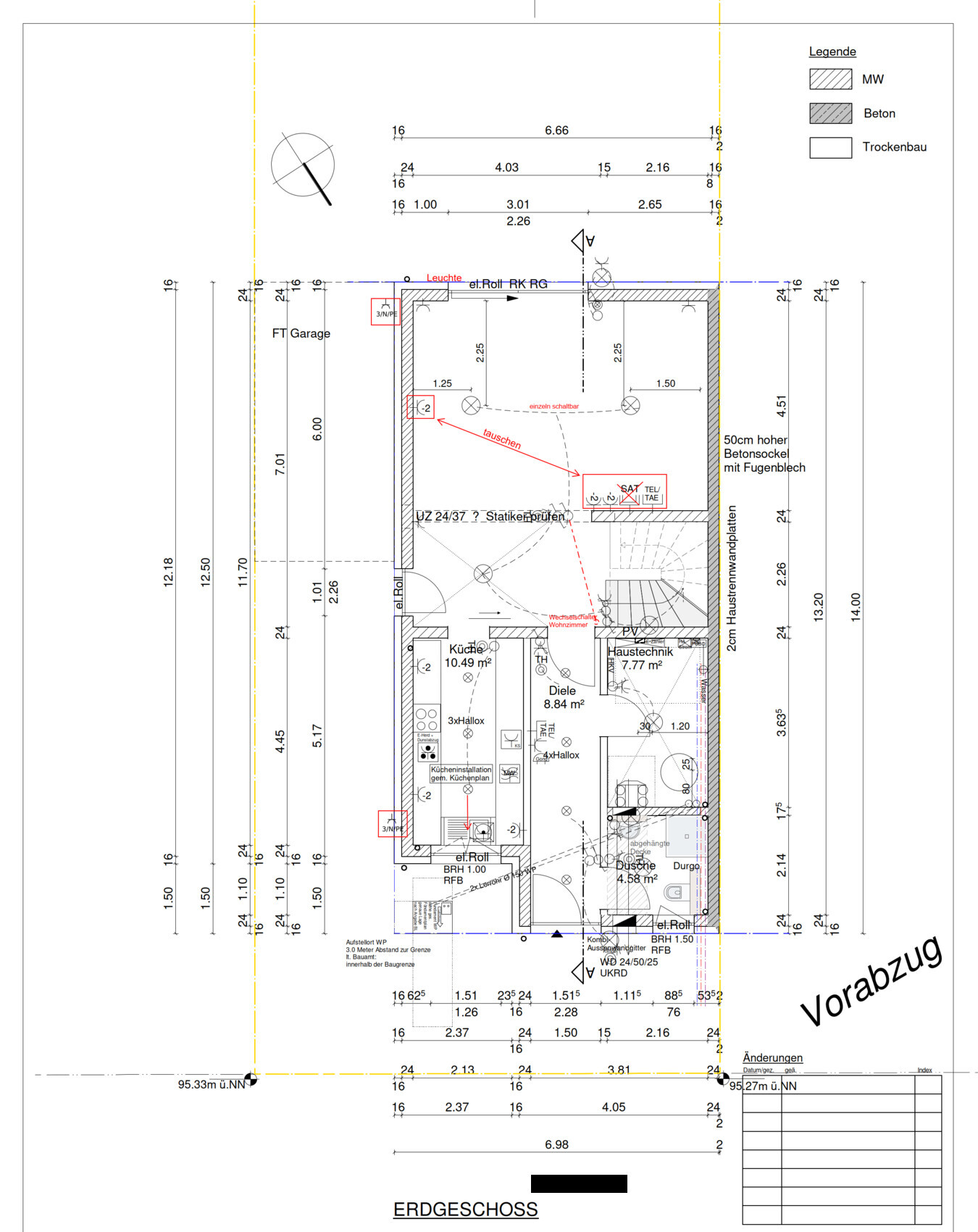
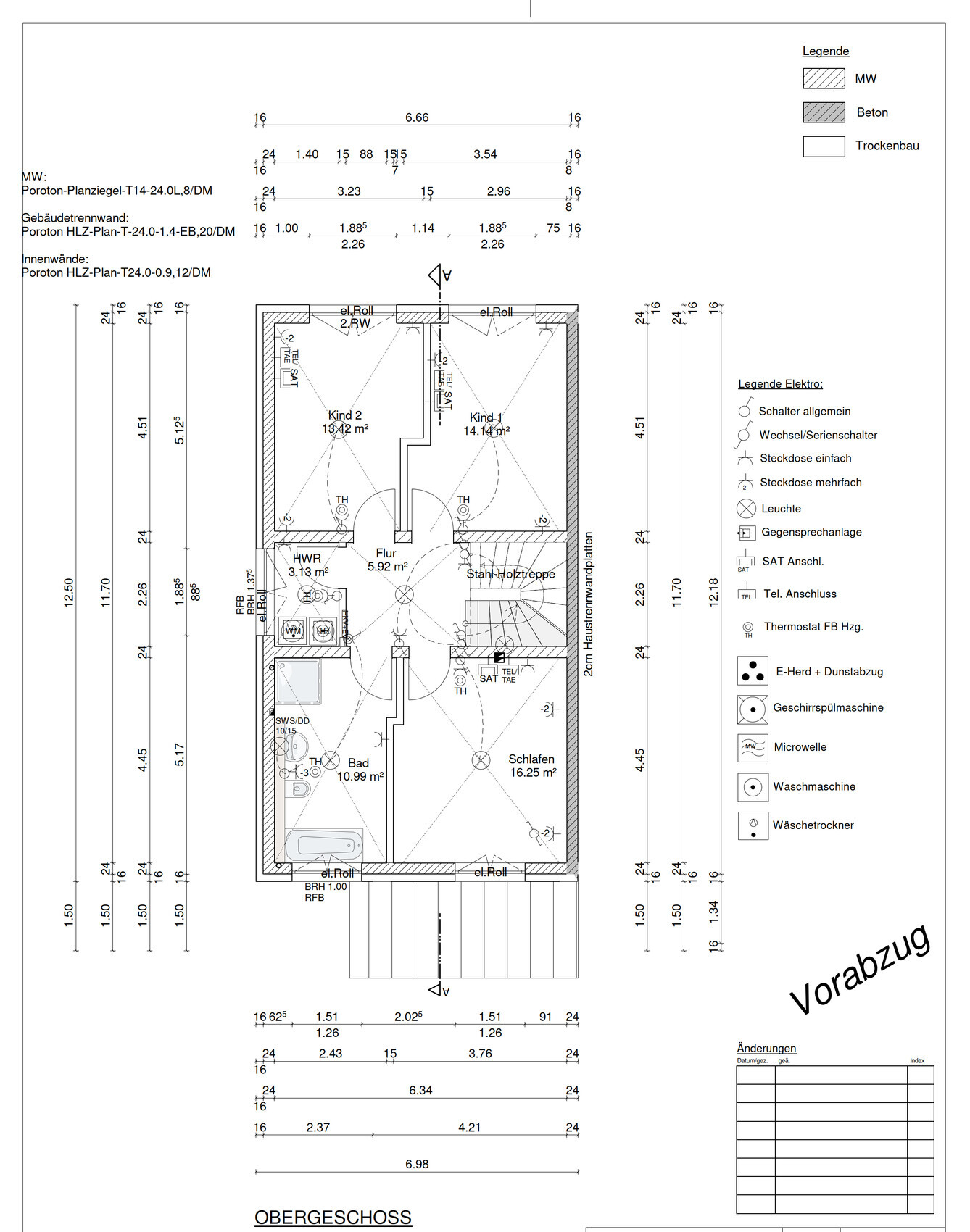
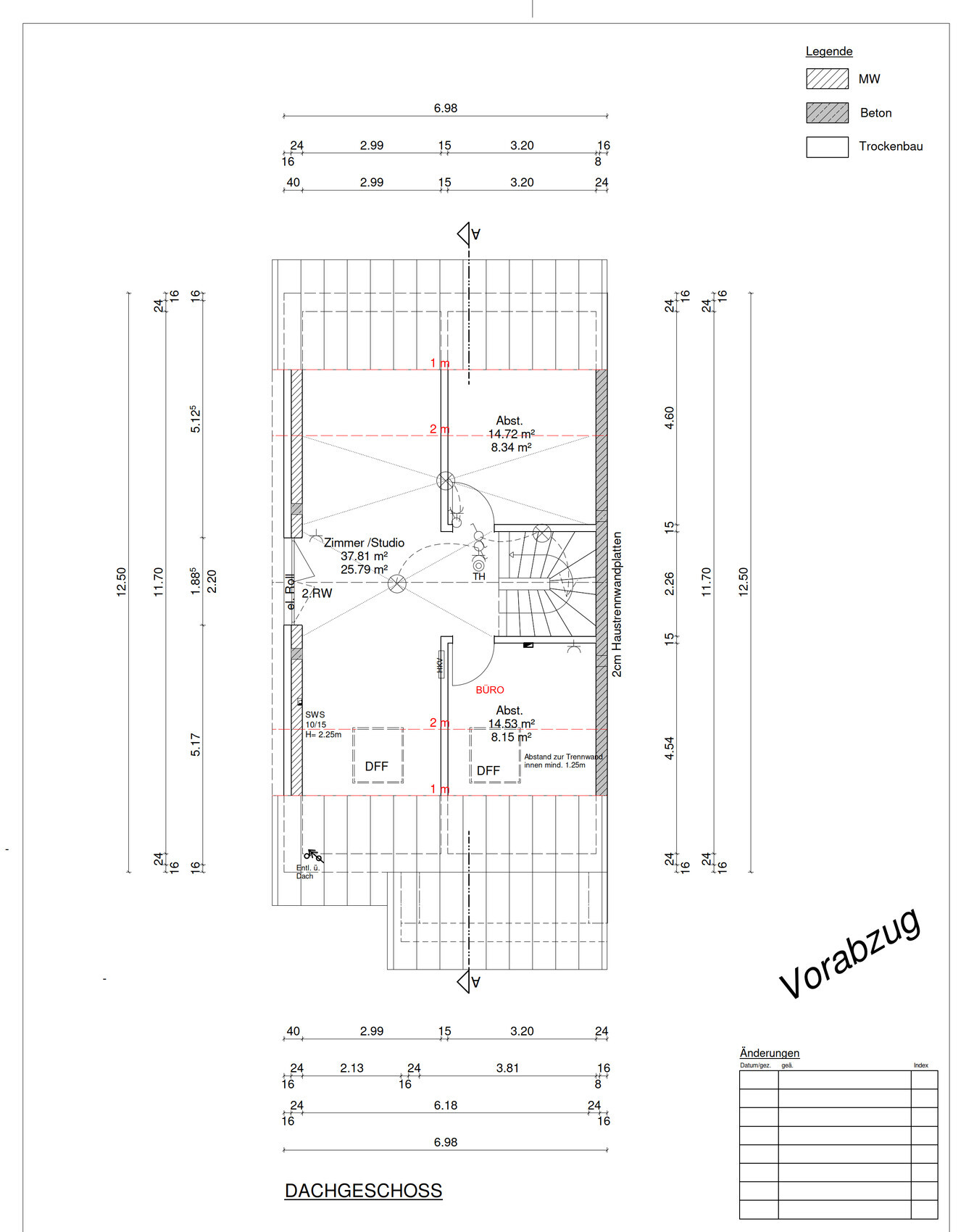
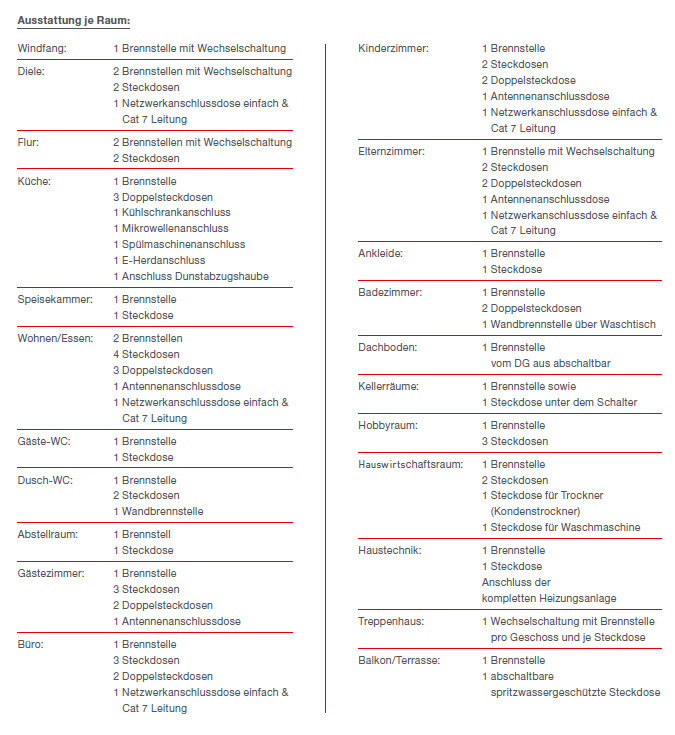
I have already read a lot here and received many great tips. Here is a brief summary of my situation:
The original construction start date was May 2022, but it has been moved forward to the end of February / beginning of March 2022. This means the electrical planning needs to be done earlier, along with groundwork, etc.
The house construction came at a somewhat inconvenient time, as we have two small children and very limited time. We had to accept an offer for a plot in the new development area just around the corner.
Now to the main topic: electrical plan
Since we actually chose a turnkey house, there is a package that already includes a certain amount of electrical installation. Therefore, there is already an electrical plan, which I can now modify according to my wishes (with an itemized calculation of additional or reduced costs). I have attached this plan, with changes already marked in red. Additionally, I have attached the builder’s construction and performance specification with the detailed list.
Now to the actual questions:
Intercom system:
- Outside: CAT7 + 4 x 0.8 mm² cable to the technical room. Would this be sufficient for all types of systems so that I can decide later?
- The door should be remotely unlocked; where should I run a cable for this? From the door corner at the top hinge - to the technical room? Another 4 x 0.8 mm² cable?
- Where should the intercom unit be placed on the ground floor? Near the stairs, so basically in the living/dining area? I have no experience with the most practical location. Should this also be CAT7 + 4 x 0.8 mm² cable to the technical room?
- I would probably place the intercom unit on the upper floor centrally on the wall in front of the utility room.
- The rest will be controlled via smartphone. I haven’t decided on the final system yet.
Network cables:
- From various threads, I’ve read that at least a double network socket should be installed in every room.
-> I will consider this for all living rooms, children’s rooms, bedrooms, and the office. All other rooms will get “just” one socket (kitchen/bathroom/hallway).
- Additionally, one access point per floor installed in the ceiling, but I have some questions here:
-> Since I am very satisfied with the mesh system from Fritzbox, I want to stick with it. However, these access points do not support PoE.
I have thought about placing an access point above the door in the upstairs utility room with CAT7 and power supply. Of course, there are options to use PoE splitters, etc., but if I can run power there anyway...
- On the ground floor, I am uncertain where to place the access point. I generally think the router in the technical room can cover the ground floor with Wi-Fi. But the garden might be a problem. This could be solved by integrating an access point into the TV wall or placing it in the garage. What do you think?
- On the attic floor, if needed, the access point will be placed in the office.
Satellite/cable TV:
- Since we basically do not watch traditional television and haven’t for years, this topic is quite unimportant to me. Nevertheless, I want to have a “basic” option just in case:
-> NO cables in the rooms. Satellite cable from the roof directly to the technical room. From there, SAT over IP if it ever becomes absolutely necessary.
High-voltage power / Wallbox:
- One high-voltage power line to the garage plus standard cables. I want to use this more like a small workshop. (Possibly also with CAT7 here)
- High-voltage power at the corner of the house/driveway for a future wallbox connection. (Also with CAT7 cable here)
These are the current questions/thoughts running through my mind. I would be very happy if anyone takes some time to share tips or comments.
Regards
Exili123

Exili123 schrieb:
I keep wondering what to do with just two network outlets in a child’s bedroom or a bedroom? In our case, we installed four in each children's room (two double sockets in different locations). This was mainly for flexibility. Otherwise, it’s best to run everything via cable whenever possible. In our setup, this includes a computer and a smart speaker but could also be extended to a printer or similar device. Who knows? Maybe your children will become IT professionals someday, and four outlets could be fully used quickly. Retrofitting cabling later is always more complicated.
In the bedroom, we only installed a double socket in case a TV is set up there—but currently, it’s unused.
Exili123 schrieb:
The TV would then be “on the left.” I think there will be an access point in the garage facing the garden. As I said: If you want Wi-Fi in the garden, put the access point in the garden. However, I would recommend placing the network outlet at the exterior wall, drilling a hole from there to the outside, and then connecting the access point with just a patch cable. Network outlets don’t handle outdoor conditions well, while patch cables are easier to replace.
Exili123 schrieb:
And if the house is sold eventually, the new owners should be able to add satellite TV relatively easily. I doubt that will influence a buying decision much. And as I said, who knows if satellite TV will still be relevant by then. Preparing for it now doesn’t cost a fortune either. We didn’t do it because we never need it and wanted to save space on the TV wall—which already has plenty of connections.
Exili123 schrieb:
My energy provider won’t “release” any more for me. Your energy provider won’t allow more just now—but that can and likely will change. So I wouldn’t see that as the final expansion level. Also, thick cables like these aren’t easy to replace. Especially with a weak grid, being able to split power between several charging points is extremely valuable. That way, one charger can draw 11 kW, or two chargers can share 5 kW each. This usually works best with proprietary communication between the charging units.
That would be too few power outlets for me, especially in the living room where the TV is located, and in the main bathroom. Living room: TV, Blu-ray player, AV receiver, possibly powered speakers, set-top box (Sky, Magenta, etc.), game console, and so on. In a new build, I would want to avoid using multiple outlet adapters behind the furniture. In the bathroom: electric toothbrushes, oral irrigator, shaver, epilator, hairdryer, straightener, curling iron, etc. Bedroom: with bedside lamps, phone chargers, and possibly a radio, the outlets would also be insufficient. I would always combine light switches at the doors with a power outlet to make vacuuming easier.
The electrical outlets are usually determined during a walkthrough at the rough-in stage.
Kokovi79 schrieb:But not all at the same time. 😉 Also, there may be additional outlets inside a bathroom cabinet. So far, we have only ever used a maximum of two outlets simultaneously, so I don’t see any major shortage in the kitchen overall.
electric toothbrushes, water flosser, shaver, epilator, hairdryer, straightener, curling iron
Exili123 schrieb:
My power connection to the house will be installed with a maximum of one wallbox with 11kW capacity. My energy provider won’t approve more since a heat pump is also running. Maximum power supply is 30kW. So, I will definitely have only one wallbox installed. K1300S schrieb:
Your energy provider won’t approve more NOW – but that might and probably will change. Probably not. They likely applied for a standard connection and will get 35mm² (approximately 2 AWG) cable into the house. For the power you need, the cable size should be 95mm² (about 3/0 AWG), or possibly 50mm² (around 1 AWG) if your provider offers that. We only have 35, 95, and 150mm² here.
I would definitely check with them if you’re considering multiple electric vehicles. Depending on the materials the supplier installs, sometimes only the cable needs to be upgraded. That costs less than 10€ (about $11) per meter extra in materials alone.
However, the main connection box might need to be a different size because fitting 95mm² cables into the “small” boxes is quite inconvenient, although they are theoretically designed for that.
In the end, asking costs nothing 🙂
Exili123 schrieb:
I actually want to control everything necessary with Shelly devices. For that, I will have deeper mounting boxes installed everywhere. Have electronic mounting boxes installed for your switches. They are unfortunately very expensive to buy but a worthwhile investment...
danixf schrieb:
He probably applied for a standard connection and will get 35mm² (0.05 inch²) cable into the house. For the power he needs, he should really go for 95mm² (0.15 inch²).That would be quite short-sighted of the distribution network operator. Here, 50mm² (0.08 inch²) cables are already installed as standard, because it is foreseeable that demand will increase, even if the current network does not yet support it everywhere. Besides, it still makes sense to have the house prepared in advance so that, if necessary, only the service entry needs to be upgraded later. Incidentally, even 35mm² (0.05 inch²) with 63 A already provides about 43 kW, which should be sufficient, and it is possible to fuse for higher currents anyway. Therefore, I don’t see a big issue with just 35mm² being installed.Similar topics