
Hello everyone,
In about three weeks, we are supposed to finalize our electrical planning on site. Unfortunately, our electrician is somewhat old-fashioned, which makes it difficult for me to collaboratively plan a future-proof electrical setup with him. Therefore, I am currently educating myself to ensure that the networking in our single-family home is fundamentally future-proof.
Basically, it’s about the LAN network... LAN wall outlets are relatively expensive, so proper planning is even more important.
About us:
- Mid to late 20s – couple without children. Planning for 2 children in the near future.
- Single-family house with a usable basement, 2 full floors, and fully equipped with concrete ceilings
- Utility room in the basement with air-to-water heat pump, ventilation system, photovoltaic system
- The router is planned to be located in the office on the ground floor
- The upper floor includes bathroom / bedroom / 2 children’s rooms
- No satellite dish or cable TV — we will use Internet TV exclusively!
Now, I am struggling to network our single-family home sensibly but as cost-effectively as possible.
I have the following questions:
1. Slightly off-topic: In the living room, I would like to have an in-wall conduit installed on the TV wall (the TV will be wall-mounted) so that no cables are visible. Is this sensible and affordable? I will get exact prices from my electrician if this makes sense at all. Would it also make sense to install power outlets at TV height? How do you plan the connections on your media wall reasonably? What should be considered?
Since we plan to use a Magenta TV box and thus IP-TV, a total of four LAN ports in the living room area would presumably be useful, right?
2. How many LAN outlets and especially where should LAN outlets be installed? Mainly: which cable? Is CAT6 sufficient?
→ Such a double LAN outlet certainly costs close to €200, so planning must be really sensible.
Is it really necessary to install 2 double LAN outlets in each children’s room? I always wonder: what is actually going to be plugged in there?
One port for the TV and one port for a multimedia device should be enough, right? So four connections would probably be overkill, correct?
The fact is: It will certainly take years or decades before our children actually use these outlets... Who knows what changes might happen by then? Therefore, could we not cost-effectively use empty conduits (empty pipes) instead?
Is it also possible to “branch off” from an existing double outlet afterward to add more ports for the room? What should be considered here? Or should we consider having an empty conduit prepared in another spot in the room so that a socket can be installed later?
3. How do you solve the “router problem”? Should the one router be placed in the office (ground floor) with LAN outlets in the existing bedrooms upstairs to ensure a stable LAN connection? Or is a router upstairs absolutely necessary?
4. How important are LAN outlets in the utility room? Should the router possibly even be located in the utility room? Because of the concrete ceiling between basement and ground floor, a second router would almost certainly be needed. How should this situation be handled with a basement?
5. What do you think about installing empty conduits for CAT cables in the kitchen / hallway etc. to enable later retrofitting? Is this relatively affordable in new builds?
I would appreciate any feedback so we can make the best possible plans 🙂
In about three weeks, we are supposed to finalize our electrical planning on site. Unfortunately, our electrician is somewhat old-fashioned, which makes it difficult for me to collaboratively plan a future-proof electrical setup with him. Therefore, I am currently educating myself to ensure that the networking in our single-family home is fundamentally future-proof.
Basically, it’s about the LAN network... LAN wall outlets are relatively expensive, so proper planning is even more important.
About us:
- Mid to late 20s – couple without children. Planning for 2 children in the near future.
- Single-family house with a usable basement, 2 full floors, and fully equipped with concrete ceilings
- Utility room in the basement with air-to-water heat pump, ventilation system, photovoltaic system
- The router is planned to be located in the office on the ground floor
- The upper floor includes bathroom / bedroom / 2 children’s rooms
- No satellite dish or cable TV — we will use Internet TV exclusively!
Now, I am struggling to network our single-family home sensibly but as cost-effectively as possible.
I have the following questions:
1. Slightly off-topic: In the living room, I would like to have an in-wall conduit installed on the TV wall (the TV will be wall-mounted) so that no cables are visible. Is this sensible and affordable? I will get exact prices from my electrician if this makes sense at all. Would it also make sense to install power outlets at TV height? How do you plan the connections on your media wall reasonably? What should be considered?
Since we plan to use a Magenta TV box and thus IP-TV, a total of four LAN ports in the living room area would presumably be useful, right?
2. How many LAN outlets and especially where should LAN outlets be installed? Mainly: which cable? Is CAT6 sufficient?
→ Such a double LAN outlet certainly costs close to €200, so planning must be really sensible.
Is it really necessary to install 2 double LAN outlets in each children’s room? I always wonder: what is actually going to be plugged in there?
One port for the TV and one port for a multimedia device should be enough, right? So four connections would probably be overkill, correct?
The fact is: It will certainly take years or decades before our children actually use these outlets... Who knows what changes might happen by then? Therefore, could we not cost-effectively use empty conduits (empty pipes) instead?
Is it also possible to “branch off” from an existing double outlet afterward to add more ports for the room? What should be considered here? Or should we consider having an empty conduit prepared in another spot in the room so that a socket can be installed later?
3. How do you solve the “router problem”? Should the one router be placed in the office (ground floor) with LAN outlets in the existing bedrooms upstairs to ensure a stable LAN connection? Or is a router upstairs absolutely necessary?
4. How important are LAN outlets in the utility room? Should the router possibly even be located in the utility room? Because of the concrete ceiling between basement and ground floor, a second router would almost certainly be needed. How should this situation be handled with a basement?
5. What do you think about installing empty conduits for CAT cables in the kitchen / hallway etc. to enable later retrofitting? Is this relatively affordable in new builds?
I would appreciate any feedback so we can make the best possible plans 🙂

OWLer schrieb:
Force the electrician to terminate the CAT cables in keystone jacks with enough slack at a suitable free location (!) and then handle the 19" rack yourself to make it neat and tidy. This is the only proper way. Electricians are rarely the right contact for the active network components. Make sure to insist that the electrician tests everything thoroughly after running the cables, meaning at least verified testing and not just checking the wiring continuity.
M
MBPassion4 Jan 2022 08:14majuhenema schrieb:
How much more expensive is a double outlet compared to a single outlet? And if the price difference is insignificant like in your case, we will go with the double outlets. It's best to choose double outlets wherever possible. The extra cost is negligible in the context of the entire house construction, and this also provides some redundancy in case a cable gets damaged. Personally, I would just make sure that you don't end up with more than 24 installed cables, as the 19-inch patch panels usually accommodate either 24 or 48 ports.
majuhenema schrieb:
I'm having a hard time deciding about the TV setup. The partition wall will be exposed concrete and should look clean. The TV will be mounted on the wall. I think it makes sense to plan power, satellite, and network connections behind the TV, and then have power and network connections again at lowboard height below. What do you think? I can’t really say how it works with exposed concrete. With our electrician, we had a cable duct installed directly inside the wall, which was then neatly plastered over by the painter. You can see it here:
At the bottom (around lowboard height), there are several power outlets, satellite connections, and a double LAN outlet. Alternatively, you could also place these at TV height, but the cables all have a certain length and it becomes more difficult to neatly hide them behind the TV.
There is also the option to later install a decorative wooden panel on top of the main wall, behind which the cables can be routed.

majuhenema schrieb:
The TV will be mounted on the wall. I think it makes sense to plan power, satellite, and network connections behind the TV and again power and network at lowboard height below.
What do you think? Yes, plan for four outlets near the TV. You can never have enough, even if devices connect wirelessly, there will still be 2-3 devices needing cables, and then it’s full again. Where the TV will be on the wall, just embed a conduit (e.g. a conduit pipe or installation tube) into the plaster or have it installed during the concrete work.
Make sure it’s large enough in diameter to accommodate all media and power cables. Possibly consider HDMI cables as well and, of course, speakers.
majuhenema schrieb:
Regarding the two network outlets outside: I planned one for the awning (app control?) and one for the outdoor access point? Also consider whether you want to install cameras. Not only for burglary protection (but also). These are usually better connected via POE (Power over Ethernet) than by other means.
majuhenema schrieb:
There will be another TV location in the utility room. That’s not a bad idea.
@MBPassion
Looks neat 🙂 At first, I wasn’t sure what kind of room it was from the phone photo. On the laptop, it became clear that this is happening under the concrete stairs 🙂
M
majuhenema4 Jan 2022 11:01OWLer schrieb:
Therefore: pressure the electrician to install the CAT cables into keystone jacks with enough cable slack in a suitable free spot (!) and then handle the 19" rack yourself to organize and tidy everything up. From this point on, it’s basically “just” about laying the cables into the network cabinet, connecting from the patch panel through the switch, setting up the network with the Fritzbox and access point, and labeling everything properly, right?
MBPassion schrieb:
Where possible, it’s best to use dual-gang boxes right away. The extra cost is negligible in the context of the entire house build, and it also provides a level of redundancy in case a cable gets damaged. In practice, for the electrician, a dual-gang box simply means using a duplex cable and terminating one additional cable per side, right?
MBPassion schrieb:
I had the electrician install a cable duct inside the wall, which was then neatly plastered over by the painter. You can see it here: That’s very clever! How large is the opening of the conduit, and is it sufficient for your needs? I need to specify something..
Mycraft schrieb:
Yes, plan for four connections near the TV. You never have enough, even if devices connect wirelessly to the network, 2–3 wired connections are usually needed there and then it gets full again. Where the TV will be mounted on the wall, just embed an HT pipe/conduit or have it pre-installed at the concrete stage.
Make sure it’s large enough in diameter to pull all media and power cables through, possibly also HDMI cables and, of course, speakers. You’re right about the TV. With the TV and Alexa, two connections are already taken and there’s no room left for other devices. We don’t have sound equipment or similar at the moment.
I will attach an updated plan in another post. Spoiler: 24 ports are not enough.
M
majuhenema4 Jan 2022 11:39Here are the revised plans incorporating your suggestions, along with a brief explanation.
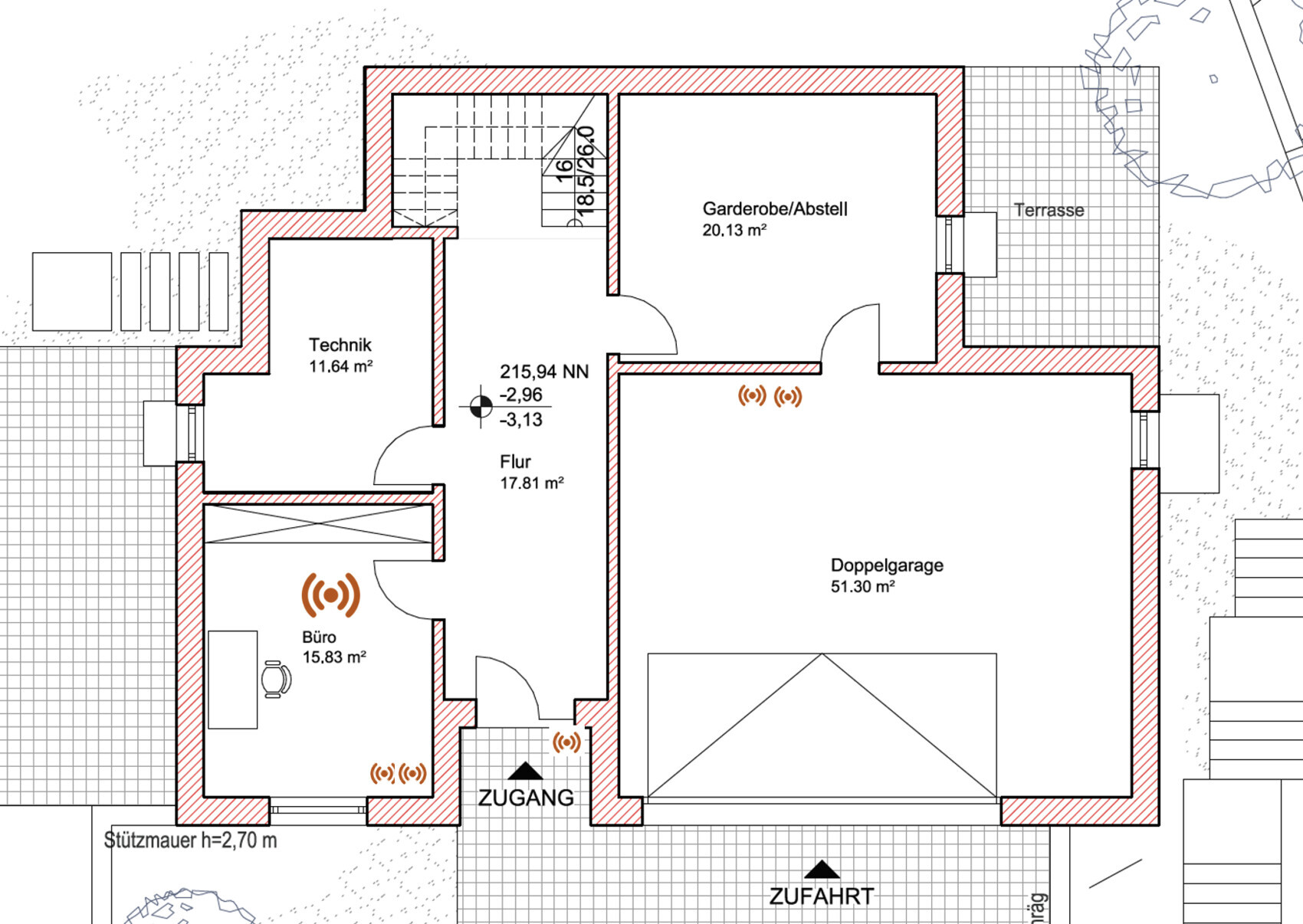
Basement: 6 connections
Office with double outlet occupied and space for an access point on the ceiling
Entrance for door station (camera)
Garage double outlet for wallbox (electric vehicle charger)
We will confirm details for the technical room
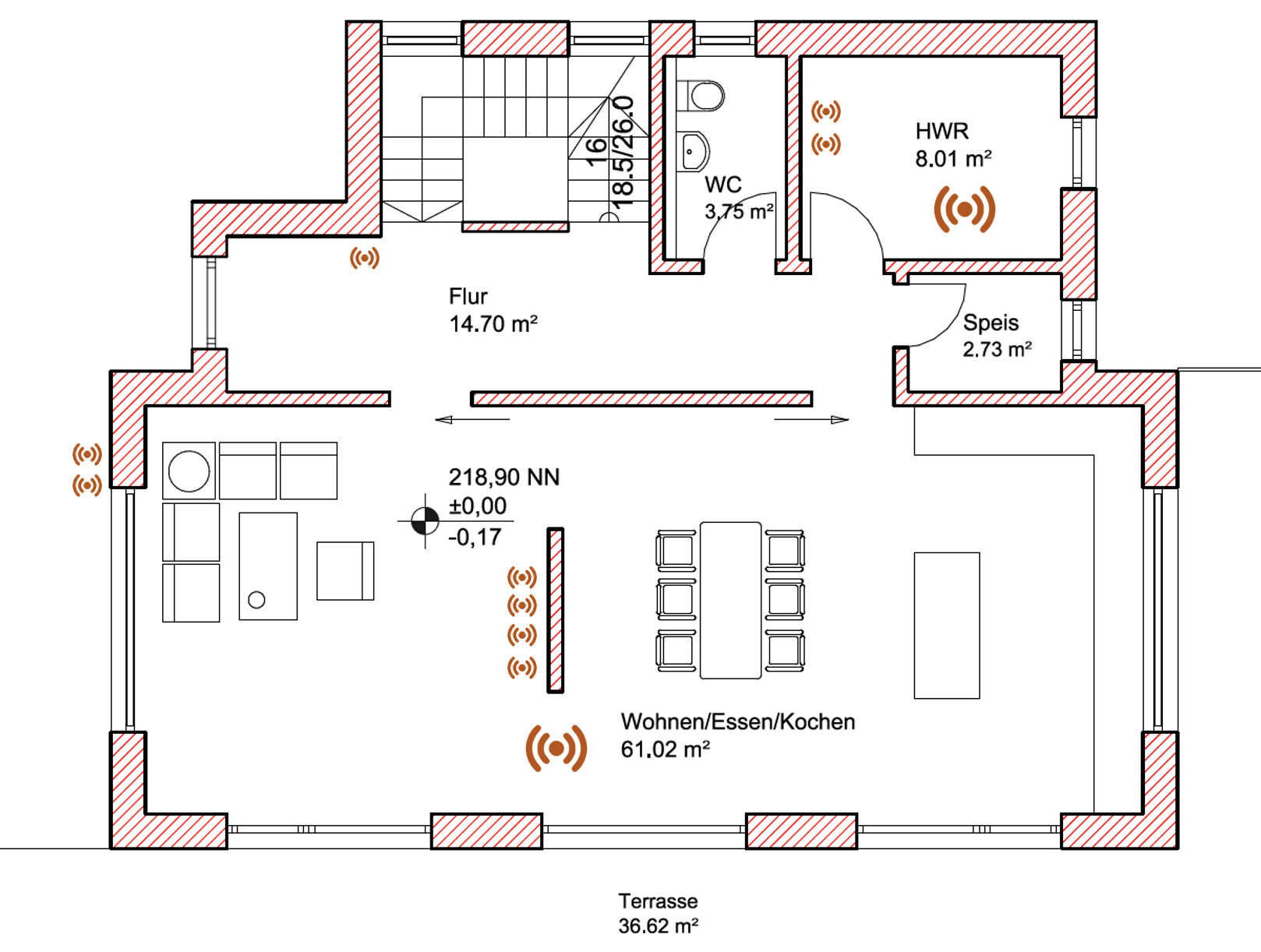
Ground floor: 11 connections
2x double outlets at the TV
2x access points (transition between living and dining areas)
Double outlet in utility room
2x outside for awning/shading and outdoor access point
1x for indoor door station
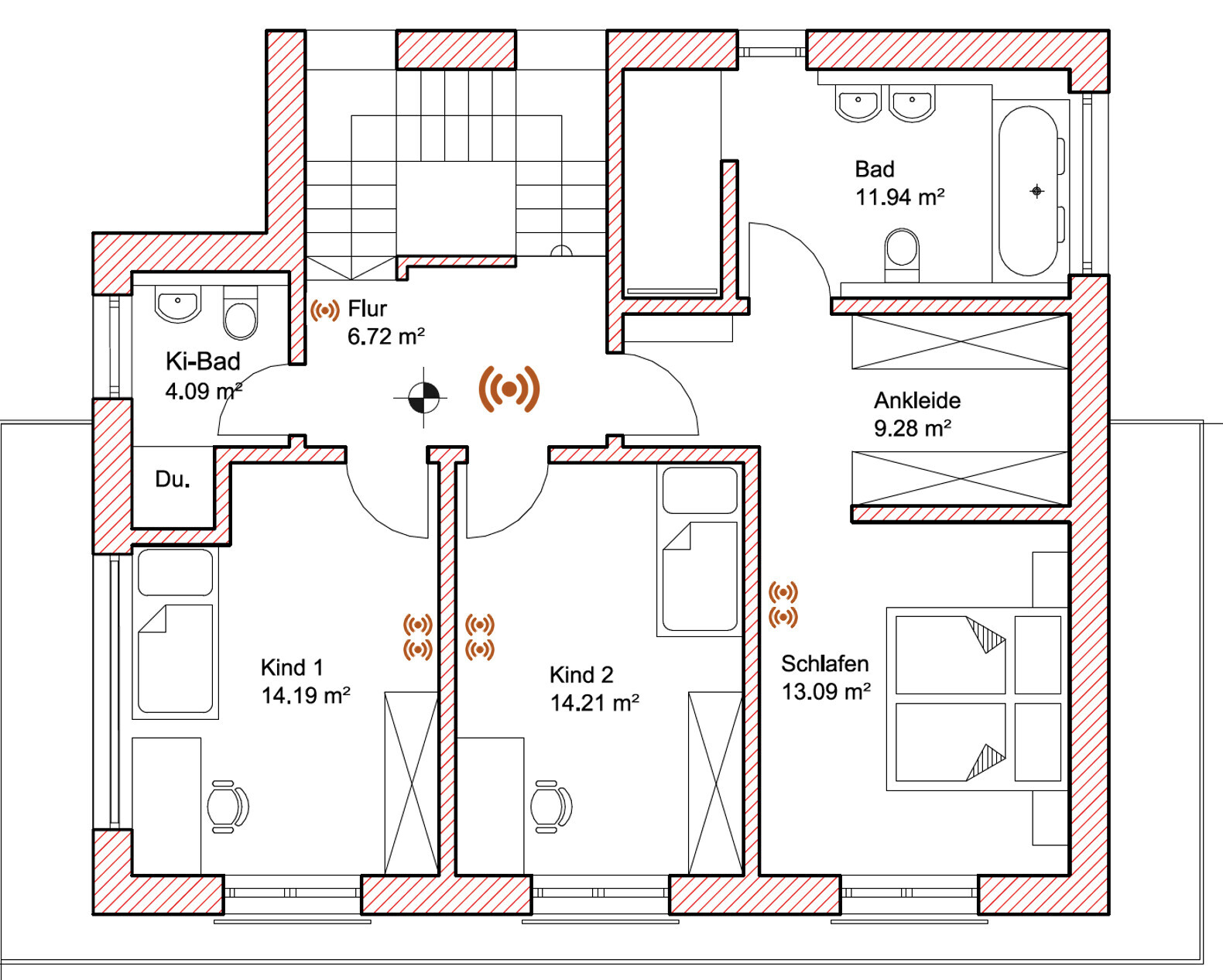
First floor: 8 connections
One double outlet each in the children’s rooms and the bedroom
1x for indoor door station
1x for access point in the hallway
In total, that makes 25 connections, and I am wondering:
1. Should we omit the outdoor access point and instead move the access point in the open living area closer to the living room?
2. Should we reduce the TV connections from 4 to 2?
3. Should we equip the master bedroom with only one connection, since we rarely watch TV or stream there? However, the calculation does not yet include a possible network connection for the heating system or other devices in the technical room. What network devices do you have in your technical room?
4. Should we choose a larger patch panel, and if so, does that have disadvantages and approximately how much more would it cost?
Basement: 6 connections
Office with double outlet occupied and space for an access point on the ceiling
Entrance for door station (camera)
Garage double outlet for wallbox (electric vehicle charger)
We will confirm details for the technical room
Ground floor: 11 connections
2x double outlets at the TV
2x access points (transition between living and dining areas)
Double outlet in utility room
2x outside for awning/shading and outdoor access point
1x for indoor door station
First floor: 8 connections
One double outlet each in the children’s rooms and the bedroom
1x for indoor door station
1x for access point in the hallway
In total, that makes 25 connections, and I am wondering:
1. Should we omit the outdoor access point and instead move the access point in the open living area closer to the living room?
2. Should we reduce the TV connections from 4 to 2?
3. Should we equip the master bedroom with only one connection, since we rarely watch TV or stream there? However, the calculation does not yet include a possible network connection for the heating system or other devices in the technical room. What network devices do you have in your technical room?
4. Should we choose a larger patch panel, and if so, does that have disadvantages and approximately how much more would it cost?
majuhenema schrieb:
That is very smart!This is the usual approach. But yes, it hasn’t reached all electricians yet.1. No, neither.
2. No, still stick with four here.
3. Yes, probably one would be enough in the bedroom.
4. 24 will be sufficient for your plan.
In the utility room, you simply don’t install any sockets. Here you can always patch directly because in most utility rooms I have seen, the wiring is surface-mounted anyway, and there are always enough connection points available.
For example, in my network cabinet (HAR), I have:
1. Heating
2. House electrical system
3. Home server
4. NAS
5. NVR
6. Raspberry Pi
7. Cameras
8. Router
Some homeowners also include ventilation and photovoltaic systems and such. I consider installing extra sockets for those unnecessary. You can connect everything directly to the switch (if it fits in the network cabinet).
Similar topics