
Hello everyone,
In about three weeks, we are supposed to finalize our electrical planning on site. Unfortunately, our electrician is somewhat old-fashioned, which makes it difficult for me to collaboratively plan a future-proof electrical setup with him. Therefore, I am currently educating myself to ensure that the networking in our single-family home is fundamentally future-proof.
Basically, it’s about the LAN network... LAN wall outlets are relatively expensive, so proper planning is even more important.
About us:
- Mid to late 20s – couple without children. Planning for 2 children in the near future.
- Single-family house with a usable basement, 2 full floors, and fully equipped with concrete ceilings
- Utility room in the basement with air-to-water heat pump, ventilation system, photovoltaic system
- The router is planned to be located in the office on the ground floor
- The upper floor includes bathroom / bedroom / 2 children’s rooms
- No satellite dish or cable TV — we will use Internet TV exclusively!
Now, I am struggling to network our single-family home sensibly but as cost-effectively as possible.
I have the following questions:
1. Slightly off-topic: In the living room, I would like to have an in-wall conduit installed on the TV wall (the TV will be wall-mounted) so that no cables are visible. Is this sensible and affordable? I will get exact prices from my electrician if this makes sense at all. Would it also make sense to install power outlets at TV height? How do you plan the connections on your media wall reasonably? What should be considered?
Since we plan to use a Magenta TV box and thus IP-TV, a total of four LAN ports in the living room area would presumably be useful, right?
2. How many LAN outlets and especially where should LAN outlets be installed? Mainly: which cable? Is CAT6 sufficient?
→ Such a double LAN outlet certainly costs close to €200, so planning must be really sensible.
Is it really necessary to install 2 double LAN outlets in each children’s room? I always wonder: what is actually going to be plugged in there?
One port for the TV and one port for a multimedia device should be enough, right? So four connections would probably be overkill, correct?
The fact is: It will certainly take years or decades before our children actually use these outlets... Who knows what changes might happen by then? Therefore, could we not cost-effectively use empty conduits (empty pipes) instead?
Is it also possible to “branch off” from an existing double outlet afterward to add more ports for the room? What should be considered here? Or should we consider having an empty conduit prepared in another spot in the room so that a socket can be installed later?
3. How do you solve the “router problem”? Should the one router be placed in the office (ground floor) with LAN outlets in the existing bedrooms upstairs to ensure a stable LAN connection? Or is a router upstairs absolutely necessary?
4. How important are LAN outlets in the utility room? Should the router possibly even be located in the utility room? Because of the concrete ceiling between basement and ground floor, a second router would almost certainly be needed. How should this situation be handled with a basement?
5. What do you think about installing empty conduits for CAT cables in the kitchen / hallway etc. to enable later retrofitting? Is this relatively affordable in new builds?
I would appreciate any feedback so we can make the best possible plans 🙂
In about three weeks, we are supposed to finalize our electrical planning on site. Unfortunately, our electrician is somewhat old-fashioned, which makes it difficult for me to collaboratively plan a future-proof electrical setup with him. Therefore, I am currently educating myself to ensure that the networking in our single-family home is fundamentally future-proof.
Basically, it’s about the LAN network... LAN wall outlets are relatively expensive, so proper planning is even more important.
About us:
- Mid to late 20s – couple without children. Planning for 2 children in the near future.
- Single-family house with a usable basement, 2 full floors, and fully equipped with concrete ceilings
- Utility room in the basement with air-to-water heat pump, ventilation system, photovoltaic system
- The router is planned to be located in the office on the ground floor
- The upper floor includes bathroom / bedroom / 2 children’s rooms
- No satellite dish or cable TV — we will use Internet TV exclusively!
Now, I am struggling to network our single-family home sensibly but as cost-effectively as possible.
I have the following questions:
1. Slightly off-topic: In the living room, I would like to have an in-wall conduit installed on the TV wall (the TV will be wall-mounted) so that no cables are visible. Is this sensible and affordable? I will get exact prices from my electrician if this makes sense at all. Would it also make sense to install power outlets at TV height? How do you plan the connections on your media wall reasonably? What should be considered?
Since we plan to use a Magenta TV box and thus IP-TV, a total of four LAN ports in the living room area would presumably be useful, right?
2. How many LAN outlets and especially where should LAN outlets be installed? Mainly: which cable? Is CAT6 sufficient?
→ Such a double LAN outlet certainly costs close to €200, so planning must be really sensible.
Is it really necessary to install 2 double LAN outlets in each children’s room? I always wonder: what is actually going to be plugged in there?
One port for the TV and one port for a multimedia device should be enough, right? So four connections would probably be overkill, correct?
The fact is: It will certainly take years or decades before our children actually use these outlets... Who knows what changes might happen by then? Therefore, could we not cost-effectively use empty conduits (empty pipes) instead?
Is it also possible to “branch off” from an existing double outlet afterward to add more ports for the room? What should be considered here? Or should we consider having an empty conduit prepared in another spot in the room so that a socket can be installed later?
3. How do you solve the “router problem”? Should the one router be placed in the office (ground floor) with LAN outlets in the existing bedrooms upstairs to ensure a stable LAN connection? Or is a router upstairs absolutely necessary?
4. How important are LAN outlets in the utility room? Should the router possibly even be located in the utility room? Because of the concrete ceiling between basement and ground floor, a second router would almost certainly be needed. How should this situation be handled with a basement?
5. What do you think about installing empty conduits for CAT cables in the kitchen / hallway etc. to enable later retrofitting? Is this relatively affordable in new builds?
I would appreciate any feedback so we can make the best possible plans 🙂

I would always recommend installing a double junction box, as it is usually only slightly more expensive. If the electrician tries to charge significantly more for it, then they should use duplex cable so you can upgrade later if needed.
I would plan network outlets for the following areas:
- Printer
- Desks
- Television
- Possibly for oven/microwave/washing machine or other kitchen appliances
- Ventilation system
- Garage
- Distribution board
- Terrace (access point)
- Ceiling access point
- Possibly for cameras
- At least one duplex outlet in the attic as a precautionary measure.
I would plan network outlets for the following areas:
- Printer
- Desks
- Television
- Possibly for oven/microwave/washing machine or other kitchen appliances
- Ventilation system
- Garage
- Distribution board
- Terrace (access point)
- Ceiling access point
- Possibly for cameras
- At least one duplex outlet in the attic as a precautionary measure.
M
MBPassion3 Jan 2022 20:19@majuhenema I would generally recommend installing double sockets everywhere. There are also pre-made Cat7 duplex cables available, which should make it easier for the electrician to install them. I would possibly plan it like this:
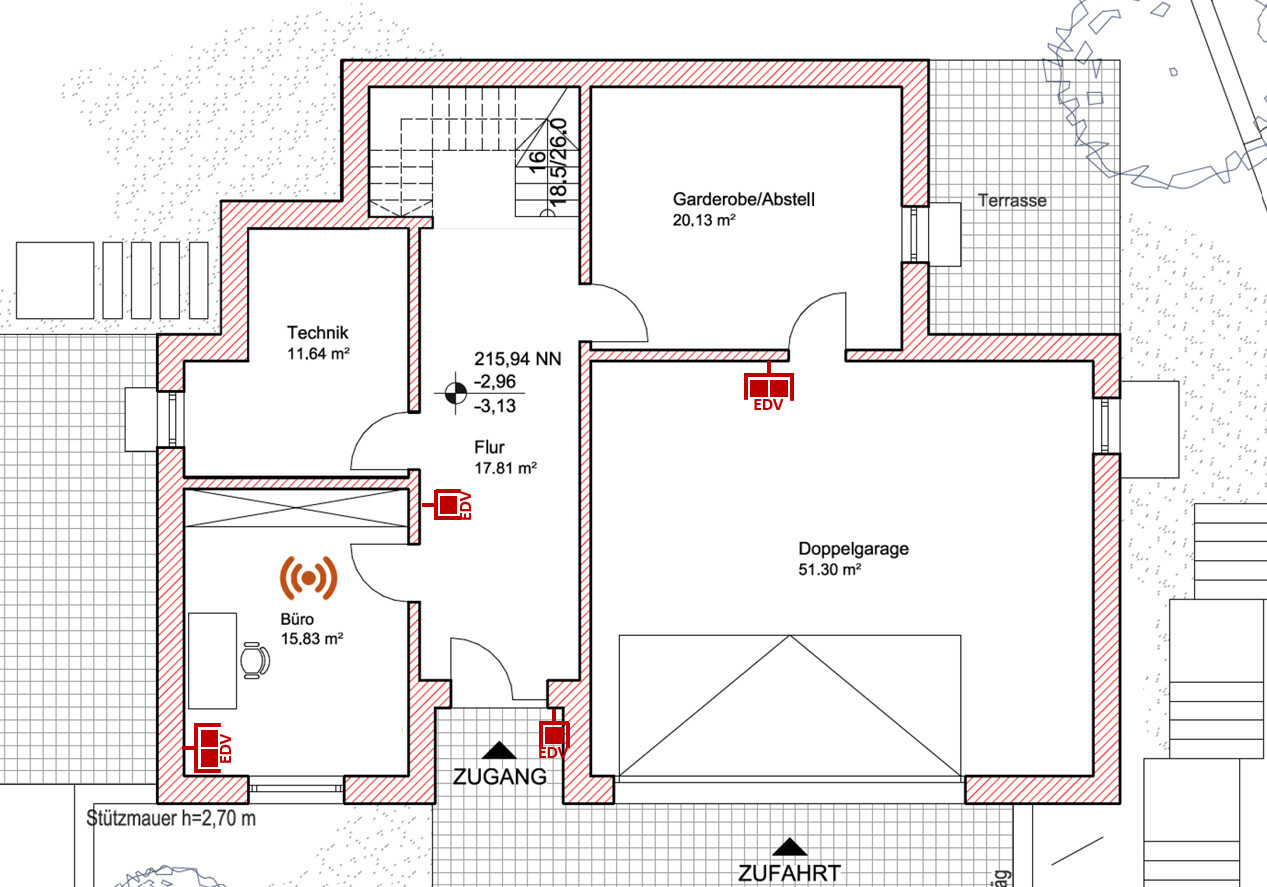
Basement
Double socket in the garage. Could be useful for future wall boxes.
Double socket in the office (at the edge where the desk will likely be placed)
Single socket in the hallway for an indoor door station
Cable outlet at the main entrance for an outdoor door station
I am assuming you will house the cables and server cabinet in the utility room. In that case, you probably don’t need an extra socket there, since the network switch will be nearby in the same room.
This results in a total of five LAN connections plus an outlet for the outdoor door station and one access point = 7 cables to be installed.
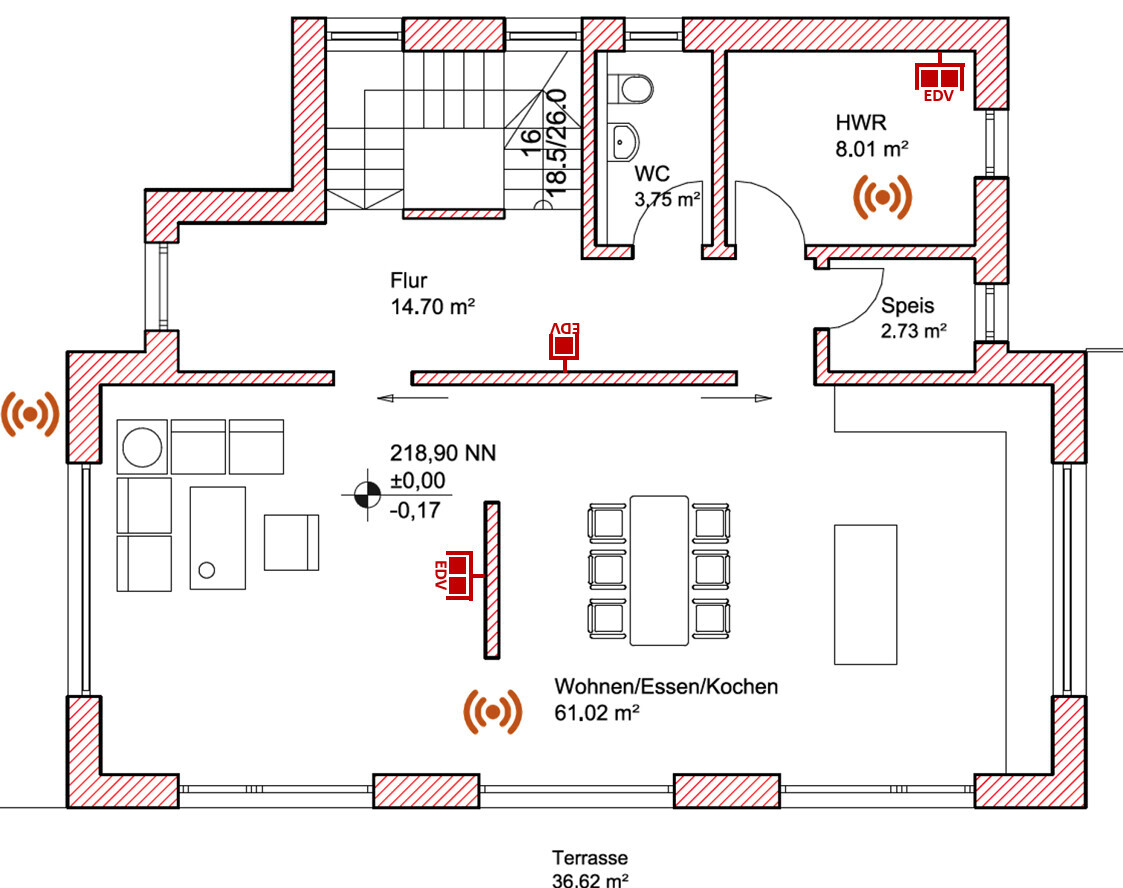
Ground Floor
Double socket in the utility room
Double socket at the TV location
Single socket in the hallway for an indoor door station
That makes five LAN connections plus two access points = 7 cables to be installed.
Note: I wouldn’t necessarily add a network socket outside next to the access point. It might only be useful for a camera, if you are interested in that. Otherwise, consider if there might be an alternative TV location.
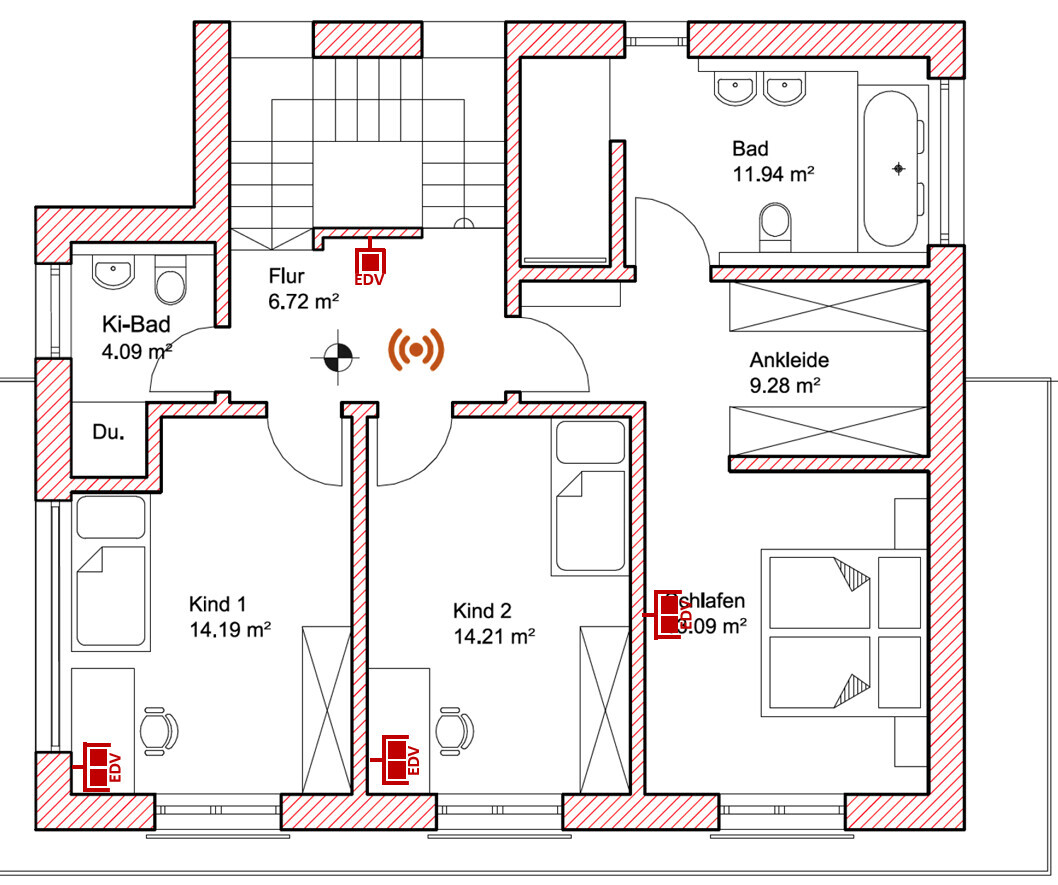
Upper Floor
Double socket in Child 1's room
Double socket in Child 2's room
Double socket in the bedroom
Single socket in the hallway for an indoor door station
That makes seven LAN connections plus one access point = 8 cables to be installed.
Note: If you are unsure about the furniture arrangement in the children’s rooms, you could also install an additional double socket on the opposite walls or one single socket each.
So, you would end up with a total of 22 cables to be installed. These fit well on a 24-port switch. Please keep in mind the following: besides the pure LAN connections, some components need to be connected directly to the switch. For example, in my setup, the router, a NAS, and a Doorbird input/output controller are directly connected to the switch. After all, the router still has some ports available.
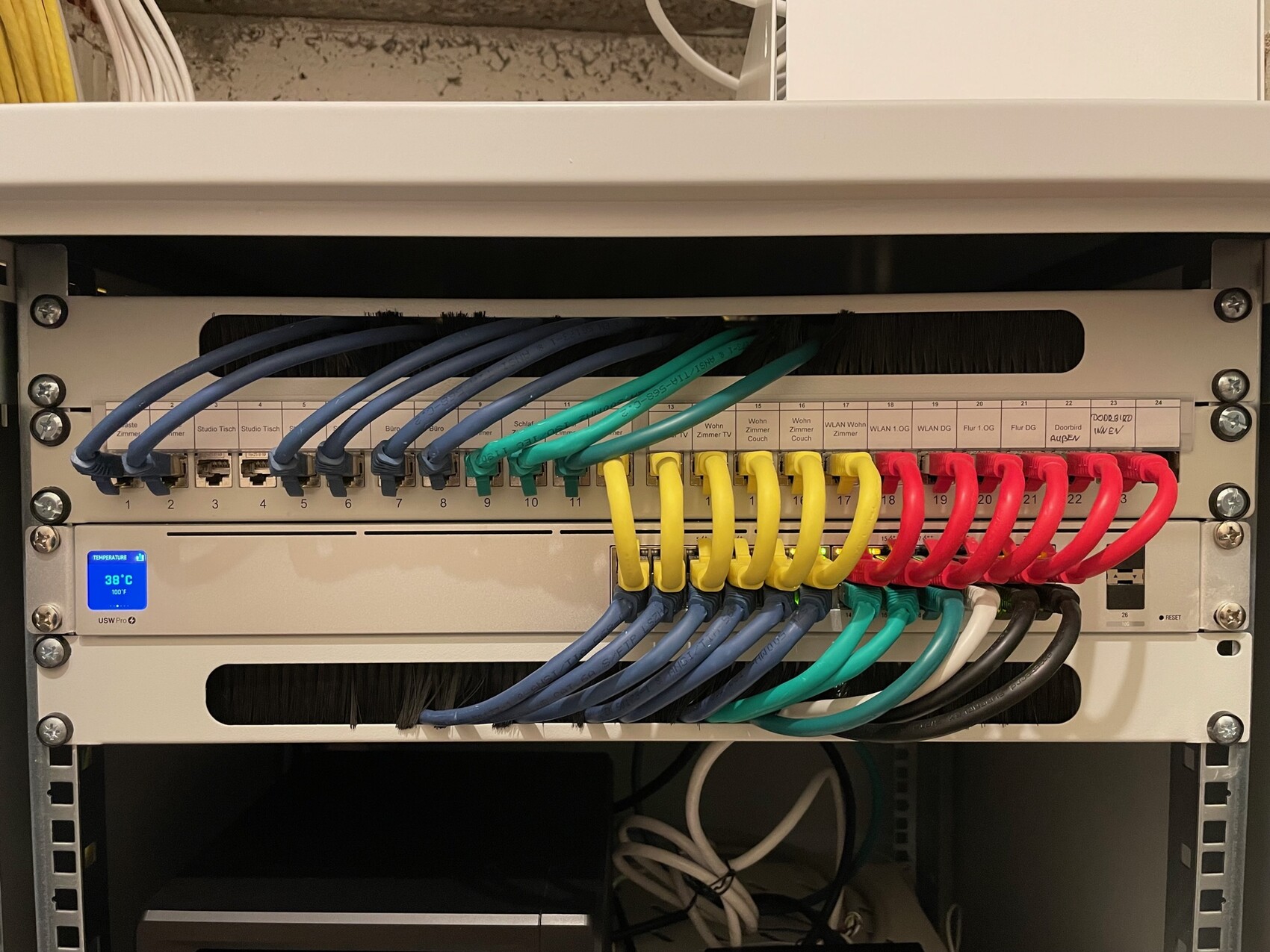
I would recommend buying the components for the network cabinet yourself and asking the electrician to properly terminate the cables on a patch panel inside the network cabinet. It’s important to use keystone jacks there to terminate the cables at the patch panel. These can be removed or rearranged later if necessary.
In my case, it looks like this:
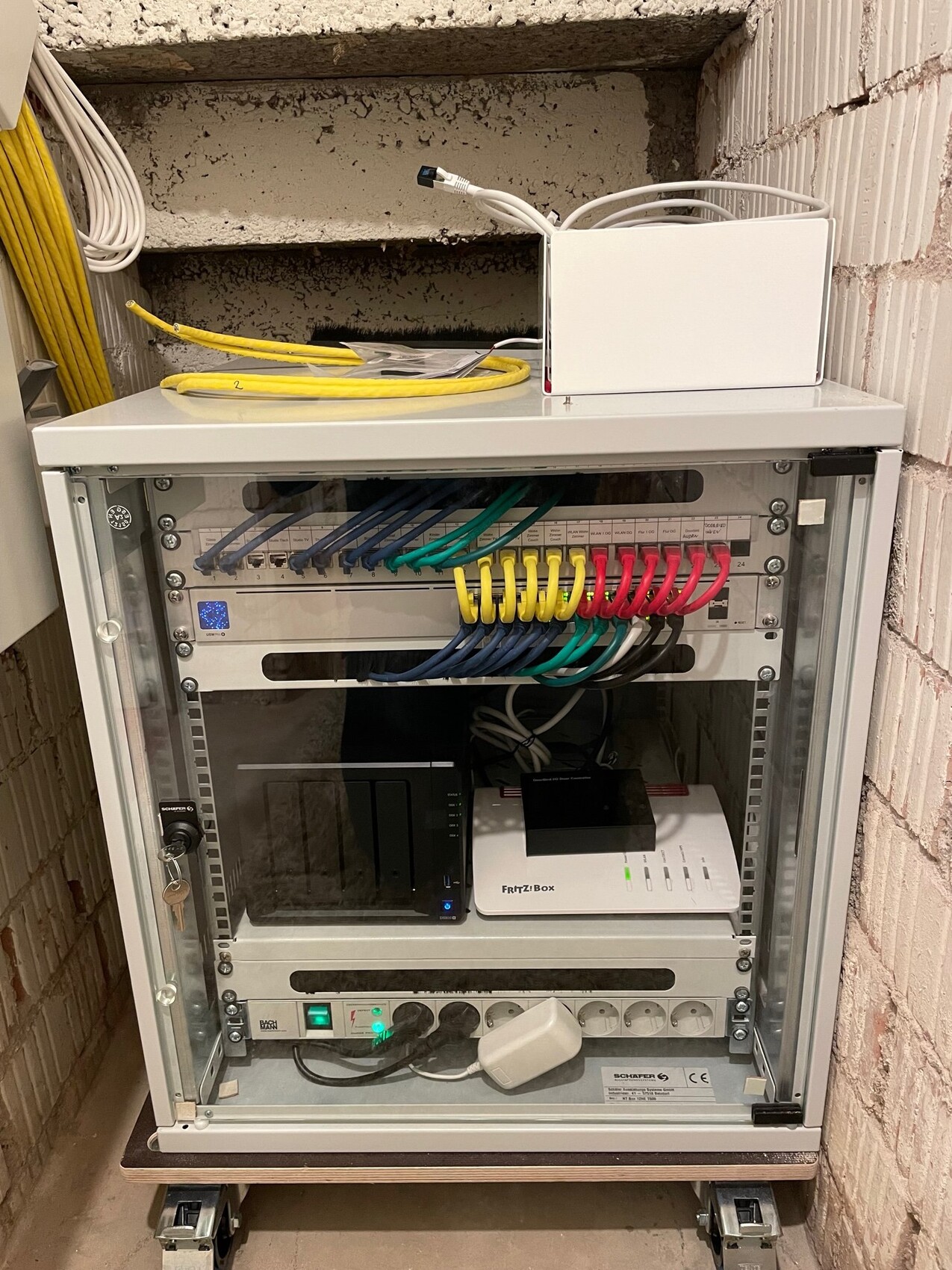
Here you can see the yellow installation cables arriving from the left and then bundled into the network cabinet from above at the back.
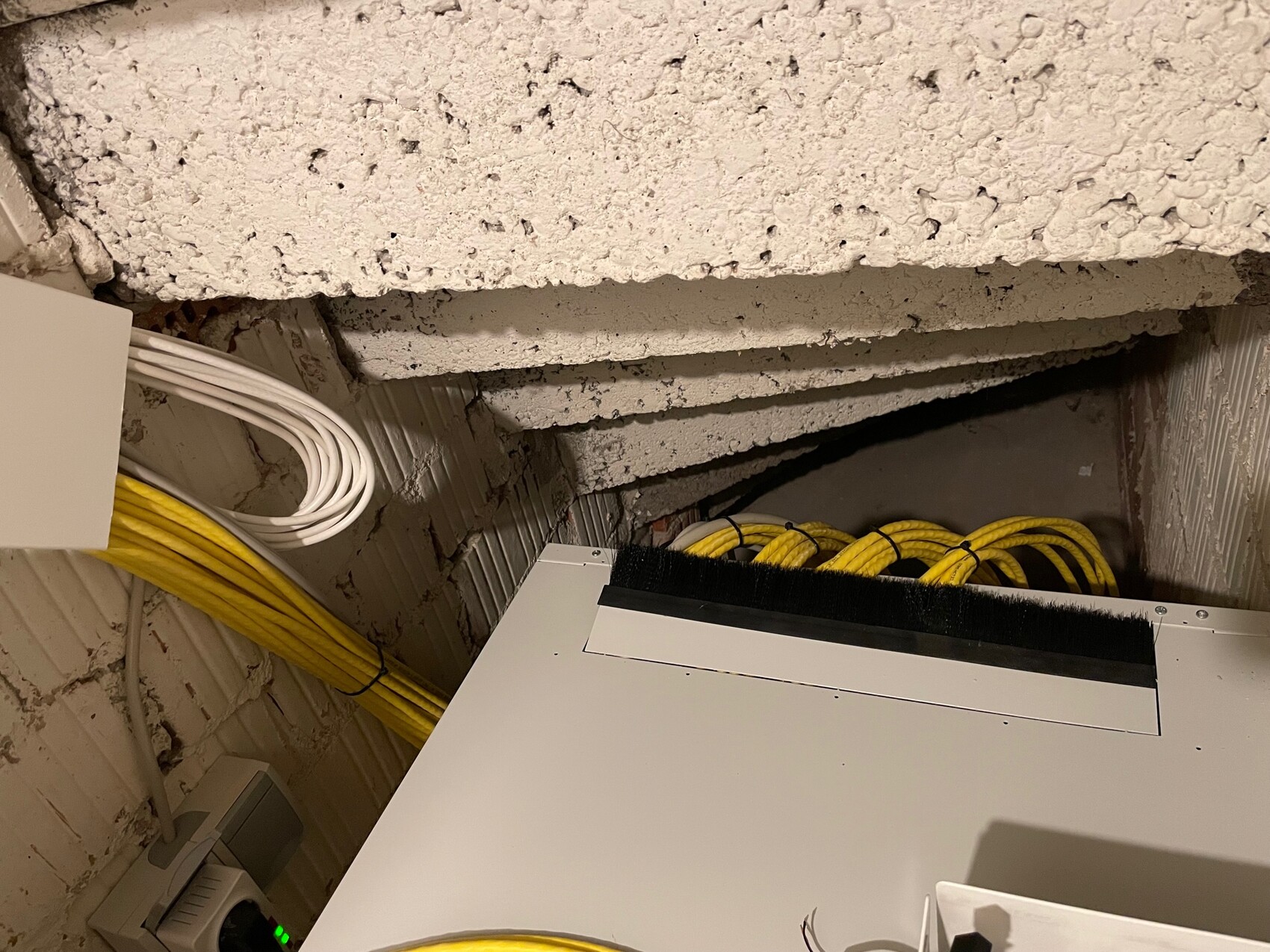
Here you see the network cabinet, which I chose generously to also have space for the NAS and the router.
Here is a close-up of the patch panel setup. We were lucky to have an electrician who worked very neatly and clearly labeled the ports. From the patch panel, some patch cables run over upper and lower brush strips to the switch. Of course, that is mainly for tidiness.
Basement
Double socket in the garage. Could be useful for future wall boxes.
Double socket in the office (at the edge where the desk will likely be placed)
Single socket in the hallway for an indoor door station
Cable outlet at the main entrance for an outdoor door station
I am assuming you will house the cables and server cabinet in the utility room. In that case, you probably don’t need an extra socket there, since the network switch will be nearby in the same room.
This results in a total of five LAN connections plus an outlet for the outdoor door station and one access point = 7 cables to be installed.
Ground Floor
Double socket in the utility room
Double socket at the TV location
Single socket in the hallway for an indoor door station
That makes five LAN connections plus two access points = 7 cables to be installed.
Note: I wouldn’t necessarily add a network socket outside next to the access point. It might only be useful for a camera, if you are interested in that. Otherwise, consider if there might be an alternative TV location.
Upper Floor
Double socket in Child 1's room
Double socket in Child 2's room
Double socket in the bedroom
Single socket in the hallway for an indoor door station
That makes seven LAN connections plus one access point = 8 cables to be installed.
Note: If you are unsure about the furniture arrangement in the children’s rooms, you could also install an additional double socket on the opposite walls or one single socket each.
So, you would end up with a total of 22 cables to be installed. These fit well on a 24-port switch. Please keep in mind the following: besides the pure LAN connections, some components need to be connected directly to the switch. For example, in my setup, the router, a NAS, and a Doorbird input/output controller are directly connected to the switch. After all, the router still has some ports available.
I would recommend buying the components for the network cabinet yourself and asking the electrician to properly terminate the cables on a patch panel inside the network cabinet. It’s important to use keystone jacks there to terminate the cables at the patch panel. These can be removed or rearranged later if necessary.
In my case, it looks like this:
Here you can see the yellow installation cables arriving from the left and then bundled into the network cabinet from above at the back.
Here you see the network cabinet, which I chose generously to also have space for the NAS and the router.
Here is a close-up of the patch panel setup. We were lucky to have an electrician who worked very neatly and clearly labeled the ports. From the patch panel, some patch cables run over upper and lower brush strips to the switch. Of course, that is mainly for tidiness.
M
majuhenema3 Jan 2022 21:00MBPassion schrieb:
@majuhenema I would generally recommend always installing double sockets. There are already prefabricated Cat7 duplex cables available, which should also make it easier for the electrician to install them.I added that to the detailed planning list – how much more expensive is a double socket compared to a single socket? If it’s only marginally more expensive like in your case, we’ll go with the double sockets.
MBPassion schrieb:
Ground Floor
Double socket in the utility room
Double socket at the TV spot
Single socket in the hallway for a door station
That makes a total of five LAN ports plus two access points = 7 data cables to be installed
Notes: outside, I wouldn’t necessarily install a network socket right next to the access point. It might only be useful for a camera, if you’re interested in something like that. Otherwise, think again if there could be an alternative TV location. I forgot the door station, thanks!
I’m struggling a bit with the TV area. The partition wall will be exposed concrete and should look very clean. The TV will be mounted on the wall. So I think it makes sense to plan power, satellite, and network connections behind the TV, and below at lowboard height another set of power and network connections.
What do you think about that?
Regarding the two network sockets outside: I had planned one for the awning (app-controlled?) and one for the outdoor access point.
There will be another TV location in the utility room.
MBPassion schrieb:
Note: If you’re unsure about the furnishing in the kids’ rooms, you could also have a double socket installed on the opposite walls or a single socket each. We have discussed the furnishing in the kids’ rooms several times and *we* are clear about that. But will the kids feel the same way in 10–15 years?
MBPassion schrieb:
I would then buy the components for the network rack myself and ask the electrician to neatly terminate the installed cables on the patch panel inside the network rack. It’s also important that you have keystones installed there that terminate the cables at the patch panel. These can be removed or rearranged later if needed.
For example, my setup looks like this: Once again, thank you very much for the detailed explanation and the photos!

I recommend you familiarize yourself with the topic of "switches, patch panels, routers, and IP address allocation." It’s not complicated. If you use automatic address assignment, you don’t need to worry about network protocols or similar details.
However, if you leave everything to the electrician, you will have to call them for every little “problem.” This will cost money, time, and patience.
Neat cabling like in the photos above looks great but doesn’t help at all if you don’t know which cables serve which function.
However, if you leave everything to the electrician, you will have to call them for every little “problem.” This will cost money, time, and patience.
Neat cabling like in the photos above looks great but doesn’t help at all if you don’t know which cables serve which function.
M
majuhenema3 Jan 2022 21:56Tarnari schrieb:
I recommend familiarizing yourself with the topics “switch, patch panel, router, IP address assignment.” It’s not complicated. If you set everything to use automatic address assignment, you don’t have to worry about network protocols, etc.
However, if you have the electrician do everything, you’ll have to call them for every tiny “issue.” This costs money, time, and patience.
Nice cabling like in the photos above looks great but doesn’t help at all if you don’t know which cables serve which purpose. I would have the electrician handle the cabling and its consolidation in the network cabinet, while I would take care of planning the components beforehand and later setting up/installing the network on the PC myself.
Small spoiler: I will ask for your help again when it’s time to approve the components. :P
Similar topics