
Hello everyone,
In about three weeks, we are supposed to finalize our electrical planning on site. Unfortunately, our electrician is somewhat old-fashioned, which makes it difficult for me to collaboratively plan a future-proof electrical setup with him. Therefore, I am currently educating myself to ensure that the networking in our single-family home is fundamentally future-proof.
Basically, it’s about the LAN network... LAN wall outlets are relatively expensive, so proper planning is even more important.
About us:
- Mid to late 20s – couple without children. Planning for 2 children in the near future.
- Single-family house with a usable basement, 2 full floors, and fully equipped with concrete ceilings
- Utility room in the basement with air-to-water heat pump, ventilation system, photovoltaic system
- The router is planned to be located in the office on the ground floor
- The upper floor includes bathroom / bedroom / 2 children’s rooms
- No satellite dish or cable TV — we will use Internet TV exclusively!
Now, I am struggling to network our single-family home sensibly but as cost-effectively as possible.
I have the following questions:
1. Slightly off-topic: In the living room, I would like to have an in-wall conduit installed on the TV wall (the TV will be wall-mounted) so that no cables are visible. Is this sensible and affordable? I will get exact prices from my electrician if this makes sense at all. Would it also make sense to install power outlets at TV height? How do you plan the connections on your media wall reasonably? What should be considered?
Since we plan to use a Magenta TV box and thus IP-TV, a total of four LAN ports in the living room area would presumably be useful, right?
2. How many LAN outlets and especially where should LAN outlets be installed? Mainly: which cable? Is CAT6 sufficient?
→ Such a double LAN outlet certainly costs close to €200, so planning must be really sensible.
Is it really necessary to install 2 double LAN outlets in each children’s room? I always wonder: what is actually going to be plugged in there?
One port for the TV and one port for a multimedia device should be enough, right? So four connections would probably be overkill, correct?
The fact is: It will certainly take years or decades before our children actually use these outlets... Who knows what changes might happen by then? Therefore, could we not cost-effectively use empty conduits (empty pipes) instead?
Is it also possible to “branch off” from an existing double outlet afterward to add more ports for the room? What should be considered here? Or should we consider having an empty conduit prepared in another spot in the room so that a socket can be installed later?
3. How do you solve the “router problem”? Should the one router be placed in the office (ground floor) with LAN outlets in the existing bedrooms upstairs to ensure a stable LAN connection? Or is a router upstairs absolutely necessary?
4. How important are LAN outlets in the utility room? Should the router possibly even be located in the utility room? Because of the concrete ceiling between basement and ground floor, a second router would almost certainly be needed. How should this situation be handled with a basement?
5. What do you think about installing empty conduits for CAT cables in the kitchen / hallway etc. to enable later retrofitting? Is this relatively affordable in new builds?
I would appreciate any feedback so we can make the best possible plans 🙂
In about three weeks, we are supposed to finalize our electrical planning on site. Unfortunately, our electrician is somewhat old-fashioned, which makes it difficult for me to collaboratively plan a future-proof electrical setup with him. Therefore, I am currently educating myself to ensure that the networking in our single-family home is fundamentally future-proof.
Basically, it’s about the LAN network... LAN wall outlets are relatively expensive, so proper planning is even more important.
About us:
- Mid to late 20s – couple without children. Planning for 2 children in the near future.
- Single-family house with a usable basement, 2 full floors, and fully equipped with concrete ceilings
- Utility room in the basement with air-to-water heat pump, ventilation system, photovoltaic system
- The router is planned to be located in the office on the ground floor
- The upper floor includes bathroom / bedroom / 2 children’s rooms
- No satellite dish or cable TV — we will use Internet TV exclusively!
Now, I am struggling to network our single-family home sensibly but as cost-effectively as possible.
I have the following questions:
1. Slightly off-topic: In the living room, I would like to have an in-wall conduit installed on the TV wall (the TV will be wall-mounted) so that no cables are visible. Is this sensible and affordable? I will get exact prices from my electrician if this makes sense at all. Would it also make sense to install power outlets at TV height? How do you plan the connections on your media wall reasonably? What should be considered?
Since we plan to use a Magenta TV box and thus IP-TV, a total of four LAN ports in the living room area would presumably be useful, right?
2. How many LAN outlets and especially where should LAN outlets be installed? Mainly: which cable? Is CAT6 sufficient?
→ Such a double LAN outlet certainly costs close to €200, so planning must be really sensible.
Is it really necessary to install 2 double LAN outlets in each children’s room? I always wonder: what is actually going to be plugged in there?
One port for the TV and one port for a multimedia device should be enough, right? So four connections would probably be overkill, correct?
The fact is: It will certainly take years or decades before our children actually use these outlets... Who knows what changes might happen by then? Therefore, could we not cost-effectively use empty conduits (empty pipes) instead?
Is it also possible to “branch off” from an existing double outlet afterward to add more ports for the room? What should be considered here? Or should we consider having an empty conduit prepared in another spot in the room so that a socket can be installed later?
3. How do you solve the “router problem”? Should the one router be placed in the office (ground floor) with LAN outlets in the existing bedrooms upstairs to ensure a stable LAN connection? Or is a router upstairs absolutely necessary?
4. How important are LAN outlets in the utility room? Should the router possibly even be located in the utility room? Because of the concrete ceiling between basement and ground floor, a second router would almost certainly be needed. How should this situation be handled with a basement?
5. What do you think about installing empty conduits for CAT cables in the kitchen / hallway etc. to enable later retrofitting? Is this relatively affordable in new builds?
I would appreciate any feedback so we can make the best possible plans 🙂
M
MBPassion2 Nov 2021 20:20I can share our experience with a full renovation and offer some recommendations. We had two in-wall cables installed in every room (each ending in a double outlet; although in most cases, a single outlet would probably suffice, since more and more connections are handled via Wi-Fi nowadays). You should have a good idea or estimate of where devices and desks will be located. In addition, we had individual lines installed at the following locations:
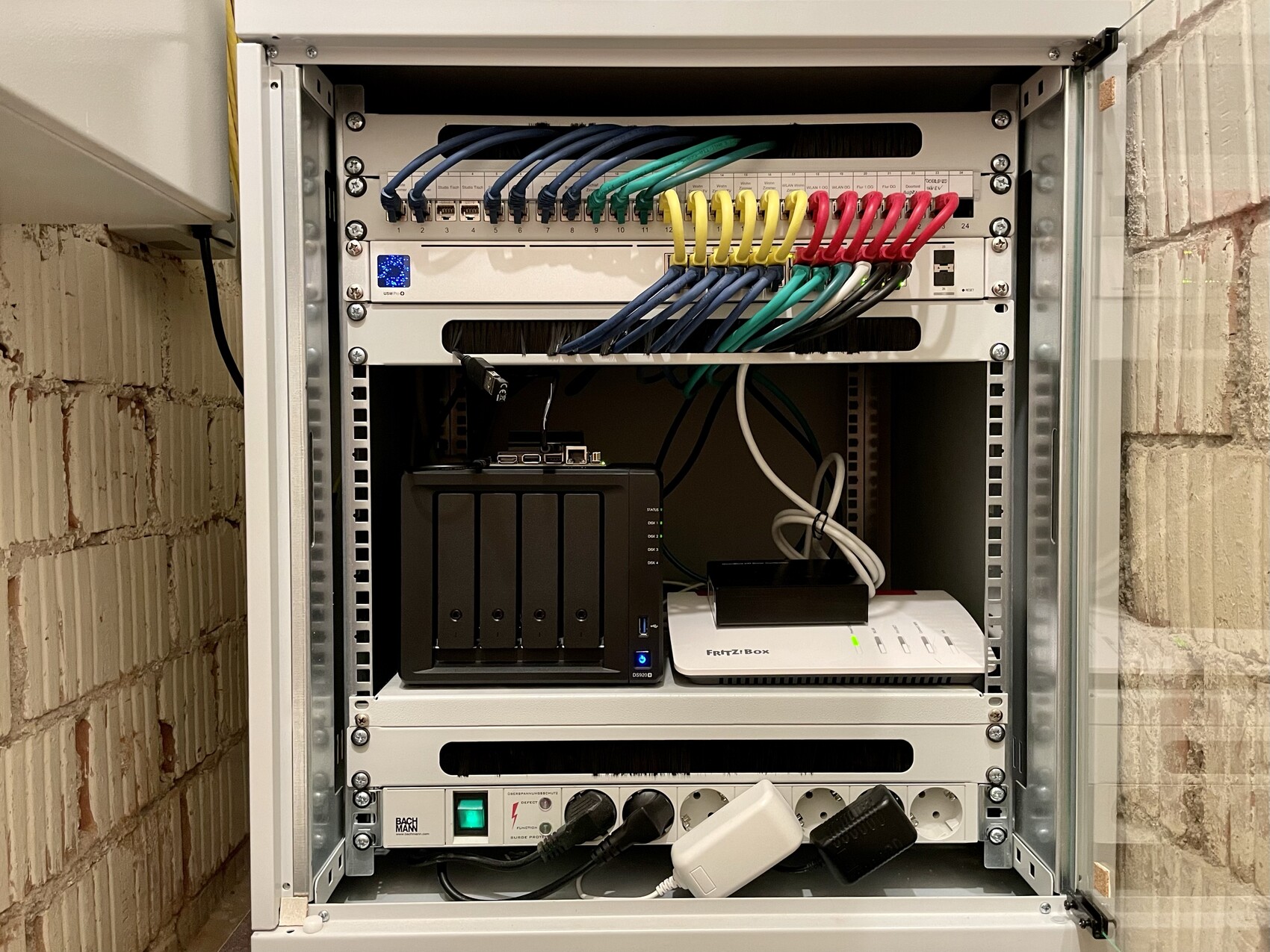
Altogether, 23 in-wall cables run to a patch panel in a small storage room in the basement. There is also a 19-inch network cabinet where I consolidate the rest of the infrastructure:
From my point of view, it is very important that the access points are well distributed because Wi-Fi is becoming increasingly important. We now have one Unifi Access Point nanoHD on each floor and are very satisfied with the coverage. We no longer need the FritzBox’s Wi-Fi and have disabled it.
For the DECT signal of the telephone, reception from the FritzBox in the basement (inside the server cabinet) is actually sufficient up to the attic. Of course, you could also install a dedicated DECT base station in a central location, such as the Gigaset Pro N670 IP DECT for around 100 euros. (Other options we considered included extending the DSL signal via in-wall cable and reconnecting it to the network using a second cable; having the TAE connection installed directly on the ground floor by the electrician; using a DECT repeater; or adding a second FritzBox.)
Regarding the access points, I highly recommend running cables directly into the ceilings for them. This looks neat (or rather unobtrusive) and provides good coverage. You should instruct the electrician to use a deep flush-mounted box, since you’ll need to connect a short patch cable from the terminated in-wall cable to the access point.
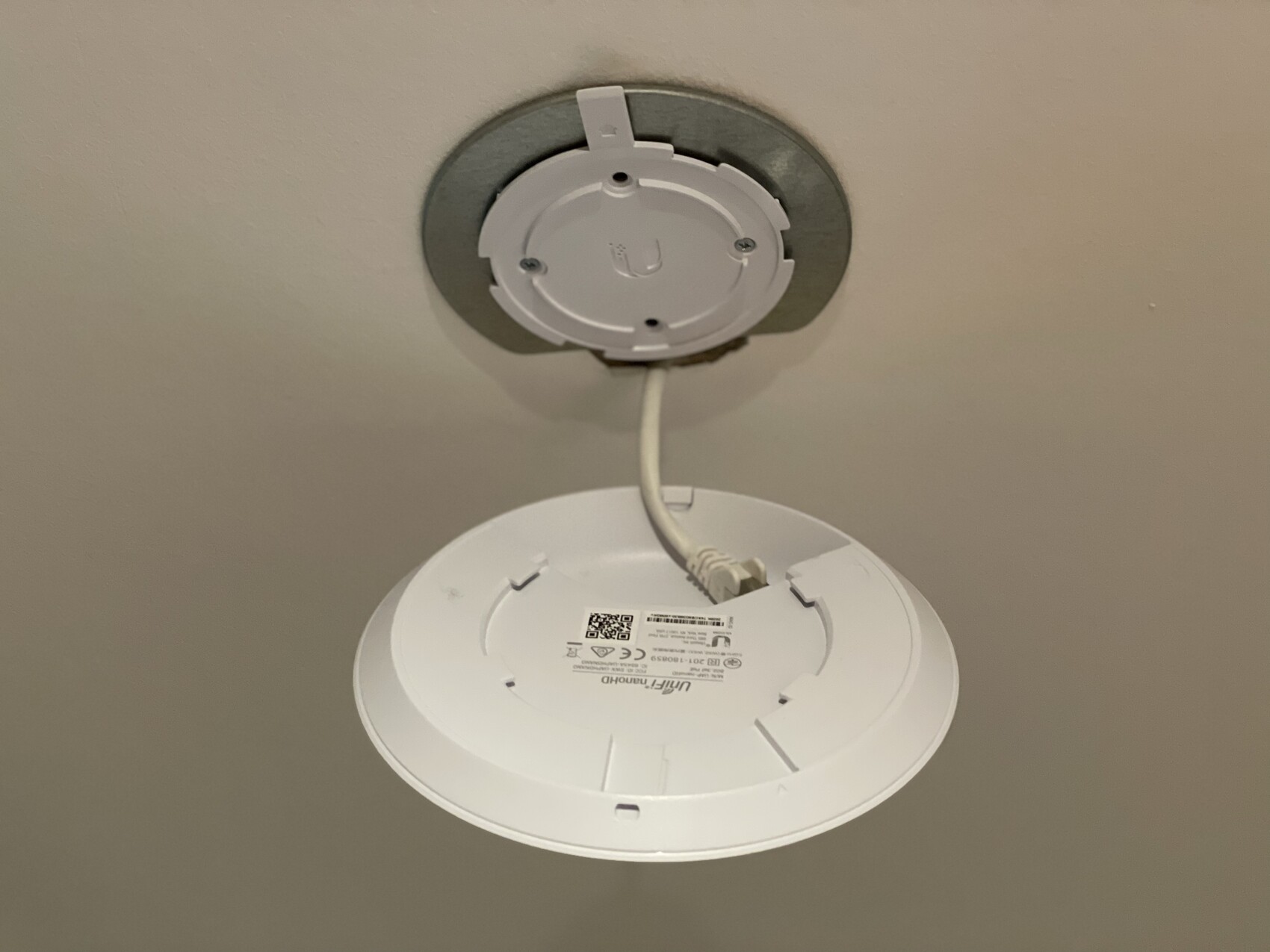
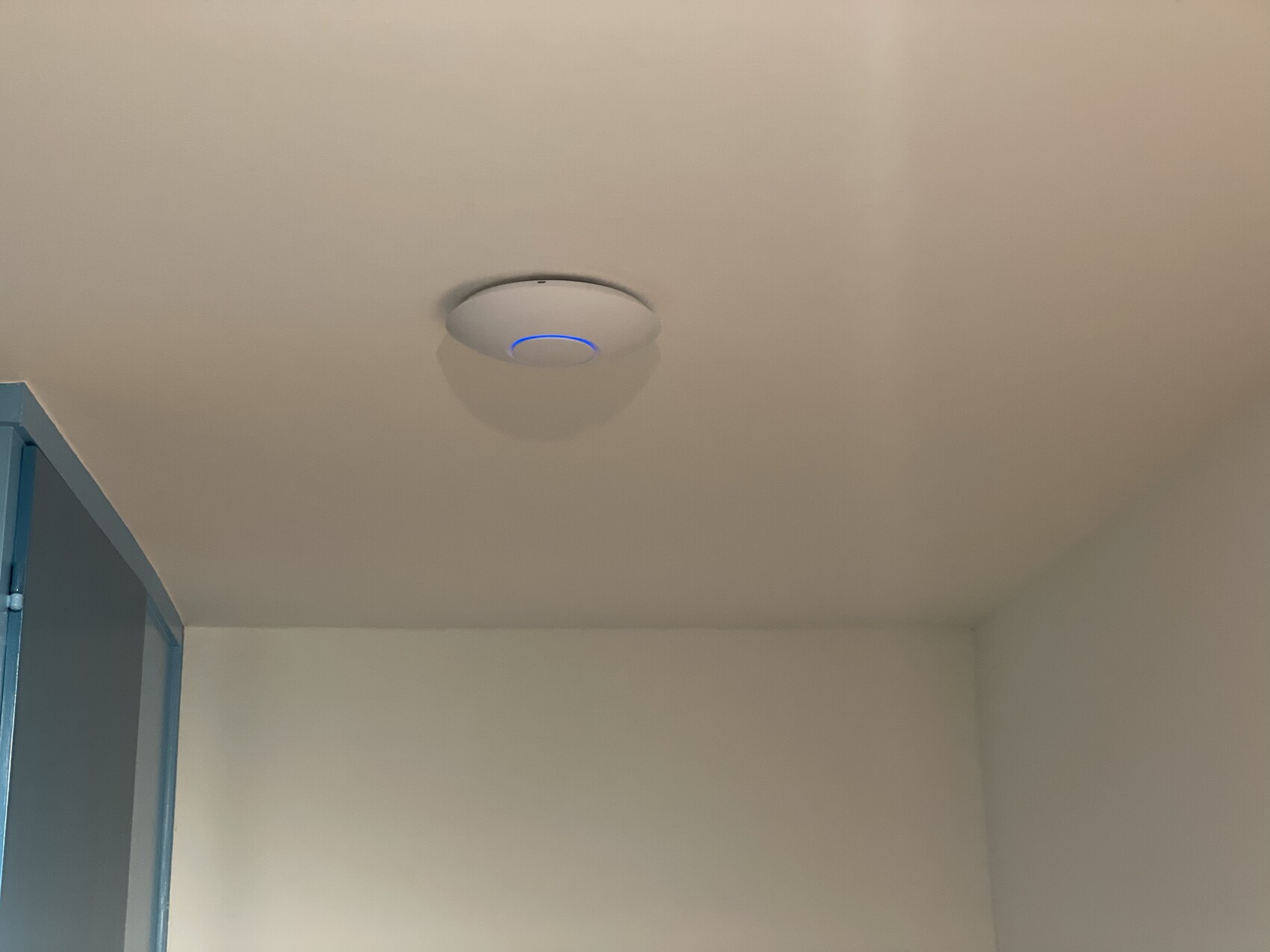
The great thing is that the access points receive power via PoE directly from my switch, so only one cable per access point is needed. Besides Unifi, there are also good solutions from other manufacturers.
For in-wall cabling, CAT7 is commonly used here in Germany, which should be future-proof. I would not go below CAT7 for in-wall cables, as CAT7 offers better shielding than CAT6. Also, in-wall cables are either very difficult to replace without conduits or you simply don’t want to replace them if conduits are used. I actually went for CAT8 in-wall cables, but that is probably too expensive for most people. For the shorter connections from network outlets to devices, CAT6 patch cables are sufficient and more flexible.
What you should keep in mind with this setup:
A large switch naturally consumes more power than a smaller one. So, if you know that 90% of the LAN ports won’t be used, it might be more economical to operate a smaller switch. (I simply wanted this kind of setup.)
The access points each draw about 5W and unfortunately cannot be easily turned off, for example at night. This bothers me a bit because it wastes unnecessary power.
Unifi devices operate within a so-called software-defined network. This means the devices themselves do not contain a controller or management interface but are managed by a central controller. While the controller is needed for initial configuration, it does not have to run continuously. I currently run it on my NAS inside a Docker container.
My setup is probably toward the upper limit for a private user. Everything could definitely be scaled down without any problems. What’s important is that you are aware of what will be hard to change in the future—and that you install a very good and durable solution in those areas. Switches, FritzBoxes, and similar equipment can always be replaced. Good cabling, however, might not be replaceable later on.
- Next to the front door for the Doorbird outdoor station
- On the ground floor at the staircase for the Doorbird indoor station
- In the hallway on the first floor
- In the hallway in the attic
- 3 times on the ceilings of ground floor/first floor/attic for three access points
Altogether, 23 in-wall cables run to a patch panel in a small storage room in the basement. There is also a 19-inch network cabinet where I consolidate the rest of the infrastructure:
- 24-port PoE switch (Unifi USW-Pro-24-POE)
- A FritzBox router (Wi-Fi disabled)
- A NAS
- A Doorbird I/O controller
- (sometimes a Raspberry Pi or Jetson Nano) 🙂
From my point of view, it is very important that the access points are well distributed because Wi-Fi is becoming increasingly important. We now have one Unifi Access Point nanoHD on each floor and are very satisfied with the coverage. We no longer need the FritzBox’s Wi-Fi and have disabled it.
For the DECT signal of the telephone, reception from the FritzBox in the basement (inside the server cabinet) is actually sufficient up to the attic. Of course, you could also install a dedicated DECT base station in a central location, such as the Gigaset Pro N670 IP DECT for around 100 euros. (Other options we considered included extending the DSL signal via in-wall cable and reconnecting it to the network using a second cable; having the TAE connection installed directly on the ground floor by the electrician; using a DECT repeater; or adding a second FritzBox.)
Regarding the access points, I highly recommend running cables directly into the ceilings for them. This looks neat (or rather unobtrusive) and provides good coverage. You should instruct the electrician to use a deep flush-mounted box, since you’ll need to connect a short patch cable from the terminated in-wall cable to the access point.
The great thing is that the access points receive power via PoE directly from my switch, so only one cable per access point is needed. Besides Unifi, there are also good solutions from other manufacturers.
For in-wall cabling, CAT7 is commonly used here in Germany, which should be future-proof. I would not go below CAT7 for in-wall cables, as CAT7 offers better shielding than CAT6. Also, in-wall cables are either very difficult to replace without conduits or you simply don’t want to replace them if conduits are used. I actually went for CAT8 in-wall cables, but that is probably too expensive for most people. For the shorter connections from network outlets to devices, CAT6 patch cables are sufficient and more flexible.
What you should keep in mind with this setup:
A large switch naturally consumes more power than a smaller one. So, if you know that 90% of the LAN ports won’t be used, it might be more economical to operate a smaller switch. (I simply wanted this kind of setup.)
The access points each draw about 5W and unfortunately cannot be easily turned off, for example at night. This bothers me a bit because it wastes unnecessary power.
Unifi devices operate within a so-called software-defined network. This means the devices themselves do not contain a controller or management interface but are managed by a central controller. While the controller is needed for initial configuration, it does not have to run continuously. I currently run it on my NAS inside a Docker container.
My setup is probably toward the upper limit for a private user. Everything could definitely be scaled down without any problems. What’s important is that you are aware of what will be hard to change in the future—and that you install a very good and durable solution in those areas. Switches, FritzBoxes, and similar equipment can always be replaced. Good cabling, however, might not be replaceable later on.

MBPassion schrieb:
I can share our experience with a complete renovation and give you some recommendations. We had two network cables installed in every room (each with a double wall socket; I would say that in most cases a single socket is sufficient since increasingly more devices connect via Wi-Fi). You should have a good idea of where the devices and desks will be placed. Additionally, we had individual cables installed in the following locations:
- Next to the front door for the Doorbird outdoor unit
- On the ground floor near the staircase for the Doorbird indoor unit
- In the hallway on the first floor
- In the hallway in the attic
- 3 x on the ceilings of ground floor/first floor/attic for three access points
In total, 23 network cables run to a patch panel in a small storage room in the basement. There we also have a 19-inch network cabinet where I consolidate the rest of the infrastructure:
- 24-port PoE switch (Unifi USW-Pro-24-POE)
- A Fritzbox (Wi-Fi disabled)
- A NAS
- A Doorbird input/output controller
- (Sometimes a Raspberry Pi or Jetson Nano) 🙂
From my perspective, it is very important that the access points are well distributed because Wi-Fi is becoming more and more important. We now have a Unifi Access Point nanoHD on each floor and are very satisfied with them. We no longer use the Fritzbox’s Wi-Fi and have it disabled.
For the DECT signal of the phone, the reception from the Fritzbox in the basement (inside the server cabinet) is sufficient to cover the attic. Of course, you can also rely on a central DECT base station, such as the Gigaset Pro N670 IP DECT, which costs around 100 euros. (Other options would have been to extend the DSL signal via a network cable and return it to the network via a second cable; have the telephone socket installed by the electrician directly on the ground floor; use a DECT repeater; or use a second Fritzbox.)
Regarding the access points, I would recommend installing network cables directly into the ceilings for them. This looks neat (or discreet) and provides good coverage. You should tell your electrician to use deep recessed wall boxes because the terminated cable needs to be connected to the access point via a short patch cable.
The great thing about this is that the access points receive power over Ethernet (PoE) from my switch, so only one cable is needed. Besides Unifi, there are also good solutions from other manufacturers.
For the network cabling, Cat7 cables are commonly used here in Germany today, which should be future-proof. I wouldn’t go below Cat7 for the installed cables since Cat7 has better shielding than Cat6 and once installed, these cables are either impossible to replace without empty conduits or undesirable to replace if conduits are present. I even opted for Cat8 cables—but that’s too expensive for most people. For the short runs from the network sockets to the devices, Cat6 patch cables are sufficient—they are more flexible after all.
What should you keep in mind with this setup:
A large switch obviously consumes more power than a smaller one. So if you know that 90% of the LAN ports won’t be used, it might be more economical to use a smaller switch. (I just wanted to set up such an arrangement.)
Each access point draws about 5W and unfortunately cannot be conveniently switched off at night, for example. This bothers me because it wastes electricity unnecessarily.
Unifi operates their devices over a so-called Software-Defined Network, meaning the devices don’t contain a controller or user interface themselves but are managed by a central controller. Although this controller is required for initial setup, it doesn’t have to run all the time. I currently run it in a Docker container on my NAS.
My setup is probably already at the upper limit for a private user. It can certainly be scaled down without any issues. The important thing is that you are clear about what will be difficult to change in the future—and install a very good and sustainable solution there. Switches, Fritzboxes, and similar devices can always be replaced; a good cabling may not be replaceable at all. That’s great and quite similar to my setup. You can find more details in the corresponding thread.
It only works with Magenta if the Magenta receivers are connected directly to the Fritzbox.
Otherwise, with Unifi switches, you get at most 10 seconds of reception before the image freezes.
H
hampshire2 Nov 2021 21:29Tarnari schrieb:
They will say that anything beyond the Speedport is outside of their support scope.And I wouldn't choose the Speedport...hampshire schrieb:
And I wouldn’t choose the Speedport...That’s true anyway. That’s why I say, do your research. Because if you don’t use the Speedport and instead, for example, choose a FritzBox or even a Draytek, then hotline support becomes even less likely.
@MBPassion
Thank you for this great answer.
As I mentioned, since I am a layperson and really know very little about this, your explanation helps me a lot!
How should I basically picture this:
Is the patch panel a separate box next to the main electrical distribution board?
Is this ultimately necessary as soon as I plan multiple LAN connections? Obviously, the cables from all rooms must be routed centrally to the basement.
You need a switch, or rather, one is needed because the router (Fritzbox) does not provide enough LAN ports, correct?
So, I need a switch with the appropriate number of ports and data transfer speed so that all LAN cables have a designated place in the patch panel.
Regarding how to connect the MAGENTA TV box, I still need to do some research because with the switch in place, I assume the Fritzbox or Speedport router will no longer be used, right? In other words, I need a device that can communicate with the Magenta box?
I also understood the part about the access points – that all sounds very good and logical to me.
PS: Our shell construction is already completely finished... The ceiling outlets are already installed in the concrete ceilings, meaning: Can I still have cables installed inside the ceiling without major extra work, or should we actually have discussed the access points with the electrician a bit earlier?
Thank you for this great answer.
As I mentioned, since I am a layperson and really know very little about this, your explanation helps me a lot!
How should I basically picture this:
Is the patch panel a separate box next to the main electrical distribution board?
Is this ultimately necessary as soon as I plan multiple LAN connections? Obviously, the cables from all rooms must be routed centrally to the basement.
You need a switch, or rather, one is needed because the router (Fritzbox) does not provide enough LAN ports, correct?
So, I need a switch with the appropriate number of ports and data transfer speed so that all LAN cables have a designated place in the patch panel.
Regarding how to connect the MAGENTA TV box, I still need to do some research because with the switch in place, I assume the Fritzbox or Speedport router will no longer be used, right? In other words, I need a device that can communicate with the Magenta box?
I also understood the part about the access points – that all sounds very good and logical to me.
PS: Our shell construction is already completely finished... The ceiling outlets are already installed in the concrete ceilings, meaning: Can I still have cables installed inside the ceiling without major extra work, or should we actually have discussed the access points with the electrician a bit earlier?
Similar topics