
Hello everyone,
I am currently considering how to set up the network in our house.
In this context, I thought it would be great if some of you could share how you have implemented a high-end network on an individual basis.
I am an IT professional myself, but my focus lies elsewhere. Nevertheless, feel free to get technical—I assume I will understand you.
I am interested in:
- How have you segmented your networks?
- What devices do you use (manufacturer-independent)?
- Which devices (manufacturer-independent) do you group together in which network, and why?
- Which networks do you allow to communicate with each other?
- How have you implemented external access, if desired?
- Do you perhaps have a DMZ?
- In your opinion, what is a “must-have” and what is a “nice-to-have”?
I am currently considering how to set up the network in our house.
In this context, I thought it would be great if some of you could share how you have implemented a high-end network on an individual basis.
I am an IT professional myself, but my focus lies elsewhere. Nevertheless, feel free to get technical—I assume I will understand you.
I am interested in:
- How have you segmented your networks?
- What devices do you use (manufacturer-independent)?
- Which devices (manufacturer-independent) do you group together in which network, and why?
- Which networks do you allow to communicate with each other?
- How have you implemented external access, if desired?
- Do you perhaps have a DMZ?
- In your opinion, what is a “must-have” and what is a “nice-to-have”?

Alright, the UDM Pro has been ordered. Allegedly a returned item but like new for 325€.
I looked into it a bit. Apparently, you can disable NAT on this device, and a script via cron job can prevent resetting on reboot. Looking forward to trying that out.
The plan now is: Telekom DSL, Fritzbox with its own network and a static route to the UDM Pro, telephony and Magenta services on the Fritzbox, UDM Pro behind it, and everything else segmented into VLANs.
Curious to see if it works as intended.
I looked into it a bit. Apparently, you can disable NAT on this device, and a script via cron job can prevent resetting on reboot. Looking forward to trying that out.
The plan now is: Telekom DSL, Fritzbox with its own network and a static route to the UDM Pro, telephony and Magenta services on the Fritzbox, UDM Pro behind it, and everything else segmented into VLANs.
Curious to see if it works as intended.
J
JoachimG.26 Oct 2021 20:59Tarnari schrieb:
So, the UDM Pro is ordered. Apparently a returned item, like new, for €325.
I’ve looked into it a bit. Apparently, you can disable NAT on this device and use a script with a scheduled cron job to prevent a reset after reboot. I’m curious to see how it works.
The plan now is: Telekom DSL, Fritzbox with its own network and a static route to the UDM Pro, telephony and Magenta on the Fritzbox, UDM Pro behind that, and the rest segmented into VLANs.
I’m looking forward to whether it works as planned. That should work.
Since general tips were asked for.
My opinion:
Especially in networking, you often need to dive into a thousand protocols to get VoIP, IPTV, or other services working reliably in your network. You have to have some enthusiasm or be willing to endure some headaches.
Therefore, like Tarnari said, if possible keep things like MagentaTV and VoIP outside the "complex" network. For IPTV, you might get lucky by choosing components that support IGMPv3, but with VoIP, you’re practically out at sea hoping for the best. I witnessed firsthand how four telecom technicians were frustrated to near tears trying one after another to get a SIP trunk running on a Cisco gateway as a PMX replacement. In the end, on my suggestion, they took some digital box from storage and it worked within 10 minutes.
Keep networks as simple as possible—unless it’s your hobby.
For Wi-Fi, I would say something similar. “Professional” equipment does not automatically make things better, just more complicated. Look out for features on access points such as DFS, TPC, and band steering (where the access point—not just the client—steers the client to the best band). Ubiquiti is a good choice; basically, it doesn’t matter which APs you pick, but their configuration is more complex and easier to misconfigure than, for example, AVM devices.
As a rule of thumb: the more established the provider is in Germany, the more likely there are adjustments for German ISPs like Telekom regarding VoIP, or at least guides and a community that can help.
For those who want to tinker: get informed first. How does your provider handle multicast? Which codecs do they use for VoIP? Which ports are required? This prevents annoying bad purchases by recognizing in advance where problems may arise.
JoachimG. schrieb:
This should work.
Since general advice was requested.
My opinion:
Especially in the network area, you often have to study thousands of protocols to eventually get VoIP, IPTV, or other services running in your network. You definitely need some enthusiasm or willingness to deal with headaches.
Therefore, as Tarnari said, if possible keep things like MagentaTV and VoIP separate from the "complex" network. For IPTV, you might get lucky by choosing components that support IGMPv3, but with VoIP, you’re basically adrift at sea. I witnessed four telecom technicians desperately trying, almost to the point of tears, to get a SIP trunk working as a PMX replacement on a Cisco gateway one after another. In the end, following my suggestion, they took a random digital gateway box from storage, and it worked within 10 minutes.
Keep networks as simple as possible, unless it’s your hobby.
The same applies to Wi-Fi for me. “Professional” equipment doesn’t automatically make things better; it often just makes it more complicated. When choosing access points, pay attention to features like the mentioned DFS, TPC, and band steering (where the network, not just the client, decides on the best frequency band). Ubiquiti is a good choice, basically any AP brand is fine, but their configuration is more complex and prone to misconfiguration than, for example, AVM.
As a general rule: the stronger a provider’s presence in Germany, the more likely there are adjustments for German providers like Telekom in the VoIP area, or at least guides and communities that can help.
For those who like tinkering: get informed beforehand. How does my provider handle multicast, which codecs are used in VoIP, which ports, etc. This prevents annoying wrong purchases by knowing where the problems will be in advance. Well said.
For me, it’s somewhat like a hobby already. However, I just want it to work and maybe a little more beyond that. I don’t want to have to work from home, too. I’m experiencing what that means right now at work. Moving into a new building. Switching the internet connection from Vodafone cable to fiber optic via NetCologne into the DFN network. As my trainer often says, “It’s really a pain in the neck.”
Switching Asterisk from ISDN to SIP trunk.
All of this requires insanely expensive external specialists as long as the specific expertise is not available in-house.
At home, I don’t need that.
I mean, if I’m ever gone someday, somehow my wife/my daughter should be able to keep everything running.
F
FoxMulder2427 Oct 2021 19:17I am using a UDM-Pro.
DSL connection --> Zyxel modem --> UDM-Pro --> switch (PoE-capable, UniFi).
From the UDM-Pro and switch, the network continues.
- Among other devices, a FritzBox is connected, which is used only as a DECT base station (I like the FritzBox’s telephone features).
- Two UniFi cameras and a NanoHD are powered via PoE.
Double NAT can be avoided, and there are guides available online for this. However, it’s important to note that MagentaTV does not work with the UDM because IGMPv3 is not supported. I also had to adjust the settings a bit because I initially experienced phone call disconnections after about 15 minutes.
Of course, if you have no knowledge or interest in software/IT, I would strongly advise against this setup. In that case, just use a FritzBox and that’s it. But the possibilities with this combination are quite nice (VLAN, cameras, firewall, etc.). Having one interface to configure (almost) everything is also convenient.
DSL connection --> Zyxel modem --> UDM-Pro --> switch (PoE-capable, UniFi).
From the UDM-Pro and switch, the network continues.
- Among other devices, a FritzBox is connected, which is used only as a DECT base station (I like the FritzBox’s telephone features).
- Two UniFi cameras and a NanoHD are powered via PoE.
Double NAT can be avoided, and there are guides available online for this. However, it’s important to note that MagentaTV does not work with the UDM because IGMPv3 is not supported. I also had to adjust the settings a bit because I initially experienced phone call disconnections after about 15 minutes.
Of course, if you have no knowledge or interest in software/IT, I would strongly advise against this setup. In that case, just use a FritzBox and that’s it. But the possibilities with this combination are quite nice (VLAN, cameras, firewall, etc.). Having one interface to configure (almost) everything is also convenient.
Here is an update…
The UDMPro arrived on Friday and was installed over the long weekend.
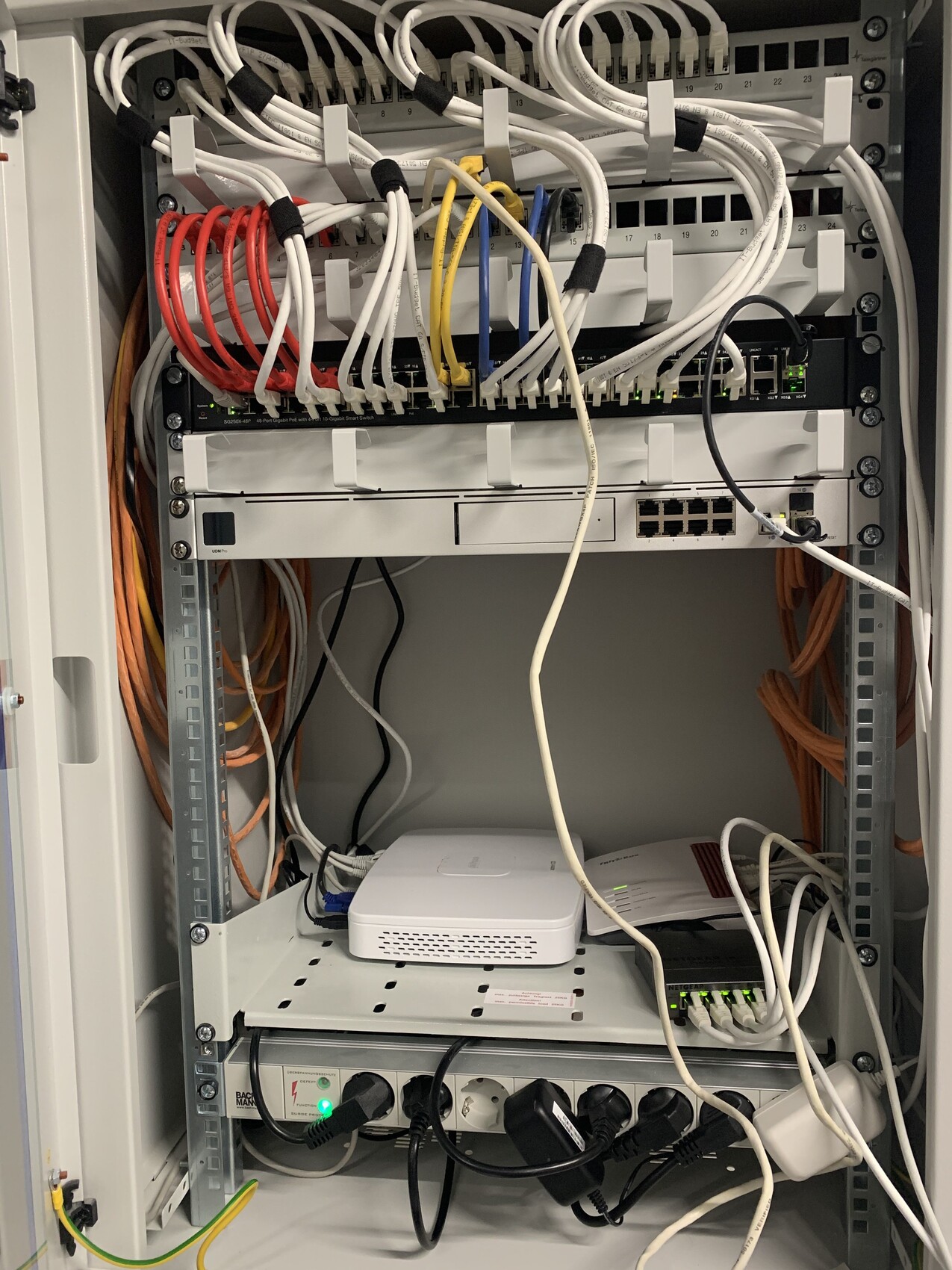
OK, it doesn’t look great yet, but it’s coming:
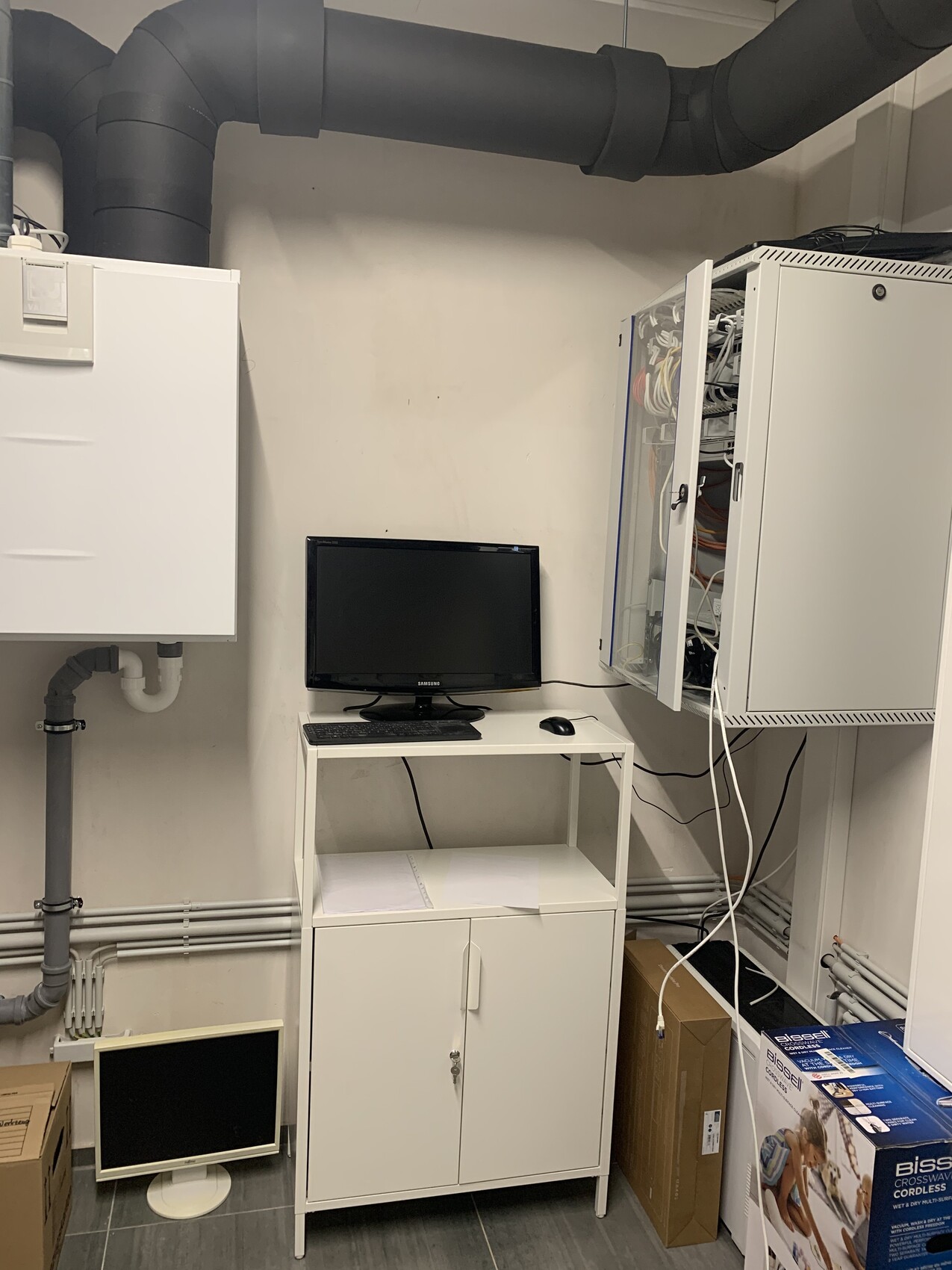
Additionally, a small work desk has found its place. This makes it a bit more comfortable for the few times a year when you need direct access and remote access is not enough.
The Magenta receivers together with the GigaSet Go box and the fax run on an old basic Netgear switch connected to the Fritzbox.
The UDM is connected via its WAN port to the Fritzbox, then behind it is the Cisco switch with 10 Gbit, and behind that is the rest of the network.
The NAT on the UDM was disabled. A script runs as a cron job every 15 minutes to check if NAT is still turned off and disables it again if a restart or firewall change re-enables it. A static route on the Fritzbox points traffic from outside into the UDM network.
Conclusion: everything works beautifully.
Well, almost.
I’m struggling with the Sunny Home Manager and the photovoltaic inverter—they’re still acting up quite a bit.
I’m also having issues with the UDM firewall. I must be doing something wrong because accessing the UDM network from the Fritzbox network hasn’t worked so far.
Additionally, DNS is giving me trouble. This was previously handled by my Windows server, with the Fritzbox as the secondary DNS. Now I’m not sure how to configure the DNS to handle everything on a new network. Forward and reverse lookups don’t work yet through the Windows server. But that will improve.
If anyone has tips, I’m happy to hear them.
Still, I can at least recommend this setup so far! Regardless of additional functions, I immediately notice a significant improvement in response time. This suggests that my Fritzbox was overwhelmed by the network, and the UDM handles it much better.
Beyond that, I can now segment the network using VLANs. That will be the next step once everything is running smoothly.
For €325 (about $350), this was a real bargain by the way.
The UDMPro arrived on Friday and was installed over the long weekend.
OK, it doesn’t look great yet, but it’s coming:
Additionally, a small work desk has found its place. This makes it a bit more comfortable for the few times a year when you need direct access and remote access is not enough.
The Magenta receivers together with the GigaSet Go box and the fax run on an old basic Netgear switch connected to the Fritzbox.
The UDM is connected via its WAN port to the Fritzbox, then behind it is the Cisco switch with 10 Gbit, and behind that is the rest of the network.
The NAT on the UDM was disabled. A script runs as a cron job every 15 minutes to check if NAT is still turned off and disables it again if a restart or firewall change re-enables it. A static route on the Fritzbox points traffic from outside into the UDM network.
Conclusion: everything works beautifully.
Well, almost.
I’m struggling with the Sunny Home Manager and the photovoltaic inverter—they’re still acting up quite a bit.
I’m also having issues with the UDM firewall. I must be doing something wrong because accessing the UDM network from the Fritzbox network hasn’t worked so far.
Additionally, DNS is giving me trouble. This was previously handled by my Windows server, with the Fritzbox as the secondary DNS. Now I’m not sure how to configure the DNS to handle everything on a new network. Forward and reverse lookups don’t work yet through the Windows server. But that will improve.
If anyone has tips, I’m happy to hear them.
Still, I can at least recommend this setup so far! Regardless of additional functions, I immediately notice a significant improvement in response time. This suggests that my Fritzbox was overwhelmed by the network, and the UDM handles it much better.
Beyond that, I can now segment the network using VLANs. That will be the next step once everything is running smoothly.
For €325 (about $350), this was a real bargain by the way.
The DNS situation is really frustrating.
Does anyone have an idea how to configure the Domain Controller to resolve within the new network? I’ve already created a new forward and reverse lookup zone, but it’s not activating.
Now I have two zones: the old one that doesn’t update and the new one that remains empty.
On top of that, I don’t fully understand the firewall concept of the UDM yet. What rule do I need to set so that I can access the UDM network from the FB network?
NAT is disabled on the UDM, and the FB has a static route into the UDM network...
Does anyone have an idea how to configure the Domain Controller to resolve within the new network? I’ve already created a new forward and reverse lookup zone, but it’s not activating.
Now I have two zones: the old one that doesn’t update and the new one that remains empty.
On top of that, I don’t fully understand the firewall concept of the UDM yet. What rule do I need to set so that I can access the UDM network from the FB network?
NAT is disabled on the UDM, and the FB has a static route into the UDM network...
Similar topics