
Hello everyone,
I am currently considering how to set up the network in our house.
In this context, I thought it would be great if some of you could share how you have implemented a high-end network on an individual basis.
I am an IT professional myself, but my focus lies elsewhere. Nevertheless, feel free to get technical—I assume I will understand you.
I am interested in:
- How have you segmented your networks?
- What devices do you use (manufacturer-independent)?
- Which devices (manufacturer-independent) do you group together in which network, and why?
- Which networks do you allow to communicate with each other?
- How have you implemented external access, if desired?
- Do you perhaps have a DMZ?
- In your opinion, what is a “must-have” and what is a “nice-to-have”?
I am currently considering how to set up the network in our house.
In this context, I thought it would be great if some of you could share how you have implemented a high-end network on an individual basis.
I am an IT professional myself, but my focus lies elsewhere. Nevertheless, feel free to get technical—I assume I will understand you.
I am interested in:
- How have you segmented your networks?
- What devices do you use (manufacturer-independent)?
- Which devices (manufacturer-independent) do you group together in which network, and why?
- Which networks do you allow to communicate with each other?
- How have you implemented external access, if desired?
- Do you perhaps have a DMZ?
- In your opinion, what is a “must-have” and what is a “nice-to-have”?


Nairil schrieb:
In this case, I would probably enable the MAC filter.Anyone with a bit of experience can bypass that.
Araknis schrieb:
Use 802.1x and block everything that doesn’t authenticate.And that’s exactly where I’m stuck. Can I use a RADIUS server to prevent my DHCP from assigning an address? Also on the port level?
Just to be clear, I’m not asking about access via Wi-Fi, but via a wired connection.
Tarnari schrieb:
Can I use a RADIUS server to prevent my DHCP from assigning an address? You actually need the RADIUS server. The yes/no decision is made before the IP assignment.
Tarnari schrieb:
Also on the port? I don’t quite understand what you mean. Where else?
Tarnari schrieb:
Just to be clear, I’m not talking about access via Wi-Fi, but via cable. Nowadays it even works over Wi-Fi, but cable is still the “standard” application.
Araknis schrieb:
You even need the RADIUS server. The yes/no decision is made before the IP is assigned.
I don’t quite understand what you mean. Where else?
Nowadays this can even work over Wi-Fi, but wired connections are the "standard" application.Okay, how should I do this?A very simple structural overview.
I have an accessible port that I want to control.
I want to connect everything I need there—TV, light, PC, access point, etc.—but I want to prevent unauthorized devices from joining the network via DHCP.
A brief outline and approach would be great.
You need a device to run the RADIUS server. For me, this is, for example, a pfSense. The authorized device must, of course, support 802.1X and know the RADIUS credentials. These devices usually have a menu option where you can enable 802.1X and enter the access credentials.
You can’t just plug in any device—what exactly is the practical goal? At some point, you need to register the authorized device with the system, either through simple MAC filtering or by using the RADIUS credentials. How do you now come to a TV? I thought you wanted to secure outdoor ports? You rarely connect a TV or PC directly to the RJ45 socket of an outdoor access point on a patio overhang. In the house (and I assume you mean a private home), you usually don’t have untrusted guests tampering with the LAN. "At-risk" ports in a guest room could then also be placed directly into a separate VLAN with strict restrictions.
With Hikvision cameras, it looks like this, for example:
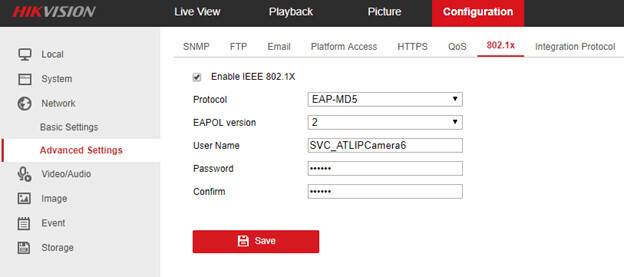
You can’t just plug in any device—what exactly is the practical goal? At some point, you need to register the authorized device with the system, either through simple MAC filtering or by using the RADIUS credentials. How do you now come to a TV? I thought you wanted to secure outdoor ports? You rarely connect a TV or PC directly to the RJ45 socket of an outdoor access point on a patio overhang. In the house (and I assume you mean a private home), you usually don’t have untrusted guests tampering with the LAN. "At-risk" ports in a guest room could then also be placed directly into a separate VLAN with strict restrictions.
With Hikvision cameras, it looks like this, for example:
Similar topics