
ᐅ Which type of camera is suitable for the main entrance area of a house?
Created on: 21 May 2020 14:29
I
ivenh0
Hello everyone,
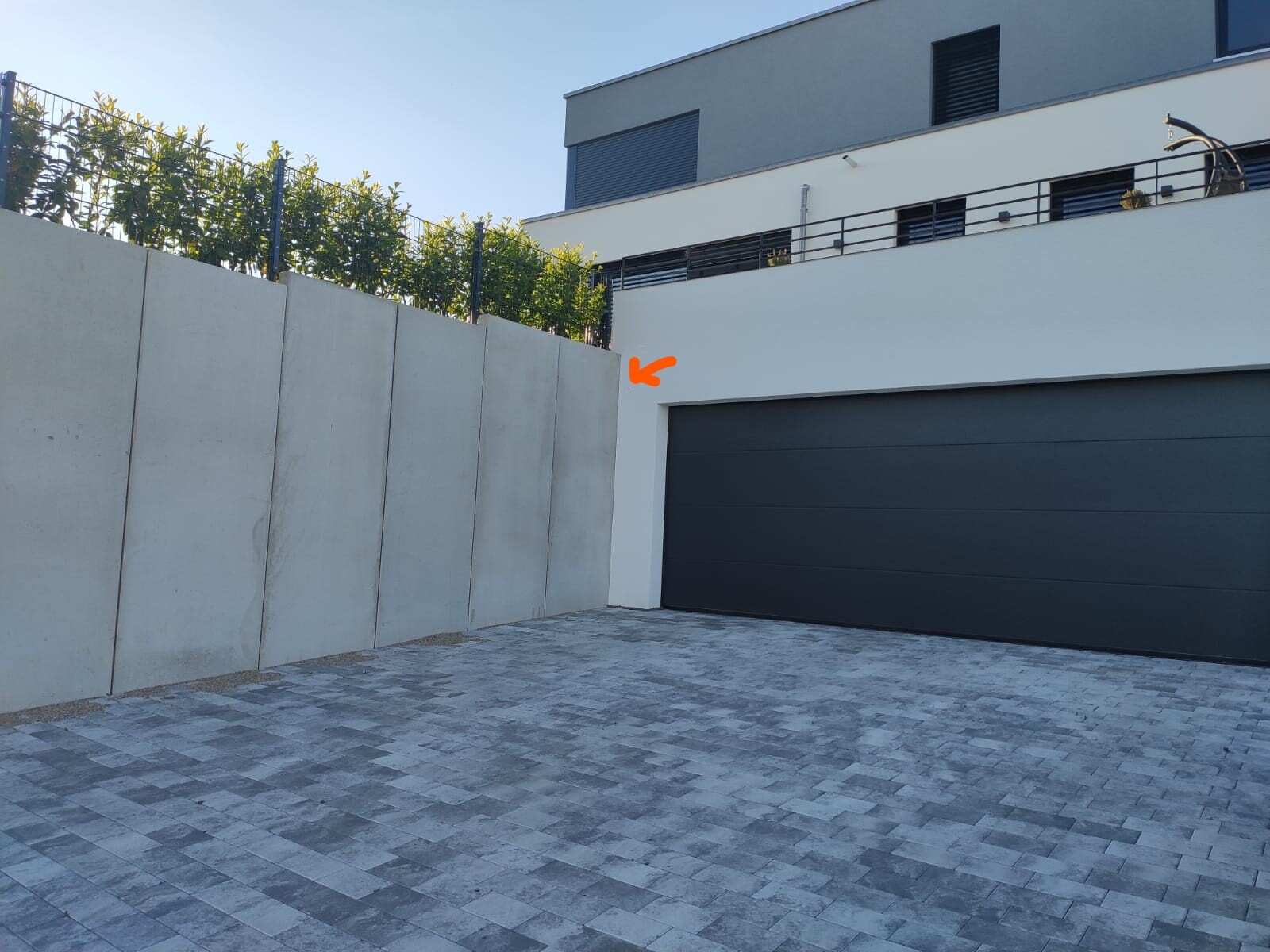
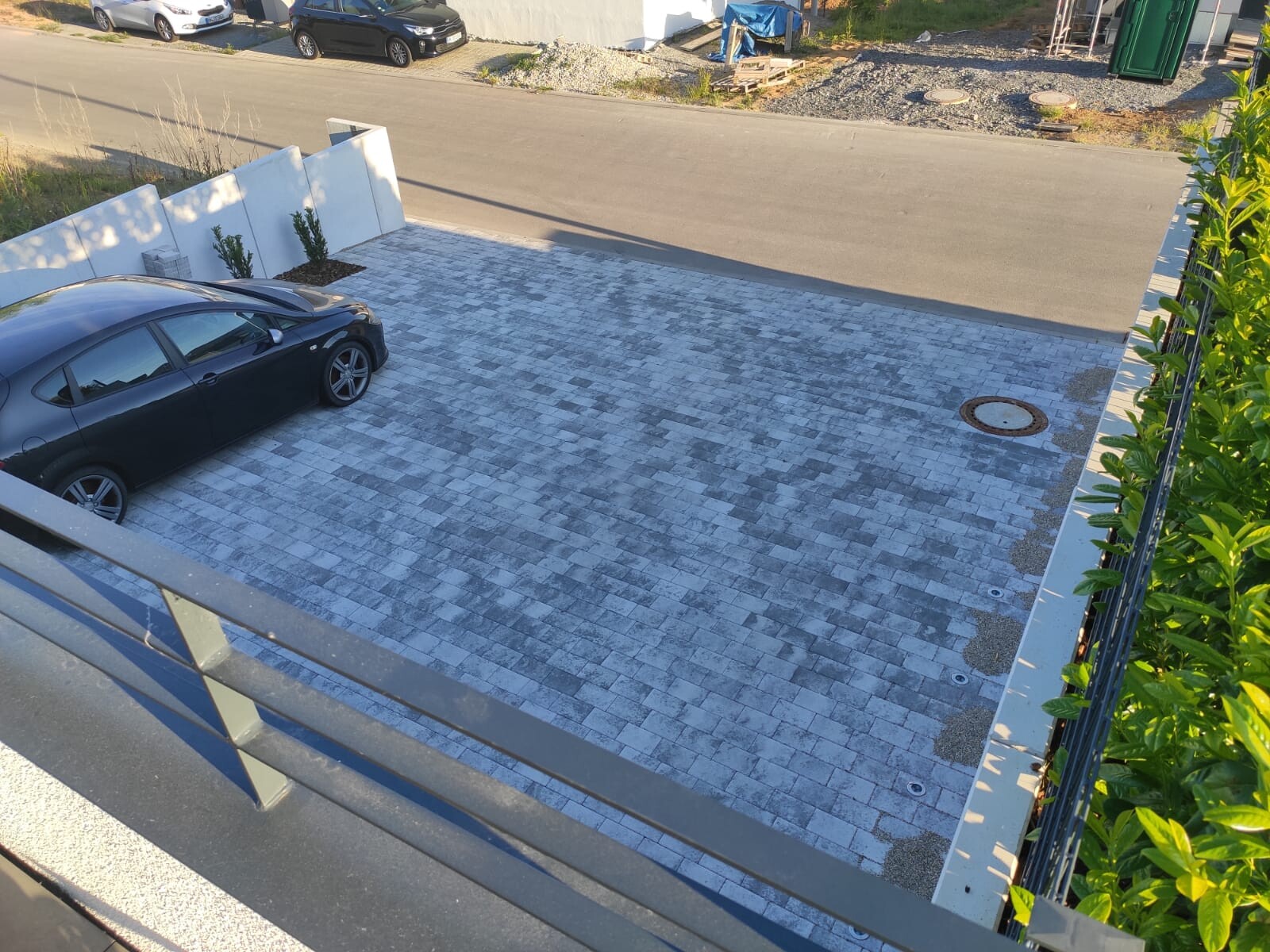
We are looking for an IP camera for our driveway and entrance area. The Dahua 5442 series sounds very promising. Therefore, I have planned an IP-B5442E-ZE for the driveway area. It will be mounted in a corner at about 2.50m (8 feet) height and should cover the driveway at a 90° angle. The range required is only 10m (33 feet). Is the bullet shape suitable for this, or would an eyeball model be better?
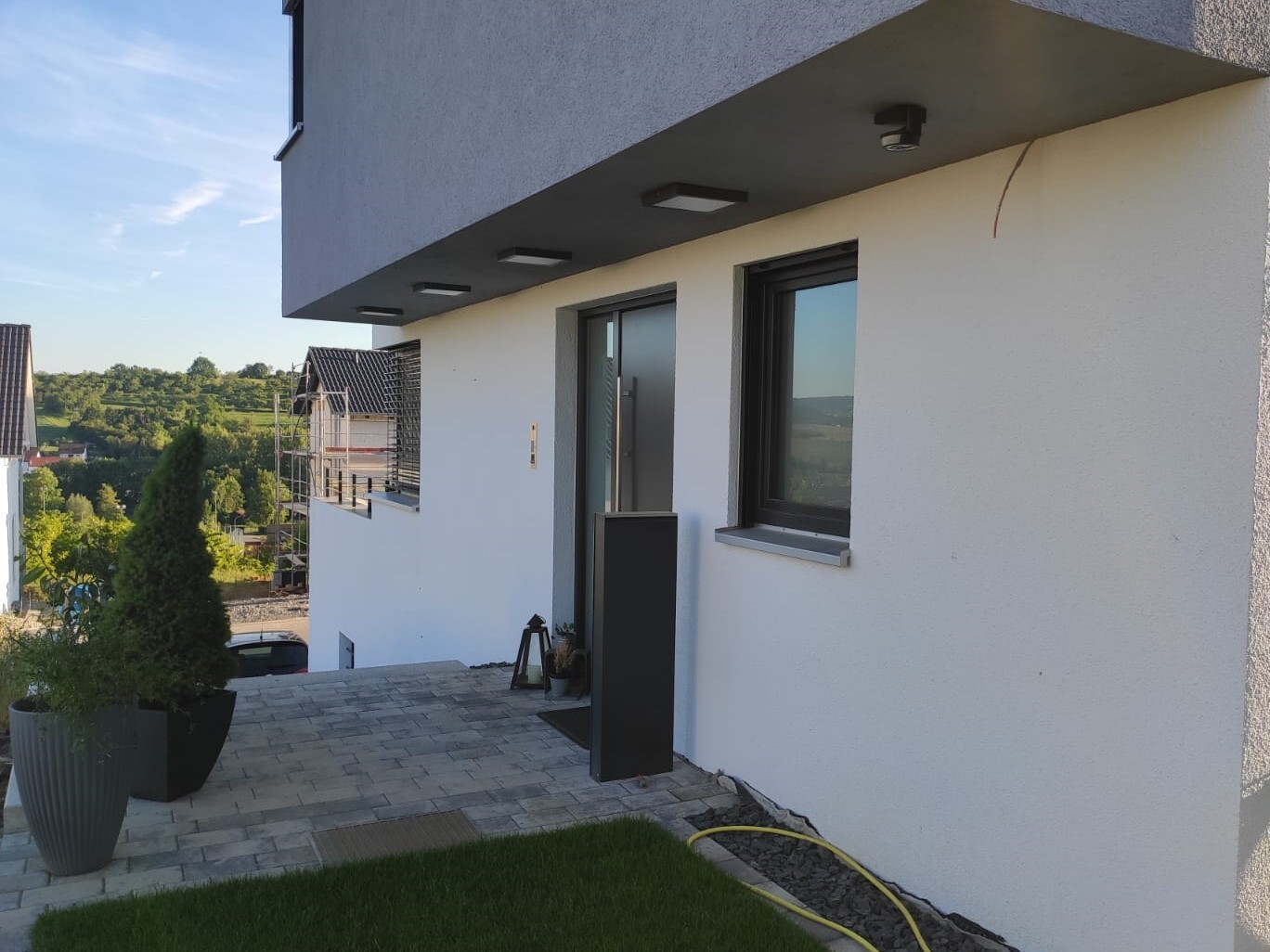
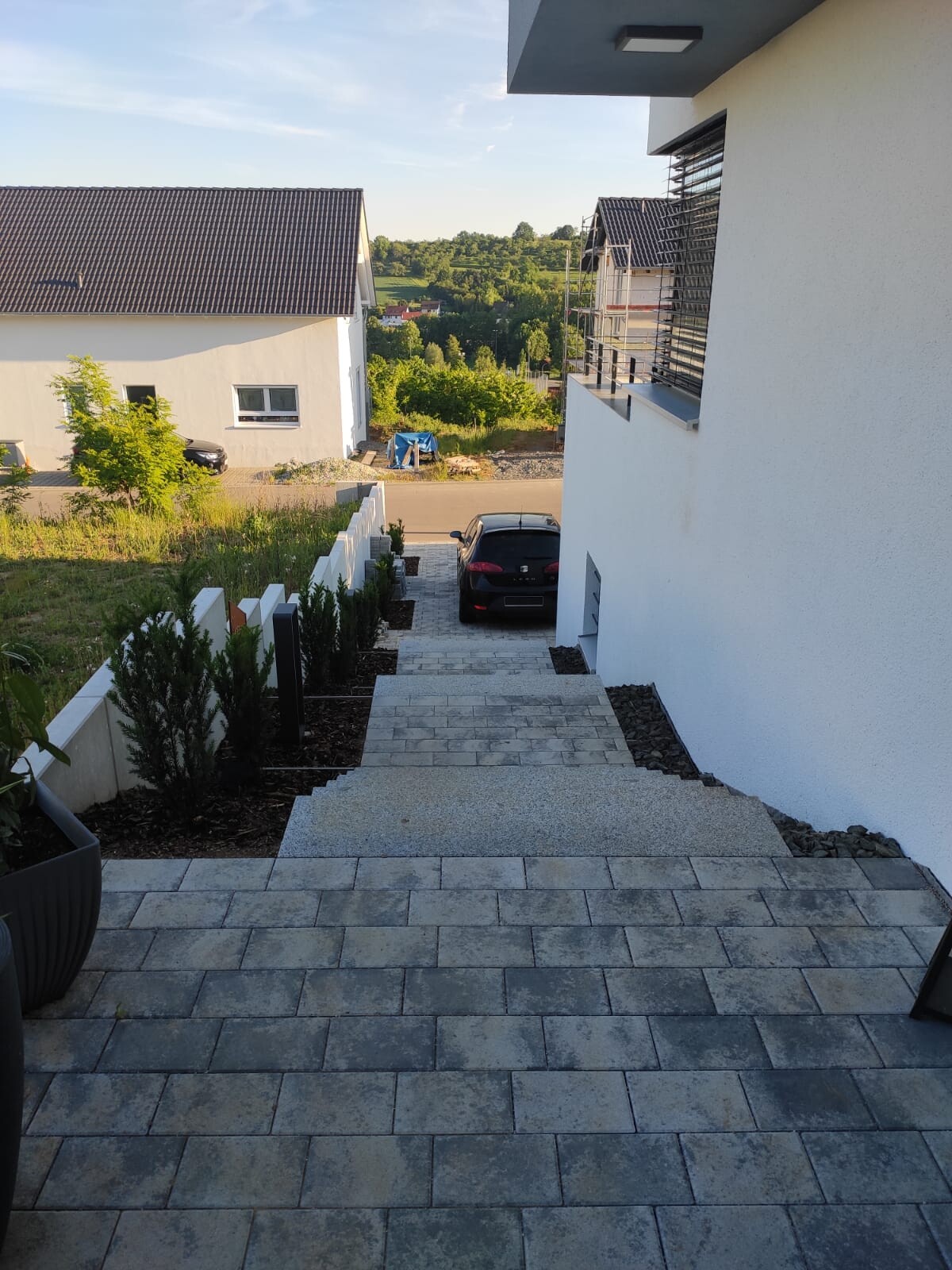
The entrance area is much more complex. Here, at least 180° need to be covered. In addition, there are several steps leading down quite a bit. The area behind the house should also be visible if possible. Is the IPC-HDPW5442G-Z suitable for this? Or how would you best cover this area? Unfortunately, I have only installed Simplex CAT cable as you can see in the photo.
We are looking for an IP camera for our driveway and entrance area. The Dahua 5442 series sounds very promising. Therefore, I have planned an IP-B5442E-ZE for the driveway area. It will be mounted in a corner at about 2.50m (8 feet) height and should cover the driveway at a 90° angle. The range required is only 10m (33 feet). Is the bullet shape suitable for this, or would an eyeball model be better?
The entrance area is much more complex. Here, at least 180° need to be covered. In addition, there are several steps leading down quite a bit. The area behind the house should also be visible if possible. Is the IPC-HDPW5442G-Z suitable for this? Or how would you best cover this area? Unfortunately, I have only installed Simplex CAT cable as you can see in the photo.

@Notstrom who planned the camera positions? There are a few important things to consider here.
What type of cameras do you want to use? That also depends on the positions...
What is your budget, and what do you want to achieve or do with the cameras?
For end users, an NVR that has a separate network usually makes the most sense.
Since most of these terms might be unfamiliar to you, I assume you don’t know how to secure or segregate a network, work with certificates, and so on.
For example, the HIKVision DS-7608NI-I2/8P is one option, but there are also other manufacturers like AXIS.
The Synology solution is much more flexible, especially since you can use the NAS for many other purposes as well. Either way, you will need a UPS to keep the cameras running during a power outage.
What type of cameras do you want to use? That also depends on the positions...
What is your budget, and what do you want to achieve or do with the cameras?
For end users, an NVR that has a separate network usually makes the most sense.
Since most of these terms might be unfamiliar to you, I assume you don’t know how to secure or segregate a network, work with certificates, and so on.
For example, the HIKVision DS-7608NI-I2/8P is one option, but there are also other manufacturers like AXIS.
The Synology solution is much more flexible, especially since you can use the NAS for many other purposes as well. Either way, you will need a UPS to keep the cameras running during a power outage.
rick2018 schrieb:
@Notstrom who planned the camera positions? There are a few things you need to consider here.
What type of cameras do you want to use? It also depends on the positions...
What is your budget and what do you want to achieve or do with the cameras?
For end users, an NVR that runs on a separate network usually makes the most sense.
Since many of these terms may be unfamiliar to you, I assume you might not know how to secure and separate a network, work with certificates, etc.
For example, the HIKVision DS-7608NI-I2/8P is one option, but there are also other manufacturers like AXIS and others.
The Synology solution is much more flexible, especially since you can also use the NAS for many other purposes. Either way, you will need an uninterruptible power supply (UPS) so that the cameras keep running during a power outage. The positions were planned by the electrician, see attachment.
What do you mean by what type of cameras? I have zero knowledge about that. The same goes for the budget. What budget does one need for a video surveillance system?
We want the cameras mainly for security reasons. Lately, there have been many cases of vandalism in our village, and our cars have already been targeted several times (front windshields smashed).
We initially wanted the Bosch Smart Eyes, but the electrician strongly advised against them because they are Wi-Fi based. What he offered was too expensive for the budget (about 1,000€ per camera).
@Notstrom Your electrician is right to advise against Wi-Fi cameras.
So, you want to monitor your driveway and the area around your house.
Without more detailed information, it is difficult to recommend specific cameras.
Cameras come in many different types (resolution, day/night vision, horizontal and vertical viewing angles, pan-tilt, zoom, etc.).
If you were quoted €1,000 (about $1,100) per camera, those were truly top-of-the-line models (Mobotix, Axis...) or the price was significantly marked up.
A one-size-fits-all solution for video surveillance is not possible because it depends on the situation and how many cameras are needed.
I suspect you might find suitable cameras in the €200-300 (around $220-330) range. Unfortunately, I can only provide information about Axis and Mobotix. User @superzapp can probably suggest alternatives.
You will also need a recording device. Motion detection usually runs either on the camera or sometimes on the recorder. With a budget of €1,500 to €2,000 (about $1,650 to $2,200), you can achieve quite a lot.
The cameras get their power through the network cable (Power over Ethernet, PoE). For this, you need a PoE-capable switch, PoE injectors, or a recording device that acts as a PoE switch.
Separate power connections are only needed for large, high-end camera systems, which cost in the four- to five-digit range.
Those are used for large areas, cities, airports, industrial facilities, high-security applications...
You don’t need all that.
To be honest, I have some concerns about camera setup, recording, and the network.
Do you have a LAN outlet inside your house near the area you want to monitor?
Even though it often goes against all "guidelines" (Wi-Fi, cloud...), check out Arlo.
It operates on its own Wi-Fi network. You can power the cameras simply by plugging them in.
The footage is uploaded to Arlo’s cloud and analyzed there.
Its detection is very good (people, animals, cars, packages, motion). Achieving such low false alarms and good detection is usually very difficult.
However, Arlo only works if the hub is close to the monitored area.
If your cameras are positioned around the house, forget it, or you would need multiple hubs. Then the cost quickly rises to unattractive levels.
You are required to notify people of the surveillance with signs, and you may only monitor your own property. Public areas and neighboring properties are off-limits. But with minor legal complaints...
If you provide more information, we can definitely find a solution.
So, you want to monitor your driveway and the area around your house.
Without more detailed information, it is difficult to recommend specific cameras.
Cameras come in many different types (resolution, day/night vision, horizontal and vertical viewing angles, pan-tilt, zoom, etc.).
If you were quoted €1,000 (about $1,100) per camera, those were truly top-of-the-line models (Mobotix, Axis...) or the price was significantly marked up.
A one-size-fits-all solution for video surveillance is not possible because it depends on the situation and how many cameras are needed.
I suspect you might find suitable cameras in the €200-300 (around $220-330) range. Unfortunately, I can only provide information about Axis and Mobotix. User @superzapp can probably suggest alternatives.
You will also need a recording device. Motion detection usually runs either on the camera or sometimes on the recorder. With a budget of €1,500 to €2,000 (about $1,650 to $2,200), you can achieve quite a lot.
The cameras get their power through the network cable (Power over Ethernet, PoE). For this, you need a PoE-capable switch, PoE injectors, or a recording device that acts as a PoE switch.
Separate power connections are only needed for large, high-end camera systems, which cost in the four- to five-digit range.
Those are used for large areas, cities, airports, industrial facilities, high-security applications...
You don’t need all that.
To be honest, I have some concerns about camera setup, recording, and the network.
Do you have a LAN outlet inside your house near the area you want to monitor?
Even though it often goes against all "guidelines" (Wi-Fi, cloud...), check out Arlo.
It operates on its own Wi-Fi network. You can power the cameras simply by plugging them in.
The footage is uploaded to Arlo’s cloud and analyzed there.
Its detection is very good (people, animals, cars, packages, motion). Achieving such low false alarms and good detection is usually very difficult.
However, Arlo only works if the hub is close to the monitored area.
If your cameras are positioned around the house, forget it, or you would need multiple hubs. Then the cost quickly rises to unattractive levels.
You are required to notify people of the surveillance with signs, and you may only monitor your own property. Public areas and neighboring properties are off-limits. But with minor legal complaints...
If you provide more information, we can definitely find a solution.
rick2018 schrieb:
@Notstrom Your electrician is right to advise against using Wi-Fi cameras.
So, you want to monitor your driveway and the area around your house.
Without more detailed information, it’s impossible to recommend specific cameras.
Cameras come in a wide variety of options (resolution, day/night vision, horizontal and vertical field of view, pan-tilt capability, zoom, etc.).
If he offered you cameras costing €1,000 each, that’s already top-tier quality (Mobotix, Axis...) or he might be marking up the price significantly.
“There is no one-size-fits-all solution for video surveillance” because it depends on the conditions and how many cameras are needed.
I suspect you’ll find suitable cameras in the €200–300 range. Unfortunately, I can only provide information about Axis and Mobotix. User @superzapp can probably suggest alternatives.
You’ll also need a recording device. Motion detection either happens in the camera itself or sometimes on the recorder. You can achieve quite a lot with a budget of €1,500 to €2,000.
The cameras get power over the Ethernet cable (PoE). For this, you need a PoE-capable switch, PoE injectors, or a recorder that functions as a PoE switch.
Separate power supply is only required for large, high-end camera systems. Those are in the four- to five-figure price range.
Typical use cases are large areas, cities, airports, industrial sites, high-security applications...
You do not need any of that.
Honestly, I have some reservations about setting up the cameras, recording system, and network.
Do you have an Ethernet port in the house near the area you want to monitor?
Although it generally goes against all “best practice” (Wi-Fi, cloud...), have a look at Arlo.
It operates over its own Wi-Fi network. You could simply power the cameras.
Videos are uploaded to Arlo’s cloud and analyzed there.
Detection is very good (people, animals, vehicles, packages, movement). Achieving so few false alarms with good detection is otherwise very difficult.
However, Arlo only works if the hub is close to the monitored area.
If your cameras are placed all around the house, forget it. Or you’d need multiple hubs, which quickly becomes too expensive.
You are required to inform people about surveillance with a notice, and you may only monitor your own property. Public areas and neighbors’ properties are off-limits. But some people still tend to complain...
If you provide more information, we can certainly find a solution. Hi, well, what the electrician usually installs is Indexa and Mobotix.
Regarding the type of camera, I’m quite inexperienced: What do you typically install in a single-family home?
To summarize:
- PoE switch: planned — also for access points inside the house — so I can skip the 230V power outlets planned for those spots, which is good.
- Why do you have reservations? In what way exactly?
- We have an access point relatively centrally located on each floor.
- Why use Arlo and wireless? Then I could just go with Bosch cameras and save on some outdoor lights as well.
“Stomach ache” because you seem to be quite inexperienced. The external network should be separated, and the clients authenticated using certificates.
You need to fine-tune the motion detection properly; otherwise, you will get constant false alarms.
That’s why the “tip” about Arlos. Detection (not just motion but humans, animals, etc.) can only be achieved reliably with very high-quality systems. Bosch devices are not at that detection level.
In single-family homes, fixed focal length cameras without zoom are usually used. Which one is suitable depends on the location and application.
Access points (APs) should not be placed centrally but where the highest speed and the most clients are located (living room, office, etc.).
You need to fine-tune the motion detection properly; otherwise, you will get constant false alarms.
That’s why the “tip” about Arlos. Detection (not just motion but humans, animals, etc.) can only be achieved reliably with very high-quality systems. Bosch devices are not at that detection level.
In single-family homes, fixed focal length cameras without zoom are usually used. Which one is suitable depends on the location and application.
Access points (APs) should not be placed centrally but where the highest speed and the most clients are located (living room, office, etc.).
rick2018 schrieb:
“Headaches” because you seem to be quite inexperienced. The external network should be separated, and clients should be authenticated using certificates.
For motion detection, you need to fine-tune it carefully; otherwise, you will constantly get false alarms.
That’s why the “tip” was to use Arlos. Detection (not just motion but humans, animals...) can otherwise only be achieved with very high-end systems. Bosch cameras are not at that level of detection.
For single-family homes, cameras with fixed focal lengths without zoom, etc., are usually used. Which ones make sense depends on the position and application.
Access points shouldn’t be placed centrally but where the most speed is needed and most clients are located (living room, office...). Well, I admit that I’ve already shown my inexperience in electrical installations in the KNX area, but I don’t see that as a problem—you can’t know everything.
Jokes aside: I just want a good camera surveillance system without a lot of maintenance effort. Preferably something plug-and-play, but I’ve also understood that there’s no way around Wi-Fi, which would be counterproductive to the original requirements.
Similar topics