
ᐅ Venetian Blinds and Roller Shutter Motors – Is It Possible to Retrofit Wireless Remote Control?
Created on: 16 Jan 2020 11:08
G
Golfi90
Hello everyone!
Our venetian blinds and roller shutters are operated conventionally with a switch.
Now I thought it would be nice to be able to operate some of the venetian blinds and roller shutters ADDITIONALLY by remote control.
Is there a way to retrofit this?
The switch should remain and continue to function normally...
Our venetian blinds and roller shutters are operated conventionally with a switch.
Now I thought it would be nice to be able to operate some of the venetian blinds and roller shutters ADDITIONALLY by remote control.
Is there a way to retrofit this?
The switch should remain and continue to function normally...
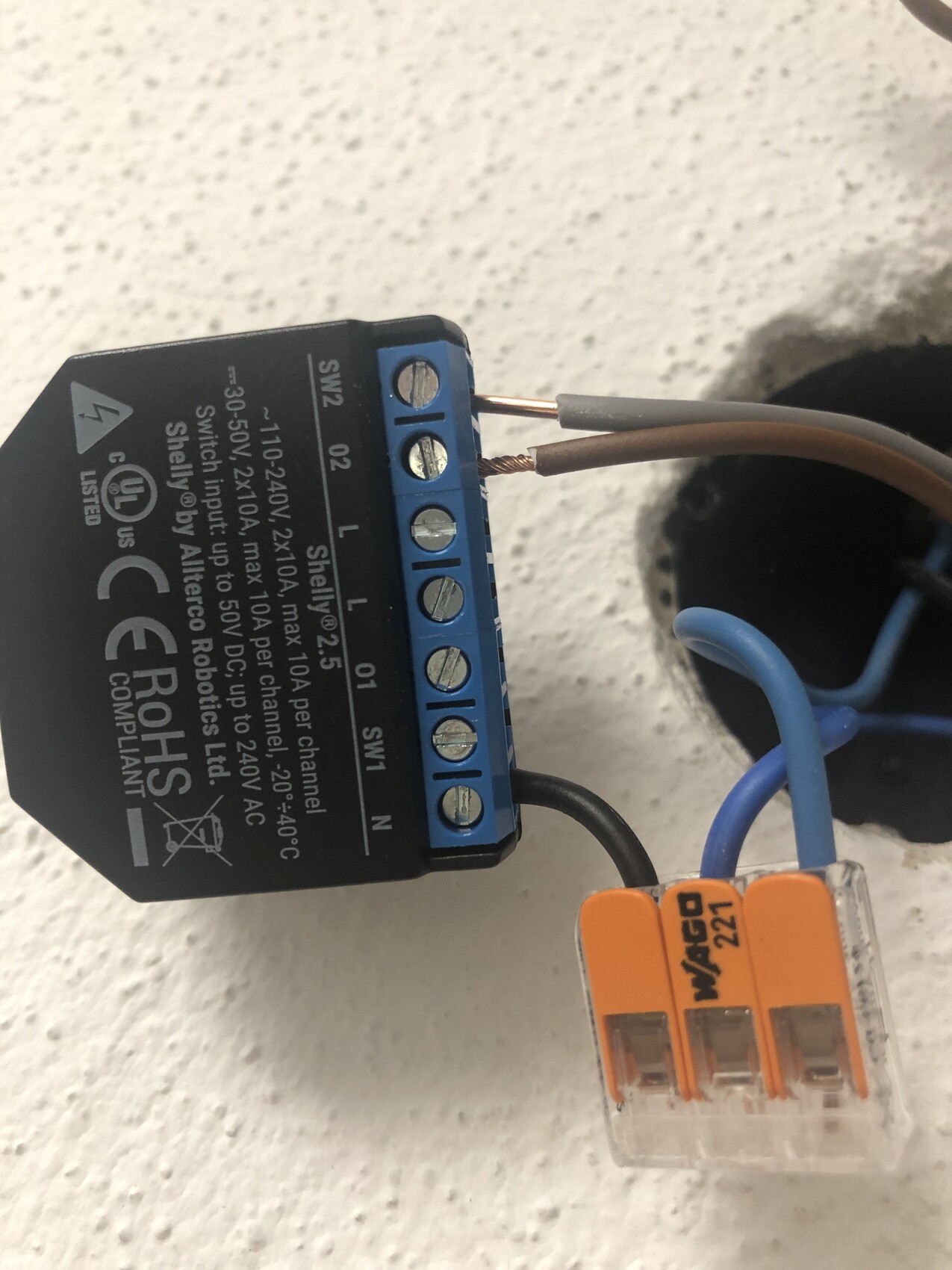
I don’t understand it. When I connect the gray and brown wires as shown in the wiring diagram (like in the photo), nothing happens when I press the switch down. But if I connect the gray wire to the brown wire and then press the switch down, the roller shutter goes down, but only down.
B
brotpeter26 Feb 2020 17:28First of all:
I am not an electrician, and what I am writing here is not a manual or anything like that! I strongly recommend you act very carefully and ALWAYS consult a professional electrician if in doubt!!!
Looking at the other image you provided, I interpret:
N – blue
L – black (the single one) (there should ALWAYS be 230V present here, regardless of the switch position)
L_Up – phase for up
L_Down – phase for down
You need to connect the Shelly 2.5 as follows:
N = N (blue)
L = constant live (in your case probably black where there is ALWAYS 230V)
SW1 = phase coming from the switch for up
O1 = phase going to the roller shutter for up
SW2 = phase coming from the switch for down
O2 = phase going to the roller shutter for down
First, check whether there is 230V on the constant live. To do this, connect this and neutral to the Shelly and see if it powers on. (Always switch off/on the circuit breaker before and after.)
You can check if it is powered on by looking for a Shelly Wi-Fi network.
Then connect the phases coming from the switch and going to the roller shutter...
(again always make sure the circuit breaker is off and there is NO power during this)
If everything is connected correctly, download the Shelly app and add the Shelly to your Wi-Fi network.
Then set the button type to Momentary and configure and calibrate the input buttons mode according to the switch (or push button)… Done.
(Don’t forget the firmware upgrade)
I am not an electrician, and what I am writing here is not a manual or anything like that! I strongly recommend you act very carefully and ALWAYS consult a professional electrician if in doubt!!!
Looking at the other image you provided, I interpret:
N – blue
L – black (the single one) (there should ALWAYS be 230V present here, regardless of the switch position)
L_Up – phase for up
L_Down – phase for down
You need to connect the Shelly 2.5 as follows:
N = N (blue)
L = constant live (in your case probably black where there is ALWAYS 230V)
SW1 = phase coming from the switch for up
O1 = phase going to the roller shutter for up
SW2 = phase coming from the switch for down
O2 = phase going to the roller shutter for down
First, check whether there is 230V on the constant live. To do this, connect this and neutral to the Shelly and see if it powers on. (Always switch off/on the circuit breaker before and after.)
You can check if it is powered on by looking for a Shelly Wi-Fi network.
Then connect the phases coming from the switch and going to the roller shutter...
(again always make sure the circuit breaker is off and there is NO power during this)
If everything is connected correctly, download the Shelly app and add the Shelly to your Wi-Fi network.
Then set the button type to Momentary and configure and calibrate the input buttons mode according to the switch (or push button)… Done.
(Don’t forget the firmware upgrade)
brotpeter schrieb:
First of all:
I am NOT an electrician, and what I write here is NOT an instruction or anything like that! I can only strongly recommend acting very carefully and ALWAYS consult a PROFESSIONAL electrician if in doubt!!!
Looking at the other picture you posted, this is how I interpret it:
N - blue
L - black (the single one) (there should ALWAYS be 230V present here regardless of the switch position)
L_Up - phase for up
L_Down - phase for down
You need to connect the Shelly 2.5 as follows:
N = N (blue)
L = constant live (in your case probably the black wire that ALWAYS has 230V)
SW1 = phase coming from the switch for up
O1 = phase going to the roller shutter for up
SW2 = phase coming from the switch for down
O2 = phase going to the roller shutter for down
First, check if there is 230V on the constant live wire. To do this, connect this and neutral to the Shelly and see if it powers on. (Always switch the fuse off/on while doing this)
You can verify if it is powered by checking if you find a Shelly Wi-Fi network.
Then connect the phases coming from the switch and going to the roller shutter...
(again, always WITHOUT the fuse inserted and NO power applied)
Once everything is connected correctly, download the Shelly app and connect the device to your Wi-Fi network.
Then set the button type to Momentary and configure and calibrate the input button mode according to your switch (or pushbutton) ... Done.
(Don’t forget the firmware upgrade) Thanks. No problem, I’m not an electrician either.
Just kidding. All good.
It worked, I just had the phase on the wrong L the first time, so it didn’t work.
Now it also works with Alexa. But looking at the commands, it’s probably not really suitable for venetian blinds. I can hardly imagine getting the right slat angle with Alexa. :-p
B
brotpeter26 Feb 2020 18:52For venetian blinds, it's mostly just up and down ... adjusting the angle precisely will be difficult.
I use Shellys for the roller shutters ...
I use Shellys for the roller shutters ...
brotpeter schrieb:
For venetian blinds, mainly just up and down ... adjusting the angle precisely will be difficult.
I use Shellys for the roller shutters ...I agree. Thanks to you.
Similar topics