
Hello,
first, a brief summary of our current situation:
In our future place of residence (village), according to Telekom, only a "slow" DSL connection would be possible. Fortunately, last year Deutsche Glasfaser launched a so-called demand aggregation for the community, which was successful. Therefore, in the next few weeks/months, the village will be supplied with fiber optic cables.
I have already placed an order with Deutsche Glasfaser for our plot for internet ("DG Classic, 400Mbit/s") and TV (IPTV, which I understand means television over the internet cable) and thus save the connection fee of 750 EUR.
Now my question
first, a brief summary of our current situation:
- currently still renting
- currently a customer of Telekom (internet + phone)
- already owner of an undeveloped plot of land (not yet connected to utilities)
- construction contract signed with general contractor, planned start of construction mid-March, guaranteed construction period ~ 6 months, so move-in expected around September, more likely October
- all electrical work included in the construction contract, no owner-provided work specified
- number of sockets, network outlets, etc., according to the construction contract very few, so we will need to add quite a few
- no basement
In our future place of residence (village), according to Telekom, only a "slow" DSL connection would be possible. Fortunately, last year Deutsche Glasfaser launched a so-called demand aggregation for the community, which was successful. Therefore, in the next few weeks/months, the village will be supplied with fiber optic cables.
I have already placed an order with Deutsche Glasfaser for our plot for internet ("DG Classic, 400Mbit/s") and TV (IPTV, which I understand means television over the internet cable) and thus save the connection fee of 750 EUR.
Now my question
- Upon inquiry, Deutsche Glasfaser told me that construction work in the community is planned to start in the coming weeks but will last a few months, so our connection will probably only be activated by the end of 2019 / beginning of 2020. If they are not ready by the time our other utilities (gas, water...) are connected to the house, they advise us to pre-install an empty conduit from the property boundary to the utility room as a preparatory measure. What would be the best solution in the meantime? We will move in in September/October. Assuming DG’s construction takes longer than planned, we would be in our nice new house without TV/television/phone.
Should we first continue ordering internet/TV connections from Telekom during our construction? Our contract there is still valid anyway. Although the connection would cost about 800 EUR, I would get the later DG TV connection free of charge.


Generally, a PoE switch/router has its own power supply and is usually located in the utility room.
A network cable is connected to it, and on the other end, for example, a camera without an additional power adapter.
Injectors are more of a workaround and are only used when there is no other option.
A network cable is connected to it, and on the other end, for example, a camera without an additional power adapter.
Injectors are more of a workaround and are only used when there is no other option.
 empyresystems20 Feb 2019 10:07
Hello,
for satellite TV, you need appropriate SAT outlet sockets in the rooms where you want to watch TV. Generally, it is also possible to distribute the signal centrally from the utility room via the network with the right hardware. Since you plan to use IPTV anyway, this might be a good option and would save the extra effort of coaxial cabling. Whether to use IPTV or SAT/cable is a fundamental question... I’m not a big fan of IPTV either, as it can occasionally have small interruptions, which personally annoys me.
For IPTV, you also need appropriate receivers for all TV sets, as far as I know, there are still no TVs with built-in IPTV receivers.
Network:
All connections from the rooms run to the patch panel, and from there you connect to your switch. This setup looks neat and organized, especially if you install it nicely in a 19" cabinet. There are also smaller cabinets for wall mounting, or you can build your own.
Anything that can be connected to LAN and is not mobile (like laptops, smartphones) can easily be connected to the LAN. The general rule of thumb: one double outlet per room (plus possibly a ceiling outlet for an access point) is a good starting point for future-proofing. You never know how a room might be used later. Whether you absolutely need a LAN connection in rooms like the kitchen or bathroom depends on what you want to connect there. In these areas, Wi-Fi might be sufficient. But if you need permanently installed touch panels for smart home applications, that would be a different matter. So far, I haven’t read anything about that here...
Alternatively, you could have just the cable (without an outlet socket) installed in the room to be on the safe side.
1 double outlet = 2 ports.
Sockets are quite affordable from brands like Keystone or Rutenbeck. Check suppliers like Kabelscheune, for example.
The CAT standard for sockets is CAT6a, and for cables, it’s CAT7. This is currently the highest and best standard. Sockets can be easily replaced later.
Cabling for outdoor use is a sensitive issue. You should place your access points so that you have the best possible reception anywhere you need it. An outdoor access point is not necessarily required. If you do need one, or if you want to connect cameras, you should consider using separate networks (keyword VLANs). If you go this far, it might be a good idea to get professional help.
You can also have the cables prepared now for later use if you’re still unsure.
If you want a modern video door station with smartphone integration, you might also need a CAT cable at the front door.
Good luck
for satellite TV, you need appropriate SAT outlet sockets in the rooms where you want to watch TV. Generally, it is also possible to distribute the signal centrally from the utility room via the network with the right hardware. Since you plan to use IPTV anyway, this might be a good option and would save the extra effort of coaxial cabling. Whether to use IPTV or SAT/cable is a fundamental question... I’m not a big fan of IPTV either, as it can occasionally have small interruptions, which personally annoys me.
For IPTV, you also need appropriate receivers for all TV sets, as far as I know, there are still no TVs with built-in IPTV receivers.
Network:
All connections from the rooms run to the patch panel, and from there you connect to your switch. This setup looks neat and organized, especially if you install it nicely in a 19" cabinet. There are also smaller cabinets for wall mounting, or you can build your own.
Anything that can be connected to LAN and is not mobile (like laptops, smartphones) can easily be connected to the LAN. The general rule of thumb: one double outlet per room (plus possibly a ceiling outlet for an access point) is a good starting point for future-proofing. You never know how a room might be used later. Whether you absolutely need a LAN connection in rooms like the kitchen or bathroom depends on what you want to connect there. In these areas, Wi-Fi might be sufficient. But if you need permanently installed touch panels for smart home applications, that would be a different matter. So far, I haven’t read anything about that here...
Alternatively, you could have just the cable (without an outlet socket) installed in the room to be on the safe side.
1 double outlet = 2 ports.
Sockets are quite affordable from brands like Keystone or Rutenbeck. Check suppliers like Kabelscheune, for example.
The CAT standard for sockets is CAT6a, and for cables, it’s CAT7. This is currently the highest and best standard. Sockets can be easily replaced later.
Cabling for outdoor use is a sensitive issue. You should place your access points so that you have the best possible reception anywhere you need it. An outdoor access point is not necessarily required. If you do need one, or if you want to connect cameras, you should consider using separate networks (keyword VLANs). If you go this far, it might be a good idea to get professional help.
You can also have the cables prepared now for later use if you’re still unsure.
If you want a modern video door station with smartphone integration, you might also need a CAT cable at the front door.
Good luck

There are also Cat 8 cables available.
Otherwise, I fully agree with @empyresystems.
With Unifi, you can download the controller software for free and input your plans (including wall materials, etc.). Then you can position the access points and get a rough idea of what makes sense for Wi-Fi coverage.
I currently have 8 Unifi systems running at friends’ and family’s homes and I am convinced by them. This allows you to easily set up multiple networks (VLANs).
For the new house, there is also a Unifi system installed (a bit of overkill).
It is currently being set up.
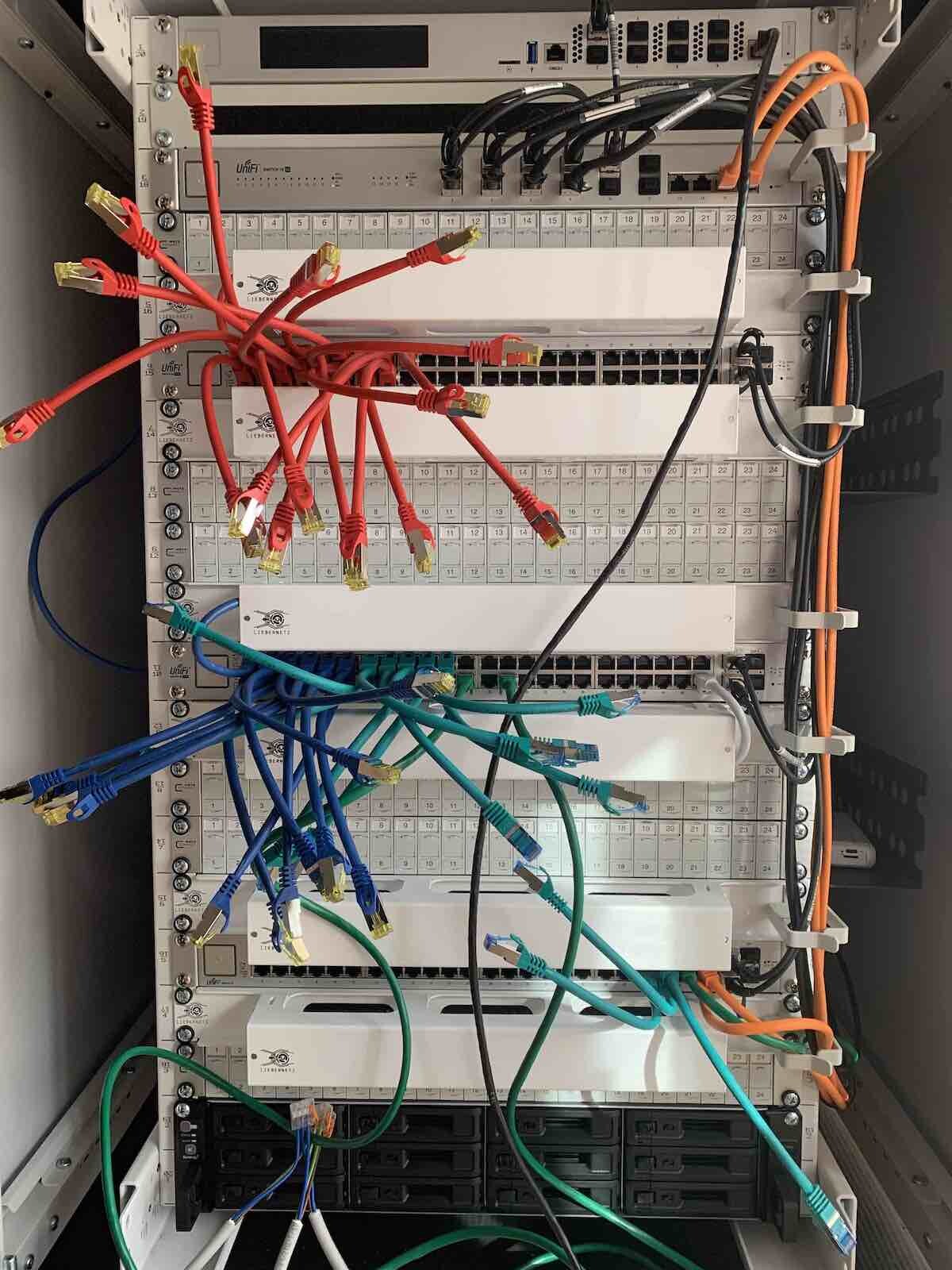
Otherwise, I fully agree with @empyresystems.
With Unifi, you can download the controller software for free and input your plans (including wall materials, etc.). Then you can position the access points and get a rough idea of what makes sense for Wi-Fi coverage.
I currently have 8 Unifi systems running at friends’ and family’s homes and I am convinced by them. This allows you to easily set up multiple networks (VLANs).
For the new house, there is also a Unifi system installed (a bit of overkill).
It is currently being set up.
S
SenorRaul721 Feb 2019 08:18Regarding TV, the decision seems to be made, and I will install a satellite dish. Now the question is about the wiring.
If I understand correctly, the traditional method is to run coaxial cable from the satellite dish to all the "TV rooms." In each room, there would be a separate satellite outlet in the wall where the TV/receiver is connected.
Another option (the one that @empyresystems hinted at?): SAT over IP?
In this case, only one cable runs from the satellite dish to the utility room, where the SAT signal is converted into an IP signal (which hardware would handle this?). This signal is then distributed via the CAT7 cables already laid in almost all rooms. Is that correct?
Would this make sense in my situation, where I am just waiting for IPTV from Deutsche Glasfaser for a few more months?
Practically speaking: in that case, only the LAN cable goes into my TV/receiver.
How does the TV/receiver know whether to process the original SAT signal from the roof or the IPTV signal from Deutsche Glasfaser?
With this solution, would the advantage "If IPTV fails or has issues, you still have your satellite dish" still apply?
If I understand correctly, the traditional method is to run coaxial cable from the satellite dish to all the "TV rooms." In each room, there would be a separate satellite outlet in the wall where the TV/receiver is connected.
Another option (the one that @empyresystems hinted at?): SAT over IP?
In this case, only one cable runs from the satellite dish to the utility room, where the SAT signal is converted into an IP signal (which hardware would handle this?). This signal is then distributed via the CAT7 cables already laid in almost all rooms. Is that correct?
Would this make sense in my situation, where I am just waiting for IPTV from Deutsche Glasfaser for a few more months?
Practically speaking: in that case, only the LAN cable goes into my TV/receiver.
How does the TV/receiver know whether to process the original SAT signal from the roof or the IPTV signal from Deutsche Glasfaser?
With this solution, would the advantage "If IPTV fails or has issues, you still have your satellite dish" still apply?
empyresystems21 Feb 2019 08:49There are now satellite dishes with IP-LNBs (as flat antennas). Check the Astra website or search for SAT>IP Astra on Google. The first result explains it clearly. This way, you don’t need a satellite cable anymore. The LNB integrated into the dish converts the satellite signal directly into IP and connects straight to the router. However, you still need a SAT-IP receiver (or IP-SAT receiver) for your TVs, since there are currently no TVs with this technology built-in. For smartphones, there are apps (for example, the HD+ app), and for PCs and laptops, software like DVB-Viewer allows you to receive the signal directly. This means your satellite signal is distributed within your local network. You remain independent of your internet connection as long as your local network is working properly. If the internet goes down, it is 99% likely the fault of your internet provider; your local network, meaning LAN and Wi-Fi, are unaffected. Only online content will be inaccessible. Your TV signal originally comes from the satellite and is only distributed locally over IP.
Hope this was clear...?
Good luck
Hope this was clear...?
Good luck
Similar topics