
Hello everyone,
we are about to buy a house from a developer. Unfortunately, they forgot or decided not to install star-topology Ethernet cabling.
I’m not yet sure if I want or can completely do without it.
So here is my idea for the wiring, and I would appreciate your constructive feedback:
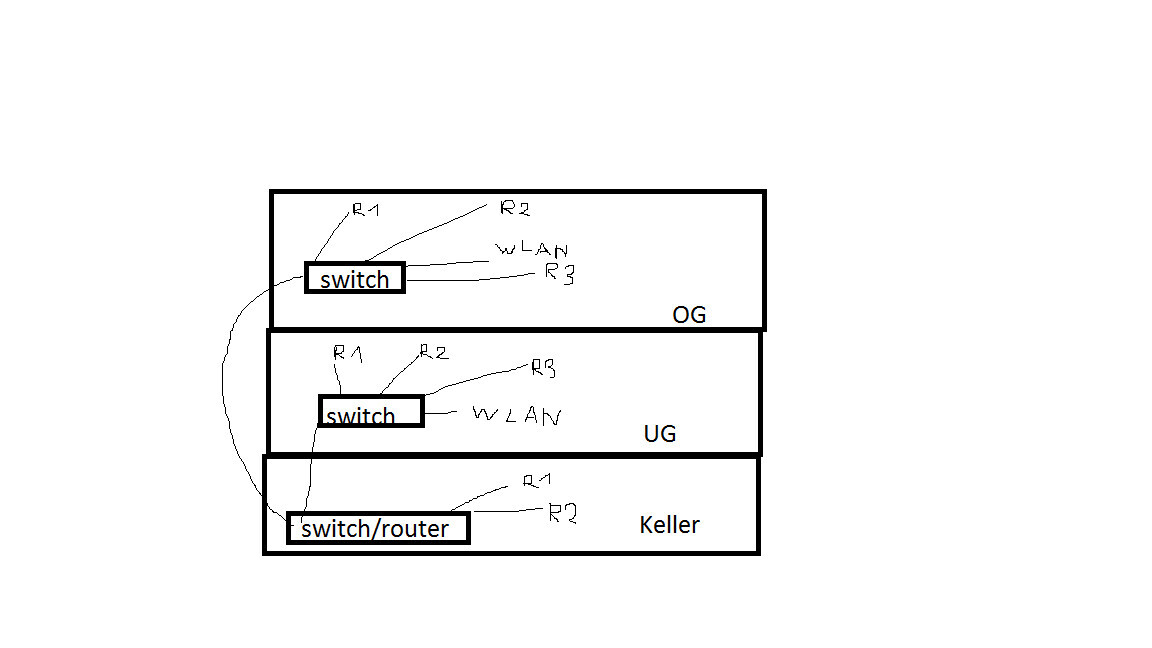
There is an empty conduit from the basement to the upper floor (originally intended for photovoltaic system preparation) that I would like to use to pull a cable (possibly duplex) to the upper floor and distribute it there with a switch. I want to pull only one cable to keep space available in the conduit for future use.
From the basement to the lower ground floor, a new hole would need to be drilled and a cable pulled up to distribute there by switch as well.
Am I missing something in my wiring plan? Cascading switches should actually allow this, right?
Do you see any major problems or performance limitations?
Thanks for your help.
we are about to buy a house from a developer. Unfortunately, they forgot or decided not to install star-topology Ethernet cabling.
I’m not yet sure if I want or can completely do without it.
So here is my idea for the wiring, and I would appreciate your constructive feedback:
There is an empty conduit from the basement to the upper floor (originally intended for photovoltaic system preparation) that I would like to use to pull a cable (possibly duplex) to the upper floor and distribute it there with a switch. I want to pull only one cable to keep space available in the conduit for future use.
From the basement to the lower ground floor, a new hole would need to be drilled and a cable pulled up to distribute there by switch as well.
Am I missing something in my wiring plan? Cascading switches should actually allow this, right?
Do you see any major problems or performance limitations?
Thanks for your help.
M
Mottenhausen7 Nov 2018 09:14The bandwidth will be sufficient for typical use, such as streaming on multiple devices, when Cat7 cables and decent gigabit switches are used. The response time (ping) may be slightly affected, so if fast-paced online gaming is planned, the kids might not appreciate an additional 5-10 ms, but it will still be far better than Wi-Fi. The question is where you need Ethernet connections and whether two cables from the basement to the upper floor might be enough. Usually, a Wi-Fi access point on the ground floor is sufficient if the stairwell is open.
Thanks for the help @Mottenhausen
What are reasonable switches?
I would probably go with standard Gigabit TP-Link switches.
Maybe add a patch panel in the basement?!
You can start with one Wi-Fi access point in the basement, and if there are any range issues, you can always add another access point on the upper floor.
What are reasonable switches?
I would probably go with standard Gigabit TP-Link switches.
Maybe add a patch panel in the basement?!
You can start with one Wi-Fi access point in the basement, and if there are any range issues, you can always add another access point on the upper floor.
Of course, it’s inconvenient without it, but having the empty conduit definitely puts you in a better position than many older buildings.
The sketch is basically fine. However, I would first summarize the current requirements and possibly any additional needs expected in the near future, as well as the rooms where the devices are or will mainly be used.
If only two cables run from the basement to the two upper floors, you could simply use a double surface-mounted network outlet and skip the patch panel. If the router has two free LAN ports, you also don’t need a switch in the basement.
The problem with switches on the upper floors is usually that they aren’t located where the "clients" are. What does that look like in your case?
TP-Link is an option. I’m currently using Zyxel myself. For access points, I’m a fan of Unifi. Right now, I have a Unifi Access Point AC Lite installed, and the Wi-Fi coverage is really good.
By the way, how has the builder planned the telephone wiring?
The sketch is basically fine. However, I would first summarize the current requirements and possibly any additional needs expected in the near future, as well as the rooms where the devices are or will mainly be used.
If only two cables run from the basement to the two upper floors, you could simply use a double surface-mounted network outlet and skip the patch panel. If the router has two free LAN ports, you also don’t need a switch in the basement.
The problem with switches on the upper floors is usually that they aren’t located where the "clients" are. What does that look like in your case?
TP-Link is an option. I’m currently using Zyxel myself. For access points, I’m a fan of Unifi. Right now, I have a Unifi Access Point AC Lite installed, and the Wi-Fi coverage is really good.
By the way, how has the builder planned the telephone wiring?
hanse987 schrieb:
The problem with the switches on the floors is usually that they aren’t located where the “consumers” are. How does it look there? Fortunately, that’s quite good. I can go up to the attic and access the drywall partitions from above.
I only made the sketch schematic. Sorry.
hanse987 schrieb:
How has the developer actually planned the telephone wiring? That’s the unfortunate part. In every room there are TAE sockets (sometimes even several) with regular telephone cables. If these had been replaced with Ethernet, everything would have been perfect.
Honestly, I don’t know what happened there. 🙁
hanse987 schrieb:
If really only 2 cables run from the basement to the two floors, then you could just use a double surface-mounted network socket and save the patch panel. If the router has 2 free LAN ports, you don’t need a switch in the basement. That was also more schematic. I’m not yet sure whether I want to provide cables to 2, 3, or maybe even 4 rooms upstairs.
Similar topics