
Hello!
We are currently working on the electrical planning. We are having a hard time with the children's rooms because the children are still being planned as well :-) and we have no idea where everything should go. Of course, there needs to be space for a bed, a wardrobe (150cm (59 inches)), a desk, and later also a TV.
For the upper children's room, we would prefer not to place the bed against the upper wall since the bathroom is located there. We have started planning but are not very satisfied with it. We also don’t know where the TV could go to plan the connection. Maybe you have some ideas.
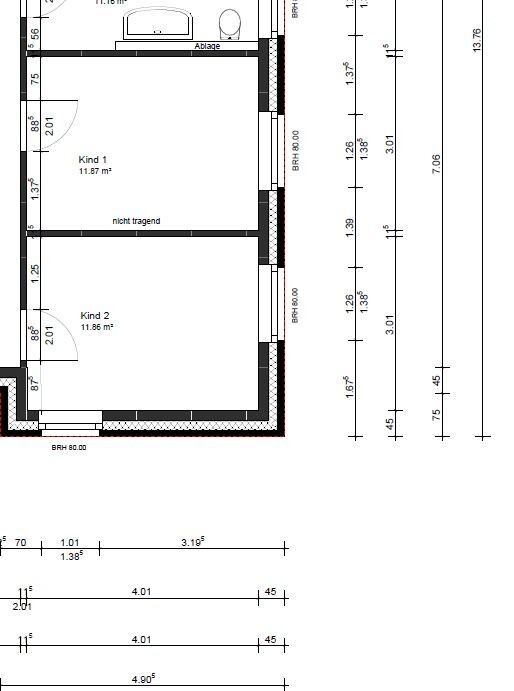
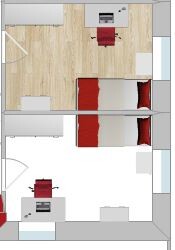
We are currently working on the electrical planning. We are having a hard time with the children's rooms because the children are still being planned as well :-) and we have no idea where everything should go. Of course, there needs to be space for a bed, a wardrobe (150cm (59 inches)), a desk, and later also a TV.
For the upper children's room, we would prefer not to place the bed against the upper wall since the bathroom is located there. We have started planning but are not very satisfied with it. We also don’t know where the TV could go to plan the connection. Maybe you have some ideas.
Of course, it is important to consider the furniture layout, but it should remain flexible. For me, this means:
- Lighting should be as even as possible, or ideally have two separate sources
- Avoid placing doors directly in a corner to allow for a wardrobe behind it
- Plenty of electrical outlets
- Ideally, LAN and satellite connections in opposite corners (these don’t need to be directly connected, as otherwise the multiswitch and patch panel can get overloaded)
Although we couldn’t change this later on, having the satellite distribution under the roof has the advantage that you can easily add a cable upstairs. The same applies to LAN, if you want to have a backup line on hand just in case.
Children’s rooms are often redesigned throughout childhood. Sometimes due to changing priorities, sometimes simply because something new is needed :-)
For example, the bed changes from a crib to a child’s bed, then to a loft bed, and eventually to a double bed (which is nowadays considered an absolute must-have starting at around 10 years old). The play area will eventually be replaced by a desk, gaming console, sofa, dressing table, and so on.
- Lighting should be as even as possible, or ideally have two separate sources
- Avoid placing doors directly in a corner to allow for a wardrobe behind it
- Plenty of electrical outlets
- Ideally, LAN and satellite connections in opposite corners (these don’t need to be directly connected, as otherwise the multiswitch and patch panel can get overloaded)
Although we couldn’t change this later on, having the satellite distribution under the roof has the advantage that you can easily add a cable upstairs. The same applies to LAN, if you want to have a backup line on hand just in case.
Children’s rooms are often redesigned throughout childhood. Sometimes due to changing priorities, sometimes simply because something new is needed :-)
For example, the bed changes from a crib to a child’s bed, then to a loft bed, and eventually to a double bed (which is nowadays considered an absolute must-have starting at around 10 years old). The play area will eventually be replaced by a desk, gaming console, sofa, dressing table, and so on.
B
Bieber081514 Feb 2018 15:5886bibo schrieb:
Ideally, LAN and satellite connections in opposite corners This is the safest approach and provides extra security. I believe even in house construction, 100 euros is still 100 euros. Normally, most people wouldn’t spend this money so generously.
For Child 2 (floor plan in #1), I would place the TV and LAN connections between the windows. A larger wardrobe will probably go in the top-left corner of the plan. I would do the same for Child 2’s room.
No doubt, having everything on every wall is great. But if you never use it... just saying... ;-)
I installed and connected the LAN and satellite sockets myself, and also pulled the cables. The materials aren’t free either, but you can initially put on blank covers. Cables hardly cost anything.
Of course, if every socket is billed separately, the costs can add up quickly.
Of course, if every socket is billed separately, the costs can add up quickly.
You can also overdo it. One power outlet per square meter of floor space is such an exaggeration.
The two network (double?) sockets in the room are similar. Nowadays, no one needs a network cable for their smartphone or tablet, and nobody wants a laptop on the bed with a network cable either.
The two network (double?) sockets in the room are similar. Nowadays, no one needs a network cable for their smartphone or tablet, and nobody wants a laptop on the bed with a network cable either.
T
toxicmolotof15 Feb 2018 21:15This shows how different the requirements can be. For us, a socket didn’t cost 20 euros, and LAN/TV connections were well under 50 euros, all inclusive. However, I was happy to spend almost two weeks working on the construction site together with my father-in-law.
Sure, there are probably a few sockets left over, but the days of extension cords with triple sockets are almost gone, except for two or three exceptions.
And I don’t think 4 LAN ports in a child’s bedroom are unreasonable. Of course, you can connect 4 smartphones, 2 laptops, 4 TVs, 6 game consoles, 2 printers, 2 PCs, 1 NAS, 1 photovoltaic system, 4 tablets, 2 handheld game consoles, a refrigerator, robot vacuum, kitchen machine, oven, washing machine, and dryer via Wi-Fi. But do I want to? No.
Sure, there are probably a few sockets left over, but the days of extension cords with triple sockets are almost gone, except for two or three exceptions.
And I don’t think 4 LAN ports in a child’s bedroom are unreasonable. Of course, you can connect 4 smartphones, 2 laptops, 4 TVs, 6 game consoles, 2 printers, 2 PCs, 1 NAS, 1 photovoltaic system, 4 tablets, 2 handheld game consoles, a refrigerator, robot vacuum, kitchen machine, oven, washing machine, and dryer via Wi-Fi. But do I want to? No.
Similar topics