
Hello everyone,
I think my question might be a bit silly, but I haven’t found an answer yet, and I might be searching in the wrong way, so I wanted to explain my situation.
In our house, we have installed Cat 7 cables on 4 floors with the corresponding network outlets (RJ45). All these Cat 7 cables lead to the connection room in the basement, where the main telecom connection will also be located.
Now, the internet/telephone/TV service from the telecom provider enters the connection room.
Here is my actual question: I assume the Cat 7 cables will be connected to the "internet" in the connection room. However, we want to place our Wi-Fi router on the ground floor, so NOT in the connection room. Is this even possible?
On the ground floor, where we want to place the Wi-Fi router, the following connections are available:
1 x network outlet (Cat 7)
1 x telephone
Sorry if this is probably the most basic question ever, but I really don’t have enough knowledge about this.
Thank you very much.
Best regards,
benkler1401
I think my question might be a bit silly, but I haven’t found an answer yet, and I might be searching in the wrong way, so I wanted to explain my situation.
In our house, we have installed Cat 7 cables on 4 floors with the corresponding network outlets (RJ45). All these Cat 7 cables lead to the connection room in the basement, where the main telecom connection will also be located.
Now, the internet/telephone/TV service from the telecom provider enters the connection room.
Here is my actual question: I assume the Cat 7 cables will be connected to the "internet" in the connection room. However, we want to place our Wi-Fi router on the ground floor, so NOT in the connection room. Is this even possible?
On the ground floor, where we want to place the Wi-Fi router, the following connections are available:
1 x network outlet (Cat 7)
1 x telephone
Sorry if this is probably the most basic question ever, but I really don’t have enough knowledge about this.
Thank you very much.
Best regards,
benkler1401
B
benkler14018 Jun 2017 09:32Hello everyone,
I’m back again (Sorry, it’s me once more).
Yesterday, we met at the shell construction stage of our semi-detached house with an acquaintance who has extensive private knowledge in electronics and IT. Since we know he tends to have somewhat unique opinions on various topics, I wanted to ask the kind forum members here for some additional or general information.
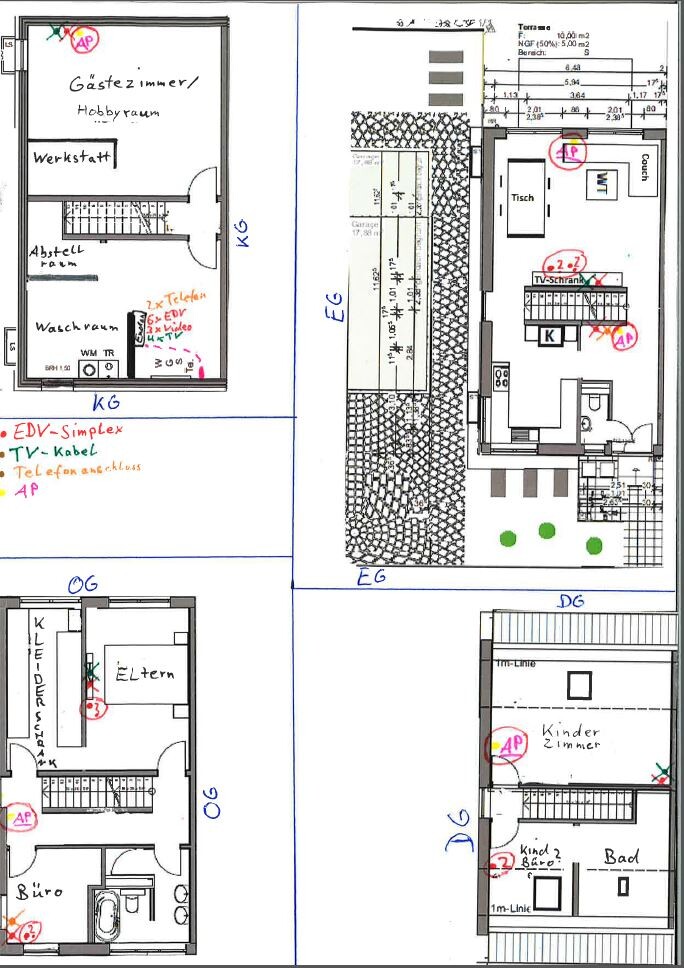
Attached you’ll find a diagram including all four floors of the semi-detached house, showing the network, TV, and telephone outlets that are already installed. You’ll also see various network outlets and access points marked with a “?” in a red circle — these are the current ideas. Suggestions for improvements are welcome.
Additional info:
- The basement has a ceiling height of 2.18m (7 feet 2 inches), so it’s not considered living space!
- All walls are masonry and the ceilings are precast concrete slabs.
- Neither of us works in an office or from home, so we won’t be using the office room extensively (at least for now).
Tomorrow, I will receive from DHL:
100 meters (330 feet) of Ligawo Cat7 1200 MHz cable
100 meters (330 feet) of Fränkisches empty conduit M20
100 metal clamps M20
Tomorrow, I plan to start pulling cables and chiseling channels.
Now, getting to the point:
Our acquaintance also recommended Access Points — YES — but suggested having network outlets and relying on Wi-Fi only if necessary.
Well, this was basically clear to us before: wired connections are ALWAYS better.
His suggestion for Access Point placement was as follows:
Ground floor (EG) = In the hallway, a FritzBox (with TAE socket in the FritzBox and one network cable running back to the basement + telephone connected to FritzBox or DECT phone). //// In the living room, mounted on the partition wall near the terrace, for example, a Ubiquiti Access Point AC + telephone connected to the phone outlet, with the FritzBox placed in the basement.
First floor (OG) = Mounted on the wall in the hallway between the office and walk-in closet.
Attic (DG) = Mounted on the wall in the children’s room, either the wall by the stairs or the exterior wall of the house.
Basement (KG) = If at all, then connecting to the existing network outlet.
He mentioned that Access Points like Ubiquiti are somewhat “overkill” for private use.
He also tested with his phone from the living room and detected 9 different sources of interference signals, if I remember correctly.
Now regarding the network outlets I additionally planned:
Ground floor (EG) = 2 outlets on the TV wall + 1 on the terrace partition wall (total: 3 on the TV wall, 1 on the terrace partition wall, 1 in the hallway/coatroom).
First floor (OG) = 1 in the office + 1 in the master bedroom (total: 2 in office, 2 in master bedroom).
Attic (DG) = 1 in the children’s room + 1 in the children’s office (total: 2 in children’s room, 2 in children’s office).
Basement (KG) = no additional outlet.
Additionally, this does not include the power supply cables for the Access Points via PoE.
So, thanks a lot in advance — you’ve helped me a lot so far, and I’m really grateful. This project involves a lot of money, and it would be a pity to regret any decisions in 1–2 years.
I’m back again (Sorry, it’s me once more).
Yesterday, we met at the shell construction stage of our semi-detached house with an acquaintance who has extensive private knowledge in electronics and IT. Since we know he tends to have somewhat unique opinions on various topics, I wanted to ask the kind forum members here for some additional or general information.
Attached you’ll find a diagram including all four floors of the semi-detached house, showing the network, TV, and telephone outlets that are already installed. You’ll also see various network outlets and access points marked with a “?” in a red circle — these are the current ideas. Suggestions for improvements are welcome.
Additional info:
- The basement has a ceiling height of 2.18m (7 feet 2 inches), so it’s not considered living space!
- All walls are masonry and the ceilings are precast concrete slabs.
- Neither of us works in an office or from home, so we won’t be using the office room extensively (at least for now).
Tomorrow, I will receive from DHL:
100 meters (330 feet) of Ligawo Cat7 1200 MHz cable
100 meters (330 feet) of Fränkisches empty conduit M20
100 metal clamps M20
Tomorrow, I plan to start pulling cables and chiseling channels.
Now, getting to the point:
Our acquaintance also recommended Access Points — YES — but suggested having network outlets and relying on Wi-Fi only if necessary.
Well, this was basically clear to us before: wired connections are ALWAYS better.
His suggestion for Access Point placement was as follows:
Ground floor (EG) = In the hallway, a FritzBox (with TAE socket in the FritzBox and one network cable running back to the basement + telephone connected to FritzBox or DECT phone). //// In the living room, mounted on the partition wall near the terrace, for example, a Ubiquiti Access Point AC + telephone connected to the phone outlet, with the FritzBox placed in the basement.
First floor (OG) = Mounted on the wall in the hallway between the office and walk-in closet.
Attic (DG) = Mounted on the wall in the children’s room, either the wall by the stairs or the exterior wall of the house.
Basement (KG) = If at all, then connecting to the existing network outlet.
He mentioned that Access Points like Ubiquiti are somewhat “overkill” for private use.
He also tested with his phone from the living room and detected 9 different sources of interference signals, if I remember correctly.
Now regarding the network outlets I additionally planned:
Ground floor (EG) = 2 outlets on the TV wall + 1 on the terrace partition wall (total: 3 on the TV wall, 1 on the terrace partition wall, 1 in the hallway/coatroom).
First floor (OG) = 1 in the office + 1 in the master bedroom (total: 2 in office, 2 in master bedroom).
Attic (DG) = 1 in the children’s room + 1 in the children’s office (total: 2 in children’s room, 2 in children’s office).
Basement (KG) = no additional outlet.
Additionally, this does not include the power supply cables for the Access Points via PoE.
So, thanks a lot in advance — you’ve helped me a lot so far, and I’m really grateful. This project involves a lot of money, and it would be a pity to regret any decisions in 1–2 years.
K
Knallkörper8 Jun 2017 09:57@TE:
I think you are doing it right. We set it up similarly with the router. Simply put, the fiber optic cable enters the utility room, where the telecom modem is located next to a double LAN outlet. The modem is connected to the network outlet with a Cat-5 cable. In the patch panel, I connect this outlet to a double outlet in the hallway (ground floor), where my telecom smart router is placed, providing the network including Wi-Fi. One LAN port of the router is connected to the double outlet, and this port is routed in the patch panel to a 32-port switch, which also connects all other LAN outlets.
Have you planned outlets in the kitchen and utility room as well?
In my opinion, Ubiquiti access points offer good value for money. I have one on the upper floor.
We reach over 200 Mbit downstream, and that is only the first expansion stage of FTTH.
I think you are doing it right. We set it up similarly with the router. Simply put, the fiber optic cable enters the utility room, where the telecom modem is located next to a double LAN outlet. The modem is connected to the network outlet with a Cat-5 cable. In the patch panel, I connect this outlet to a double outlet in the hallway (ground floor), where my telecom smart router is placed, providing the network including Wi-Fi. One LAN port of the router is connected to the double outlet, and this port is routed in the patch panel to a 32-port switch, which also connects all other LAN outlets.
Have you planned outlets in the kitchen and utility room as well?
In my opinion, Ubiquiti access points offer good value for money. I have one on the upper floor.
77.willo schrieb:
I have countless network outlets in the house and use them all. But if it’s just about distributing internet, Wi-Fi is more than sufficient. When planned properly, it will never drop below internet speed.
My last apartment was right in the city center and I saw around 30 other Wi-Fi networks around me, yet it was more than enough to stream multiple Netflix streams simultaneously.
We reach over 200 Mbit downstream, and that is only the first expansion stage of FTTH.
B
benkler14018 Jun 2017 15:53My main question is regarding the access points—where would you recommend placing them?

benkler1401 schrieb:
Since we know he always has his somewhat unique views on various thingsThis is "normal" and unavoidable: the more high-tech your home automation is, the more fanatically and zealously the specialist will argue that only his preferred system is the absolute truth. Getting second opinions is essential if you want to reach a reasonable conclusion as a layperson.
https://www.instagram.com/11antgmxde/
https://www.linkedin.com/company/bauen-jetzt/
Similar topics