
ᐅ LAN / Wi-Fi / Telephone – Searching for Suitable Hardware Components
Created on: 12 Apr 2017 08:37
S
sirhc
Hello everyone,
Attached is a first look at our main distribution frame (?) in the house connection room in the basement.
What we have:
- Duplex LAN in living, sleeping, and working rooms in the basement, ground floor, and upper floor
- Telecom connection with 50 Mbit/s
- TV via satellite
- No ISDN wanted
What we want:
- Additional Wi-Fi on every floor
- LAN access from all connected rooms to a NAS / network storage with photos, music, series, movies
- Wi-Fi access from all connected rooms to the NAS / network storage with photos, music, series, movies
I’m currently trying to figure out the right hardware components. About 24 LAN cables come together in the house connection room in the basement, which are connected to a patch panel and linked to a switch.
I need:
- A router
- A switch
- Two access points / (repeaters?)
- NAS
- Clients for the NAS
Router:
The telecom provider only rents routers for 5 EUR per month. However, I don’t want any of their hardware, whether rented, purchased, or provided for free. When I look for a suitable FritzBox, I find the 7430: it supports VDSL, can handle a DECT phone, media server (although I’m not yet sure if a separate component would be better here, or if a NAS already covers this functionality — I believe it does). The idea: the router connects to the switch, so all connected rooms can access the network and internet via cable. MU-MIMO seems to be a new feature for when many devices are connected via Wi-Fi. Since this will only involve two smartphones and two laptops, rarely all at the same time, I don’t think I need this feature — printers and media libraries will be wired. Therefore, I think the 7430 will be sufficient.
Switch:
I don’t need any special functions here and find plenty of options under 100 EUR. It should simply bundle my 24 cables and connect them to the router.
Though I just realized two LAN lines are for cameras and one LAN line for the doorbell — I’m not sure how yet, but these should not be connected to the internet.
Access points:
I have planned one outlet and one network connection in each hallway on the ground floor and upper floor for an access point (repeater?). The idea is to have a device that is connected via cable to the router and provides Wi-Fi on that floor.
NAS:
So far, I’m clueless. I’m thinking of around 10 TB of storage for starters, accessible via LAN / Wi-Fi. No user management needed yet, maybe in a few years. I want to be able to access our “media library” from all sleeping/living rooms, although I’m not sure yet which client will be suitable for this. Our TVs are a few years old and likely can’t do this, and the existing receivers neither.
If I roughly estimate what I need to set up our home network:
- Switch 100 EUR
- Router 100 EUR
- Access point 50 EUR
- Access point 50 EUR
- NAS ??? EUR
- NAS client ??? EUR living room
- NAS client ??? EUR bedroom
Now I have two questions for the group:
1. Are there any mistakes in my hardware setup plan?
2. Which devices do you actually use / recommend / advise against?
3. Is my assumption correct that I don’t need MU-MIMO if the “media library” is wired?
Thanks and best regards
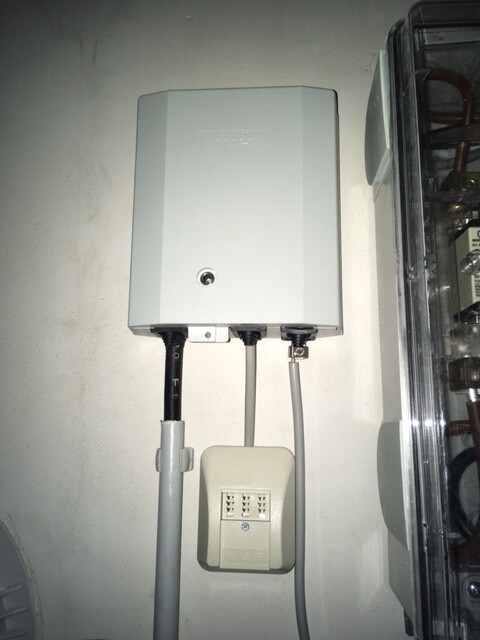
Attached is a first look at our main distribution frame (?) in the house connection room in the basement.
What we have:
- Duplex LAN in living, sleeping, and working rooms in the basement, ground floor, and upper floor
- Telecom connection with 50 Mbit/s
- TV via satellite
- No ISDN wanted
What we want:
- Additional Wi-Fi on every floor
- LAN access from all connected rooms to a NAS / network storage with photos, music, series, movies
- Wi-Fi access from all connected rooms to the NAS / network storage with photos, music, series, movies
I’m currently trying to figure out the right hardware components. About 24 LAN cables come together in the house connection room in the basement, which are connected to a patch panel and linked to a switch.
I need:
- A router
- A switch
- Two access points / (repeaters?)
- NAS
- Clients for the NAS
Router:
The telecom provider only rents routers for 5 EUR per month. However, I don’t want any of their hardware, whether rented, purchased, or provided for free. When I look for a suitable FritzBox, I find the 7430: it supports VDSL, can handle a DECT phone, media server (although I’m not yet sure if a separate component would be better here, or if a NAS already covers this functionality — I believe it does). The idea: the router connects to the switch, so all connected rooms can access the network and internet via cable. MU-MIMO seems to be a new feature for when many devices are connected via Wi-Fi. Since this will only involve two smartphones and two laptops, rarely all at the same time, I don’t think I need this feature — printers and media libraries will be wired. Therefore, I think the 7430 will be sufficient.
Switch:
I don’t need any special functions here and find plenty of options under 100 EUR. It should simply bundle my 24 cables and connect them to the router.
Though I just realized two LAN lines are for cameras and one LAN line for the doorbell — I’m not sure how yet, but these should not be connected to the internet.
Access points:
I have planned one outlet and one network connection in each hallway on the ground floor and upper floor for an access point (repeater?). The idea is to have a device that is connected via cable to the router and provides Wi-Fi on that floor.
NAS:
So far, I’m clueless. I’m thinking of around 10 TB of storage for starters, accessible via LAN / Wi-Fi. No user management needed yet, maybe in a few years. I want to be able to access our “media library” from all sleeping/living rooms, although I’m not sure yet which client will be suitable for this. Our TVs are a few years old and likely can’t do this, and the existing receivers neither.
If I roughly estimate what I need to set up our home network:
- Switch 100 EUR
- Router 100 EUR
- Access point 50 EUR
- Access point 50 EUR
- NAS ??? EUR
- NAS client ??? EUR living room
- NAS client ??? EUR bedroom
Now I have two questions for the group:
1. Are there any mistakes in my hardware setup plan?
2. Which devices do you actually use / recommend / advise against?
3. Is my assumption correct that I don’t need MU-MIMO if the “media library” is wired?
Thanks and best regards

Ok, I will try that. Thanks.
How do you connect a telephone?
DECT with Wi-Fi capability?
DECT with LAN capability?
Telephone cable from the main connection box/router to the installation location?
For the DECT base station next to the router, I assume the signal probably won’t reach all parts of the house for the handsets.
In the other post you just wrote:
Quote from Kaspatoo: ↑
Are there now telephones that can connect via Wi-Fi or do I still need a telephone cable from the router to the phone’s location?
-> Phones with DECT have existed for decades and they work very well inside and around the house, alongside your Wi-Fi.
So placing the base station centrally in the house via LAN and then getting DECT coverage throughout the entire house (including across floors) makes sense.
Just so I understand correctly:
I distribute LAN throughout the house from the router. Does the phone have to be IP-capable? Can it then be connected to the router via LAN and work?
Do I need a special plan from the DSL provider for this? Or a different router than the one provided by the provider? Or are standard DSL contracts and supplied routers only sufficient for analog phones?
How do you connect a telephone?
DECT with Wi-Fi capability?
DECT with LAN capability?
Telephone cable from the main connection box/router to the installation location?
For the DECT base station next to the router, I assume the signal probably won’t reach all parts of the house for the handsets.
In the other post you just wrote:
Quote from Kaspatoo: ↑
Are there now telephones that can connect via Wi-Fi or do I still need a telephone cable from the router to the phone’s location?
-> Phones with DECT have existed for decades and they work very well inside and around the house, alongside your Wi-Fi.
So placing the base station centrally in the house via LAN and then getting DECT coverage throughout the entire house (including across floors) makes sense.
Just so I understand correctly:
I distribute LAN throughout the house from the router. Does the phone have to be IP-capable? Can it then be connected to the router via LAN and work?
Do I need a special plan from the DSL provider for this? Or a different router than the one provided by the provider? Or are standard DSL contracts and supplied routers only sufficient for analog phones?

Kaspatoo schrieb:
How do you connect a telephone?This is about ISDN, but the principle is the same...just imagine the picture showing a telephone instead of an "ISDN telephone system." The telephone outlet boxes (UAE sockets) would then be one port on your patch panel and one RJ-45 socket (LAN) somewhere in the house.
Kaspatoo schrieb:
DECT with Wi-Fi?
DECT with LAN?DECT is DECT; it has absolutely nothing to do with Wi-Fi or LAN...it operates on different frequencies and is a completely different technology.
Kaspatoo schrieb:
For the DECT base station next to the router, the signal for the handsets probably won’t reach throughout the whole house, I think.If there’s more than about 50m (165 feet) in between, possibly not...How big is the house supposed to be?
As I showed you in the picture, you don’t necessarily have to place the DECT base station right next to the router. If you set the base station on the ground floor and your ceilings are particularly thick, a good phone should still reach at least half of the usual range, about 25m (80 feet)...so that would cover a typical house.
Kaspatoo schrieb:
I distribute LAN throughout the house from the router.No, from the switch...the router is usually a separate device unless you only have 3-4 sockets in the house, then it’s often combined in one unit.
Kaspatoo schrieb:
Does the telephone have to be IP capable?No, why would it?
Kaspatoo schrieb:
And then it can be connected to the router via LAN and will work?You only use the existing CAT cables for the telephone, but these are not integrated into the LAN. That would not work, as these are simply two different systems.
Kaspatoo schrieb:
Do I need a special plan from the DSL provider for that?No, what happens behind the network termination point usually doesn’t concern the provider at all...
Kaspatoo schrieb:
Or do I need a different router than the one provided by the respective provider?That’s a matter of personal preference...some like the provided hardware, some don’t, others don’t care and just use whatever is given.
Kaspatoo schrieb:
Or are standard DSL contracts and supplied routers only adequate for analog phones?Usually the provided hardware supports analog, as well as ISDN, IP telephony, DECT...Wi-Fi and routing functions are also typically included.
Just read what is offered...it’s all clearly stated.
Here is how I understand it:
The building connection is in the basement (KG), where the telephone connection box (TAE) will be located.
I will connect a router to this.
A patch panel is connected to the router.
All LAN cables that run to every room in the house are connected to the patch panel.
In any room with a LAN connection, I will plug in my analog telephone, possibly using an RJ11 to RJ45 adapter.
Normally, I am used to plugging the telephone directly into the router using an F-connector.
Now the telephone signal comes through the internal network in the router.
Is this still possible, or do I need to unplug the LAN cable where the analog telephone is connected from the patch panel and connect it separately to the router’s F-connector using an F-connector adapter?
The building connection is in the basement (KG), where the telephone connection box (TAE) will be located.
I will connect a router to this.
A patch panel is connected to the router.
All LAN cables that run to every room in the house are connected to the patch panel.
In any room with a LAN connection, I will plug in my analog telephone, possibly using an RJ11 to RJ45 adapter.
Normally, I am used to plugging the telephone directly into the router using an F-connector.
Now the telephone signal comes through the internal network in the router.
Is this still possible, or do I need to unplug the LAN cable where the analog telephone is connected from the patch panel and connect it separately to the router’s F-connector using an F-connector adapter?

Kaspatoo schrieb:
Here is how I understand it now:
The house connection is in the basement, where the telecommunications outlet (TAE) will be located.
I connect a router to this outlet.
I connect a patch panel to the router.
All LAN cables running to every room in the house are connected to the patch panel.
In any room with a LAN connection, I plug in my analog phone, possibly using an RJ11 to RJ45 adapter.Almost correct. Basically, you have understood it well. You are just using some terms a little incorrectly.
You plug what you call the router (probably because it contains one) into the "first TAE" (the one provided by the service provider). Let’s call it, for example, a Fritzbox. From there, you run cables from each port to the patch panel, where, like the old-fashioned telephone operators, you connect the telephone line to the room where the phone socket will be. The internal wiring in the house where this happens is essentially already a LAN, you are right about that. However, the term LAN is mainly associated with computer networking, which can cause some confusion in this context.
Every outlet is wired back to the patch panel. Each connection is as well. At the patch panel, you physically connect the cables. In fact, when you plug the cables in, you act like a manual router.
https://www.instagram.com/11antgmxde/
https://www.linkedin.com/company/bauen-jetzt/
11ant schrieb:
You plug into the "first TAE" (the one provided by the service provider) what you call the router (probably because one is inside it). Let’s call it, for example, Fritzbox.Why do you call it the "first TAE"? I didn’t mention multiple ones, and isn’t it just the TAE? What do you call it if not a router? I am quite sure that this is without a doubt the correct term here.
11ant schrieb:
From there you go out from each connection to the patch panel,You don’t mean I should connect all four LAN ports from the router (assuming it has more than one) to it, but only the different connectors of the router? (That means 1x LAN (RJ45) + 1x AMT (F-connector)).So, for the latter, an adapter to RJ45 is needed?
11ant schrieb:
with which you (like the operator’s assistant in the old days) plug the telephone line into the socket where the phone is supposed to be.Does that mean the telephone signal travels through the patch panel via the directly connected network cable only to the AMT port of the router and never interacts with the LAN?
11ant schrieb:
The in-house cabling where this happens is basically a LAN, you are right about that. But the term LAN is mostly associated with IT use and can cause some confusion in the discussion.
Every outlet is wired to the patch panel. Every connection as well. In the patch panel, you connect them together. In a way, when you plug the cables in, you act like a human router.The connecting together happens by linking each of these other connections (so excluding AMT and possibly others) with an individual/additional cable to a switch? Of course, I have to make sure that the LAN port from the router is also connected to the switch.
I tried to illustrate my understanding graphically:
Similar topics